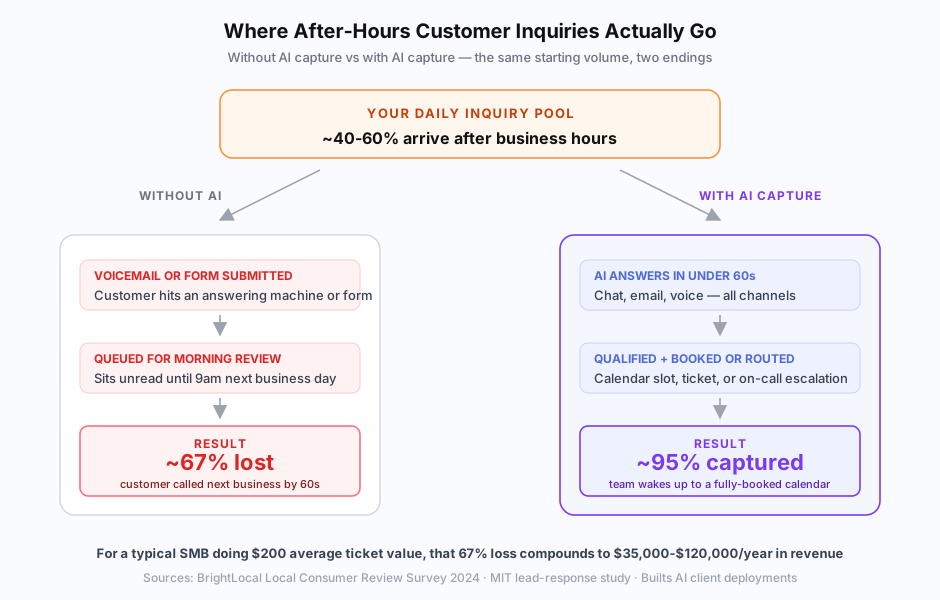
If you run a small business, your most valuable customer service hours probably aren’t 9-5. According to a 2024 BrightLocal Local Consumer Review Survey, 40-60% of customer inquiries for service businesses arrive outside business hours — and 67% of those customers call the next business if you don’t pick up within 60 seconds. That’s not a small leak. For a typical SMB, it’s tens to hundreds of thousands of dollars per year in revenue going to whoever answers their phone next.
The fix isn’t hiring an after-hours team. The economics never work for an SMB. The fix is automation that captures, qualifies, and books after-hours inquiries while you sleep — so your team wakes up to a fully-loaded calendar instead of a voicemail backlog.
This guide is the practical playbook for SMB owners and operators who want to stop losing after-hours leads. It covers the volume math, the technical options, the build path, and how to measure whether it’s working.
How much business are SMBs actually losing after hours?
Most SMBs lose 40-60% of their potential daily customer volume to after-hours non-response. The math: if 50% of inquiries arrive outside 9-5 and 67% of those customers call the next business by morning, you lose 33% of total daily inquiries to silence — every day. For a service business with $200 average ticket value, that compounds to $35,000-$120,000 per year in lost revenue.
The data behind those numbers:
- BrightLocal 2024 Local Consumer Review Survey: 67% of customers call the next business if you don’t pick up within 60 seconds
- MIT Sloan lead-response study: contacting a lead within 5 minutes makes you 21x more likely to qualify them than within 30
- Inside Sales 2024 benchmark report: average response time to web form inquiries is 47 hours; 48% of inquiries never get a response at all
- Salesforce 2025 State of Service: 72% of customers expect immediate acknowledgment of inquiries regardless of when they’re submitted
For service businesses (HVAC, dental, legal, real estate, home services), the after-hours share runs even higher. The HVAC company in our home services case study was losing every weekend’s inquiries to Monday-morning processing — until they automated the after-hours flow and doubled their weekly service call capacity. Hospitality runs even more lopsided: a 45-property short-term-rental operator we worked with was getting 70%+ of guest messages outside business hours — see the full setup in our vacation rental guest support case study for the channel-routing and pre-arrival/post-stay automations that handle it without a 24/7 team.
Why traditional answering services don’t solve the problem
Live answering services cost $1.50-$3 per call and still hand off most work to your office team in the morning. Customers get a human voice, but the human can’t book into your calendar, can’t see your dispatch system, can’t quote your pricing. The customer has to call back during business hours anyway — at which point you’re back to the original problem of losing 67% of those callers to faster competitors.
Traditional answering services were designed for a pre-AI world where capturing the customer’s contact info was the best you could do after hours. That’s no longer competitive. The current bar for after-hours customer service is resolution, not just capture:
- Quote pricing for standardized services
- Book appointments into your real calendar with real availability
- Route emergencies to your on-call protocol immediately
- Send order/account/status updates from your live data
- Handle the 60-80% of repetitive questions without escalation
A live answering service does step 1 (capture). AI customer service does steps 2-5 (resolution). The cost gap is real but the value gap is bigger.
What does after-hours AI customer service actually need to do?
A working after-hours AI customer service system needs to do five things: respond in under 60 seconds across all channels (chat, email, phone), qualify the inquiry against your criteria, take meaningful action (book, quote, escalate), route emergencies to humans immediately, and document everything for morning review. Anything less is a glorified auto-responder.
The functional requirements:
Sub-60-second response across all channels. Web chat, contact forms, email, phone — the AI handles all of them with the same knowledge and routing logic. According to MIT’s lead-response study, response within 5 minutes makes you 21x more likely to qualify a lead than within 30. Sub-60-second response makes you the only option in the customer’s mental queue.
Real qualification, not just intake. The AI runs your qualification questions naturally in conversation: budget, timeline, location, service type, urgency. Hot leads get scheduled immediately; cold leads enter a nurture sequence; out-of-scope inquiries get a polite redirect.
Meaningful action. For service businesses, that’s booking the appointment into your real calendar (Google Calendar, Outlook, ServiceTitan, Housecall Pro, Jane App, Dentrix). For e-commerce, it’s checking order status from Shopify. For SaaS, it’s checking account state from your CRM. Generic chatbots that just collect contact info don’t move the needle — see our guide to connecting AI customer service to your CRM for the integration patterns this requires.
Emergency escalation. Genuine emergencies (water leak, severe pain, security breach, statute deadline) bypass the AI and route to your on-call protocol immediately. The AI shouldn’t try to handle every situation; it should hand off the right things cleanly.
Documentation for morning review. Every conversation is logged with structured data (customer info, request type, action taken, follow-up needed). Your team starts the day with a dashboard, not 47 voicemails to listen through.
How does AI capture work for phone inquiries specifically?
AI voice agents — built on platforms like Vapi, Bland AI, Retell AI, or directly on Twilio — answer your business phone after hours, handle common questions in natural conversation, book appointments via voice, and transfer real emergencies to your on-call protocol. According to a 2025 Twilio State of Customer Engagement report, 64% of consumers now prefer AI voice over traditional IVR menus when the AI can actually resolve their issue.
The voice setup specifically:
- Inbound number: Either your existing business line (forwarded after hours) or a dedicated AI number that takes overflow
- Voice model: Modern AI voice agents use ElevenLabs, OpenAI TTS, or PlayHT for natural-sounding voices. The robotic IVR experience is gone
- Conversation flow: The AI greets, asks the customer’s name and reason for calling, runs through your qualification, takes action (book, quote, escalate), and confirms next steps
- Escalation: Emergency keywords trigger immediate transfer to your on-call number; complex requests outside the AI’s scope get logged with structured detail for morning callback
- Call recording: Every call is recorded and transcribed for quality review
We covered the voice agent landscape (Vapi vs Bland AI vs Retell, build vs buy, pricing) in our AI voice agents for small business 2026 overview. The short version: voice AI is now production-ready for SMBs at $50-$300/month for managed platforms or $5,000-$15,000 one-time for custom builds.
What does after-hours AI capture look like for chat and email?
For chat and email, after-hours AI customer service runs through a chat widget on your website (or your existing helpdesk like Intercom, Tidio, or Crisp) and through your support inbox. The AI answers from your knowledge base, looks up live data when needed (orders, accounts, calendar), and takes structured action — book, quote, route, or escalate — within the same conversation.
The chat side typically deploys in two patterns:
Pattern 1: Off-the-shelf chatbot widget. Tools like Chatbase and Tidio Lyro drop a chat widget on your site, train on your help docs, and handle FAQ-style inquiries. Quick to deploy (a few hours), $19-$99/month, but limited to static knowledge — no live order lookups, no CRM integration without middleware.
Pattern 2: Custom AI integrated with your stack. The chat widget connects to your CRM, calendar, billing, and helpdesk so the AI can do meaningful work — book the appointment, check the account, quote the price, send the document. Takes 4-6 weeks to build, $8K-$30K one-time, but handles the full resolution loop instead of just intake.
For email, the same AI engine processes inbound emails to your support address, classifies them, drafts responses or takes action, and either sends auto-responses for routine inquiries or queues complex ones with suggested replies for morning review. Most SMBs we work with see 60-80% of after-hours emails resolved without human touch within 30 days of deployment.
How do you handle the things AI shouldn’t try to do alone?
Even a well-built after-hours AI system needs guardrails for three failure modes: emergencies that need a human now, novel problems the AI can’t recognize, and high-stakes situations where you’d rather escalate than guess. The defense-in-depth pattern is identical to general AI customer service hallucination prevention but tuned for after-hours where there’s no human standing by to catch errors in real time. The technical foundation that makes accurate after-hours answers possible is RAG — see our guide to building AI customer service on your knowledge base for the full pattern.
The guardrails to build into every after-hours deployment:
Emergency keyword detection. Train the AI to recognize industry-specific emergencies and bypass normal flow immediately. Plumbing: “water leak”, “no hot water in winter”, “burst pipe”. Dental: “severe pain”, “knocked out tooth”, “swelling”. Real estate: “buyer ready to make offer”. Legal: “deadline tomorrow”, “court date”. The AI hands off to your on-call protocol before any normal qualification happens.
Confidence scoring with human fallback. When the AI’s confidence in its answer is below threshold, it tells the customer their question requires a team member’s attention and queues the conversation for morning callback with full context. This is much better than a hallucinated answer at 2am.
Out-of-scope detection. If the customer asks for something outside the AI’s documented capabilities (legal advice from a non-legal AI, medical advice from a non-medical AI, refund decisions that require management approval), the AI clearly states it’ll route to a human and does so cleanly.
Audit logs. Every conversation is logged with full context: what the customer asked, what the AI did, why it took that action. Morning review catches the edge cases and informs the next round of tuning.
The point isn’t AI doing everything — it’s AI doing the predictable repetitive volume well and handing off the rest cleanly so your team’s morning is meaningful work, not damage control.
How much does after-hours customer service automation cost?
After-hours AI customer service ranges from $0-$50/month for basic chatbot tools to $300-$2,000/month fully loaded for custom-built integrated systems. The decision matrix depends on volume and integration depth — under 500 monthly inquiries with FAQ-style content, off-the-shelf wins; above that or with real CRM integration needs, custom usually pays back inside 12 months.
The pricing tiers:
| Setup | Cost | What it handles |
|---|---|---|
| Free chatbot (Tidio free, Chatbase free) | $0/month | Basic FAQ deflection, contact capture |
| Off-the-shelf chatbot ($19-$99/month) | $228-$1,188/year | FAQ + simple booking via widget |
| Off-the-shelf + voice (Tidio + Vapi) | $1,500-$3,000/year | Chat + voice + basic CRM via Zapier |
| Custom build (Builts AI) | $8K-$30K one-time + $500-$2,500/month | Full integration: CRM, calendar, dispatch, billing |
We did the full TCO breakdown across all 5 customer service options in our 2026 AI customer service pricing guide. For after-hours specifically, the calculation is simpler than general customer service: capture cost vs revenue captured. If you’re losing $35K-$120K/year to after-hours non-response and a $5K-$10K capture system recovers 50%+ of it, the payback is measured in months not years.
How do you measure whether after-hours capture is actually working?
Track three metrics: (1) Capture rate — % of after-hours inquiries that get a response in under 60 seconds, target 95%+. (2) Conversion rate — % of captured after-hours inquiries that convert to booked appointments, tickets, or sales, target 25-50% depending on industry. (3) Revenue from after-hours capture — multiply captured inquiries by your conversion rate and average ticket value. Most SMBs see clear ROI within 2-4 months of deployment.
The full measurement framework:
Capture rate. % of after-hours inquiries (chat, email, voice) that receive a meaningful response within 60 seconds. Target: 95%+. If your AI is below 90%, you have configuration issues or volume spikes overwhelming the deployment.
Resolution rate. % of after-hours inquiries fully resolved by AI without human intervention. Target: 60-80% for documented question types. Below 50% suggests your knowledge base is incomplete or the AI is over-escalating.
Conversion rate. % of captured inquiries that convert to a meaningful business outcome (booked appointment, ticket created, sale completed). Target varies by industry — service businesses typically see 30-50%; e-commerce sees 15-25%.
Revenue captured. Multiply: (after-hours inquiries × capture rate × conversion rate × average ticket value). Compare against the same metric pre-deployment to quantify recovered revenue.
Customer satisfaction. Post-conversation CSAT survey. Target: 4.5+/5 for AI-handled interactions. Below 4.0 suggests tone or accuracy issues.
The teams that get the best results review these metrics weekly for the first 90 days, then monthly after that. Most of the optimization happens in the first 30 days as the AI’s responses get tuned to real customer questions.
When should you build vs use off-the-shelf for after-hours capture?
Use off-the-shelf chatbot tools (Chatbase, Tidio Lyro) for after-hours capture when your inquiries are mostly FAQ-style, your monthly volume is under 1,000, and you don’t need real-time CRM or calendar integration. Build custom when you need live booking into your calendar, real CRM/order/dispatch lookups, multi-channel coverage (chat + email + voice), or compliance requirements that off-the-shelf tools can’t handle.
The decision shortcuts:
- B2C e-commerce, FAQ-heavy: Chatbase or Tidio Lyro. $19-$99/month, deploy in a day, captures the basics.
- Service business with calendar booking needs: Custom build with calendar integration. $8K-$30K one-time, books real appointments from real availability.
- High-volume phone-heavy ops: AI voice agent (Vapi, Bland) + custom integration. $50-$300/month for managed platform plus integration cost.
- Regulated industries (healthcare, legal, finance): Custom build with compliance-grade infrastructure. Off-the-shelf tools don’t handle PIPEDA/HIPAA/GDPR cleanly enough.
For most Builts AI clients, the after-hours system is the highest-ROI piece of the larger customer service automation engagement. The math works out: a 4-6 week custom build that captures even 30% of currently-lost after-hours revenue typically pays for itself inside 6-9 months.
The pricing breakdown for our build-and-maintain model is on our pricing page, and the customer service automation service shows what we deliver in a typical engagement. There’s also our broader 2026 AI customer service trends overview if you want to map the landscape, or our honest AI vs offshore support comparison if you’re currently running an offshore arrangement and weighing the migration. If lead capture from after-hours traffic is your primary goal, our lead follow-up automation overview covers the full funnel from capture to CRM entry.
The hardest part of after-hours customer service used to be staffing it. Now the hardest part is admitting how much business you’re losing every night to silence — and the second-hardest is picking which automation path to commit to. Both problems have answers in 2026.