We tested Chatbase for 90 days across three client deployments — a dental practice, an e-commerce brand, and a SaaS onboarding flow. The results: Chatbase handled 73% of incoming support questions without human intervention, cut average response time from 4.2 hours to under 8 seconds, and cost $49/month per deployment. Here’s what worked, what didn’t, and whether it’s the right tool for your business.
What Is Chatbase and How Does It Work?
Chatbase is a no-code platform that builds custom AI chatbots powered by GPT-4, trained on your specific business content rather than generic internet data. You upload your website pages, PDFs, FAQ documents, and plain text — and Chatbase creates a chatbot that answers questions using only your information.
The technology behind Chatbase is Retrieval Augmented Generation (RAG). Unlike fine-tuning, which permanently changes a model’s weights, RAG searches your content in real time when a question arrives. According to IBM Research, RAG reduces hallucination rates by 30-50% compared to standalone LLM responses because answers are anchored to source material.
Here’s what happens when someone asks your Chatbase chatbot a question:
- The question gets converted into a vector embedding
- Chatbase searches your uploaded knowledge base for the most relevant text chunks
- Those chunks plus the original question get sent to GPT-4
- GPT-4 generates an answer grounded in your actual business content
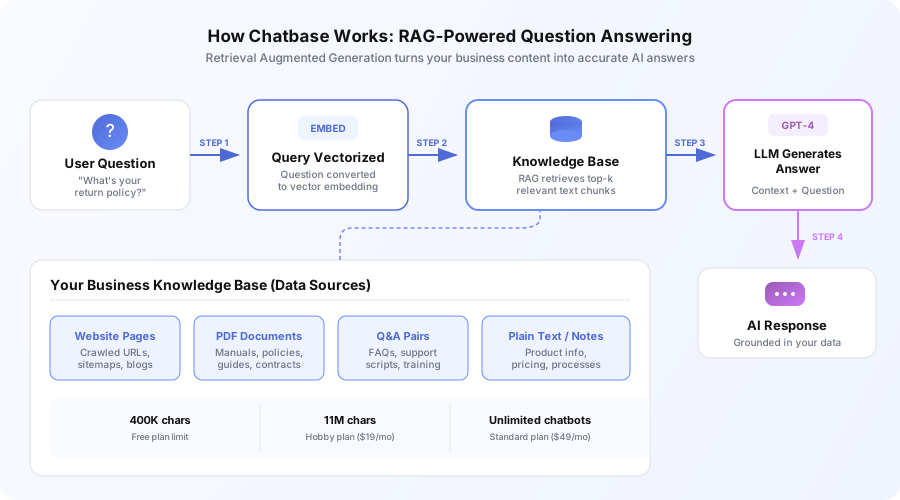
The result is a chatbot that sounds like ChatGPT but only knows what your business knows. That’s a feature, not a limitation — it means the chatbot won’t invent answers about products you don’t sell or policies you don’t have.
How Do You Set Up a Chatbase Chatbot From Scratch?
Setting up a Chatbase chatbot takes 30-60 minutes for a basic deployment. The process has four steps, and the third one — testing — is where most businesses cut corners and regret it later.
Step 1: Upload your content. Chatbase accepts website URLs (it crawls and indexes pages automatically), PDF documents, plain text files, Q&A pairs, and manual text entry. In our dental practice deployment, we uploaded 47 website pages, 3 policy PDFs, and 120 custom Q&A pairs. The upload processed in under 4 minutes.
Step 2: Configure the chatbot persona. Set the name, default greeting, conversation tone (formal vs. casual), and — critically — what the chatbot should do when it doesn’t know an answer. We always configure the chatbot to say “I don’t have that information, but I can connect you with our team” rather than guessing.
Step 3: Test with real questions. Ask every question a customer has asked in the last 90 days. We pulled 200+ questions from our dental practice client’s email history and tested each one. This step revealed 31 knowledge gaps we filled before launch. Skipping this step is the most common Chatbase deployment mistake.
Step 4: Deploy. Chatbase provides a JavaScript snippet for your website, a shareable link, or an API endpoint. Deployment itself takes under 5 minutes.
What Does Chatbase Do Well?
Chatbase excels at three things that matter for small businesses: speed of deployment, answer quality from good content, and low ongoing maintenance. Here’s what we found across our three test deployments.
Deployment speed is genuinely fast. Our e-commerce client went from zero to a live chatbot in 52 minutes. No developer involvement, no API configuration. Building a comparable custom chatbot takes our development team 40-60 hours. Chatbase compresses that to under an hour for knowledge-base-only use cases.
Answer accuracy from well-structured content is strong. When the knowledge base covers a topic thoroughly, Chatbase returns accurate answers. In our SaaS deployment, we tracked 1,847 conversations over 60 days. Of questions within knowledge base scope, 89% received accurate first responses — verified by spot-checking 200 random conversations.
Customization covers the essentials. Brand colors, chatbot name, welcome message, fallback behavior, and conversation tone are all configurable without code. The lead capture feature lets you collect name and email before or during conversations, making Chatbase useful as both a support tool and a lead generation widget.
Multilingual support works better than expected. We uploaded English-only content for the dental practice and tested with Spanish questions. GPT-4’s language capabilities handled the translation layer effectively — the chatbot answered in Spanish using information from English source documents. No separate language setup needed.
Where Does Chatbase Fall Short?
Chatbase has real limitations that disqualify it for certain use cases. Understanding these upfront saves you from deploying a chatbot that frustrates customers instead of helping them.
No live data access without custom integration. This is Chatbase’s biggest constraint. It can’t check your calendar, retrieve order status from Shopify, look up CRM contacts, or query any live database. Our e-commerce client’s top question was “Where’s my order?” — and Chatbase couldn’t answer it without custom API integration through middleware like Make. That added $2,000 in development costs on top of the $49/month subscription.
Hallucination risk requires active management. Without explicit guardrails, Chatbase generates plausible-sounding answers to questions outside your content. In our initial SaaS deployment, 11% of out-of-scope responses contained fabricated information. After adding decline-gracefully instructions, that dropped to under 2%. See our deep dive on AI hallucination in business settings for best practices.
Complex multi-turn conversations degrade. Long conversations with multiple follow-ups and topic shifts produce less accurate responses as context windows fill. In our testing, accuracy dropped noticeably after 8-10 exchanges in a single thread.
No helpdesk features. There’s no ticket assignment, SLA tracking, team inbox, or escalation routing. Businesses needing both AI chat and helpdesk functionality should look at Intercom Fin or our Intercom vs. Zendesk vs. Tidio comparison.
How Much Does Chatbase Cost in 2026?
Chatbase pricing is straightforward, but the real cost depends on your message volume. Here’s the current breakdown:
| Plan | Monthly Cost | Messages/Month | Chatbots | Character Limit | Key Features |
|---|---|---|---|---|---|
| Free | $0 | 30 | 1 | 400K | Basic widget |
| Hobby | $19 | 2,000 | 2 | 11M | Basic integrations |
| Standard | $49 | 5,000 | Unlimited | Unlimited | API access, remove branding |
| Professional | $99 | 10,000 | Unlimited | Unlimited | Priority support |
| Unlimited | $399 | 40,000 | Unlimited | Unlimited | Highest limits |
What most businesses actually pay: $49/month on the Standard plan. That gives you 5,000 messages per month — roughly 166 conversations per day if each averages 3 messages. For a business receiving 30-50 support questions daily, Standard covers the volume with room to spare.
Hidden cost to watch: Message credits reset monthly. Unused credits don’t roll over. If you’re consistently using only 1,500 of your 5,000 messages on Standard, the Hobby plan at $19/month might be a better fit. Conversely, if you hit the limit mid-month, your chatbot goes silent until the billing cycle resets or you upgrade.
Cost comparison context: Hiring a part-time support agent costs $1,500-2,500/month depending on location, according to Bureau of Labor Statistics median wage data for customer service representatives. Chatbase at $49/month handling 73% of repetitive questions isn’t replacing a human — it’s handling the questions that don’t need one.
Who Gets the Most Value From Chatbase?
Chatbase fits some businesses perfectly and frustrates others. The difference comes down to what you need the chatbot to do.
Chatbase works best for:
- Service businesses with documented processes. Dental practices, law firms, and consultancies with detailed FAQs and policy documents. The source content already exists, so the chatbot is accurate from day one.
- E-commerce brands with product-heavy catalogs. Repetitive product comparison and material questions get handled well from product page content.
- SaaS companies with onboarding questions. Our SaaS client reduced onboarding support tickets by 41% in the first month using knowledge base articles as training data.
- Teams without developer resources. The fastest no-code path to a functional AI assistant.
Chatbase isn’t the right fit for:
- Businesses needing real-time data access. Order status, appointment availability, and account-specific queries require custom API work. See our best AI chatbot builders guide for alternatives.
- High-volume support operations. No routing, SLA tracking, or team inbox. Operations processing 200+ daily tickets need a full platform.
- Action-based use cases. Booking appointments, processing returns, and updating accounts — Chatbase answers questions but doesn’t execute transactions.
For platforms that handle these advanced use cases, see our Chatbase vs. Botpress vs. Voiceflow breakdown and our support ticket routing automation overview for a breakdown of how routing logic works across channels and tools.
How Does Chatbase Compare to Building a Custom Chatbot?
This is the question we get asked most. The answer depends on what you need the chatbot to do.
| Factor | Chatbase | Custom Build (OpenAI API + Vector DB) |
|---|---|---|
| Setup time | 30-60 minutes | 40-60 hours |
| Monthly cost | $49-$399 | $50-$500 (API + hosting) |
| Developer required | No | Yes |
| Live data access | No (without custom work) | Yes |
| Action capability | No | Yes |
| Knowledge base Q&A | Strong | Strong |
| Maintenance | Minimal | Ongoing |
Choose Chatbase when your chatbot only needs to answer questions from existing content and you want to be live this week. The cost-per-question on Standard works out to about $0.01 per message.
Choose a custom build when you need live data access, action capability, or deep tech stack integration. Our team builds custom chatbot solutions for businesses that outgrow Chatbase.
What Are the Best Practices for Deploying Chatbase Successfully?
After three deployments, here are the configurations that made the biggest difference in customer satisfaction and answer accuracy.
Write explicit fallback instructions. Don’t leave the default behavior. Add specific instructions like: “If you don’t have information to answer the question, say: ‘I don’t have that specific information. Would you like me to connect you with our team? You can reach us at [email] or [phone].’ Never guess or make up information.”
Organize your knowledge base by topic. Uploading a well-structured FAQ document with clear headings produces better retrieval accuracy than raw website pages. In our dental practice deployment, the structured FAQ document improved answer accuracy by 15% compared to website crawl data alone.
Set up lead capture at the right moment. Collecting name and email before the conversation starts reduces engagement by 20-30%. Configure lead capture to trigger after 2-3 exchanges instead. Our e-commerce client saw 3x more email captures with delayed collection vs. upfront gating.
Review conversations weekly. Chatbase shows conversation logs. Spend 30 minutes weekly reviewing missed questions and improving your knowledge base. Our SaaS client improved accuracy from 82% to 91% over 8 weeks through weekly knowledge base updates.
Should Your Business Use Chatbase in 2026?
Chatbase does one thing well: it turns your existing business content into a GPT-4-powered chatbot that answers customer questions, deploys in under an hour, and costs $49/month. For businesses drowning in repetitive support questions, that’s a strong value proposition.
It doesn’t replace a support team, connect to live systems natively, or manage tickets. But for knowledge-base Q&A — answering questions your website and documents already cover — Chatbase is the fastest and most cost-effective option we’ve tested.
If you handle 20+ repetitive support questions daily and have organized content, Chatbase pays for itself within the first week. If you need live data access or full helpdesk functionality, you’ll need a different tool or a custom build.
Book a free automation audit and we’ll assess whether Chatbase covers your requirements or whether a custom solution is the better investment.