A 6-technician HVAC company doubled its weekly service calls — from roughly 80 to 160 — and cut dispatch time per job from 30 minutes to under 5, without hiring a single new office employee. The unlock wasn’t more demand or better technicians. It was three automations: dispatch, follow-up, and invoicing. According to Salesforce’s 2024 Field Service Report, field service firms that automate scheduling and dispatch see a 27% lift in jobs completed per tech per week. This company ran past that benchmark in 90 days because administrative overhead was doing the capping, not the crew.
What were the headline results after 90 days?
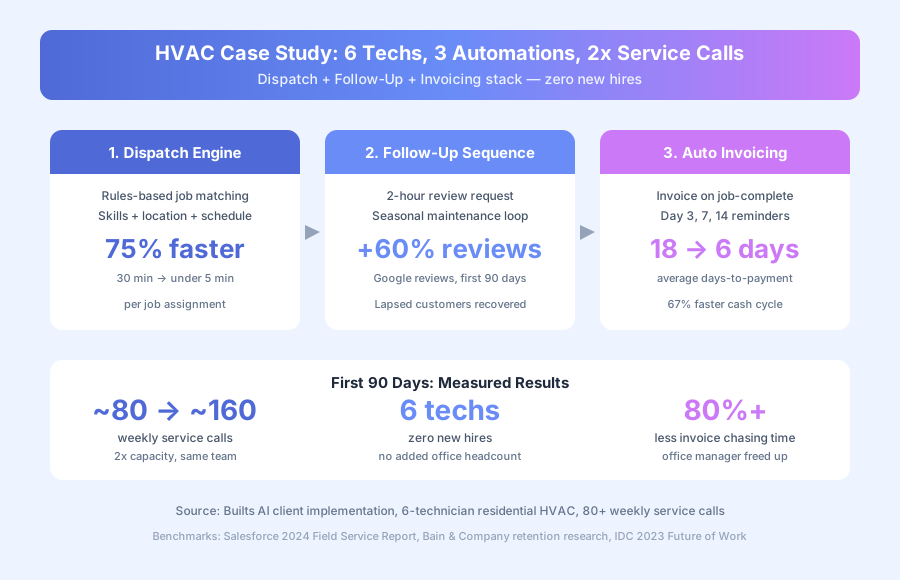
The 6-tech HVAC operation doubled weekly service calls, cut dispatch time per job by 75%, and dropped days-to-payment from 18 to 6. Google review volume climbed 60%. Office overtime effectively disappeared. All of it happened without adding a single office employee or new technician to the crew.
The scoreboard
| Metric | Before | After | Change |
|---|---|---|---|
| Dispatch time per job | 20-30 min | Under 5 min | 75% faster |
| Weekly service calls | ~80 | ~160 | 2x capacity |
| Average days to payment | 18 days | 6 days | 67% faster |
| Invoice follow-up (office hours/week) | Several hours | Near zero | 80%+ reduction |
| Google reviews (monthly volume) | Baseline | +60% | First 90 days |
| New office hires | n/a | 0 | Zero added headcount |
Source: client operational data, first 90 days post-implementation. The doubling of weekly calls wasn’t driven by new marketing — incoming demand was roughly flat. The same techs completed more billable work per day because dispatch overhead stopped absorbing the time those additional jobs required.
What was actually capping the company’s capacity?
Three compounding bottlenecks — manual dispatch, missing post-service follow-up, and lagging invoicing — were each invisible individually but added up to days of weekly office overhead. The owner wasn’t understaffed. The operation was unautomated. Every extra minute spent building the schedule was a minute the crew couldn’t bill.
The 8 AM call that triggered the rebuild
A call came in at 8 AM in January: no heat, young family. By the time the office manager had checked the schedule, called two techs to find one free, worked out who was closest, and texted the job details, it was 9:15. The customer had already called a competitor. According to a Harvard Business Review study on lead response (Oldroyd, 2011, updated by Drift’s 2023 benchmark research), responding within 5 minutes makes a business 100x more likely to connect than waiting 30 minutes. The HVAC company was losing those connections daily.
Where the time was actually going
Dispatch took 20-30 minutes per job. The office manager had to check which techs were scheduled, where they were, what skills the job needed, and what equipment was on their truck. With 80+ weekly calls, that’s well over a full day of pure dispatch work per week. Post-job follow-up didn’t exist — once a tech drove away, the relationship effectively ended. Invoicing ran 24-48 hours behind job completion because techs logged completions by phone or text at the end of the day.
Why couldn’t the office manager just work faster?
Because the constraint wasn’t effort, it was process. A manual dispatch workflow has a fixed minimum time per job: check the schedule, match skills, confirm availability, communicate the assignment. Pressure doesn’t compress those steps. The same applies to invoicing and follow-up — speed doesn’t reduce the number of manual touches required.
According to IDC’s 2023 Future of Work study, field service employees spend 30% of their time on administrative coordination tasks that could be automated. For a small HVAC shop where everyone wears multiple hats, 30% is a staggering capacity drain. It’s the difference between a 6-tech crew running like 6 techs and the same crew running like 8.
What three systems did the company build?
The owner built a dispatch engine, a post-service follow-up sequence, and an auto-invoicing workflow. Together they cover the full job lifecycle — from incoming request to paid invoice — and they run on top of the existing field service platform. No new software was added, only a workflow layer that ties the stack together.
System 1: Automated job dispatch
The dispatch system connects to the company’s field service software and applies a rules-based assignment engine to every incoming job.
How it runs:
- New service request arrives via phone, web form, or repeat-customer portal
- System captures job type, location, and urgency
- Rules engine matches against available techs by current schedule, location, skill set, truck inventory, and estimated duration
- Best-match tech gets an automatic app notification with customer name, address, issue, and access notes
- Customer receives an automatic confirmation with tech name, arrival window, and real-time tracking link
- Dispatcher reviews the day rather than building it — exceptions and conflicts are the only manual work
Dispatch time per job dropped from 20-30 minutes to under 5 minutes. The office manager moved from scheduler to exception handler. The same rules engine sits behind our appointment scheduling and dispatch build for HVAC companies.
System 2: Post-service follow-up and reviews
Two hours after a tech marks a job complete, the customer enters an automated follow-up sequence that runs on a simple timer.
How it runs:
- Tech marks job complete in the field service app
- 2 hours later: follow-up message with job summary and a Google Review link
- For maintenance customers: seasonal reminder scheduled 5 months out
- Recurring maintenance bookings enter an annual reminder cycle automatically
- Non-responders get a second prompt 30 days after the first
Google reviews climbed 60% in the first 90 days. That same post-job loop, with complaints routed privately to the office instead of onto the profile, is how we build review and reputation automation for home services. The 2-hour window matters — it’s the sweet spot between the customer still remembering the tech’s name and before the service experience fades. Bain & Company’s retention research shows that a 5% lift in customer retention drives 25-95% more profit, and for seasonal trades, the reminder loop is the highest-ROI retention tool available.
System 3: Auto invoicing and payment follow-up
The invoicing system fires the moment a tech marks a job complete, pulling labour time, parts, and service type directly from the job record.
How it runs:
- Job marked complete — labour, parts, and service type already logged in the app
- Invoice generates within minutes and emails to the customer with a payment link (card, e-transfer)
- Unpaid at day 3: automatic reminder
- Unpaid at day 7: second, more direct reminder
- Unpaid at day 14: escalation to office for manual follow-up
- Payment received: receipt emails automatically and A/R record updates
Average days-to-payment dropped from 18 to 6. According to QuickBooks’ 2023 State of Small Business Cash Flow report, 61% of small businesses struggle with cash flow, and 66% of that stress traces back to unpaid invoices. Closing the lag between job completion and invoice delivery cut the company’s accounts receivable aging almost in half.
Why does dispatch speed matter more than most HVAC owners realise?
Because in residential HVAC, urgency is the primary purchase trigger. A family without heat in January isn’t comparison-shopping — they’re calling until someone confirms a tech. Fast dispatch isn’t a nice-to-have; it’s the single biggest determinant of whether a call converts into a job or a missed revenue opportunity.
The company’s manual process was losing high-urgency calls to competitors who could confirm a tech faster. Not because the competitor had more crews — because they could confirm availability in the time it took this company to check the schedule. The Harvard Business Review 5-minute response window applies as directly to HVAC service calls as it does to B2B sales leads. Drift’s 2023 State of Conversational Marketing report confirmed the same pattern holds across service industries: the first business to confirm a response wins the job most of the time.
What about the seasonal revenue pattern?
HVAC demand runs in predictable cycles — AC in spring and summer, heat in fall and winter. Companies that don’t systematically follow up after seasonal service calls lose a sizeable share of the same customers the following season. Not because those customers found a better HVAC firm, but because they don’t remember who serviced their unit 6 months ago.
The seasonal reminder automation changed that. A customer who received a “time for your annual heating check” message in October, from a company they had used the previous spring, converted at a far higher rate than cold outreach. The company already had the relationship — automation activated it. Per Bain & Company, retention gains compound faster than acquisition gains in any business with recurring demand, and HVAC maintenance is the textbook example.
What can other trades and home services businesses take from this?
Three principles carry over to any field service business, regardless of trade. They hold for plumbing, electrical, cleaning, landscaping, and pest control just as directly as they do for HVAC. The specific rules engine differs by trade, but the workflow structure stays identical across the category.
1. Dispatch is a matching problem, not a judgment problem
Most dispatch decisions follow consistent rules: closest available tech with the right skills gets the job. Automating rule execution frees dispatchers for the genuine judgment calls — emergency rerouting, customer-specific preferences, multi-job coordination. Those are the cases where a human adds value. Everything else is pattern matching a rules engine handles faster and more consistently than a person under pressure.
2. The review window is 2-4 hours post-service
After that, the urgency of the experience fades. An automated message sent while the customer still remembers the tech’s name generates reviews at a far higher rate than a generic email blast a week later. Google’s 2024 local search ranking research consistently puts review volume and recency in the top three ranking signals for local service businesses, so the review loop pays for itself in inbound demand within a quarter.
3. Every lag between job completion and invoice is cash flow leak
In field service, money is earned when the job is done. Invoicing that happens 24-48 hours later, followed by inconsistent payment chasing, is a structural delay in the cash cycle. Automation closes that gap within minutes. The 12-day compression in days-to-payment this company saw — 18 days down to 6 — freed working capital that had previously been stuck in A/R limbo.
Could this work for your field service business?
The dispatch, follow-up, and invoicing automation pattern applies to any trade or home services business that runs a field crew and invoices after completion. HVAC, plumbing, electrical, landscaping, cleaning, and pest control all fit the same workflow shape. The rules engine needs trade-specific inputs, but the three-system structure is consistent across the category.
For related reading, see our Booking Automation for Service Businesses guide and our article on How to Automate Appointment Reminders That Reduce No-Shows by 80%. Both cover workflow components that plug into the pattern described here. If you want to see exactly what we build for HVAC, plumbing, and electrical businesses, see our AI customer service for home services page.
Book a free automation audit and we’ll map your dispatch, follow-up, and invoicing lifecycle to find where operational overhead is quietly capping your weekly call capacity.