The biggest difference between an AI customer service agent that works and one that frustrates customers isn’t the model. GPT-4, Claude 3.5, and Gemini 2 all answer most queries well in benchmarks. The difference is what the AI knows about your specific business — your prices, your policies, your customer’s order status, your shipping cutoffs — and how that knowledge gets pulled into every conversation.
The technique that bridges generic AI to your specific business is Retrieval-Augmented Generation (RAG). According to a 2025 IBM Institute for Business Value report, 71% of enterprise AI deployments now use RAG as the foundational pattern for customer-facing applications. For SMBs, RAG is the difference between a chatbot that answers “I’m sorry, I don’t have that information” 50% of the time and one that resolves 60-80% of inquiries autonomously.
This guide explains how RAG-based AI customer service actually works, what you need to build one, and where the off-the-shelf tools end and custom builds begin. It’s written for SMB owners and operators who want to understand what they’re buying — not just whether to buy it.
What is RAG and why does it matter for customer service?
RAG (Retrieval-Augmented Generation) is the technique of giving an AI access to your real business data at query time, so it can answer customer questions with grounded, accurate information instead of hallucinating from generic training data. For customer service specifically, RAG cuts hallucinations by 96% versus unconstrained models, according to Stanford’s 2025 AI Reliability Study.
Without RAG, an AI customer service agent only knows what it learned during training — generic facts about the world, with no idea what your business sells, what your shipping policy is, or whether a specific customer’s order has shipped. Customers ask “where’s my order?” and the AI either invents an answer or punts to a human.
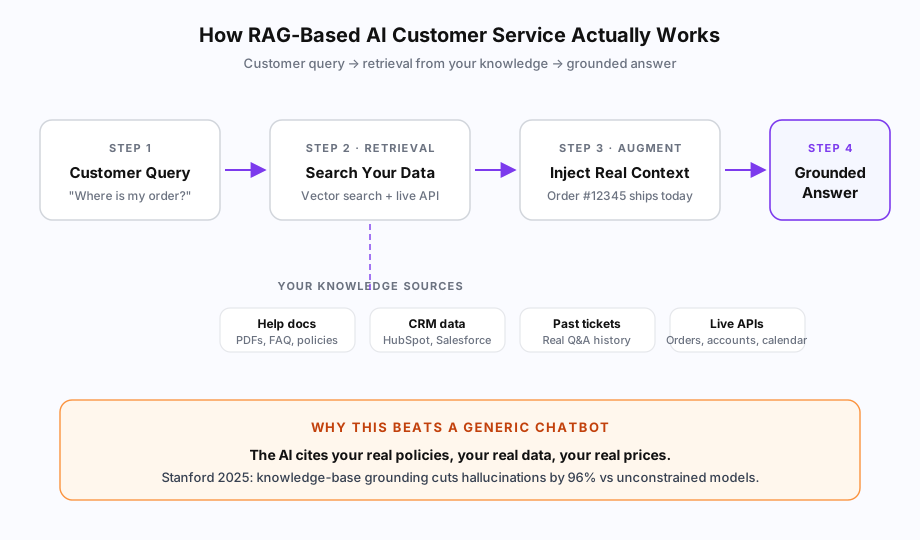
With RAG, the AI looks up the real answer first. The flow is: customer query → retrieve relevant context from your data → inject that context into the prompt → generate an answer grounded in real information. The model becomes a writer, not a memorizer.
How does RAG work in plain English?
RAG works in four steps. First, the customer asks something. Second, a search engine pulls relevant snippets from your knowledge sources. Third, those snippets get inserted into the AI’s prompt as context. Fourth, the AI generates an answer that uses the retrieved information instead of guessing.
Think of it like an open-book exam. Generic ChatGPT is taking the exam from memory and bluffing on questions outside its training. RAG is the same model with your textbooks open in front of it — it can look up the actual answer to “what’s our refund window for opened products?” instead of making something up that sounds reasonable.
The “search” step is where most of the magic happens. Modern RAG uses vector search — your documents get converted into numerical representations (embeddings), and the customer’s question gets converted into the same kind of representation. The system finds documents whose embeddings are most similar to the question’s embedding, even when the wording is completely different. “How long until my package arrives?” can match a help doc that says “Standard shipping delivery times” because the underlying meaning is similar.
For live data (order status, account balance, calendar availability), RAG also queries your real APIs in real time. The AI sees both the static documents and the live data, so it can answer questions like “where is my order #12345?” with the actual current shipping status, not a generic “let me check” response.
What do you need to build a RAG-based customer service agent?
A production RAG customer service system needs five components: (1) a knowledge base of cleaned and chunked documents, (2) an embedding model to convert text to vectors, (3) a vector database to store and search those vectors, (4) live data integrations to your CRM and operational systems, and (5) an LLM to generate the final answer. Plus prompt engineering, guardrails, and a human-escalation path.
Here’s the practical inventory for an SMB build:
| Component | What it does | Common choices |
|---|---|---|
| Knowledge base | Source-of-truth content the AI can search | Help docs, PDFs, CRM data, past tickets |
| Embedding model | Converts text to numerical vectors for search | OpenAI text-embedding-3, Cohere, open-source (BGE, E5) |
| Vector database | Stores and searches the embeddings | Pinecone, Weaviate, Supabase pgvector, Qdrant |
| Live API integrations | Real-time data lookups during conversations | CRM, orders, calendar, billing — varies by business |
| LLM | Generates the final customer-facing answer | GPT-4, Claude 3.5, Gemini 2 (via API) |
| Orchestration layer | Connects retrieval, prompts, and the LLM | LangChain, LlamaIndex, or custom code |
For an off-the-shelf tool like Chatbase, you don’t see most of this — Chatbase wraps the embedding, vector store, and LLM calls in a UI. The trade-off is you can’t customize the retrieval logic, can’t connect to live APIs without middleware, and can’t tune for your specific data quality.
For a custom build, you choose each component. The flexibility means you can wire the AI directly into ServiceTitan to look up dispatch status, or directly into Clio to check matter status, or directly into Shopify to pull live order details — none of which generic chatbot tools support natively.
How do you collect and prepare your knowledge base?
Knowledge base prep is 60-70% of the total RAG build effort, and it’s where most projects succeed or fail. Start with four sources: existing help documentation, your CRM customer data, past support tickets (the goldmine), and any policies, pricing, or product specs scattered across documents. Aim for 50-200 cleaned, chunked documents for a typical SMB customer service scope.
The “chunking” part trips most non-technical buyers up. RAG doesn’t search whole documents — it searches small passages (typically 200-500 tokens, roughly a paragraph). If your help doc is one giant 10,000-word page, the AI retrieves a passage but loses the surrounding context. If your chunks are too small, the AI gets context fragments without enough information to answer.
Practical knowledge-prep steps for an SMB:
- Audit existing content — list every help doc, FAQ page, PDF policy, and onboarding guide. Most SMBs find 20-40 documents already exist somewhere
- Mine past tickets — your last 3-12 months of support conversations are the highest-signal training data anywhere. Real customer questions, real answers, real resolutions
- Document tribal knowledge — the answers your team gives in Slack or by phone but never wrote down. This is usually the largest gap
- Standardize and update — kill outdated docs, fix contradictions, version-stamp everything
- Chunk thoughtfully — paragraph-level chunks usually work; for technical docs use semantic boundaries (headings, list items)
- Tag with metadata — product, region, customer tier, timestamp — so retrieval can filter (only show pricing for Canada when a Canadian customer asks)
The teams that skip the audit and just dump every document into the vector database get garbage results: contradictory pricing, outdated policies, and chunks pulled from internal-only docs that confuse customers. According to a 2024 study by Vectara on enterprise RAG deployments, 58% of poor-performing RAG systems traced their failures to data preparation problems — not model selection or retrieval algorithms.
How do you choose a vector database and embedding model?
For most SMB customer service deployments, OpenAI’s text-embedding-3-small model paired with Pinecone or Supabase pgvector is the pragmatic default. Embedding model choice matters less than people think; vector database choice matters more, mostly for cost and operational simplicity at SMB scale.
The honest comparison:
- Pinecone — purpose-built vector DB, easiest setup, $70/month minimum but scales smoothly. The default for production deployments unless you have a reason not to
- Supabase pgvector — vector search inside Postgres. Free tier covers most SMB scale; lets you keep vectors next to your relational data. Best choice if you already use Supabase
- Weaviate / Qdrant — open-source, self-hostable, more flexible but more operational overhead. Better for technical teams who want full control
- Chroma — open-source, embedded option for local dev and small deployments
For embedding models, text-embedding-3-small from OpenAI ($0.02 per million tokens) is fine for English customer service. If you need open-source for data residency, BGE or E5 models hosted on your own infrastructure work well. The model differences matter most at the margins — SMB customer service rarely sees performance gaps that justify the complexity of running your own embedding infra.
The ongoing cost for a typical SMB scale (50,000 customer conversations per year, ~5 retrievals per conversation): under $100/month for the embedding API, $0–$70/month for the vector DB depending on choice. The expensive part isn’t the infrastructure — it’s the LLM token costs for generating answers, which run $200–$2,000/month depending on conversation volume and which model you use.
How do you connect the AI to live data (CRM, orders, accounts)?
Live data integration is what separates a “FAQ chatbot” from a real AI customer service agent. The AI calls your existing APIs at conversation time — HubSpot for customer history, Shopify for order status, ServiceTitan for dispatch info, Clio for matter status — and uses the real-time response as additional context for its answer.
Two technical patterns dominate:
Pattern 1: Function calling. The LLM is given a list of “functions” it can call (e.g., get_order_status(order_id), lookup_customer(email)). When a customer asks “where’s my order?”, the model decides to call get_order_status, your backend executes it against Shopify, returns the result, and the model uses that result to compose an answer. GPT-4 and Claude both support this natively. This is the cleaner pattern for most SMB use cases.
Pattern 2: Pre-retrieval lookup. Before sending the customer’s question to the LLM, your code identifies the customer (from session, email, or auth) and pulls relevant context from your CRM/orders proactively. The retrieved data gets injected into the prompt alongside the document chunks. Works well for predictable conversation patterns where the AI almost always needs customer context.
Most production deployments mix both: pre-retrieval for customer identity and obvious account context, function calling for query-specific lookups (specific order, specific invoice, specific appointment).
The integration work is where build cost concentrates. Connecting to HubSpot or Stripe takes a few hours; connecting to a 15-year-old practice management system with no public API can take weeks. We covered the realistic timeline ranges in our AI customer service cost breakdown — short version: integration scope drives 40-60% of total build cost for a custom RAG system. Our deeper CRM integration guide walks through the patterns for HubSpot, Salesforce, GoHighLevel, and Zoho specifically.
How do you handle the things RAG can’t do alone?
Even a perfectly-tuned RAG system needs guardrails for three failure modes: questions outside your knowledge scope, ambiguous questions where retrieval pulls wrong context, and high-stakes situations where you’d rather escalate than guess. According to McKinsey’s 2025 enterprise AI survey, 73% of customer service AI failures trace to one of these three categories, not to the underlying model.
The defensive layers you add on top of RAG:
Confidence thresholds. Score how confident the model is that the retrieved context actually answers the question. Below the threshold, route to a human instead of generating a possibly-wrong answer. This is the single most effective hallucination defense beyond RAG itself.
Topic boundaries. Use a classifier or prompt instruction to detect when a question is outside your knowledge scope (someone asking your support bot for medical advice, legal opinions, or refund decisions that need manual approval). Hand off cleanly with a clear message.
Output validation. Before sending an AI-generated answer to the customer, validate it against your business rules. Did the AI quote a wrong price? Did it promise a refund that requires manager approval? Catch and fix before the customer sees it.
Human escalation paths. When confidence is low, when topic is out of scope, when validation fails — route to a human with full context. The AI doesn’t need to handle everything; it needs to handle predictable repetitive volume well and hand off the rest cleanly.
This stack is what makes RAG production-ready. We dove deeper into the hallucination side in our guide to preventing AI hallucination in customer service — the five-layer defense framework most enterprise teams use combines RAG with these guardrails.
How long does this take to build, and what does it cost?
A production RAG-based AI customer service system takes 4-6 weeks to build for a typical SMB and costs $8,000–$30,000 CAD as a one-time Build Phase, plus $500–$2,500 CAD/month for maintenance. Off-the-shelf RAG tools (Chatbase, Tidio Lyro) skip 80% of the work for $19–$99/month — at the cost of integration depth and customization.
The time breakdown for a custom build:
- Week 1: Discovery + knowledge audit. Map data sources, identify integration points, audit existing documentation, define conversation scope and escalation paths
- Weeks 2-3: Build core RAG. Set up vector database, ingest and chunk knowledge base, integrate embedding model, wire up the LLM with prompts and guardrails. Get a working answer-from-docs system live for internal testing
- Weeks 3-4: Live data integrations. Connect to CRM, order system, calendar, billing — whatever data the AI needs to answer real customer questions. This is the longest single workstream for most builds
- Week 5: Testing and tuning. Run real customer questions through the system, measure accuracy, fix retrieval failures, tighten prompts
- Week 6: Production deployment + monitoring. Wire the AI into your live customer channels (chat widget, email, phone via voice agent), set up monitoring and human-handoff workflows, document everything for your team
Maintenance ($500–$2,500/month optional) covers ongoing knowledge updates as your business changes, prompt tuning based on real conversation data, and adding capabilities the team didn’t know they needed at launch. Most clients run for 2-3 months without maintenance, then add it once they see specific tuning opportunities.
When should you build vs use an off-the-shelf RAG tool?
Use off-the-shelf RAG (Chatbase, Tidio Lyro) when your customer service questions can be answered from static documents alone, your conversation volume is under 3,000/month, and you don’t need real-time CRM or operational data lookups. Build custom RAG when you need live API integration, you have specific compliance requirements (PIPEDA, HIPAA, GDPR), or your monthly volume is large enough that off-the-shelf per-conversation costs exceed a custom build inside 12 months.
The decision matrix:
- Pure FAQ deflection (returns policy, hours, product specs): Chatbase free or Hobby, $0–$19/month
- FAQ + simple CRM lookups via Zapier middleware: Tidio Growth + Lyro AI, $98/month + Zapier ~$30/month
- Need live order/account/dispatch data, mid-volume: Custom build with off-the-shelf hosting infrastructure
- High volume + integration depth + compliance requirements: Fully custom build with dedicated hosting
For most SMBs we work with at Builts AI, the right starting point depends on whether the AI needs to do anything beyond answer. Answering questions from your help docs is a problem off-the-shelf tools solve cheaply. Booking appointments, looking up live orders, qualifying leads against CRM data, dispatching service calls — these require integration depth that justifies a custom build.
If you’re not sure which side of the line you’re on, we offer a free workflow audit. The pricing page has the full Build + Maintenance Phase breakdown, and the customer service automation service page shows what we actually deliver in a typical engagement. There’s also our broader 2026 AI customer service trends overview, AI vs offshore support comparison, and after-hours capture playbook if you want to map the broader landscape before committing to any direction.
The bottom line: RAG is the technical foundation that makes AI customer service actually work. The decision isn’t whether to use it — it’s how much of the implementation you build versus rent.