A founder told me last month: “We tried an AI chatbot. Customers hated it. Now I’m scared to automate anything.” That’s the actual problem with customer support automation in 2026 — not the technology, not the cost, but the people who’ve already been burned. They watched their CSAT drop, refunded angry customers, and quietly turned the bot off in month four.
Here’s the part vendors won’t tell you: customers don’t hate automation. They hate it in the wrong places. A 2024 Gartner survey found 64% of consumers would rather companies didn’t use AI in customer service — but the same study found 70% positive sentiment when AI was deployed for the right tasks (order tracking, FAQ, scheduling). The difference isn’t AI. It’s where you point it.
This guide is the playbook we use at Builts AI to automate customer support without breaking customer experience. It’s based on 30+ SMB deployments where we measured CSAT before and after — and a 9-point average CSAT lift, not a drop. The steps below cover what to automate, what to leave alone, and the seven moves that protect customer trust along the way.
Why do most customer support automation projects annoy customers?
Most customer support automation projects annoy customers because they automate the wrong tasks, train AI on generic content instead of real knowledge, give the bot no way to access actual customer data, and offer no escape hatch to a human. The result is a chatbot that loops customers on the same question, can’t answer anything specific, and frustrates them past the point of forgiveness. The technology isn’t broken — the deployment is.
Four patterns we see in failed deployments at Builts AI:
- Generic training data. A chatbot trained on a 12-page FAQ that’s missing half your real product knowledge fails the moment a customer asks anything specific. Customers feel ignored.
- No data access. The bot can’t see the customer’s order, account, or history. It answers as if every visitor is brand new. For returning customers, this is insulting.
- No human escape. The bot routes back to itself when escalation is requested. Customers Google “[your company] customer service phone number” within 90 seconds.
- Pointed at emotional moments. Refund requests, complaints, cancellations — these need empathy, not pattern matching. The customer is already upset. The bot makes it worse.
Get any one of these wrong and customers churn. Get all four wrong and you’ll spend the next year repairing brand damage. Our AI hallucination prevention guide covers the technical patterns that close the accuracy gap; the rest of this guide covers the strategy that prevents the experience problem.
What customer support tasks are actually safe to automate?
The safe-to-automate list is anything repetitive, factual, and time-sensitive: order status lookups, appointment booking, top 10 FAQ answers, password resets, returns within policy window, proactive status updates, after-hours capture. These tasks account for 60–80% of typical SMB support volume, and customers prefer self-serve to waiting on hold. Automating them lifts CSAT, not the other way around.
The decision is binary: can a well-trained AI answer this faster and as accurately as your best human agent? If yes, automate. If no, keep human.
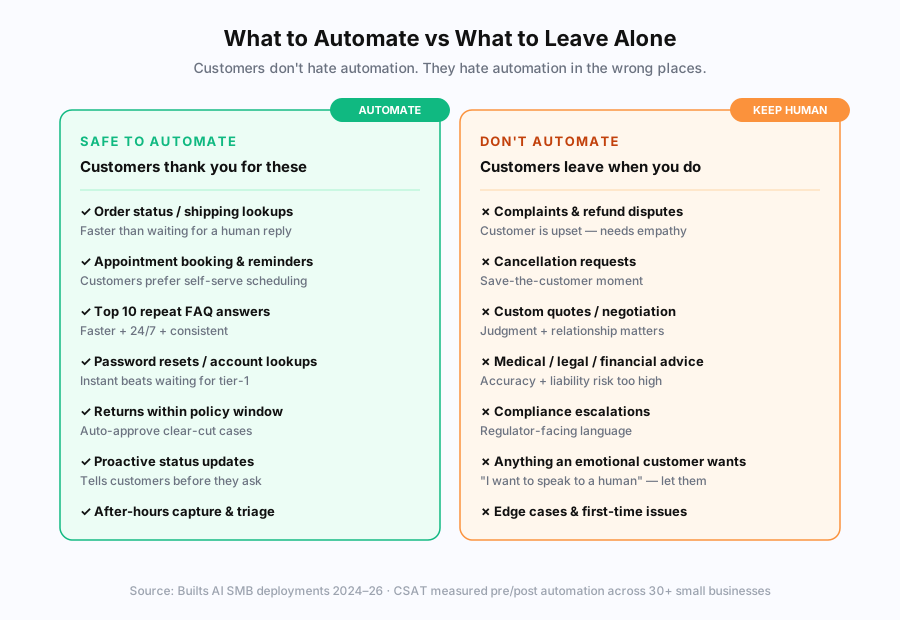
The split holds across industries we’ve worked with. For e-commerce, the safe list is dominated by WISMO (where-is-my-order) tickets, which can be 30–40% of total volume. For service businesses, it’s appointment-related queries. For SaaS, it’s account access and how-to questions. The “keep human” list is more consistent: emotional moments, custom decisions, and anything carrying liability.
How do I actually start automating customer support?
The fastest start is a 3-step sequence: pull your last 200 support tickets, find the 10 patterns that account for 60% of volume, and automate those first. This takes one afternoon to map and 4–6 hours to implement using your existing helpdesk’s templates and rules. You’ll save 5–8 hours per week immediately at $0–$50/month in tooling. This is the foundation everything else builds on.
Three things to do before touching any AI tool:
- Audit your last 200 tickets. Sort by topic. Count occurrences. You’ll find 8–12 questions that drive 60–70% of volume. This list is your roadmap.
- Tag your top 10 in your helpdesk. Build a clean tag taxonomy (“shipping,” “refund-request,” “appointment,” “billing”) so any future automation can route by category.
- Write a canned response for each top 10 question. These become both the immediate auto-response AND the training data for any AI chatbot later.
We covered the full audit framework in our workflow audit guide. For customer support specifically, the 200-ticket sample is enough — adding more tickets rarely surfaces new patterns past that threshold. For the technical setup of routing rules and tag-based automation once your categories are mapped, see our support ticket routing automation guide.
What’s the 7-step framework to automate without annoying customers?
The framework below ships customer support automation in 4–8 weeks for a typical small business, with measurable CSAT protection at each stage. Each step is a gate — don’t move to the next until the previous one passes its acceptance criteria. Skipping steps is what causes the chatbot-customers-hate problem.
Step 1: Map your ticket types
Pull your last 200–500 support tickets. Categorize by topic, urgency, and emotional valence (neutral, frustrated, angry). You’ll see three groups emerge: high-volume neutral tickets (your automation targets), high-volume emotional tickets (keep human), and low-volume edge cases (keep human, document for AI later).
Step 2: Pick 2–3 automation targets from the safe list
Don’t try to automate everything at once. Pick the top 2–3 categories from your safe-to-automate list — usually the ones with highest volume × lowest complexity. For most SMBs, that’s order status (WISMO), FAQ answers, and after-hours capture.
Step 3: Train AI on your real knowledge base
This is the step most teams skip. AI needs to learn from your actual product docs, FAQs, return policy, shipping rules, and tone-of-voice samples — not a generic dataset. We covered the technical setup in our RAG setup guide. The shortcut version: feed it your top 50 help articles, your last 100 resolved tickets, and your written brand voice guide.
Step 4: Test on your worst tickets
Don’t test on FAQ-style queries you know the AI will pass. Test on your last 50 complex tickets — including the angry ones, the edge cases, the misunderstood requests. Score accuracy and tone on a 1–5 scale. Fix anything below 4 before customer one ever sees the system. This is where most failed deployments would have caught the problem if they’d tested properly.
Step 5: Build the human escape hatch
Every screen, every response, every chatbot reply needs a one-click path to a human. “Talk to a human” button. “This didn’t help” trigger. Email fallback. Phone number visible. The customers who don’t need the escape never use it; the customers who do need it churn permanently if it’s missing.
Step 6: Roll out in tiers
Don’t go from zero to 100% on day one. Roll out to 10% of traffic, watch CSAT and escalation rates for one week. If both hold, move to 25%. Then 50%. Then 100%. Total rollout time: 4 weeks. Most problems surface in the 10% tier — fix them before they affect more customers.
Step 7: Monitor CSAT weekly and tune monthly
Set up CSAT triggers on AI-handled tickets specifically. If CSAT drops below your pre-automation baseline, find the failing query category and retrain. Tune the AI monthly on the previous month’s resolved tickets to keep accuracy compounding. Skipping this step is how good deployments slowly become bad ones.
How does customer support automation compare to keeping it manual?
Automated customer service handles 60–80% of repetitive volume at $0.02–$0.50 per interaction, 24/7, with consistent quality. Manual customer service handles 100% of volume but only during business hours, at $3–$8 per interaction loaded cost, with quality that varies by agent and time of day. The right answer for most SMBs is hybrid: AI on the repetitive volume, humans on the judgment calls. Pure-automated systems fail. Pure-manual systems can’t scale past a certain volume without burning out the team.
A practical comparison for a typical 12-person business doing 1,500 monthly support conversations:
| Capability | Manual only | Automated + human escalation |
|---|---|---|
| Coverage hours | 8–10 hrs/day, weekdays | 24/7/365 |
| First response time | 2–8 hours | Under 60 seconds |
| Cost per interaction | $3.00–$8.00 | $0.10–$0.50 (AI) + $3–$8 (escalations) |
| CSAT on repetitive tickets | 3.8–4.2 (variable) | 4.4–4.6 (consistent) |
| CSAT on emotional tickets | 4.2–4.6 (with good agents) | Skip — route to human |
| Capacity ceiling | Hard ceiling at team size | Scales without adding heads |
| Hire-avoidance | None | $45K–$70K/yr per avoided hire |
The cost savings are real but they’re not the only reason to automate. The bigger reason is that humans hate doing the same repetitive task 80 times a day. Agent retention improves when AI handles the boring tickets — your team gets to do the interesting work. We saw this clearly in our e-commerce brand case study, where the support team went from quitting in 9 months to staying past 24.
How do I make sure customers can always reach a human?
The single most important rule of customer support automation: customers must always have a frictionless path to a human. Not after three menu levels. Not after the bot tries five times. One click, one obvious button, one clear escalation path. The cost of one customer abandoned in a chatbot loop is bigger than the savings from 100 successfully automated tickets — both in churn and in word-of-mouth damage.
What the human escape looks like in practice:
- A persistent “Talk to a human” button visible on every chatbot screen, not buried in a menu
- A “this didn’t help” trigger at the end of every AI response that routes to a real person
- Visible business hours and contact options — phone, email, live chat — alongside the bot
- Automatic escalation on emotional keywords (“frustrated,” “angry,” “complaint,” “cancel,” “refund,” “manager”)
- No more than 2 failed AI attempts before automatic handoff to human
The fastest way to lose a customer in 2026 isn’t a slow response. It’s making them feel trapped. Per a 2024 NewVoiceMedia survey, 75% of customers say being unable to reach a human is the most frustrating part of automated service. The fix is cheap — a button — and the payoff is enormous.
What does customer support automation cost — and what’s the ROI?
Customer support automation costs $0–$300/month for off-the-shelf tools (Chatbase, Tidio Lyro, Intercom Fin), $8,000–$30,000 one-time for custom CRM-integrated builds, and produces typical 12-month ROI of 200–400% for small businesses doing 1,000+ monthly conversations. The ROI comes from staff time reclaimed (12–25 hours/week), new hires avoided ($45K–$70K each), and after-hours leads captured. Our full cost breakdown covers the off-the-shelf pricing tiers and total cost of ownership math.
The ROI pattern across the deployments we’ve measured:
- Off-the-shelf chatbot ($50–$300/mo): Payback in 1–3 months for businesses doing 500+ monthly conversations
- Helpdesk AI add-on (Intercom Fin at $0.99/resolution, Zendesk AI at $50/agent): Payback in 3–6 months, gets expensive at high volume
- Custom-built integrated agent ($15,000 one-time + $1,000/mo): Payback in 4–8 months, then compounds — no per-message fees, full CRM integration
We did a head-to-head of these models in our Intercom Fin AI review — short version: Fin is excellent tech with brutal economics at scale. The right answer depends on your monthly volume and integration needs. Under 1,000 conversations, start off-the-shelf. Past 1,500, custom builds usually pencil out.
For the cost-cutting side specifically, our companion post reduce customer service costs breaks down the 9 specific AI plays that deliver 40–60% cost reduction without outsourcing.
What about the customers who say they hate AI in customer service?
The customers who say they hate AI in customer service usually mean they hate bad AI — the chatbots that loop, the bots that can’t help, the systems with no escape. The same customers, when surveyed about specific tasks, rate AI higher than humans for fast factual queries (order status, scheduling, FAQ). A 2024 Salesforce study found 68% of consumers prefer AI for routine queries when it works. The job isn’t to hide AI — it’s to deploy it where customers actually want it.
What the data actually says when you separate “AI in general” from “AI for specific tasks”:
- AI for order status / WISMO: 78% prefer AI (instant vs waiting)
- AI for appointment booking: 71% prefer AI (self-serve control)
- AI for password resets: 84% prefer AI (no agent needed)
- AI for refund disputes: 12% prefer AI (need empathy)
- AI for complaints: 8% prefer AI (need to be heard)
- AI for cancellations: 16% prefer AI (save-the-customer moment)
The customers who hate AI aren’t wrong — they’re describing the bad deployments they’ve seen. Build the good version (right tasks, real training data, easy human escape) and the same customers will use it gladly. Our AI vs offshore customer service breakdown covers the cases where neither AI nor outsourcing is the right answer — sometimes the right move is just to hire one more rep.
What’s the right way to start this week?
Pick three tasks from your last 200 tickets. Ideally one quick win (auto-response templates for top FAQs), one mid-impact deflection (WISMO or appointment booking automation), and one structural improvement (after-hours capture). Ship the quick win this week. Plan the deflection for next month. Plan the structural change for next quarter. Don’t try to do all three at once — that’s how good deployments turn into burned-by-AI stories.
At Builts AI, we build custom AI customer support systems for small and mid-sized businesses across Canada and the US. Pricing is transparent: $8,000–$30,000 CAD for the one-time Build Phase, plus optional $500–$2,500 CAD/month Maintenance. We start with a free audit that produces a written automation map in 48 hours, including which tickets to automate, which to leave human, and what your CSAT-protected ROI looks like at your real volume.
If you’ve been burned before, that’s not a reason to skip automation. It’s a reason to do it differently this time. The customers who hated your last chatbot aren’t going to hate the next one — if the next one is built on the rules above.