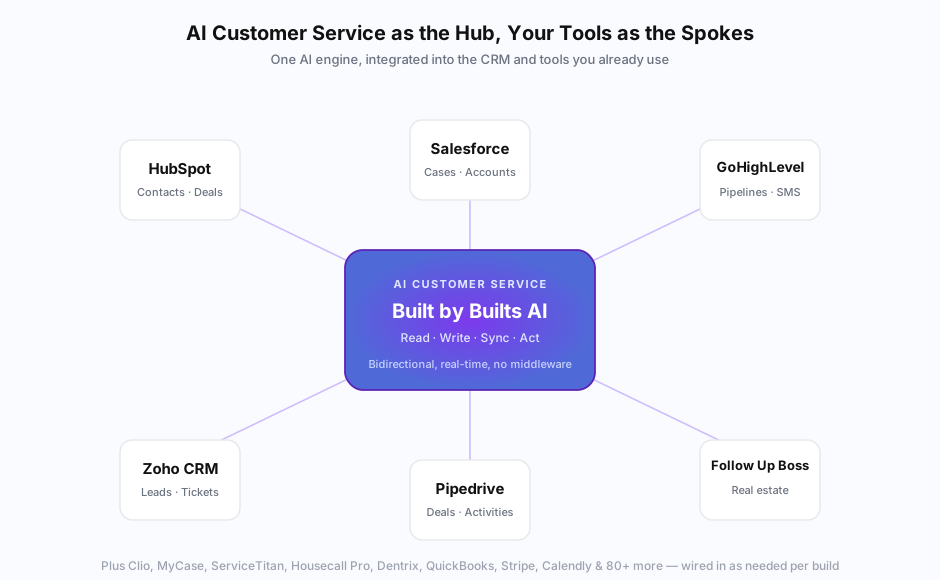
The biggest difference between an AI chatbot that captures emails and an AI customer service agent that resolves tickets is the CRM. Without integration, the AI is talking past your customer — it doesn’t know who they are, what they bought, or what they’ve asked before. With proper integration, the AI sees what your team sees, takes the same actions your team takes, and writes the result back to the same place your team would update.
Most AI customer service deployments fail not because the model is bad but because the CRM integration is shallow or missing entirely. According to a 2025 Forrester report on enterprise AI customer service, 64% of underperforming deployments traced their failures to integration gaps — not to model quality, training, or prompt design.
This guide is the practical playbook for connecting AI customer service to your CRM. Native vs middleware vs custom, what each costs, what each enables, and how to pick the right pattern for your platform and scale.
Why does AI customer service need CRM integration?
AI customer service needs CRM integration so the AI can see who the customer is, what they’ve purchased, what they’ve asked before, and what state their account is in — then respond with that context and write the result back. Without integration, the AI is a generic chatbot answering FAQs in a vacuum. With integration, it’s an agent doing the same work your team does, except faster and 24/7.
The concrete things integration enables:
- Personalized responses: “I see you’ve been a customer since 2024 and your last order was last week” instead of “How can I help you today?”
- Live data lookups: order status, account balance, ticket history, deal stage — pulled in real time, not from training data
- Action-taking: book the appointment, escalate the ticket, update the contact, log the conversation
- Conversation continuity: customer comes back tomorrow, the AI knows what was discussed today
- Bidirectional sync: every AI conversation gets written back to the CRM as part of the customer’s record
According to Salesforce’s 2025 State of Service report, customer satisfaction scores for AI-handled interactions are 31 points higher when the AI has CRM context than when it doesn’t. The integration isn’t optional infrastructure — it’s the difference between AI customer service that works and AI customer service that frustrates customers. (For the broader cost case, see our AI customer service vs offshore support comparison — integrated AI beats offshore on per-interaction cost by 10-50x.)
How do you connect AI customer service to HubSpot?
HubSpot is the easiest CRM to connect AI customer service to. Three options: (1) native API integration via HubSpot’s well-documented REST API and Webhooks, (2) middleware via HubSpot’s Zapier/Make integrations (3,000+ pre-built actions), or (3) AI tools with built-in HubSpot connectors (Chatbase, Tidio, Intercom all ship with native HubSpot integration). Most SMBs deploy via middleware first, then move to native when volume justifies it.
The HubSpot integration patterns:
Native API integration:
- Uses HubSpot’s REST API + Webhooks
- Best for production deployments at any volume
- No per-call middleware fees
- Requires 1-2 weeks of engineering as part of an AI build
- Free tier of HubSpot supports API access
Middleware via Zapier or Make:
- Pre-built HubSpot apps with 100+ actions/triggers
- Fastest setup (hours, not weeks)
- Ongoing cost $20-$300/month in middleware fees
- Best for low-volume or rapid prototyping
- Has rate limits at scale
Native AI tool connectors:
- Chatbase, Tidio, Intercom each ship with HubSpot integrations
- Setup is point-and-click within the AI tool’s UI
- Limited to what the connector supports (usually contact create/update, not custom objects)
- Free with most paid AI plans
For a typical Builts AI HubSpot integration, the AI:
- Reads contact properties, deal stage, lifecycle stage, custom properties
- Reads associated companies, deals, tickets, and conversation history
- Writes back conversation summaries to the contact’s timeline
- Creates tickets when customers report issues
- Updates deal stages based on conversation outcomes
- Creates notes with structured customer intent data
We covered the broader chatbot platform landscape in our best AI chatbot builders for small business 2026 roundup — most of those tools have HubSpot connectors built in.
How do you connect AI customer service to Salesforce?
Salesforce integration is more powerful and more complex than HubSpot. Native API uses Salesforce’s REST and Bulk APIs plus Apex triggers for advanced workflows. Middleware via Zapier/Make works for simple flows but breaks down at high volume. Most Salesforce-native AI customer service deployments use a combination of API integration for reads/writes and Apex for complex business logic.
The Salesforce integration patterns:
REST API + Webhooks:
- Standard for read/write operations
- Salesforce Connected Apps for OAuth authentication
- Bulk API for high-volume data operations
- Required for any production deployment
Apex triggers and flows:
- For custom logic that needs to run inside Salesforce (validation rules, automated assignments, multi-step workflows)
- Requires Apex knowledge or a Salesforce admin
- Most SMBs don’t need this level of customization
Salesforce Service Cloud + Einstein:
- Salesforce’s own AI offering integrated with Service Cloud
- Predictable, expensive ($165/agent/month for Einstein for Service)
- Best if you’re already deep in Service Cloud and want first-party AI
Middleware (Zapier/Make):
- Same trade-offs as HubSpot middleware — fast setup, ongoing fees, rate limits at scale
For SMBs running Salesforce, the practical choice is usually REST API integration with custom prompt logic that knows Salesforce’s data model. Salesforce’s complexity (custom objects, validation rules, sharing rules, profiles) makes middleware less reliable at scale.
How do you connect AI customer service to GoHighLevel?
GoHighLevel (GHL) integration is straightforward via GHL’s REST API and Webhooks, plus their Workflow Builder for triggered automations. The platform is purpose-built for agencies and service businesses, so the AI integration patterns map cleanly to common workflows: lead capture, appointment booking, follow-up sequences, and pipeline management. Most AI customer service tools either have native GHL connectors or integrate via webhook-driven workflows.
The GoHighLevel integration approach:
- REST API: read/write for contacts, opportunities, conversations, calendars, custom fields
- Webhooks: GHL fires webhooks on events (new contact, opportunity stage change, appointment booked) — AI can subscribe and react
- Workflow Builder: visual automation builder; AI can be triggered as part of a workflow step
- Native AI features: GHL has growing first-party AI features (conversation AI, voice AI), some of which are good enough to use directly
A typical GHL integration we build for service businesses:
- AI handles inbound conversations across SMS, email, and Facebook Messenger
- Pulls contact context from GHL for personalized responses
- Books appointments directly into the GHL calendar with real availability
- Updates opportunity stages based on conversation outcomes
- Triggers GHL workflows for follow-up sequences
We covered GoHighLevel as a service business platform in detail in our GoHighLevel for service business automation guide — the AI integration is one of several automation layers that work well on the platform.
How do you connect AI customer service to Zoho CRM?
Zoho CRM has a comprehensive REST API and OAuth 2.0 authentication. Integration patterns are similar to HubSpot but the documentation is less polished and AI tools have fewer native connectors. Custom-built integration is usually required because the off-the-shelf AI customer service tools (Chatbase, Tidio) don’t ship with Zoho-native connectors. Middleware via Zapier or Zoho Flow works for simpler flows.
The Zoho integration approach:
- REST API: standard read/write for contacts, leads, deals, custom modules
- Zoho Flow: Zoho’s own automation platform (cheaper than Zapier for Zoho-to-Zoho flows)
- Webhooks: Zoho supports webhook subscriptions for real-time event handling
- Custom integration via Zoho Catalyst (their serverless platform): for complex business logic
The challenge with Zoho is feature variability across modules. Zoho CRM has good API support; Zoho Desk (their helpdesk) has different APIs; Zoho Inventory has another set. AI customer service deployments touching multiple Zoho modules need integration work for each.
What’s the role of middleware (Zapier, Make, n8n) in CRM integration?
Middleware platforms (Zapier, Make, n8n) are the practical bridge between AI customer service tools and CRMs that don’t have native connectors. They translate API calls between systems via pre-built “apps” with hundreds of triggers and actions. Best for simple flows and low volume; cost and rate-limit constraints push high-volume deployments to native integration. Most production deployments end up hybrid — middleware for some flows, native for others.
When middleware is the right choice:
- Low conversation volume (under 1,000/month)
- Quick prototyping and validation
- Flows that span 5+ systems where building each native integration is impractical
- Non-engineering teams maintaining the integration
When middleware breaks down:
- High volume (Zapier rate limits at 1 task/second on most plans)
- Real-time requirements (Zapier polls every 1-15 minutes; Make and n8n can be webhook-driven)
- Complex multi-step logic that’s faster to write in code
- Per-execution costs add up at scale
The honest middleware comparison:
- Zapier: easiest setup, broadest app library, expensive at scale, rate-limited
- Make (formerly Integromat): more powerful logic, complex visual builder, better pricing at scale
- n8n: open-source, self-hostable, most flexible, requires technical comfort
We did a head-to-head comparison in our Make vs n8n self-hosted automation guide — the short version is that Make wins for most SMBs and n8n wins for technical teams who want full control.
How do you handle bidirectional data sync without breaking the CRM?
Bidirectional sync — AI reads from CRM, AI writes back to CRM — needs three things to not break: clear ownership rules for which system is authoritative for each field, idempotent writes so duplicate webhooks don’t create duplicate records, and comprehensive logging so you can trace any data anomaly back to its source. Most “AI broke our CRM” complaints trace to weak versions of one of these three.
The integration patterns we use to keep bidirectional sync clean:
Ownership rules: For each CRM field, decide which system is authoritative. Customer name? CRM is source of truth; AI never overwrites it. Last conversation summary? AI is source of truth; CRM displays whatever AI last wrote. Deal stage? Could be either, but pick one and stick to it. Document this matrix as part of the integration design.
Idempotent writes: Every write operation includes a unique idempotency key. If the AI’s webhook handler retries due to network failure, the second write is a no-op instead of creating a duplicate record. Salesforce, HubSpot, and most modern CRMs support idempotency keys natively.
Conflict resolution: When AI and human update the same record close in time, decide whose write wins. Usually “last write wins by timestamp” with the older write logged for audit. Some teams prefer “human always wins” — both work as long as the rule is consistent.
Comprehensive audit logging: Every read and write is logged with timestamp, source system, user/AI identity, and before/after values. When something looks wrong, you can replay the data flow and find the cause.
This isn’t sexy work but it’s the difference between integration that scales and integration that produces a “the AI deleted all my deal stages last Tuesday” disaster.
How do you handle authentication securely?
Production AI customer service CRM integration uses OAuth 2.0 with refresh tokens, stored in encrypted vaults (AWS Secrets Manager, HashiCorp Vault, 1Password CLI, etc.) — never in code or plain config. Per-CRM access scopes follow least-privilege: the AI gets only the permissions it needs to do its job, not full admin access. Token rotation runs automatically every 30-90 days depending on the CRM.
The security checklist for any production CRM integration:
- OAuth 2.0 with refresh tokens (not basic auth or static API keys)
- Encrypted secret storage (Secrets Manager / Vault / similar)
- Least-privilege access scopes per integration
- Automatic token rotation every 30-90 days
- Per-environment credentials (dev/staging/prod separated)
- Audit logs of every API call retained for 90 days minimum
- Rate limit handling with exponential backoff
- Compliance documentation for the customer’s insurance/security review
For Builts AI deployments, we document the entire integration architecture and provide it to the client’s security or compliance team during onboarding. For clients in regulated industries (healthcare, legal, finance), we use Canadian-region infrastructure (AWS Canada Central / Azure Canada) per our data residency commitments.
What does a typical CRM integration timeline look like?
A typical CRM integration in a Builts AI 4-6 week customer service build takes 1-3 weeks depending on the platform and integration depth. HubSpot, GoHighLevel, and Pipedrive: 1-2 weeks (well-documented APIs, common patterns). Salesforce: 2-3 weeks (more complex setup, often custom Apex). Practice management systems (Clio, Dentrix, ServiceTitan): 2-3 weeks (API quirks, authentication complexity). Legacy systems with no API: 4+ weeks or sometimes infeasible.
The week-by-week breakdown for a typical 4-6 week build:
| Week | CRM integration work |
|---|---|
| 1 | Discovery: map current CRM data model, identify integration points, audit fields the AI will read/write |
| 2 | OAuth setup, basic read/write of core entities (contacts, deals, tickets), authentication and security review |
| 3 | Bidirectional sync: webhook handlers, conflict resolution rules, idempotent writes, audit logging |
| 4 | Custom logic: industry-specific workflows (appointment booking into calendar, ticket routing rules, deal stage automation) |
| 5 | Testing: end-to-end test of every flow, edge case validation, security verification |
| 6 | Production deployment + monitoring setup, runbook for common operational scenarios |
For most SMB deployments, weeks 1-3 are tight but achievable; weeks 4-6 vary based on how custom your workflows are. We covered the broader RAG-based AI customer service build timeline in detail — CRM integration is one of three parallel workstreams in any production deployment.
How much does CRM integration add to AI customer service cost?
For off-the-shelf AI customer service tools (Chatbase, Tidio) using middleware-based CRM integration, expect $20-$300/month in middleware fees on top of the AI tool subscription. For custom-built AI customer service systems, CRM integration is included in the $8K-$30K Build Phase scope — typically 15-25% of total build cost. Native integration has near-zero ongoing cost; middleware accumulates monthly fees that compound at scale.
The cost breakdown:
| Setup | One-time integration cost | Monthly ongoing |
|---|---|---|
| Middleware (Zapier free tier) | $0 | $0-$30 |
| Middleware (Zapier Pro / Make) | $0 | $30-$300 |
| Native API integration (DIY) | $2,000-$8,000 in dev time | Near $0 |
| Native API integration (agency build) | Included in $8K-$30K Build | Near $0 |
For a typical SMB doing 1,500 monthly conversations, the 12-month TCO comparison:
- Off-the-shelf + Zapier middleware: ~$1,500/year ongoing
- Off-the-shelf + Make middleware: ~$1,200/year ongoing
- Custom build with native integration: $25,000 first year (Build + Maintenance), then $9,600/year ongoing — and integration breakage from rate limits or middleware downtime drops to near zero
We did the full TCO comparison across 5 AI customer service options in our 2026 AI customer service pricing guide. The integration cost is one of the biggest hidden multipliers — sticker price of the AI tool often doubles or triples when you add the middleware needed to make it actually useful.
When does middleware integration stop being viable?
Middleware integration stops being viable around 3,000-5,000 monthly conversations or when you need real-time bidirectional sync. Below that volume, the simplicity and speed of middleware setup outweighs the per-task costs. Above that, middleware fees, rate limits, and reliability issues compound — at which point native API integration (custom build) is both cheaper and more reliable.
Decision shortcuts:
- Under 1,000 conversations/month, simple flows: Middleware (Zapier or Make), $30-$100/month
- 1,000-3,000 conversations/month: Hybrid — middleware for fast prototyping, native for hot paths
- 3,000+ conversations/month or real-time requirements: Native API integration, custom build
- Compliance-heavy industries (healthcare, legal, finance): Native always — middleware adds an audit liability surface
For most Builts AI clients in service industries, the right pattern is custom-built native integration from day one. The integration work is included in the Build Phase, runs without ongoing per-task fees, and scales to whatever conversation volume the business reaches without rebuild. CRM integration also unlocks the after-hours capture flow described in our after-hours customer service capture guide — without CRM lookups, the AI can’t book appointments at 2am with real customer context.
The pricing breakdown shows our Build + Maintenance Phase model, and the customer service automation service walks through what we deliver in a typical engagement. There’s also our broader AI customer service trends 2026 overview if you want to map the landscape before committing to any specific approach. For the full lead-capture-to-CRM pipeline that CRM integration enables, see our lead follow-up automation overview.
The bottom line: AI customer service without CRM integration is a chatbot. With proper integration, it’s a customer service agent. The decision isn’t whether to integrate — it’s how much of the integration to build natively versus rent through middleware.