You know your team burns hours on repetitive work. You just don’t know exactly how much, on which tasks, or where to start fixing it. A workflow audit solves that in 4 weeks.
According to IDC’s 2023 Future of Work study, employees spend 30% of their day on manual data entry and transfer. For a 5-person team earning $55,000 each, that’s $82,500 a year in labor on work a system could handle. You can’t fix what you haven’t measured, and you can’t measure what you haven’t documented.
We’ve run this audit with dozens of businesses across education, real estate, tax, SaaS, immigration, and marketing agencies. The pattern holds every time: teams overestimate complex work and underestimate repetitive admin. Here’s the exact 4-week framework, plus the scoring template we use to rank what to automate first.
How Do You Audit Your Workflows for Automation?
A workflow audit follows four steps: inventory every repeatable process, track actual time for a week, calculate real cost across five layers, then score by Volume x Time x Frequency x Complexity. The process with the highest score and highest total cost becomes your first automation target.
The whole thing takes 4 weeks of part-time effort or one focused week if you can block calendars. No special software needed. A spreadsheet, a timer, and honest interviews with your team cover 95% of what matters.
Week 1: How Do You Build a Complete Process Inventory?
A process inventory lists every repeatable task your team performs, who owns it, how often it runs, and which tools it touches. The goal is capture, not analysis. Get everything on paper before you judge anything.
According to McKinsey’s 2024 Global Survey on AI and Automation, 60% of occupations have at least 30% of their activities that could be automated. Your inventory reveals which 30% that is for your specific business.
Step 1: Build the spreadsheet. Create these columns: Process Name, Owner, Department, Frequency/Week, Time (min), Tools Used, Error Rate, Notes.
| Process Name | Owner | Frequency/Week | Time (min) | Tools Used | Error Rate |
|---|---|---|---|---|---|
| Lead follow-up email | Sales | 100 | 8 | Gmail, HubSpot | Low |
| Invoice creation | Admin | 15 | 12 | QuickBooks, Sheets | Medium |
| Client report | Account mgr | 40 | 25 | GA4, Semrush, Sheets | High |
Step 2: Interview people individually. Don’t ask “what do you do?” Ask “walk me through last Tuesday, hour by hour.” The specific question surfaces invisible tasks. For structured documentation, our guide on how to map your business processes pairs well with this step.
Step 3: Include the small stuff. Copying data between Sheets and CRM. Reformatting client names. Sending the same confirmation email. According to Gartner’s 2023 Data Quality report, poor data quality costs organizations $12.9 million a year on average. Most of that hides in tiny, frequent data handling tasks.
At Pixorr, this exercise surfaced 23 distinct manual processes across a 5-person team. The biggest surprise wasn’t the large tasks. It was how many 5-minute tasks added up to hours a day.
Week 2: How Do You Accurately Measure Time Spent on Each Process?
Track actual time for every inventoried process across one full work week. Use Toggl, Clockify, or a spreadsheet with timestamps. Most teams underestimate process time by 30-50% because they forget setup, tool switching, and exception handling overhead.
According to Process Street’s 2024 Automation Benchmark, companies that document processes before automating achieve ROI 2.3x faster. Measurement is the step that makes everything else work.
What Should You Measure for Each Process Instance?
Capture five things per instance to get an honest number. Teams that only time the “core task” miss 30-50% of the real cost. The invisible time is where automation usually wins.
- Setup time: Opening tools, finding the record, loading data
- Execution time: The actual steps of the task
- Context switching: Moving between tools or tabs
- Exception handling: What happens when something breaks
- Completion time: Logging, filing, notifying others
What Are the Most Common Measurement Mistakes?
| Mistake | Why It Matters | Fix |
|---|---|---|
| Only timing the “core task” | Misses 30-50% of actual time | Include setup, switching, and logging |
| Estimating instead of tracking | Human estimates run 30-50% low | Start a timer on every instance |
| Tracking for one day only | Daily variation skews the average | Track 5 full business days |
| Ignoring interruptions | Context switching adds 15-25% overhead | Log interruptions and restart time |
At Taxvisory, the founder thought document chasing took “a few hours a week.” Proper tracking during tax season clocked it at 15-20 hours a week. The real number was 3-4x her estimate. That’s a typical gap.
Week 3: How Do You Calculate the Real Cost of Each Process?
Convert time data to dollars using the five-layer cost framework: direct labor, error correction, speed penalties, opportunity cost, and scaling ceiling. Most businesses only calculate layer 1 and miss 60-70% of the true cost hiding in the other four layers.
According to Statistics Canada’s 2024 SEPH data, a Canadian full-time employee costs $45,000-$65,000 a year when you include benefits and overhead. That’s $22-$32 an hour loaded.
What Are the Five Cost Layers?
Layer 1: Direct labor. Hours per week x loaded hourly rate x 52 = annual labor cost.
Layer 2: Error correction. Errors per month x time to fix x hourly rate x 12 = annual error cost.
Layer 3: Speed penalties. Revenue lost to slow execution (missed leads, late invoices, delayed projects).
Layer 4: Opportunity cost. What your team could do with the freed hours (higher-value, revenue-generating work).
Layer 5: Scaling ceiling. The extra hires you’d need to grow without automation.
How Do You Apply the Framework?
Add all five layers for each process. The numbers often surprise people, especially layers 3 and 5.
| Process | Layer 1 | Layer 2 | Layer 3 | Layer 4 | Layer 5 | Total |
|---|---|---|---|---|---|---|
| Lead follow-up | $15,600 | $2,000 | $30,000 | $20,000 | $0 | $67,600 |
| Client reporting | $26,000 | $5,000 | $0 | $15,000 | $55,000 | $101,000 |
| Document collection | $10,400 | $3,000 | $5,000 | $8,000 | $0 | $26,400 |
According to Forrester’s 2024 Total Economic Impact studies, the average business process automation ROI is 200% in the first year. Your cost analysis shows which processes earn that return and which don’t.
Thompson Career College found their lead follow-up had a massive Layer 3. A 1-2 day response time was losing prospective students to faster competitors. According to a Harvard Business Review study (Oldroyd, 2011; updated by Drift, 2023), responding within 5 minutes makes you 100x more likely to connect. Speed penalty was their single biggest cost.
Week 4: How Do You Score and Prioritize Automation Opportunities?
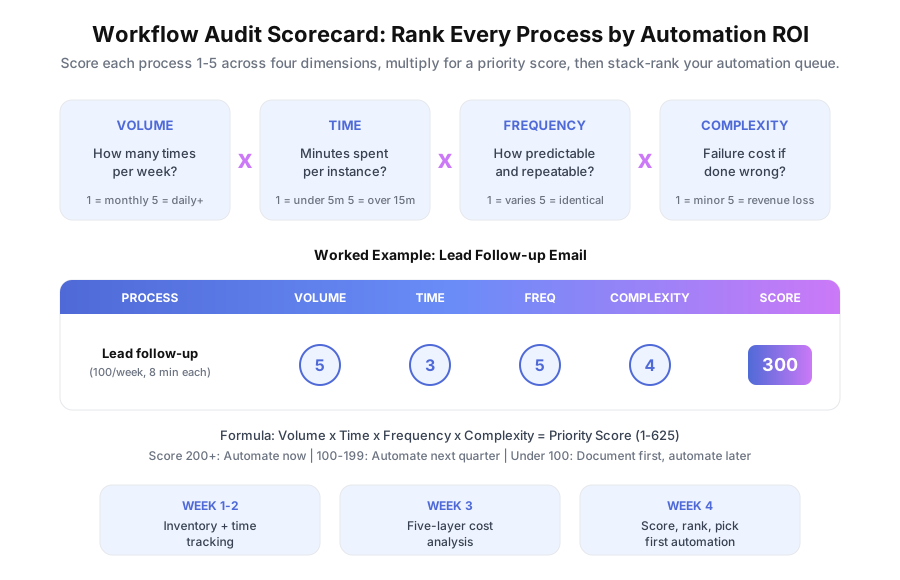
Score each process using Volume x Time x Frequency x Complexity, rated 1-5 per dimension. Multiply them together (max score 625) and cross-reference against total cost from Week 3. The process with the highest score AND highest cost is your first automation.
What Does the Scoring Rubric Look Like?
| Factor | 1 (Low) | 3 (Medium) | 5 (High) |
|---|---|---|---|
| Volume | Monthly | Weekly | Daily or more |
| Time per task | Under 5 min | 5-15 min | Over 15 min |
| Frequency/predictability | Varies widely | Semi-structured | Identical every time |
| Complexity/failure cost | Minor inconvenience | Rework required | Lost revenue or compliance risk |
How Does Example Scoring Work?
| Process | V | T | F | C | Score | Total Cost | Priority |
|---|---|---|---|---|---|---|---|
| Lead follow-up | 5 | 3 | 5 | 4 | 300 | $67,600 | #1 |
| Client reporting | 3 | 5 | 3 | 3 | 135 | $101,000 | #2 |
| Document collection | 4 | 3 | 4 | 3 | 144 | $26,400 | #3 |
| Invoice reminders | 4 | 2 | 5 | 4 | 160 | $18,000 | #4 |
Lead follow-up wins on score (300) with a high total cost ($67,600). That’s your first automation. Use these thresholds: score 200+ means automate now, 100-199 means automate next quarter, under 100 means document first.
According to Deloitte’s 2023 Global Intelligent Automation Survey, 78% of organizations that sequenced basic automation first reported faster time-to-value. Start with the top scorer. Automate it. Measure. Then move to #2.
At AcquireX Properties, the audit flagged deal analysis as the highest-cost bottleneck. Layer 5 was huge because they couldn’t grow the portfolio without hiring. Three custom automation systems later, they tripled capacity with the same 3-person team.
What Are the Most Common Audit Findings?
After running this framework across 6 industries, the same patterns show up every time. If you’re short on time, read these three findings before you start.
Finding 1: The biggest cost is never where people expect. Teams assume the most expensive process is the slowest one. Usually it’s the one with the biggest speed penalty or opportunity cost, costing 3-5x more than a simply slow task. TCC’s lead follow-up wasn’t their most time-consuming work. It was their most expensive because of lost enrollments.
Finding 2: 3-5 processes account for 80% of the waste. You don’t need to automate everything. The Pareto rule holds in every audit we’ve run. A handful of high-frequency, high-cost processes drive most of the manual overhead.
Finding 3: The “small” tasks compound fastest. A 5-minute task done 20 times a day runs 8.3 hours a week, or 430 hours a year. At $30 an hour that’s $12,900 on something nobody tracks because each instance feels trivial. These tasks almost always have scores over 200.
What Happens After the Audit?
You’ve got three paths: automate it yourself with Zapier, Make, or n8n for simple flows; hire an automation agency for complex multi-system builds; or do nothing and keep spending the money you just calculated. If you’re new to automation, start with our overview of what business process automation is and why it matters. If you’re unsure your team is ready, check signs your business is ready to automate.
According to SHRM’s 2024 Human Capital Benchmarking Report, average cost-per-hire is $4,129. If your audit shows automation can replace a new hire, the savings begin before the system is even built.
Want to skip the 4-week self-guided process? Book a free 30-minute audit with us. We’ll map your workflows, pinpoint the top 2-3 automation opportunities, and send a written Automation Opportunity Report within 48 hours. Same framework, compressed into one session because we’ve run it dozens of times and know which questions to ask first.
The audit is free. The report is yours to keep. And the numbers usually make the decision obvious.