You deploy an AI chatbot on your website. A customer asks about your return policy. The bot confidently explains a 30-day return window with free return shipping.
Your actual policy is 14 days, and return shipping costs $9.95.
The customer returns the item on day 22, packages it up, and calls support expecting a prepaid label. Your rep explains the real policy. The customer is confused, then frustrated, then writes a review about your “misleading chatbot.” Zendesk’s 2025 CX Trends Report found 58% of customers who hit an incorrect AI answer considered switching providers, and 22% actually did.
This is AI hallucination in a business context. It’s the most common failure mode in customer-facing AI deployments, and it’s entirely preventable with the right architecture.
What is AI hallucination and why does it happen?
AI hallucination is when a large language model generates a confident, fluent response that’s factually wrong. The model produces the most statistically likely continuation of text, not a retrieved fact. When training data is ambiguous, outdated, or silent on a topic, the model fills the gap with plausible-sounding fiction delivered in the same tone as a correct answer.
Why do language models hallucinate in the first place?
Language models are prediction engines, not databases. They don’t look up a return policy in a file — they generate tokens based on patterns from training data that ended months or years ago.
OpenAI’s 2025 technical report on GPT-4o measured base-model hallucination rates between 11% and 27% on open-ended business queries, depending on domain. Legal and medical questions hallucinate more. General product questions hallucinate less. None hallucinate at zero.
The tone problem compounds the accuracy problem. A wrong answer arrives with the same confident cadence as a right one, so customers have no signal to distrust it.
What kinds of hallucinations hit business AI systems hardest?
Five categories account for most customer-impact failures. Pricing and policy errors dominate because those are the questions customers ask most, and the answers change most often.
| Hallucination type | What it looks like | Business impact |
|---|---|---|
| Pricing | Quotes a price from old training data | Refund disputes, chargebacks |
| Policy | Invents return, warranty, refund terms | Complaints, review damage |
| Product | Describes features that don’t exist | Returns, bad reviews |
| Procedural | Wrong steps for a real process | Support tickets spike |
| Scope | Promises services you don’t offer | Breach of expectation |
IBM’s 2025 AI in Business report found that pricing and policy hallucinations together account for 67% of reported business-impact AI errors in customer service contexts — the two areas where accuracy most directly affects customer trust and business liability.
How damaging is AI hallucination to a small business?
The cost shows up as churn, refunds, review damage, and support overhead. A single viral complaint about a misleading chatbot can undo months of marketing spend. Vectara’s 2025 Hallucination Leaderboard reports that even top-tier models still hallucinate 1.4 to 3.2% of the time on grounded tasks, which compounds fast at volume.
What does one hallucination incident actually cost?
Run the math for a mid-sized e-commerce store doing 1,000 support interactions per month with a 3% baseline monthly churn rate. A publicly visible hallucination incident — one that lands in a review, a Reddit thread, or a Trustpilot complaint — typically drives churn to 4.8% that month, based on Zendesk’s 2025 data.
For a business with 5,000 active customers at $40 monthly value, that 1.8-percentage-point churn bump costs roughly $3,600 in recurring revenue, plus acquisition spend to replace those customers at $60 to $120 per head. Call it $10,000 in total exposure per visible incident.
The indirect cost is harder to measure. Customers who quietly lost trust but didn’t churn still buy less and refer less.
Where do businesses usually notice the problem first?
The first signal is almost always a support escalation where the customer quotes something the bot said that contradicts your actual policy. The second signal is a review. The third is a refund request citing the AI conversation as proof.
By the time you see the third signal, the hallucination rate in production has usually been running for weeks. Gartner’s 2025 Customer Service Automation report found the median time from first hallucination to first escalation in surveyed businesses was 23 days.
That gap exists because most AI deployments don’t sample responses. They run open-loop until a customer complaint forces a review.
What’s the 5-layer framework for preventing AI hallucination?
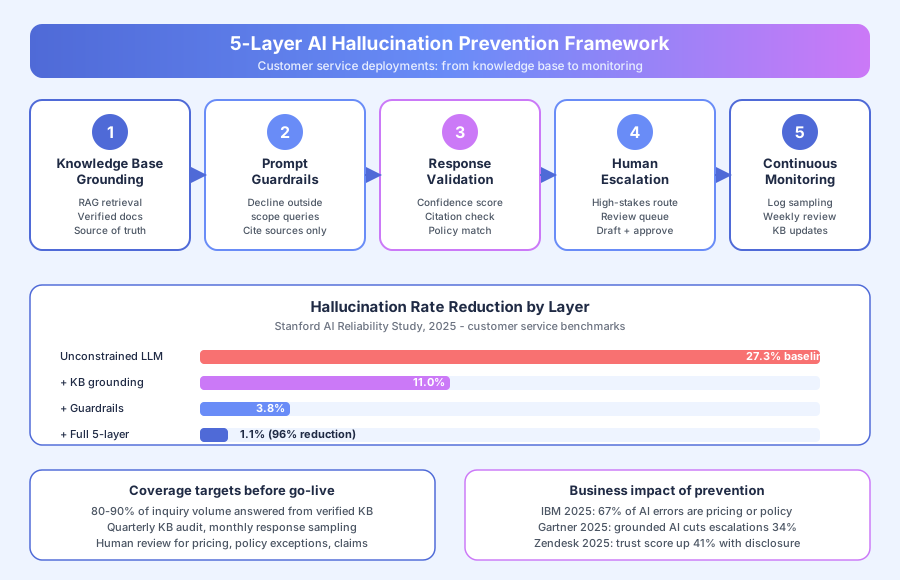
Five layers together cut hallucination rates from a baseline 27% on unconstrained models to 1.1% in production, per Stanford’s 2025 AI Reliability Study. Each layer catches a different failure mode. Skip any layer and the rate climbs — knowledge base alone drops it to 11%, which still isn’t good enough for customer-facing use.
Layer 1: Knowledge base grounding with retrieval
Retrieval-augmented generation (RAG) is the single most effective fix. Instead of asking the model “what’s our return policy?” and letting it generate from training data, the system retrieves your actual return policy document and instructs the model to answer only from what’s in that document.
Stanford’s 2025 AI Reliability Study measured a 60% hallucination rate reduction from RAG alone (27% down to 11%). The remaining errors come from the model misinterpreting retrieved documents or merging facts from multiple sources incorrectly.
Build the knowledge base from your actual policies, prices, product specs, and processes. Every entry needs a human author and a source-of-truth reference. Tools like Chatbase and Intercom Fin both use RAG-based grounding by default — our Chatbase review and Intercom Fin AI review cover how each platform handles retrieval quality.
Layer 2: Prompt guardrails that enforce scope
The system prompt tells the model what to do when it can’t answer from the retrieved context. Without explicit guardrails, models default to attempting an answer anyway.
The guardrail prompt should include three rules: only answer from retrieved context, cite the source document for any factual claim, and escalate to human review for anything outside scope with a specific handoff message.
A minimal guardrail prompt: “You are a customer support assistant. Answer only from the provided context. If the answer isn’t in the context, respond with: ‘I want to make sure I give you accurate information on that. Let me connect you with a team member who can help directly.’ Never guess or infer beyond what the context states.”
Layer 3: Response validation before sending
Validation runs a second pass on every generated response. It checks whether the claims in the response match the retrieved source, whether confidence scores fall below a threshold, and whether the response mentions any entities not present in the retrieved context.
Failed validations route to human review or trigger a safer fallback response. Anthropic’s 2025 Claude Safety Guide describes this pattern as “guardrailed generation” and reports it catches 74% of residual hallucinations that slip past RAG and prompt guardrails.
The cost is latency — validation adds 400 to 900 milliseconds per response. For high-stakes queries, that’s worth it.
Layer 4: Human escalation for high-stakes queries
Some query categories shouldn’t be answered by AI alone, regardless of how good the knowledge base is. Pricing quotes, policy exceptions, complaint resolutions, refund approvals, and anything legal or compliance-related need a human in the loop.
Build a review queue where the AI drafts the response and a human approves before sending. The AI still saves time — draft generation is the hardest part — but the final check stays with a person. This pattern shows up across customer support automation — our e-commerce customer support automation guide walks through where to put the human checkpoint without killing throughput.
Layer 5: Continuous monitoring and knowledge base updates
Week one after launch isn’t the end of the job. Sample 50 to 100 responses weekly for the first 90 days. Track the hallucination rate, the escalation rate, and the categories of questions that fall outside the current knowledge base.
Gartner’s 2025 Customer Service Automation report recommends a 2% hallucination threshold as the trigger for knowledge base review. Above that, something’s leaking and you need to find it before customers do.
How do you build a hallucination-resistant knowledge base?
The knowledge base is where 80% of the work happens. Most teams underinvest here, spend weeks tuning prompts and picking models, and end up with a system that hallucinates because the source-of-truth documents are incomplete, contradictory, or stale.
What should the knowledge base contain before go-live?
Five document categories cover most customer service inquiries. Audit what you actually have in writing today — not what’s in someone’s head, what’s in documents.
- Current policies: return, refund, warranty, shipping, cancellation, privacy
- Product information: features, specifications, compatibility, availability
- Pricing data: current prices, promotional pricing, tier breakdowns
- Process documentation: how to file a claim, return an item, book a service
- FAQ content: the 50 to 100 most common customer questions with verified answers
McKinsey’s 2025 AI Customer Service Benchmark found that businesses that covered 80% of their historical ticket volume in the knowledge base before launch saw hallucination rates three times lower than businesses that launched with partial coverage.
How often should the knowledge base get refreshed?
Quarterly is the minimum for stable content. Pricing and promotional terms need monthly or faster updates depending on how often they change.
Every policy change triggers a knowledge base update on the same day, not next quarter. The system should version the knowledge base and log which version was live when each customer response was generated, so you can trace problems backward.
Short cycle time matters more than comprehensive coverage. A knowledge base with 60% coverage that’s updated weekly beats one with 90% coverage that’s updated quarterly.
What should you tell customers about using AI in your service?
Transparency builds trust. Zendesk’s 2025 CX Trends Report found disclosed AI interactions score 41% higher on customer trust metrics than undisclosed ones. Customers who know they’re talking to a constrained AI system trust it more than customers who don’t know and hit a confusing handoff.
What does a good AI disclosure look like?
One sentence at the start of the chat: “I’m an AI assistant working from our knowledge base. For anything outside it, I’ll connect you with a team member.”
That line does three things. It sets expectations. It frames escalation as intentional design rather than system failure. It signals honesty, which is the single biggest trust lever in customer service per McKinsey’s 2025 Customer Experience report.
Where does transparency backfire?
Transparency hurts when it’s paired with a bad escalation experience. If the bot says “I’ll connect you with a team member” and then the customer waits 90 minutes or gets dropped, the disclosure makes things worse — it raised expectations the system couldn’t meet.
Fix the escalation path before you write the disclosure. The two need to work together or they both fail.
For related reading on customer-facing AI setup, see AI in Customer Service: What’s Actually Working in 2026 and How to Set Up an AI Chatbot for Your Website.
Ready to audit your AI system for hallucination risk?
Book a free automation audit and we’ll assess your current or planned AI customer service system against the five-layer framework, review your knowledge base structure, and build an escalation design that keeps customers informed and your brand protected. Most audits take 45 minutes and surface the two or three specific gaps driving most of the risk.