An AI agent is software that reasons, plans, and takes action on your behalf. Not a chatbot that answers questions, but a system that closes the loop on multi-step work. According to Salesforce’s 2025 State of AI report, 45% of business leaders cite confusion about the difference between chatbots and agents as a top barrier to adoption. This guide clears that up in plain English — with the four use cases that are mature enough for SMB production in 2026, realistic cost ranges, and the honest limits you need to plan for.
If you’ve read “AI agent” in a dozen newsletters and still aren’t sure what one actually does, start here.
What is an AI agent, exactly?
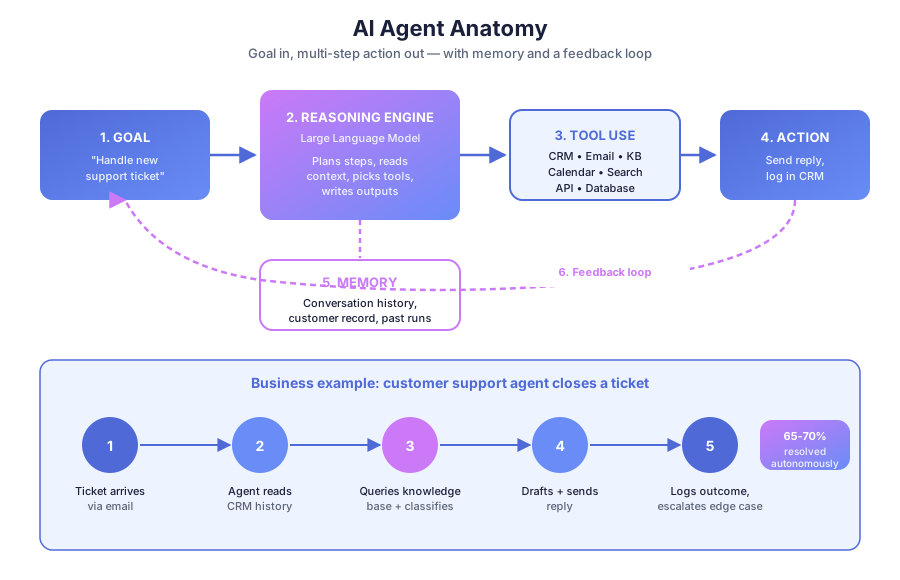
Answer Capsule: An AI agent is a software system that reasons, plans, and takes multi-step action toward a goal. It combines a large language model (for thinking), tools (for acting on CRMs, email, calendars), memory (for context), and instructions (for guardrails). Unlike a chatbot, it finishes the task instead of just answering questions.
The four anatomical parts of every agent are simple:
- A language model — the reasoning engine (GPT-4, Claude, Gemini)
- Tools — APIs and integrations it can call (email, CRM, calendar, search, database)
- Memory — conversation history, customer records, prior runs
- Instructions — its role, policies, and constraints
Give a support agent the goal “handle this ticket.” It reads the inbound email, pulls the customer history from HubSpot, queries the knowledge base, drafts a reply, sends it, and logs the outcome — or escalates to a human with full context if it isn’t confident. That’s six steps the owner didn’t touch.
How is an AI agent different from a chatbot?
Answer Capsule: A chatbot responds to input with output — one turn at a time. An AI agent is given a goal and autonomously pursues it across multiple tools and steps. A chatbot tells you your order status. An agent issues the refund, updates inventory, notifies the customer, and logs the case — without being prompted for each step.
Per Salesforce’s 2025 State of AI report, the gap between these two is the main source of confusion among 45% of business leaders entering the space. Here’s a direct comparison:
| Capability | Chatbot | AI Agent |
|---|---|---|
| Answer a question | Yes | Yes |
| Send email, update CRM | No | Yes |
| Plan multi-step workflows | No | Yes |
| Recover when a step fails | No | Yes |
| Operate without human prompting each turn | No | Yes |
| Use memory across turns and sessions | Limited | Yes |
A chatbot participates in the workflow. An agent closes the loop on it. That single distinction decides whether you’re saving minutes or hours per task.
What can AI agents do for a small business right now?
Answer Capsule: Four use cases are production-ready for SMBs in 2026: customer support triage, lead qualification, appointment booking, and document processing. Each targets high-volume, language-heavy work that traditional automation can’t handle. Together they cover the 70-80% of repetitive SMB workflows that currently consume staff time.
Let’s break down each one with real numbers.
Customer support triage and response
A support agent monitors your inbox across channels, classifies every incoming message (billing, refund, product question, complaint), checks the knowledge base, replies to known question types, and escalates anything unclear with the full conversation attached.
According to Zendesk’s 2025 CX Trends report, tier-1 AI agents resolve 55-70% of inquiries end-to-end without human involvement. The humans handle the rest — but arrive with full context, cutting average resolution time by 30-40%. For a hands-on walkthrough, see our ecommerce customer support automation guide.
Lead qualification and routing
A lead qualification agent receives a new inquiry from a form, ad, or DM, asks your screening questions (budget, timeline, decision authority), scores the lead, and routes qualified ones directly to a sales calendar while moving unqualified ones into a nurture sequence.
The value isn’t the AI closing the sale. It’s making sure your sales team only meets with leads who have already confirmed fit. HubSpot’s 2025 State of Marketing report found that SMBs using AI lead qualification increase sales-accepted lead rate by 34% on average.
Appointment booking
A booking agent manages scheduling end-to-end: it presents real-time availability, handles rescheduling, sends confirmations, and triggers pre-appointment prep sequences. Staff walk into the meeting — the agent handled every step before it. See our booking automation guide for service businesses.
Document processing
For firms handling contracts, invoices, intake forms, or applications, a document agent extracts key fields, validates the data, populates your CRM or accounting system, and flags anything that needs human review.
Per McKinsey’s 2025 AI Adoption Index, document processing agents deliver the fastest payback of any agent category — under 90 days for most implementations. If you run a professional services practice, our tax firm automation workflows post shows this in action.
What does an AI agent look like in practice?
Answer Capsule: Most SMB agents aren’t custom-coded. They’re pre-built agent tools connected to your existing stack through automation platforms like Make, n8n, or Zapier — plus a GPT or Claude node for the reasoning step. A typical customer support agent takes 2-3 weeks to design, build, and deploy end-to-end.
Here’s a real setup we’ve shipped for SMB clients:
- New message arrives on any channel (email, chat, Instagram DM, WhatsApp)
- Make routes the message into the agent workflow
- Agent classifies the inquiry using GPT-4
- Agent queries the knowledge base for a relevant answer
- Agent drafts and sends a reply on the original channel
- Agent logs the full interaction in the CRM
- If unresolved, it escalates to the human team with context attached
The owner’s involvement in 65-70% of inquiries: zero. For a side-by-side look at the leading agent platforms, see our CrewAI vs AutoGPT vs Make Agents breakdown. Emerging platforms like OpenClaw and Manus are also making it easier to deploy multi-step agents without custom development.
How much do AI agents cost to implement?
Answer Capsule: Pre-built SMB agent tools start at $50-200 per month. Custom agents on Make or n8n with GPT integration run $2,000-8,000 to implement plus $100-400 per month in platform costs. Gartner’s 2025 AI Implementation Survey found SMB support agents recoup build costs within 4-6 months through labor savings — the fastest payback of any SaaS category.
Cost depends on three variables:
| Agent type | Implementation | Monthly run cost | Typical payback |
|---|---|---|---|
| Pre-built SaaS (Intercom Fin, Ada) | $0-500 | $50-300 | 2-4 months |
| Make or n8n + GPT-4 custom | $2,000-8,000 | $100-400 | 4-6 months |
| Multi-agent custom build | $15,000-50,000 | $500-2,000 | 6-12 months |
For most SMBs, the middle tier wins. It’s flexible enough to handle real workflows but doesn’t require a dedicated engineering team. According to Gartner, 78% of production SMB agents in 2025 ran on an automation platform rather than custom code.
What can’t AI agents do yet?
Answer Capsule: AI agents still make mistakes on novel situations, miss emotional context, and shouldn’t make high-stakes irreversible decisions. Design for human oversight on exceptions, not autonomy on everything. The working principle is simple: automate the predictable, escalate the complex. Stanford’s 2025 AI Index shows 78% of production agents use human-in-the-loop review for edge cases.
Honest limits matter. Agents misclassify messages. They draft responses that are technically correct but tone-deaf. They struggle with genuinely new situations that don’t match patterns in their training data.
The fix isn’t avoiding agents — it’s scoping them to the predictable majority and routing exceptions to a human with full context. A refund agent can resolve a $25 within-policy return. It shouldn’t unilaterally approve a $5,000 goodwill exception. Policy limits, approval thresholds, and escalation triggers are part of every good agent design.
Should you use an AI agent or workflow automation first?
Answer Capsule: Start with workflow automation. It’s cheaper, more reliable, and easier to debug. Add an AI agent only when natural-language understanding is the bottleneck — classifying unstructured input, generating personalized replies, or handling variability that rules can’t capture. The best SMB systems combine both: rules for deterministic steps, AI for language-heavy ones.
If your workflow is “new form submission triggers an email and a Slack message,” you don’t need an agent. A Zap or Make scenario handles that in 10 minutes. If your workflow is “read an inbound email, understand intent, pull context, and reply,” an agent earns its keep.
For a deeper breakdown, see our guide on Generative AI vs Workflow Automation: Which One to Invest In First.
What’s the right first AI agent for your business?
Answer Capsule: For most SMBs, customer support is the highest-ROI entry point. Inquiry volume is high, question types repeat, and slow replies cost measurable revenue. An agent that auto-resolves 60% of tickets and escalates the rest with full context usually pays back in weeks. Start with one channel, one workflow, one clear success metric.
Pick the process that meets three criteria:
- High volume — at least 50 events per week
- Predictable structure — the task repeats in recognizable shapes
- Clear escalation path — a human can take over when the agent isn’t sure
For service-based SMBs, booking automation is a strong second choice. For professional services, document intake often wins. The point isn’t the sexiest use case — it’s the one where hours come back to your week on day one.
Frequently asked questions
Are AI agents only for tech companies?
No. The fastest adopters in 2026 are service businesses, retail, healthcare clinics, and professional services firms — not tech. Zendesk’s 2025 CX Trends report found 62% of SMB agent deployments are in non-tech verticals. The common thread is high volume of repetitive, language-heavy work, not industry.
Do AI agents hallucinate?
Yes, occasionally — especially when asked questions outside their context. The fix is grounding: feeding the agent a verified knowledge base and constraining it to answer only from that source. Retrieval-augmented generation (RAG) cuts hallucinations by an estimated 70-85% in production SMB deployments, per Anthropic’s 2025 technical benchmarks.
How long does it take to build an SMB AI agent?
Pre-built tools deploy in hours. A custom Make or n8n agent typically takes 2-4 weeks: one week on process mapping, one to two weeks on build and test, and a week on guardrails and monitoring. For a worked example of scope and timeline, see our professional services automation guide.
Ready to deploy your first AI agent?
The question isn’t whether AI agents work for small businesses — it’s which workflow to start with. Book a free automation audit and we’ll map your current process, identify the highest-ROI agent candidate, and model the payback period before you commit to anything. Most SMBs leave with a concrete 30-day plan and a working prototype within two weeks of engagement.