Professional services firms lose 25-35% of billable capacity to admin work, and that number is backed by hard data. IDC’s 2023 Future of Work study found employees spend 30% of their time on manual data entry and transfer tasks. McKinsey’s 2024 Global Survey on AI and Automation put it higher: 60% of occupations have at least 30% of their activities that could be automated today. For tax, immigration, and consulting firms, that lost time is almost entirely intake forms, document chasing, invoice generation, status updates, and scheduling. The billable work stays human. The overhead doesn’t have to.
We’ve built automation systems for two very different firms. A solo CPA managing 300 clients. A 15-person immigration consultancy processing hundreds of applications per year. Their operations looked nothing alike, but the pattern was identical: skilled professionals spending a third of their time on work that didn’t need their skills.
Where is billable capacity actually disappearing?
Professional services firms lose 22-40 hours per week to five repeatable admin categories: intake, document collection, billing, status updates, and scheduling. At a $75 per hour billable rate, that’s $85,800-$156,000 per year per firm. These workflows are predictable, repetitive, and peak during busy season. That combination makes them ideal automation candidates.
According to IDC’s 2023 Future of Work study, 30% of employee time goes to manual data entry and transfer tasks. Layer in Gartner’s 2023 Data Quality Market Survey finding that poor data quality costs organizations $12.9 million per year on average, and the cost gets worse: duplicated work, billing errors, missed deadlines.
Here’s the breakdown for a typical small firm:
| Admin Category | Hours per Week | Annual Cost at $75/hr |
|---|---|---|
| Client intake and onboarding | 8-12 | $31,200-$46,800 |
| Document collection and follow-up | 5-10 | $19,500-$39,000 |
| Billing, invoicing, collections | 3-6 | $11,700-$23,400 |
| Status updates and client comms | 4-8 | $15,600-$31,200 |
| Scheduling and calendar management | 2-4 | $7,800-$15,600 |
| Total | 22-40 | $85,800-$156,000 |
That’s one to two full-time employees of billable capacity buried in repeat work. Same process, different client names, every single time.
Why does this get worse during busy season?
Admin doesn’t scale linearly with client volume. It scales worse. During tax season, year-end, or immigration deadline crunches, the same 22-40 hours of weekly admin compresses into tighter windows, creating the overtime spiral every partner knows too well. According to a 2024 Thomson Reuters Institute survey, 65% of tax and accounting firm respondents cite talent retention as a top challenge, and burnout from seasonal admin is a leading cause. The firms that survive peak season cleanly are the ones who automated before volume spiked, not the ones who hired more assistants in January.
How do you automate client intake without losing the personal touch?
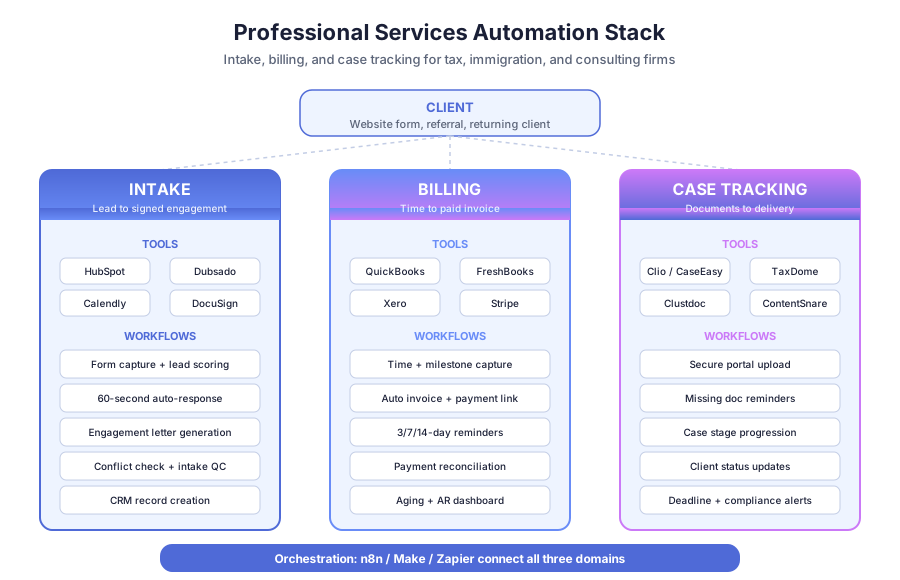
Automated intake captures a lead, qualifies it, sends a personalized response, generates an engagement letter, and launches document collection, all within minutes of the first inquiry. Clients get a fast, professional experience. Your team gets a qualified lead with full context, not a raw form submission that still needs triage before anyone can act on it.
According to a 2023 Drift update to the original Harvard Business Review lead response study (Oldroyd, 2011), responding within 5 minutes makes you 100x more likely to connect with a prospect compared to waiting 30 minutes. Most professional services firms respond in 1-2 business days. That gap is where deals die.
What does an automated intake flow look like?
The workflow has six steps, each triggered by the previous one:
- Prospect submits the intake form on your website
- System qualifies by practice area, location, budget, and urgency
- Qualified leads receive a personalized email within 60 seconds including next steps and booking link
- Engagement letter generates automatically via DocuSign or PandaDoc
- Signed engagement triggers document collection through a secure portal with automated reminders
- CRM updates with all details and notifies the assigned professional
Taxvisory, a solo CPA practice, automated exactly this flow. Before automation, the founder was spending evenings drafting engagement letters and chasing documents over email. After automation, clients upload to a secure portal, sign engagement letters electronically, and book appointments through Calendly. Document chasing dropped 80%. She manages 300 clients solo, something that would have required 2-3 assistants the old way.
How do you keep the experience feeling personal?
The trick is to automate the operational layer while keeping the relational layer in human hands. Use merge fields with real context (practice area, referral source, jurisdiction) instead of generic “Dear Valued Client” templates. Route qualified leads to a 15-minute discovery call with an actual professional, not a chatbot. Follow up after the engagement letter is signed with a short video or voice note from the lead professional. According to Salesforce’s 2024 State of the Connected Customer report, 81% of clients expect faster service as technology improves, and 73% expect better personalization. Automation delivers both when you use it to remove friction, not to remove people.
What does automated document collection look like in practice?
Automated document collection replaces email chains with a secure client portal that sends reminders until everything is uploaded, tracks completion status per client, and organizes files by type automatically. Staff only step in when something is missing or incorrect. Routine follow-up happens without anyone on your team touching it.
According to CPA Practice Advisor’s 2025 Accounting Industry Report, 69% of tax firms cite slow client document collection as a top operational bottleneck. That delay cascades through every engagement: late starts mean compressed timelines, rushed work, and overtime during peak season, which hurts both quality and team retention.
Skylarks International, a 15-person immigration consultancy, had the same problem at larger scale. Their team was chasing documents from hundreds of clients across LMIA, PR, study permit, and work permit applications. Every application type required different documents. Tracking who submitted what was a full-time job by itself.
After automating document collection with a client portal:
- Document collection time dropped 70%
- Around 80% of “any update on my file?” calls disappeared because clients check the portal
- Staff redirected time to casework and client advising, not status chasing
The tool combinations that work: Clustdoc or ContentSnare for secure document portals, Clio or CaseEasy for case management, and n8n or Make connecting everything to your CRM and email stack. If you want to extend the portal beyond document collection into a self-serve client hub — case status, deliverable downloads, payment history — our guide on how to build a client portal covers the workflow setup that lets clients answer their own “any update on my file?” questions 24/7 without a developer.
What should a reminder cadence actually look like?
A reminder sequence that works is three-stage, not one-and-done. Day 0 sends the initial document request with a clear list and deadline. Day 3 sends a gentle nudge listing only the outstanding items. Day 7 escalates to a firmer reminder that flags consequences such as delayed filing. Day 10 triggers an internal alert so a human can intervene before the deadline slips. According to Salesforce’s 2023 State of Service report, 78% of customers expect consistent interactions across channels, which means the same reminder tone should carry through email, SMS, and portal notifications. Staff only touch the 10-15% of clients who truly need a phone call, not the 85% who just needed a second nudge.
How should professional services firms handle billing automation?
Automated billing generates invoices from tracked time or project milestones, delivers them on schedule, follows up on overdue payments with escalating reminders, and reconciles payments against your accounting software. End-of-month invoice scrambles go away. So do the “did that client ever pay?” questions you never have time to chase.
According to Gartner’s 2023 Data Quality Market Survey, poor data quality costs organizations $12.9 million per year on average. For small firms, that shows up as incorrect invoices, missed billable hours, and delayed collections that drain working capital right when peak-season payroll hits.
What does an automated billing workflow look like?
| Step | Trigger | Action | Tool |
|---|---|---|---|
| Invoice generation | Milestone or billing date | Generate invoice from time entries | QuickBooks, FreshBooks, Xero |
| Delivery | Invoice created | Email to client with payment link | Accounting software |
| Reminder 1 | 3 days overdue | Gentle reminder email | n8n or Make workflow |
| Reminder 2 | 7 days overdue | Firm reminder with payment options | Automated sequence |
| Escalation | 14 days overdue | Alert to partner or principal | Slack notification |
| Reconciliation | Payment received | Mark paid, update AR dashboard | Stripe, QuickBooks sync |
The difference between manual and automated billing isn’t just time saved. It’s consistency. Automated reminders go out on schedule every time, regardless of how busy your team is. Statistics Canada’s 2024 SEPH data puts the cost of a Canadian full-time employee at $45,000-$65,000 per year. An automated billing system that replaces 5 hours of admin per week pays for itself in months. For a step-by-step build guide, see how to automate invoicing.
How much does billing automation actually improve cash flow?
Faster, more consistent billing directly compresses days sales outstanding (DSO), which is the average number of days between invoice and payment. According to a 2024 PYMNTS and American Express survey, mid-sized firms that automated accounts receivable reduced DSO by 12-15 days on average. For a firm invoicing $50,000 per month, shaving 12 days off DSO frees roughly $20,000 in working capital. That’s real money available for payroll, technology, or hiring, not just a metric improvement on a dashboard. The second benefit is error reduction: automated invoices pulled from time entries match reality, so disputes drop and client trust rises.
How does case tracking automation work for tax, immigration, and consulting firms?
Case tracking automation ties intake, documents, deadlines, and client communication into a single status that updates in real time. Clients see where their file sits without calling. Staff see what’s blocking each case without scanning inboxes. Deadlines trigger alerts before they become problems. The case becomes the source of truth, not 12 scattered email threads and a spreadsheet.
According to CPA Practice Advisor’s 2025 report, 62% of firms are adding advisory services because compliance automation freed up capacity. That capacity comes from automation picking up the routine case-tracking work that used to consume admin hours across the team.
Practice area shapes the tooling more than anything else:
- Tax firms: TaxDome, TaxCycle, and Karbon handle return status, document checklists, and review workflows
- Immigration consultancies: CaseEasy and INSZoom track application stages, deadlines, and government submissions
- Law firms: Clio, PracticePanther, and MyCase manage matters, trust accounting, and court deadlines
- Consulting firms: HubSpot, Dubsado, and ClickUp handle project-style engagements with milestones and deliverables
The orchestration layer, n8n or Make, connects these platforms to your CRM, accounting system, and email so client updates, document status, and billing events all flow into the same record. That’s where the 70-80% reduction in status calls comes from.
What should a case dashboard track?
A useful case dashboard answers four questions at a glance: where is each case in its stage, what’s blocking it, when is the next deadline, and who owns the next action. Every field should update from system events rather than manual entry. When the portal logs a document upload, the checklist updates. When DocuSign returns a signed engagement, the stage advances. When the billing system closes an invoice, the financial panel refreshes. According to Gartner’s 2024 Digital Workplace Survey, 47% of employees say they waste time searching for information across systems, and a single source of truth is the fix. Your dashboard should be the last place anyone has to look, not the first of many.
What stays human when you automate a professional services firm?
Automation handles the operational backbone. Three things must stay human: professional judgment including case strategy, tax planning, and legal advice; relationship management covering client meetings, difficult conversations, and trust-building; and quality review for final deliverable sign-off. These are the hours clients actually pay you for.
According to Deloitte’s 2023 Global Intelligent Automation Survey, 78% of organizations that implemented basic process automation first (before AI or RPA) reported faster time-to-value than those who started with more complex technology. The firms that succeed with automation aren’t replacing their expertise. They’re protecting it by removing the admin overhead that dilutes it.
Here’s what we’ve seen work across the firms we’ve built for:
Automated (system handles entirely):
- Intake form processing and lead qualification
- Document collection reminders and tracking
- Appointment scheduling and confirmations
- Invoice generation and payment reminders
- Status update emails and client notifications
- Data sync between CRM, accounting, and case management
Augmented (system assists, human decides):
- Document review where the system flags missing items and humans verify
- Lead qualification where the system scores and humans decide on edge cases
- Report generation where the system compiles data and humans add analysis
Human only:
- Client consultations and professional advice
- Strategy and planning sessions
- Negotiations and dispute resolution
- Final deliverable sign-off
- Relationship development and referrals
The split matters because clients can tell when they’re talking to a person versus a workflow. Keep the personal contact where it belongs, and let automation carry the admin weight.
How do you get started with professional services automation?
Start with your highest-frequency admin workflow, the one that repeats most and costs the most when it’s late or wrong. For most firms, that’s client intake or document collection. These two workflows touch every single client and cascade into everything that follows, so fixing them first drives compounding returns across billing, case tracking, and client experience.
Map the process step by step: every trigger, every action, every decision point. Then decide whether to build it with tools like Zapier or Make, or work with an automation partner for multi-system workflows with error handling and monitoring baked in.
According to Process Street’s 2024 Automation Benchmark, companies that document processes before automating achieve ROI 2.3x faster than those that skip straight to tools. Mapping isn’t overhead. It’s the investment that makes everything else work.
Forrester’s 2024 Total Economic Impact studies put average first-year business process automation ROI at 200%, with intake automation typically paying back in under two months. That’s a faster payback than almost any software investment a professional services firm will make this year.
What are the common mistakes that kill automation projects?
Three mistakes wreck most professional services automation projects before they deliver value. First, teams try to automate broken processes instead of fixing them first. If your intake form asks for the wrong information, automating it just gets you bad data faster. Second, firms buy tools before mapping workflows, ending up with overlapping subscriptions that don’t talk to each other. Third, automation gets built without owners, so when something breaks there’s no one accountable for fixing it.
According to a 2024 Gartner survey on hyperautomation initiatives, 40% of automation projects underperform because of unclear process boundaries and ownership gaps. Fix this by assigning every automated workflow a named owner, a monitoring dashboard, and a quarterly review. Automation is software. It needs maintenance like any other software your firm depends on.
What should your first 90 days of automation look like?
A realistic 90-day plan breaks into three phases. Days 1-30: map your top three admin workflows, document current state, and pick one to automate first, usually intake. Days 31-60: build and test the first workflow with a small group of real clients, gather feedback, and fix friction points. Days 61-90: roll the workflow out to all clients, start mapping the next workflow (usually document collection or billing), and measure time saved against baseline. By day 90 you should have one workflow in production, one being built, and hard numbers on billable hours recovered.
Book a free 30-minute audit and we’ll map your firm’s workflows, identify the 2-3 biggest bottlenecks, and send a written report within 48 hours with estimated savings for each. You’ll see exactly where your billable hours are disappearing and what it would take to get them back.