69% of tax firms say slow client document collection is their number one bottleneck during filing season, according to CPA Practice Advisor’s 2025 Accounting Industry Report. Not the preparation. Not the filing. The chasing. Last April, a solo CPA named Sarah at Taxvisory was working seven days a week on 300 clients with no assistant and a voicemail box full of “just checking on my documents” messages. By October she’d automated three workflows and got her weekends back. Her client count went up, not down.
Here are the 10 workflows that matter most, ranked by hours saved per week, with real numbers from firms running them right now.
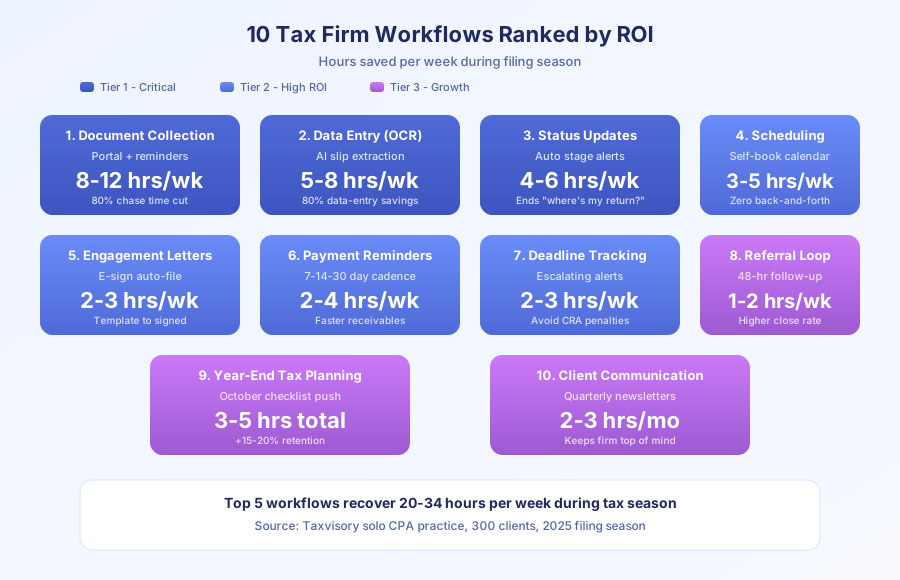
Which workflow should tax firms automate first?
Client document collection. Every time. It’s the biggest time sink in every practice we’ve audited. A secure upload portal with a dynamic checklist, auto reminders, and completion tracking replaces hundreds of individual emails and phone calls. Taxvisory cut document chase time by 80%, dropping from 10+ hours a week of follow-up to under 2 hours of exception handling.
Workflow 1: Client document collection (8-12 hours/week saved)
The manual version: email each client a list of required documents. Wait. Follow up. Wait. Follow up again. Manually check what’s missing. Call the client. Repeat for 300 people.
The automated version: on January 15, every client gets a personalized checklist portal link. The system knows their filing type (T1, T2, trust) and shows only the slips they actually need. As uploads arrive, the checklist updates live. Auto reminders fire at 7-day intervals for anything missing. The CPA sees one dashboard showing completion status across all 300 clients.
Per CPA Practice Advisor’s 2025 report, 69% of firms name document collection as their top delay. Fixing it first compounds everything else.
Tools: TaxDome or Canopy for the portal, n8n or Make for reminder logic, Airtable for tracking.
Setup time: 1 to 2 weeks for a 200-client firm, including client onboarding to the new portal.
Workflow 2: Data entry from source documents (5-8 hours/week saved)
OCR and AI extraction changed this workflow completely. Per TX CPA Magazine’s 2026 AI adoption report, firms using AI cut 80% of the time normally spent on data entry. TaxCycle and Lacerte now auto-populate from scanned T4s, T5s, and brokerage statements with >95% accuracy on clean scans.
The automation layer routes each uploaded slip to the right client file, flags discrepancies against prior-year amounts, and queues the CPA’s review list. Sarah at Taxvisory used to spend 6 hours a week keying slips. Now it’s about 45 minutes of validation.
The one caveat: OCR accuracy drops sharply on phone-camera photos versus scanned PDFs. Train clients to use a proper scanner app (Adobe Scan, Genius Scan) during onboarding, and set up a simple image-quality check in the intake flow. Firms that skip this step end up correcting so many fields that they lose the time savings.
Tools: TaxCycle or Lacerte for OCR and auto-fill, n8n for document routing.
What are the highest-ROI workflows after document collection?
Status updates, scheduling, and engagement letters. Combined, they recover 9 to 14 hours a week during filing season. Status updates alone kill the “where’s my return?” calls that break up deep work. Scheduling removes back-and-forth emails. Engagement letters become a template-to-signed pipeline that runs without the CPA touching it.
Workflow 3: Client status updates (4-6 hours/week saved)
The top question every tax season: “what’s happening with my return?” Per CPA Practice Advisor’s 2025 report, 62% of firms are adding advisory services to grow revenue. You can’t sell advisory work if you’re answering status calls all day.
The automated version: as a return moves through stages (documents received, prep started, review, filed, assessment received), the client gets a notification the same hour the stage changes. No phone call needed. Taxvisory uses a 4-column Airtable board. A status change triggers a personalized email through n8n.
The unexpected benefit: inbound “where are we at?” calls dropped by 70% at Taxvisory within the first filing season. Clients stopped calling because they already knew. That recovered another 2 to 3 hours per week on top of the direct time savings, and it made every remaining client call a real conversation instead of a status check. Status notifications are the first thing we wire up in an AI customer service system for an accounting firm for exactly that reason.
Tools: Airtable or TaxDome for tracking, n8n or Make for notifications, Gmail or Outlook for delivery.
Workflow 4: Appointment scheduling (3-5 hours/week saved)
Per TX CPA Magazine’s 2026 report, firms using scheduling automation cut 80% of admin time tied to booking meetings. The “what about Tuesday at 2? No wait, Thursday?” email chain is pure waste.
The automated version: clients self-book from a link inside their document-collection email. The calendar checks availability, sends confirmation, adds it to the CPA’s Google or Outlook schedule, and fires a reminder 24 hours out. Reschedules handle themselves.
Tools: Calendly, Cal.com, or TaxDome’s built-in scheduler, synced with Google Calendar or Microsoft 365.
Workflow 5: Engagement letters (2-3 hours/week saved)
The manual version: create letter from template, fill in name and fees, email it, wait for signature, follow up, file the signed copy.
The automated version: when a client’s checklist hits 60% complete, the system generates an engagement letter using their filing type and fee tier, sends it via DocuSign or TaxDome e-sign, and files the signed PDF to their client folder. The CPA only sees it if the client asks a question.
Tools: DocuSign or TaxDome built-in e-sign, Airtable or Notion for fee schedules.
How do deadline tracking and payment workflows reduce tax season stress?
They take two invisible jobs (remembering hundreds of dates, chasing hundreds of invoices) and move them off the CPA’s mental stack. Deadline automation sends escalating alerts as filing dates approach. Payment reminders run on a 7-14-30 day cadence without anyone clicking send. Together they save 4 to 7 hours a week and prevent the late-filing penalties that cost Canadian taxpayers an estimated $800 million a year, per Canada Revenue Agency enforcement data.
Workflow 6: Deadline tracking and compliance alerts (2-3 hours/week saved)
The manual version: a spreadsheet checked each morning. Things slip through, especially after a long Sunday prep session.
The automated version: every client record has filing deadlines populated from their entity type and fiscal year. The CPA gets a daily digest at 7 AM showing upcoming deadlines at 7, 3, and 0 days out, plus an “at risk” flag for anything missing documents. Clients with incomplete files get a final “we need this by Friday” nudge without the CPA drafting it.
The Canada Revenue Agency’s published penalty data shows late-filing penalties hit $800+ million annually across Canadian filers, making missed deadlines one of the costliest compliance failures in the industry.
Tools: Airtable or Notion with date fields, n8n for alert logic, Gmail or Outlook for delivery.
Workflow 7: Payment reminders and invoicing (2-4 hours/week saved)
Nobody likes chasing invoices. The automated version: on filing completion, the system generates an invoice at the engagement-letter fee, sends it to the client, and follows up at 7, 14, and 30 days if unpaid. It reconciles with QuickBooks or Xero automatically.
Taxvisory’s days-sales-outstanding dropped from 42 days to 18 after wiring this up. That’s real cash flow, not just hours. The system also stops sending reminders the moment a payment clears, so there’s no embarrassing “please pay” email after the check arrives.
Tools: QuickBooks or Xero for invoicing, n8n or Make for reminder cadence, Stripe or Square for online payments.
What lower-priority workflows still deserve automation?
Referral follow-up, year-end planning, and ongoing client communication. These aren’t urgent during filing season, but they drive growth and retention the other 38 weeks of the year. A referral that sits unacknowledged for two weeks is lost. Year-end planning outreach in October positions you as an advisor, not just a filer. Quarterly newsletters keep the firm top of mind when clients get asked “who does your taxes?”
Workflow 8: Referral follow-up (1-2 hours/week saved)
When a client refers someone, you have about 48 hours before the goodwill fades. The automated version: the CPA logs a referral in Airtable (one line), which fires a thank-you email to the referring client and an intro email to the prospect within the hour. A 3-touch follow-up sequence runs if the prospect doesn’t respond.
Per practice management benchmarking published by CPA.com, firms that respond to referrals within 24 hours close at roughly double the rate of those that take a week or more.
Tools: Airtable for logging, n8n for triggers, Gmail for outreach.
Workflow 9: Year-end tax planning checklists (3-5 hours total, high ROI)
In October, clients should be thinking about RRSP contributions, income splitting, and capital gains timing. Most CPAs mean to send planning reminders. Few actually do during the fall crunch.
The automated version: on October 1, every active client gets a personalized year-end checklist based on their filing history. Clients with investment income get capital gains prompts. Incorporated clients get dividend planning reminders. Clients with kids get RESP check-ins. The outreach happens whether the CPA remembers or not.
Per CPA Canada’s Practice Management Guidelines, proactive year-end communication lifts client retention by 15 to 20%. It also sets up advisory revenue for Q4, which bills at 2 to 3 times compliance rates.
Tools: Airtable for client segmentation, n8n for scheduling, Gmail or Mailchimp for delivery.
Workflow 10: Ongoing client communication (2-3 hours/month saved)
Tax prep is seasonal. Client relationships aren’t. The automated version: quarterly newsletters, tax law update summaries, and “how’s the year going?” check-ins run on their own. Content is segmented by client type (personal, corporate, trust) so every email is relevant to the reader.
The real payoff isn’t hours saved, it’s retention. Firms with active off-season communication see measurably lower churn, which means fewer re-sold seats every January.
Tools: Mailchimp or ConvertKit for email, Airtable for segmentation, n8n for triggers.
What does the full automation stack look like for a tax firm?
Six layers: preparation (TaxCycle or Lacerte), practice management (TaxDome or Canopy), accounting (QuickBooks or Xero), e-signature (DocuSign), tracking (Airtable or Notion), and an automation connector (n8n, Make, or Zapier). The connector is the glue. Everything else is a system of record.
| Layer | Tool Options | Purpose |
|---|---|---|
| Tax preparation | TaxCycle, Lacerte, Drake | Return prep and filing |
| Practice management | TaxDome, Canopy, Karbon | Client portal, workflows, billing |
| Accounting | QuickBooks, Xero | Firm books and client bookkeeping |
| E-signature | DocuSign, TaxDome built-in | Engagement letters, authorizations |
| Tracking | Airtable, Notion | Status dashboards, deadline tracking |
| Automation | n8n, Make, Zapier | Connects tools, runs logic |
| Communication | Gmail, Outlook, Mailchimp | Client email and updates |
Taxvisory’s stack is on the simpler end: TaxCycle, Airtable, n8n, DocuSign, and Gmail. Five tools, 300 clients, one person. The automation layer (n8n) does the heavy lifting. For the long version of how Sarah built this practice, read how Taxvisory manages 300 clients solo with automation.
How did Taxvisory go from overwhelmed to managing 300 clients solo?
Sarah automated the top three workflows: document collection, scheduling, and status updates. That recovered 15 to 20 hours per week during filing season. The time went into actual tax prep (the billable hours) and advisory services. Client satisfaction went up because communication got more consistent. The 80% reduction in document chasing was the single biggest win.
Before automation, Sarah’s tax-season week looked like this:
- Monday: 3 hrs chasing documents, 2 hrs scheduling, 3 hrs prep
- Tuesday: 2 hrs status calls, 1 hr engagement letters, 4 hrs prep
- Wednesday through Sunday: repeat, no days off
After automation:
- Monday: 30 min reviewing document dashboard exceptions, 6 hrs prep
- Tuesday: 1 hr client calls (advisory and edge cases), 6 hrs prep
- Weekends: off
The system didn’t just save hours, it changed what the hours got used for. Sarah now spends 70% of working time on billable prep and advisory, up from about 35% before. That’s the real unlock, not the raw time saved.
How do you prioritize which workflows to automate first?
Start with the one that causes the most pain during your busiest month. For 90% of tax firms, that’s document collection. Automate it fully, measure results for 30 days, then move to the next. Don’t try to automate all 10 at once. Stack them in order: collection, data entry, status updates, scheduling, engagement letters, then everything else. Each workflow builds on the data from the ones before it.
| Priority | Workflow | Hours Saved/Week | Setup Effort |
|---|---|---|---|
| 1 | Document collection | 8-12 | Medium |
| 2 | Data entry (OCR) | 5-8 | High |
| 3 | Status updates | 4-6 | Medium |
| 4 | Scheduling | 3-5 | Low |
| 5 | Engagement letters | 2-3 | Low |
| 6 | Deadline tracking | 2-3 | Low |
| 7 | Payment reminders | 2-4 | Low |
| 8 | Referral follow-up | 1-2 | Low |
| 9 | Year-end checklists | 3-5 total | Low |
| 10 | Client communication | 2-3/month | Low |
The top 5 workflows alone recover 20 to 34 hours per week. That’s a full-time employee’s worth of capacity, without the salary, benefits, or onboarding. For a firm billing at $150 an hour, 25 recovered hours a week over a 14-week tax season equals $52,500 in potential billable capacity, against typical setup costs of $8,000 to $15,000 for the full stack. Payback usually lands inside the first filing season, often by late February.
Filing season doesn’t have to mean burnout. Taxvisory proved one person with the right systems can handle what used to take a team. The workflows above aren’t theoretical, they’re running right now for real firms, saving real hours.
Ready to build your stack? See how we work with professional services firms, read the full Taxvisory case study, or get in touch to map your highest-ROI automation in a 30-minute call.