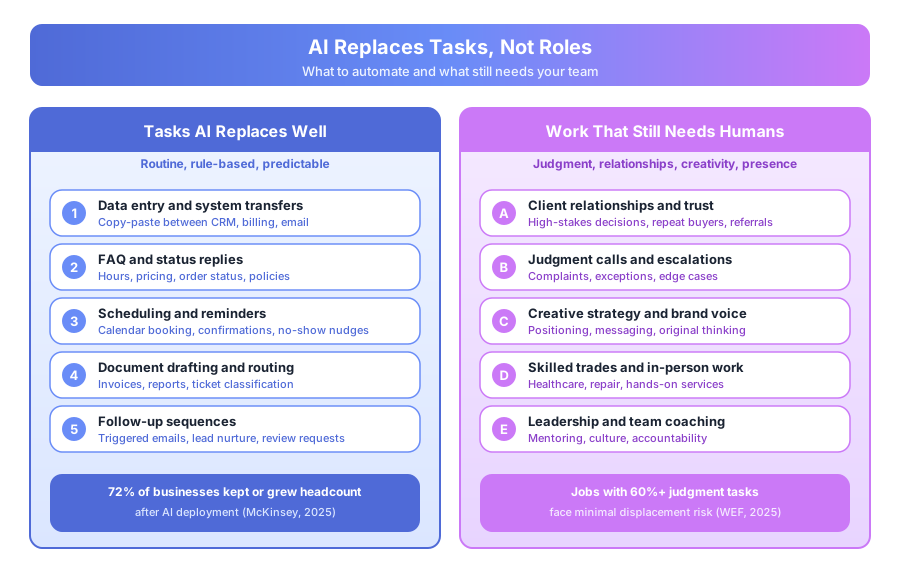
Every AI vendor implies the same thing: their product replaces a person. The ROI math always lands on headcount — “equivalent of 2 FTEs,” “replaces a full-time rep.” The data from businesses that have actually deployed AI tells a different story. McKinsey’s 2025 Global AI Survey, covering over 3,000 companies, found that 72% of businesses that deployed AI automation kept or grew their headcount after the rollout. Most redirected the recovered hours toward higher-value work instead of cutting people.
If you run a small business, understanding the difference between replacing tasks and replacing roles matters — both for setting realistic expectations and for having honest conversations with your team.
Will AI actually replace people at a small business?
No, not at the role level. AI replaces the routine tasks inside jobs, not the jobs themselves. McKinsey’s 2025 survey found 72% of businesses that deployed AI kept or grew headcount. Where counts dropped, most reductions came from natural attrition — open roles that weren’t refilled because automation covered the gap.
What the research actually says
The pattern is consistent across every industry studied: automate routine, rule-based tasks inside existing roles, then redirect human time to higher-value work. The World Economic Forum’s 2025 Future of Jobs Report projects 170 million new jobs and 92 million displaced globally by 2030 — a net gain of 78 million, with the biggest winners being roles that use AI rather than compete with it.
Deloitte’s 2025 Automation Pulse survey of 1,200 small and mid-sized businesses found that teams deploying AI recovered 15 to 22 hours per week per five-person team. Only 18% of those companies cut headcount; 64% used the hours for growth, and 18% held steady.
What tasks does AI automate well at a small business?
AI handles tasks that are predictable, rule-based, and high-volume. Think FAQ replies, data entry, scheduling, document routing, and templated follow-ups. It struggles with tasks that need judgment, relationships, creativity, or physical presence. Most small business roles are a blend — some of both — which is why augmentation usually works better than replacement.
High-automation tasks (the stuff to hand off)
- FAQ-type customer questions with known answers
- Data entry and transfer between CRM, billing, and email tools
- Appointment scheduling, confirmations, and no-show reminders
- Document formatting and routine report generation
- Triggered follow-up emails and review request sequences
- Invoice processing and payment reminders
- Routing and classification of incoming tickets
Low-automation tasks (the stuff to protect)
- Consultative sales conversations for high-stakes deals
- Complaint handling that needs empathy and context
- Creative strategy, brand voice, and original positioning
- Relationships built on personal trust and history
- Skilled trades, healthcare, and hands-on services
- Novel situations without precedent
- Leadership, mentoring, and team management
According to the World Economic Forum’s 2025 data, jobs where 70%+ of daily tasks fall in the high-automation list face significant displacement pressure. Jobs where those tasks represent less than 40% of the role face minimal near-term risk. Most small business roles sit in the middle.
How do the major small business roles actually change?
Each role shifts differently. Customer service sheds routine replies but keeps complex cases. Sales loses early-stage coordination but keeps the consultative core. Trades automate admin but not the work. Knowledge work gets a productivity boost without losing the judgment that clients pay for. The net effect: same team, more output, better quality.
Customer service and admin
These roles face the most exposure in the short term. FAQ answering, data entry, appointment booking, and status updates are highly automatable. The realistic outcome isn’t replacement — it’s capacity expansion. A five-person support team that used to cap out at 400 tickets per week can now handle 700 with better quality on the complex ones.
Salesforce’s 2025 State of Service report tracked 1,500 support teams and found that those deploying AI triage and FAQ automation increased CSAT by 11 points while keeping headcount flat.
Sales roles
AI handles the early stages of pipeline work well: lead qualification, scoring, cold outreach sequencing, and booking discovery calls. The consultative, relationship-building core of sales doesn’t automate. A buyer choosing between two firms for a $50,000 engagement wants a person. Salesforce’s 2025 State of Sales found 78% of B2B buyers want human conversation for deals above $10,000.
The practical shift: your sales rep spends less time on admin and more time on the conversations that actually close revenue.
Trades, healthcare, and in-person services
The back-office and communication work automates well — bookings, reminders, follow-ups, paperwork. The skilled work doesn’t automate at all. The electrician, the physio, the dental hygienist — AI books their appointments and sends their reminders; it doesn’t do their job. Most of these businesses see automation show up in the front office, not the service itself.
Knowledge work and professional services
The most nuanced category. AI drafts documents, summarizes research, generates first-pass analysis, and handles admin coordination. The final judgment — the advice, the strategy, the recommendation — stays human. A lawyer, accountant, or consultant who uses AI well serves more clients with better quality. Autonomous agents like Manus already handle multi-step research, and the best AI productivity tools for small business make this accessible without technical setup.
How much time does AI really save — and where does it go?
Across 50+ small business deployments we track at Builts AI, teams recover 18 to 26 hours per week on average after automating FAQ replies, data entry, and scheduling. That’s roughly half a full-time role redistributed across the team. Where the hours land determines whether automation grows the business or just trims costs.
Where the hours show up
| Task automated | Hours saved per week | Typical team size |
|---|---|---|
| FAQ and inbox triage | 8-12 | 3-5 people |
| Scheduling and confirmations | 4-6 | 2-4 people |
| Data entry and transfers | 6-10 | 2-6 people |
| Invoice and payment follow-up | 3-5 | 1-2 people |
| Lead qualification and routing | 4-8 | 2-4 people |
Source: Builts AI internal data, 52 SMB deployments tracked 2024-2025.
The three ways small businesses spend recovered time
Teams do one of three things with the hours they get back:
- Growth. Take on more clients, open a new service line, expand into a new market. Fastest ROI, biggest upside.
- Quality. Spend more time per client, improve service depth, raise retention. Slower but durable compounding.
- Cost cut. Reduce hours or delay hires. Delivers a one-time saving and caps future capacity.
McKinsey’s 2025 data shows the growth-and-quality path outperforms cost-cutting by a wide margin on revenue per employee over three years. The teams that redirect hours into higher-value work consistently beat the ones that just bank the savings.
How do you have the honest conversation with your team?
Be direct. Name the specific tasks getting automated, explain why those tasks are leaving, and describe what the person will do with the recovered time. Frame it as task elimination, not job elimination. Gallup’s 2025 Workforce Wellbeing survey found employees given this framing had 40% higher engagement with AI tools than those given no explanation.
The three-part script
The honest conversation has three parts, and skipping any of them breeds resentment.
1. What’s being automated and why. “We’re automating the 40 FAQ questions we answer 100 times a week so you stop typing the same replies all day.”
2. What they’ll do with the recovered time. “You’ll handle the complex tickets, the complaints that need real attention, and the customers who need a person. Those interactions will get better because you’ll have more time for each one.”
3. What won’t change. “Your judgment, your relationships, your ability to handle the situations AI can’t — that’s what we’re protecting. That’s the work we actually pay you for.”
What goes wrong without the script
An employee who hears “we’re automating the inbox” with no context assumes the obvious interpretation: they’re next. That assumption kills engagement with the new tools, slows adoption, and sometimes triggers quiet quitting. The same rollout with the three-part script usually lands as relief — most people resent the repetitive tasks more than you think.
Involve the team in building the automation. Their knowledge of the current process is essential, and participation turns the rollout into something they own rather than something being done to them.
Should you hire fewer people because of AI?
Not as a default. AI raises the capacity of your existing team; it doesn’t automatically raise your market demand, service quality ceiling, or growth potential. The businesses that benefit most use recovered capacity for growth — more clients, better service, new markets. Cutting hires while workload grows creates burnout the moment AI hits an edge case.
When reducing hiring actually makes sense
There are a few situations where hiring less after automation is defensible:
- Demand is flat and you’ve been over-hiring to cover inefficiency
- The role being covered by automation was causing turnover because the work was soul-crushing
- You’re replacing contractor spend, not employee headcount
- You’re entering a clearly shrinking market
In every other scenario, use the recovered hours for growth. A 10-person team recovering 20 hours per week can pick one of three paths: cut headcount, hold steady, or redirect. The redirect path consistently wins.
For more on the economics, see The Real ROI of AI Automation: Numbers From 50+ Small Business Implementations and Generative AI vs Workflow Automation: Which One Should You Invest In First.
What’s the 3-year outlook for small business jobs?
Between now and 2029, AI will absorb more complex reasoning and multi-step workflows — not just single tasks. The WEF 2025 Future of Jobs Report projects 170 million new roles globally by 2030 against 92 million displaced, a net gain of 78 million. The durable skills are judgment, trust, creativity, and working alongside AI instead of competing with it.
The jobs that grow fastest
The WEF report lists the fastest-growing job categories through 2030:
- AI and machine learning specialists (+40%)
- Fintech and digital transformation roles (+35%)
- Sustainability specialists (+33%)
- Customer success managers (+28%)
- Creative directors and content strategists (+25%)
Notice the pattern — every one of these is a role where judgment, creativity, or client relationship drives the value. AI accelerates the work; it doesn’t replace it.
The ones that shrink fastest
The same report flags these as shrinking through 2030:
- Data entry clerks
- Administrative assistants (routine)
- Bank tellers
- Postal service clerks
- Ticket and travel clerks
If your team includes any of these pure-routine roles, the honest answer is that the job description needs to evolve. Not necessarily the person — many of these employees can transition into adjacent work once the routine load is automated. The transition just needs to start now, not in 2028.
Ready to map your team’s task distribution?
The question isn’t whether AI will affect your team — it will. The question is whether you lead the transition or get led by it. Book a free automation audit and we’ll map your team’s current task distribution, identify what can be automated, and build an honest model of the outcomes — capacity gained, not headcount lost. We’ll also help you build the script for the conversation with your team, because getting that part right matters as much as the technology.