A plumber misses a voicemail at 2 PM while he’s under a sink. A salon owner sees 3 missed calls during a Saturday rush. A consultant finds 4 scheduling emails at 5 PM, all from people who need different times. Phone tag is the most expensive game service businesses play, and it runs every day of the week.
According to a Harvard Business Review study (Oldroyd, 2011; updated by Drift, 2023), responding to an inquiry within 5 minutes makes you 100x more likely to book than waiting 30 minutes. Most service businesses can’t answer in 5 minutes because they’re doing the actual work. That’s a systems problem, not a staffing problem.
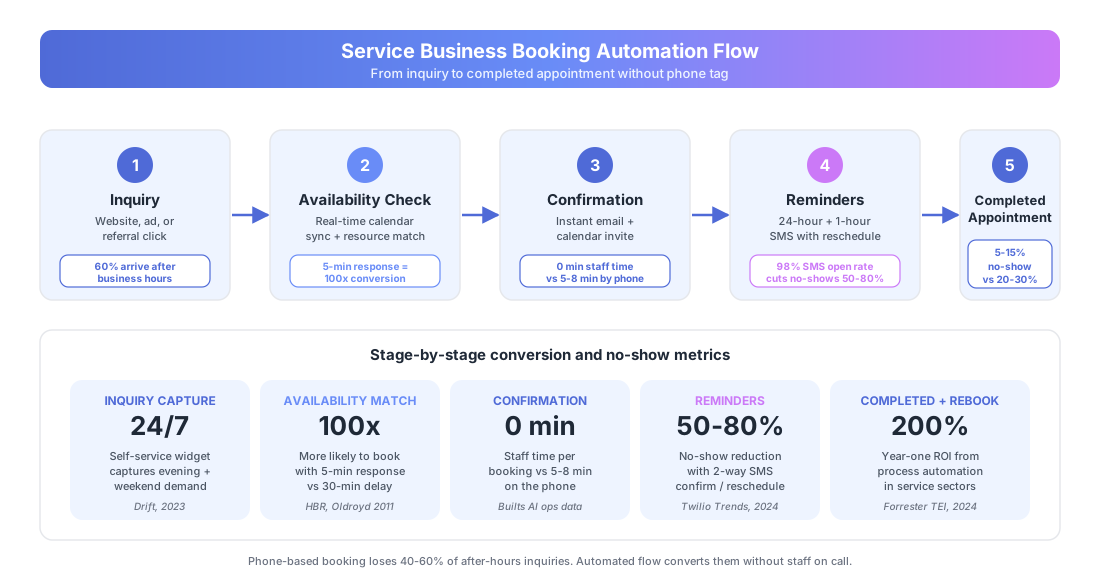
What Does the Full Booking Automation Cycle Look Like?
A complete booking automation handles six steps: inquiry response, availability check, confirmation, reminder sequence, no-show follow-up, and post-appointment rebooking. The client self-serves through the whole flow. Staff only step in for custom requests or complex edge cases. Inquiry response is the step with the most leverage — it’s the same speed-to-lead problem covered in our real estate lead follow-up playbook, and the conversion math applies to any service business: respond in minutes or lose the lead.
Here’s the end-to-end flow:
| Step | Trigger | Automated Action | Impact |
|---|---|---|---|
| 1. Inquiry | Client visits site or clicks ad | Booking widget shows live availability | Eliminates phone tag |
| 2. Booking | Client picks a time slot | Instant confirmation + calendar invite | Saves 3-5 min per booking |
| 3. Pre-appointment | 24 hours before | SMS + email with prep details | Cuts no-shows 50-80% |
| 4. Day-of | 1 hour before | Final SMS with directions or link | Last-chance no-show save |
| 5. No-show | Missed appointment | Follow-up with reschedule link | Recovers 20-30% of no-shows |
| 6. Post-appointment | Service done | Review + rebooking prompt | Drives repeat revenue |
According to Forrester’s 2024 Total Economic Impact studies, the average ROI on business process automation hits 200% in the first year. For booking automation, the ROI tends to land faster because the before-and-after is so measurable: hours spent scheduling, no-show rate, and booking volume all track from day one.
Taxvisory, a solo CPA managing 300 clients, moved their scheduling to Calendly. Clients now book their own appointments based on real-time availability. Confirmations and reminders run without human touch. Before automation, scheduling consumed 3-5 hours a week during tax season. After? Near zero.
Why Is Self-Service Booking Better Than Phone Scheduling?
Self-service booking converts more inquiries because it’s open 24/7, removes the friction of phone tag, and lets clients book the moment they’re motivated, not when your office opens. According to McKinsey’s 2024 Global Survey on AI and Automation, 60% of occupations have 30% or more automatable tasks, and scheduling is among the easiest wins.
A typical service business receives 40-60% of inquiries outside business hours, like evenings, weekends, and holidays. With phone-only booking, those inquiries wait until the next business day. By then, the client has already called your competitor.
Self-service booking captures after-hours inquiries instantly. The client books at 9 PM on a Tuesday. You wake up to a confirmed appointment. No phone call, no email chain, no missed opportunity.
Phone booking vs. self-service booking:
| Factor | Phone Booking | Self-Service Booking |
|---|---|---|
| Availability | Business hours only | 24/7/365 |
| Time per booking | 5-8 min (call + entry) | 0 min (client self-serves) |
| After-hours inquiries | Lost or delayed | Captured instantly |
| No-show rate | 20-30% (no reminders) | 5-15% (with SMS reminders) |
| Rescheduling friction | Another phone call | One-click link |
| Staff time per week | 10-15 hours | Under 1 hour (exceptions only) |
According to Statistics Canada’s 2024 SEPH data, a full-time employee costs $45,000-$65,000 per year. A receptionist spending 15 hours a week on phone scheduling represents $17,000-$25,000 a year on that task alone. A booking tool costs $15-$97 a month.
How Do Automated Reminders Reduce No-Shows?
Automated reminder sequences cut no-shows by 50-80% by sending confirmation at booking, a reminder 24 hours before, and a final reminder 1 hour before. Two-way SMS is the most effective channel because clients can reply to confirm, reschedule, or cancel without calling. A cancellation is better than a no-show because the slot reopens.
The reminder sequence we’ve seen work best across service businesses:
- Immediately after booking: Email confirmation with appointment details, prep instructions, and directions or meeting link.
- 24 hours before: SMS reminder. “Hi [Name], your appointment with [Business] is tomorrow at [Time]. Reply C to confirm, R to reschedule.”
- 1 hour before: SMS with directions or the meeting link. “Your appointment is in 1 hour. Need to reschedule? [Link]”
- No-show (15 minutes after start time): SMS plus email. “We missed you! Reschedule here: [Link]”
The two-way SMS is the critical piece. For a step-by-step build, see how to automate appointment reminders. According to Twilio’s 2024 Messaging Trends report, SMS has a 98% open rate compared to 20-30% for email. When clients can reply “R” to reschedule instead of calling, they actually do it. Your calendar stays full. Your day stays planned.
Tools that handle this: GoHighLevel ($97/month with full CRM and SMS), Twilio for custom SMS at $0.0079 per message, Calendly at $15/month for basic scheduling, and Acuity Scheduling at $27/month with the SMS add-on.
What Tools Work Best for Different Types of Service Businesses?
The right booking tool depends on your service type, team size, and whether you need scheduling alone or a full client management system. A solo coach needs something different than a 12-technician HVAC company.
| Business Type | Best Fit | Monthly Cost | Key Feature |
|---|---|---|---|
| Solo consultant or coach | Calendly | $15 | Clean, integrates with everything |
| Salon or spa | Acuity Scheduling | $27 | Service menus, intake forms, packages |
| HVAC, plumbing, electrical | Housecall Pro | $59 | Field dispatch, estimates, invoicing |
| Medical, dental, therapy | Jane App | $79-$399 | PIPEDA/HIPAA compliant, insurance billing |
| Multi-service business | GoHighLevel | $97 | Full CRM, SMS, pipeline, reputation |
| Enterprise field service | ServiceTitan | Custom | Route optimization, fleet management |
For most small service businesses, we suggest starting with Calendly or Acuity for the scheduling layer, then connecting it to your CRM and communication tools through n8n or Make. That gets you self-service booking live in days while you build toward a fully automated inquiry-to-rebooking pipeline.
What About Businesses With Complex Scheduling Needs?
Not every service business can use a simple “pick a time” widget. Some need resource allocation like which technician, which room, or which vehicle. Others have variable appointment lengths or multi-step bookings where a consultation leads into a procedure and a follow-up.
For these cases, the booking widget is just the front door. Behind it, automation handles the complexity:
- Resource matching: Client picks the service type. The system checks which technicians are qualified, available, and in the right service area, then offers only valid slots.
- Variable duration: A 30-minute consultation and a 2-hour installation don’t show the same availability. The calendar blocks adjust automatically.
- Multi-step booking: The initial consultation auto-triggers follow-up scheduling. Each appointment in the sequence is linked with its own reminder cadence.
Housecall Pro and ServiceTitan cover this for field services. Jane App covers it for healthcare. According to IBISWorld’s 2024 Home Services Industry report, field-service companies using integrated scheduling and dispatch software see 15-25% higher technician utilization versus manual scheduling. For a real example of what that looks like in practice, see how a 6-tech HVAC firm cut dispatch time by 75% and doubled service calls using three connected automations. For custom requirements, n8n or Make can build scheduling logic no off-the-shelf tool covers.
How Do You Turn One-Time Clients Into Repeat Bookings?
Post-appointment automation is where most service businesses leave money on the table. The client had a good experience. They’ll probably come back. But “probably” isn’t a system, and “probably” doesn’t fill your calendar next month.
Automated post-appointment workflows to build:
- Satisfaction check (2 hours after appointment): “How was your experience? [1-5 rating]”
- Review request (sent to 4-5 star ratings): “Would you leave us a Google review? [Direct link]”
- Rebooking prompt (sent 7 days after or at the recommended interval): “Time for your next [service]? Book here: [Link]”
- Win-back (sent 90 days after last visit with no rebooking): “We haven’t seen you in a while. Here’s [incentive] for your next visit.”
According to Deloitte’s 2023 Global Intelligent Automation Survey, 73% of organizations report positive ROI from automation within 12 months. For service businesses, post-appointment automation often drives the highest long-term return because it turns one-time clients into recurring revenue with zero manual outreach. A 5-star review flow alone can double your Google reviews within 90 days, and reviews feed back into new-client acquisition.
How Much Staff Time Does Booking Automation Actually Save?
Most service businesses save 10-15 hours a week once automation is fully deployed, based on our work with solo practitioners and small teams. That figure covers inbound call handling, manual calendar entry, reminder calls, and no-show follow-ups. For a team with a dedicated receptionist, the savings often go to higher-value work like client care rather than headcount cuts.
The math is straightforward. A receptionist handling 8-12 phone bookings a day spends roughly 5-8 minutes per booking between the call, calendar entry, and confirmation email. That’s 40-90 minutes daily on bookings alone, plus another 30-60 minutes on reminder calls and rescheduling. Over a five-day week, you land at 10-15 hours.
According to Statistics Canada’s 2024 labour data, the average Canadian service worker earns $28-$35 per hour loaded. At 12 hours a week saved, that’s $17,500-$22,000 a year in recovered capacity. A $97/month GoHighLevel subscription pays back in under a week. Two case studies show what this looks like in practice: a physiotherapy clinic cut its no-show rate from 18% to 7% with self-booking and a multi-step reminder sequence, and a 3-location fitness studio chain dropped front-desk inquiry volume by 65% with an FAQ chatbot running across web, app, and WhatsApp.
How Do You Get Started With Booking Automation?
Start with the simplest version. Embed a Calendly or Acuity widget on your website this week. That alone kills phone tag for 50-70% of bookings. Add SMS reminders through Twilio or your scheduling tool’s built-in feature to cut no-shows. Then layer on post-appointment automation as you get comfortable with the flow.
The whole setup can be live in a week. No custom development needed for the basics.
For businesses with complex scheduling, multiple locations, or field-service requirements, book a free audit. We’ll map your booking workflow, identify where clients drop off, and design a system that turns inquiries into confirmed, reminded, and returning appointments. Written report in 48 hours. No cost.
Learn more about booking automation or browse related case studies in our resources library.