According to Writesonic’s 2025 AI Tools Survey, 72% of small businesses now use at least one AI assistant daily — up from 44% in 2024. The two tools at the top of every comparison list? ChatGPT from OpenAI and Claude from Anthropic. Both cost $20/month. Both handle writing, analysis, and planning tasks. But the differences between them matter more than most reviews admit.
After testing both across 200+ real business tasks — client proposals, contract reviews, marketing copy, data extraction, email sequences — here’s the breakdown that actually helps you pick.
What Are ChatGPT and Claude, and How Do They Compare?
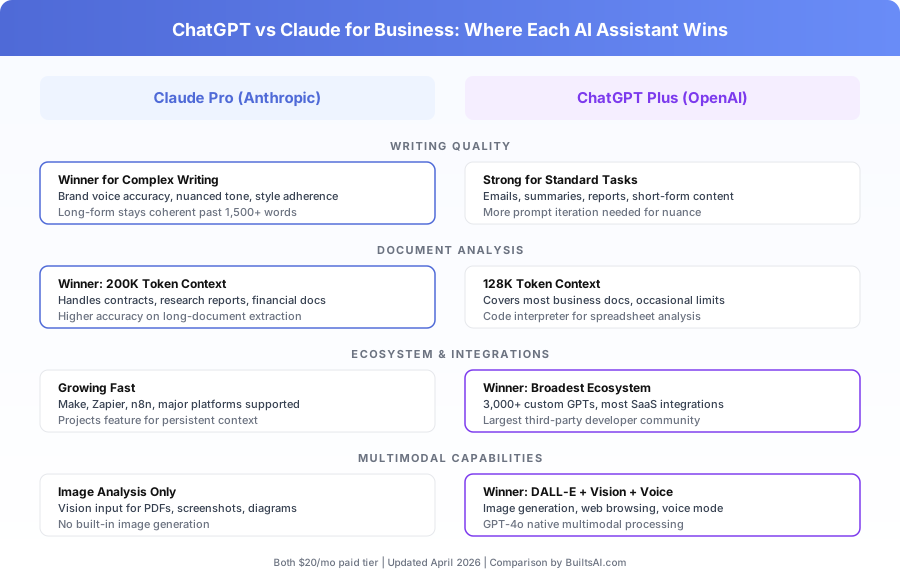
ChatGPT and Claude are general-purpose AI assistants built by competing companies with different design philosophies. ChatGPT prioritizes breadth and multimodal features. Claude prioritizes depth, accuracy, and instruction-following. Both serve business teams well, but they don’t serve them equally across every task type.
ChatGPT is OpenAI’s flagship AI assistant. ChatGPT Plus ($20/month) gives you access to the GPT-5.6 model family, GPT Image generation, web browsing, a code interpreter, and a library of thousands of custom GPTs built by other users.
Claude is Anthropic’s AI assistant. Claude Pro ($20/month) provides access to Claude’s latest models (Sonnet 5 is the default, with the frontier Fable 5 tier above it), a context window of up to 1 million tokens on current models, and Projects — a feature for maintaining persistent context across conversations.
The comparison below is based on consistent performance differences across real business tasks, not one-off tests.
Which AI Assistant Writes Better Business Content?
Claude produces higher-quality business writing with fewer revision cycles. It follows detailed style instructions on the first attempt, maintains consistent tone across long outputs, and avoids the generic corporate voice that makes AI content obvious. For teams where writing is the primary AI use case, Claude’s advantage is measurable and consistent.
Where Does Claude’s Writing Advantage Show Up?
Claude’s writing edge isn’t visible on simple tasks like summarizing a meeting or drafting a quick email. Both tools handle those well. The gap appears on complex writing.
Brand voice adherence. Give Claude a 200-word description of your brand voice and a writing task. It’ll match tone, vocabulary, and structure on the first output about 80% of the time. ChatGPT hits the same mark closer to 55-60%, typically needing one or two follow-up prompts to dial in. For teams producing client-facing content daily, that difference saves 10-15 minutes per task.
Long-form coherence. On outputs over 1,500 words — think blog posts, proposals, white papers — Claude maintains its structure, argument flow, and tone from start to finish. ChatGPT’s longer outputs tend to drift. The introduction might be sharp and specific while the conclusion reverts to generic filler. According to Vellum AI’s 2025 LLM Benchmarks, Claude scored 8% higher on long-form coherence tests across business writing categories.
Nuanced communication. Sensitive client emails, legal-adjacent language, rejection letters, compensation discussions — Claude handles tone calibration better on tasks where word choice carries weight.
When Does ChatGPT Write as Well or Better?
ChatGPT matches or beats Claude on structured, shorter writing tasks. Standard emails, bullet-point summaries, meeting recaps, and formulaic reports come out clean and fast. If 80% of your team’s writing fits that profile, ChatGPT’s writing quality won’t hold you back.
ChatGPT also excels at creative brainstorming. Its outputs tend to be more varied and surprising, which is useful for taglines, marketing angles, and ideation sessions.
For a deeper look at prompting either tool effectively, see our guide on How to Write AI Prompts That Actually Work for Business.
Which AI Handles Long Document Analysis Better?
Claude wins decisively on document analysis. Its current models accept up to 1 million tokens of context — enough for a multi-hundred-page contract in a single pass. Claude also maintains higher extraction accuracy across long documents, reducing the risk of missed clauses or confused details.
How Much Context Can Each AI Process?
The raw numbers: both vendors’ current models now advertise context windows around 1 million tokens via API, so capacity alone no longer separates them. The real gap is accuracy at scale — and how much of that window each app actually exposes.
According to Anthropic’s 2025 Needle-in-a-Haystack benchmark results, Claude retrieves specific facts from full-context documents with 99.2% accuracy. ChatGPT’s accuracy drops more noticeably as documents approach its context limit.
What this means in practice: Upload a 120-page vendor contract and ask Claude to find every clause that mentions indemnification, termination penalties, and auto-renewal terms. Claude will return a structured list with page references. ChatGPT will typically find 85-90% of them, occasionally missing clauses buried in the middle third of the document.
What Business Documents Should You Use Claude For?
Claude’s document analysis advantage matters most for:
| Document Type | Typical Length | Claude Advantage |
|---|---|---|
| Vendor contracts | 50-200 pages | Catches clauses ChatGPT misses |
| Grant applications | 40-100 pages | Better section cross-referencing |
| Financial reports | 30-150 pages | More accurate data extraction |
| Research compilations | 100-500 pages | Maintains coherence across sources |
| Long email threads | 200+ messages | Better attribution of who said what |
For businesses processing fewer than five long documents per month, the difference is minor. For legal teams, finance departments, or consulting firms reviewing documents daily, Claude’s accuracy advantage is significant.
For a comprehensive review of Claude’s business capabilities, see our full Claude for Business review.
Does ChatGPT or Claude Have a Better Integration Ecosystem?
ChatGPT has a substantially larger ecosystem of third-party tools, plugins, and integrations. If your business needs AI connected to the widest range of other software — CRMs, project management, email marketing, analytics — ChatGPT’s integration advantage is real and unlikely to close soon.
What Integrations Does Each AI Assistant Support?
ChatGPT’s ecosystem is broader by every measure. OpenAI was the first widely adopted LLM API, which gave it a multi-year head start.
ChatGPT ecosystem highlights:
- 3,000+ custom GPTs for specific business use cases
- Native integrations with Slack, Salesforce, HubSpot, and 100+ SaaS platforms
- More browser extensions and Chrome plugins
- Larger developer community building on the OpenAI API
Claude ecosystem highlights:
- Supported in Make, Zapier, n8n, and major automation platforms
- Growing API adoption among enterprise software vendors
- Projects feature for team-wide persistent context
- According to Zapier’s 2025 Automation Trends Report, Claude API usage on their platform grew 340% year-over-year
Both tools work well inside automation workflows. The gap is in breadth: if a niche SaaS tool offers AI integration, it’s more likely to support ChatGPT first.
Which AI Is Better for Business Automation Workflows?
For teams building custom automations using Make, Zapier, or n8n, both APIs perform well. Claude’s higher instruction-following consistency gives it an edge for structured tasks — data extraction, email classification, document routing — where output format needs to match exact specifications.
ChatGPT’s ecosystem advantage matters more for teams that want pre-built, plug-and-play AI features inside existing tools rather than custom automation workflows.
For a broader view of how both fit into your tech stack, see our guide to the best AI tools for small business in 2026.
What Multimodal Features Does Each AI Offer for Business?
ChatGPT offers more multimodal features at the same price. GPT Image generation, real-time web browsing, advanced voice mode, and GPT-5.6’s native multimodal processing give ChatGPT a clear advantage for teams that need visual content creation alongside text-based tasks.
What Can ChatGPT Do That Claude Can’t?
Three specific capabilities separate them:
Image generation. ChatGPT includes GPT Image (DALL-E’s replacement since mid-2026), which produces marketing-quality images, product mockups, social media graphics, and visual concepts. Claude can’t generate images. If your team creates visual content, this alone might justify ChatGPT.
Voice mode. ChatGPT’s advanced voice mode supports real-time spoken conversations — useful for hands-free brainstorming, accessibility, and mobile use. Claude doesn’t offer a comparable voice interface as of April 2026.
Web browsing. ChatGPT can browse the web in real-time to pull current data, check facts, and research topics. Claude’s web access is more limited.
Where Does Claude’s Vision Input Win?
Claude isn’t multimodal-zero, though. Its vision input capabilities are strong:
- Upload PDFs, screenshots, charts, and diagrams for analysis
- Extract data from images of handwritten notes or whiteboards
- Analyze complex tables and figures from scanned documents
For businesses that primarily need to analyze visual content rather than create it, Claude’s vision input is competitive. But ChatGPT’s combined generation and analysis capabilities give it the broader multimodal toolkit.
How Reliable Is Each AI for Following Complex Instructions?
Claude has a consistent and measurable advantage in instruction-following reliability. For businesses running AI-assisted workflows where output consistency directly affects efficiency, this difference reduces error rates and saves time on quality checks.
What Makes Claude More Reliable at Following Instructions?
Anthropic’s training approach, called Constitutional AI, explicitly optimizes for careful instruction-following. In practice, this means:
Multi-step compliance. Give Claude a 10-step prompt with specific formatting, content, and constraint requirements. Claude follows all 10 steps about 85% of the time. According to Scale AI’s 2025 Multitask Language Understanding benchmark, ChatGPT follows all steps on comparably complex prompts about 72% of the time.
Uncertainty signaling. When Claude doesn’t know something, it says so. ChatGPT is more likely to produce a confident-sounding answer that contains inaccuracies — a pattern called “hallucination” that’s particularly costly in business contexts.
Output consistency. Run the same prompt through Claude five times and you’ll get structurally similar outputs with minor variation. ChatGPT’s outputs across repeated runs vary more, which creates inconsistency in automated workflows.
When Does Instruction-Following Reliability Matter Most?
This advantage matters for:
- Automated email generation — where tone and format must match every time
- Data extraction from documents — where missed fields create downstream errors
- Customer-facing chatbots — where inconsistent responses damage trust
- Classification tasks — where output must match predefined categories exactly
For one-off creative tasks, the reliability gap doesn’t matter much. For recurring, structured workflows processing 50+ items per week, Claude’s consistency pays for itself quickly.
How Do ChatGPT and Claude Compare on Pricing for Teams?
Both individual plans cost $20/month. Team and enterprise pricing diverges slightly, but neither has a major cost advantage. The pricing decision should be based on which tool’s strengths match your use cases, not on subscription cost.
| Plan | Claude | ChatGPT |
|---|---|---|
| Free tier | Yes (limited usage) | Yes (limited usage) |
| Individual pro | $20/month (Pro) | $20/month (Plus) |
| Team plan | $25/user/month | $25/user/month |
| Enterprise | Custom ($60+/user) | Custom ($60+/user) |
| Context window | Up to 1M tokens | Up to ~1M (API); lower in-app |
| Image generation | No | Yes (GPT Image) |
| Voice mode | No | Yes |
| Custom agents/GPTs | Projects | Custom GPTs |
According to Gartner’s 2025 AI in the Workplace Report, the average business team spends $35-50/user/month on AI tools when combining multiple subscriptions. At $20/month each, testing both for a month costs less than one hour of most employees’ time.
Is It Worth Paying for Both ChatGPT and Claude?
For many teams, yes. A common and effective split:
- Claude handles: Long-form writing, document analysis, complex prompts, structured data extraction, workflow automation where consistency matters
- ChatGPT handles: Image generation, web research, ecosystem plugins, short-form creative tasks, voice-assisted brainstorming
At $40/month total, the combined cost is modest compared to the productivity gains. Teams that use both report spending less time on prompt iteration because they route each task to the tool that handles it better on the first attempt.
How Do Claude Projects Compare to ChatGPT Custom GPTs?
Both platforms offer ways to customize the AI for your team’s specific needs, but they take different approaches. Claude’s Projects feature focuses on persistent context. ChatGPT’s Custom GPTs focus on specialized behavior.
Claude Projects let you upload documents, style guides, brand assets, and context files that persist across every conversation in that project. Every team member with access gets the same base context automatically. It’s designed for teams that want consistent outputs grounded in their specific materials.
ChatGPT Custom GPTs let you create purpose-built assistants with custom instructions, knowledge files, and API integrations. The GPT Store has 3,000+ pre-built options for specific use cases — from SEO analysis to financial modeling.
For teams that value grounded, consistent outputs based on their own documents, Claude Projects is the stronger feature. For teams that want access to a marketplace of specialized tools, ChatGPT’s Custom GPTs offer more variety.
For a detailed feature comparison, see our article on Claude Projects vs ChatGPT Custom GPTs.
What’s the Best AI Productivity Stack for Small Businesses?
The right answer depends on your team’s top three use cases. Here’s a quick decision framework based on real usage patterns.
| If Your Team Mostly Does… | Best Primary Tool | Consider Adding |
|---|---|---|
| Client proposals and writing | Claude Pro | ChatGPT for images |
| Marketing content + graphics | ChatGPT Plus | Claude for long-form |
| Contract and document review | Claude Pro | — |
| Customer support automation | Claude Pro | ChatGPT for voice |
| General productivity tasks | Either works | Test both free tiers first |
| Heavy SaaS ecosystem needs | ChatGPT Plus | — |
The productivity tool market changes fast. For a broader view of where ChatGPT and Claude fit alongside other tools, see our guide to the best AI productivity tools for small business.
Which AI Assistant Should Your Team Choose in 2026?
There’s no single “better” AI assistant. Claude is the better tool for writing quality, document analysis, and instruction-following reliability. ChatGPT is the better tool for multimodal features, ecosystem integrations, and visual content creation. Both are good enough for general tasks.
Choose Claude Pro if your team primarily uses AI for writing, document analysis, and structured workflows. Claude’s accuracy advantage on these tasks saves time and reduces revision cycles. The million-token context window on current models makes it the default choice for document-heavy teams.
Choose ChatGPT Plus if your team needs image generation, values ecosystem breadth, or wants access to the widest range of custom GPTs and third-party integrations. ChatGPT’s multimodal capabilities and voice mode add versatility Claude doesn’t match.
Use both if your team’s use cases span both strengths. At $40/month combined, the cost is less than one hour of most employees’ time — and routing tasks to the right tool eliminates the prompt iteration that wastes time with a single-tool approach.
The cost of choosing wrong is low. Both offer free tiers. Try each for your team’s top three tasks before committing. You’ll know which fits better within a week.
Where teams actually get stuck isn’t picking the assistant — it’s connecting it to their real work. That connection layer is what our custom AI workflows handle.
Book a free automation audit and we’ll show you exactly how Claude, ChatGPT, or both fit into your specific workflow — with a custom recommendation for your team’s use cases.