Sixty-three percent of small business employees say they waste at least two hours per day on repetitive tasks they believe AI could handle. That’s according to Salesforce’s 2025 Small Business Trends report — and it explains why the AI productivity tool market hit $14.2 billion in 2025, per Gartner’s forecast data.
But here’s the problem most comparison articles won’t tell you: the “best” AI tool isn’t the one with the highest benchmark score. It’s the one that lives where your team already works. A brilliant AI assistant sitting in a separate browser tab gets used 60% less than one embedded in the app your team has open eight hours a day. According to Microsoft’s 2025 Work Trend Index, embedded AI tools see 3.4x higher daily active usage than standalone alternatives.
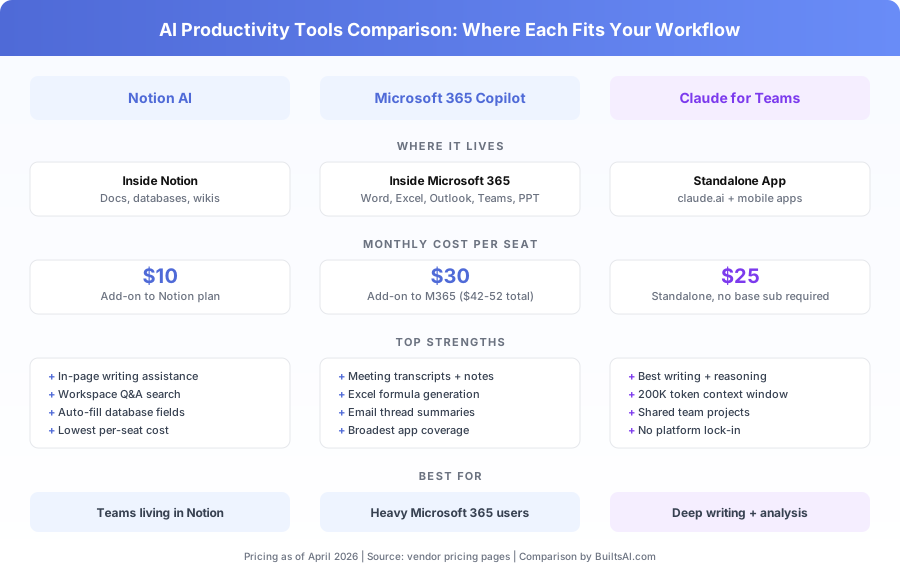
Three tools dominate the small business AI productivity conversation in 2026: Notion AI, Microsoft 365 Copilot, and Claude for Teams. This comparison breaks down exactly where each one fits, what it costs, and which combination delivers the best return for teams of 5-50 people.
Why Does “Where the AI Lives” Matter More Than Model Quality?
The single biggest predictor of whether your team actually adopts an AI tool isn’t its capability — it’s its proximity to existing work. An AI that’s already inside Outlook when you’re reading email will get used. One that requires switching tabs won’t.
According to Forrester’s 2025 Digital Worker Survey, 71% of knowledge workers said they’d use AI features “multiple times daily” if embedded in their primary work app, compared to just 28% who said the same about standalone AI assistants. That 43-point gap explains why this comparison isn’t just about features — it’s about workflow placement.
Notion AI lives inside Notion pages, databases, and wikis. If your team runs on Notion, the AI is already there.
Microsoft 365 Copilot lives inside Word, Excel, Outlook, PowerPoint, and Teams. If you’re a Microsoft shop, it’s in every tool you touch.
Claude for Teams lives at claude.ai. You bring your work to it. That extra step costs adoption — but what you get in return is the most capable AI reasoning available today.
What Does Notion AI Actually Do for $10 Per Month?
Notion AI is an add-on to any Notion plan that puts AI assistance directly inside your workspace. At $10/seat/month, it’s the cheapest option in this comparison. For teams already running their projects, docs, and knowledge bases in Notion, the ROI calculation is straightforward.
What Can Notion AI Generate and Edit?
Notion AI handles five core tasks inside the Notion workspace. It drafts content within pages, summarizes long documents, edits for tone and length, auto-fills database properties based on page content, and answers natural-language questions about anything stored in your workspace.
The “Ask AI” shortcut (Cmd/Ctrl+J) works on any Notion page. You can highlight text and ask it to rewrite, translate, or expand. According to Notion’s 2025 user data, the average Notion AI user triggers the assistant 11 times per workday — roughly once every 45 minutes during an eight-hour day.
The database autofill feature is particularly useful for teams managing projects. Set up a “Summary” or “Status” property and Notion AI populates it by reading the full page content. A 15-person marketing agency using Notion told us this feature alone saves their project managers about 40 minutes per week on status report compilation.
Where Does Notion AI Fall Short?
Notion AI works well for quick, in-context tasks. It doesn’t match Claude or GPT-4 on complex reasoning, long-form analysis, or tasks requiring a large context window. If you need to analyze a 50-page contract or write a detailed strategy memo from scratch, you’ll hit Notion AI’s limits quickly.
The model powering Notion AI (a mix of Anthropic and OpenAI models) is capable but optimized for speed inside the editor, not for the kind of deep work you’d bring to Claude.
| Notion AI Capability | Quality Rating | Notes |
|---|---|---|
| Short-form drafting | Strong | Blog intros, email drafts, meeting agendas |
| Document summarization | Strong | Works well within Notion pages |
| Database autofill | Strong | Best-in-class for Notion databases |
| Workspace Q&A | Good | Searches across your Notion content |
| Long-form writing | Moderate | Lacks context depth for 2,000+ word pieces |
| Complex analysis | Weak | Not designed for multi-step reasoning |
| Code generation | Moderate | Basic code snippets only |
Pricing: $10/seat/month add-on to any Notion plan (Free, Plus, Business, or Enterprise).
Bottom line: If your team lives in Notion, the $10/seat is the easiest AI investment decision you’ll make this year. Don’t expect it to replace a standalone AI assistant for heavy-duty work.
What Does Microsoft 365 Copilot Actually Do for $30 Per Month?
Microsoft 365 Copilot is the most ambitious embedded AI play in the market. It puts AI assistance inside every major Microsoft 365 application — Word, Excel, Outlook, PowerPoint, and Teams. For businesses already paying $12-$22/seat/month for Microsoft 365, Copilot adds $30/seat on top.
According to Microsoft’s 2025 Work Trend Index, which surveyed 31,000 workers across 31 countries, Copilot users reported saving an average of 1.2 hours per day. The most impactful features were email summarization in Outlook (cited by 68% of users) and meeting notes in Teams (cited by 57%).
How Does Copilot Work Inside Each Microsoft App?
Each Microsoft 365 app gets AI features specific to its function. Here’s what Copilot does in each.
In Outlook: Summarizes long email threads into bullet points. Drafts replies matching your writing style. Creates meeting briefings by pulling context from your calendar and recent emails. According to Microsoft’s internal data, Outlook Copilot users process email 29% faster than non-Copilot users.
In Teams: Transcribes meetings in real time. Generates meeting notes with action items within 60 seconds of the meeting ending. Answers questions about past meetings (“What did the client say about the timeline?”). This alone can replace a $10-$20/seat/month meeting transcription tool like Otter.ai or Fathom.
In Word: Drafts documents from prompts. Rewrites or improves selected sections. Summarizes long documents. Generates content using context from other M365 files.
In Excel: Builds formulas from plain-language descriptions (“Show me a 3-month rolling average of sales by product”). Generates charts and pivot tables. Highlights trends and outliers. According to a 2025 Nucleus Research study, Excel Copilot users reported 31% faster spreadsheet task completion.
In PowerPoint: Creates slide decks from prompts, Word docs, or outlines. Adds speaker notes and suggests layouts.
Where Does Microsoft 365 Copilot Fall Short?
Copilot’s AI quality on complex writing and reasoning tasks sits below Claude’s. According to LMSYS Chatbot Arena (March 2026), GPT-4 — the model powering Copilot — ranks behind Claude 3.5 on long-form writing and multi-step analysis tasks.
The total cost is also the highest in this comparison. At $42-$52/seat/month (M365 subscription + Copilot), a 10-person team pays $420-$520/month before considering that some team members may not use it enough to justify the expense.
| Copilot Feature | App | Standalone Equivalent It Replaces |
|---|---|---|
| Meeting transcription + notes | Teams | Otter.ai, Fathom ($10-20/seat) |
| Email thread summarization | Outlook | No direct equivalent |
| Formula generation | Excel | No direct equivalent |
| Document drafting | Word | ChatGPT, Claude (partial) |
| Presentation creation | PowerPoint | Gamma, Beautiful.ai (partial) |
Pricing: $30/seat/month. Requires Microsoft 365 Business Basic ($6/seat), Standard ($12.50/seat), or Premium ($22/seat). Total: $36-$52/seat/month.
Bottom line: If your team spends 3+ hours per day in Microsoft 365 apps, Copilot is the highest-impact AI investment. The Teams meeting notes feature alone often justifies the cost. If your team barely uses Microsoft 365, the $30/seat premium won’t pay for itself.
If you’re not on Microsoft 365 — or you want real-time AI augmentation during the call, not just notes after — the standalone meeting-assistant category is where to look. Our Cluely vs. Fathom vs. Otter vs. Fireflies comparison covers the four main options and which one fits each team setup, and our overview of Cluely explains the new real-time AI overlay approach that’s emerging beyond passive transcription.
What Does Claude for Teams Actually Do for $25 Per Month?
Claude for Teams is Anthropic’s business-tier offering for Claude, the AI assistant that consistently ranks first or second on independent benchmarks for writing quality, reasoning, and instruction-following. At $25/seat/month, it’s a standalone tool — not embedded in any productivity suite. For a detailed breakdown, see our Claude for Business review.
According to LMSYS Chatbot Arena rankings as of March 2026, Claude leads GPT-4 on long-form writing, document analysis, and tasks requiring careful instruction-following. This isn’t marketing copy — it’s based on over 1.5 million blind comparisons from real users.
What Makes Claude for Teams Different from Claude Pro?
Claude for Teams ($25/seat/month) includes everything in Claude Pro ($20/month) plus shared team Projects, admin controls, user management, higher usage limits, and business data handling terms. Anthropic explicitly commits to not training on your business data.
The shared Projects feature is the standout team capability. You upload company documents (brand guidelines, product specs, client briefs), set custom instructions, and every team member works from the same context. A 12-person consulting firm we work with created a “Client Proposals” project with their pricing framework, case studies, and tone guide — new team members produce on-brand proposals from day one. For a comparison of how Projects stacks up, see our guide to Claude Projects vs ChatGPT Custom GPTs.
Claude’s 200K-token context window (roughly 150,000 words) means it can process entire documents that Notion AI and Copilot can’t handle in a single pass — financial reports, legal contracts, research papers.
Where Does Claude for Teams Fall Short?
Claude isn’t embedded in your productivity apps. Your team opens a separate tab or app to use it. That friction reduces daily casual usage. According to Anthropic’s own 2025 usage data, the average Claude for Teams user initiates 4-6 sessions per day — compared to the 11 daily interactions Notion AI users average.
Claude also can’t transcribe meetings, manage email, or build spreadsheet formulas. It’s an assistant you bring work to, not one that sits inside the work.
| Claude for Teams Capability | Quality Rating | Notes |
|---|---|---|
| Long-form writing | Excellent | Ranks #1 on LMSYS for writing tasks |
| Document analysis | Excellent | 200K context processes full reports |
| Complex reasoning | Excellent | Multi-step logic, nuanced arguments |
| Shared team context | Strong | Projects feature with uploaded docs |
| Code generation | Excellent | Full application scaffolding |
| In-app integration | Weak | Standalone only, no embedded features |
| Meeting transcription | None | Use Fathom or Otter alongside |
| Email management | None | No Outlook/Gmail integration |
Pricing: $25/seat/month. No additional subscription required.
Bottom line: Claude for Teams is the best AI assistant for quality of output. It’s not the best for casual, high-frequency use inside existing tools. Pair it with Notion AI or Copilot for the combination that covers both use cases.
How Do These Three Tools Compare Side by Side?
Here’s the direct comparison across every dimension that matters for a small business purchasing decision. Pricing data is current as of April 2026.
| Dimension | Notion AI | Microsoft 365 Copilot | Claude for Teams |
|---|---|---|---|
| Monthly cost per seat | $10 (add-on) | $30 (add-on) | $25 (standalone) |
| Total cost with base subscription | $18-35/seat | $42-52/seat | $25/seat |
| Integration approach | Inside Notion | Inside all M365 apps | Standalone web + mobile |
| Writing quality | Good | Good | Excellent |
| Document analysis | Limited | Strong | Excellent (200K context) |
| Meeting transcription | No | Yes (Teams) | No |
| Email management | No | Yes (Outlook) | No |
| Spreadsheet analysis | No | Yes (Excel) | Upload CSV only |
| Knowledge base search | Notion workspace | M365 file graph | Team Projects |
| Data privacy commitment | No training on data | No training; M365 tenant | No training; explicit terms |
| Platform lock-in | Notion ecosystem | Microsoft ecosystem | None |
| Best for | Notion-first teams | Microsoft-first teams | Quality-first teams |
The total cost column is where most comparisons get it wrong. Notion AI at $10/seat looks cheap until you add Notion Plus ($10/seat) or Business ($18/seat). Copilot at $30/seat requires a $12-$22 Microsoft 365 subscription underneath. Only Claude for Teams has a flat $25/seat cost with no prerequisite subscription.
Which Tool Gives You the Best Return per Dollar?
ROI calculations differ by team type, but here’s a framework based on time savings data from vendor reports and our own client engagements with teams of 5-30 people.
According to Microsoft’s 2025 data, Copilot saves 1.2 hours/day per user. At a blended cost of $40/hour for a small business knowledge worker, that’s $48/day in recovered time — $960/month against a $42-$52/month cost. That’s a strong theoretical ROI, though real-world adoption rates bring the effective number down.
Notion AI’s value is harder to quantify per hour but easier to justify per dollar. At $10/seat, a team member needs to save only 15 minutes per day to break even (assuming the same $40/hour rate). According to Notion’s 2025 customer data, the median Notion AI user saves approximately 25 minutes per day on writing and summarization tasks.
Claude for Teams delivers ROI differently. It doesn’t save time on routine micro-tasks — it improves the quality and speed of substantial work: proposals, analyses, strategy documents, research synthesis. Our consulting and agency clients report that Claude reduces first-draft creation time by 40-60% on documents that previously took 2-4 hours.
| Tool | Monthly Cost (10-person team) | Daily Time Saved per User | Monthly Value (at $40/hr) | ROI Ratio |
|---|---|---|---|---|
| Notion AI | $100 | ~25 min | $3,333 | 33:1 |
| Microsoft 365 Copilot | $420-520 | ~72 min (1.2 hrs) | $9,600 | 18-23:1 |
| Claude for Teams | $250 | ~45 min on substantial tasks | $6,000 | 24:1 |
Time savings figures from vendor-published data and Builts AI client engagements. Actual results vary by role and usage patterns.
What’s the Right Tool for Your Specific Team?
Stop evaluating these tools against each other as if you’ll only pick one. Most teams of 10+ people end up using two AI tools: one embedded in their primary productivity platform, one standalone for deep work.
Are You a Microsoft 365 Team?
If your team lives in Outlook, Word, Excel, and Teams — and most of the team uses these tools 3+ hours daily — start with Copilot. The meeting notes in Teams and email summaries in Outlook deliver the fastest visible value.
Add Claude for Teams if your team also does substantial writing, research, or analysis that Copilot handles at a B+ level when you need A-level output. Our ChatGPT vs Claude for Business comparison can help you decide between Claude and ChatGPT for that standalone slot.
Are You a Notion Team?
If Notion is your project hub, documentation home, and team wiki — start with Notion AI. At $10/seat, it’s the cheapest add-on and the lowest-risk decision.
Add Claude for Teams when your team needs to produce long-form content, analyze complex documents, or work through multi-step reasoning that Notion AI can’t match.
Are You a Mixed-Tool Team?
If your team uses Google Workspace, a mix of tools, or hasn’t standardized on one platform — Claude for Teams is the right first AI investment. It works alongside everything without requiring commitment to Notion or Microsoft.
For more on building a complete AI tool stack, see our article on The Small Business AI Stack: Which AI Tools Are Actually Worth Paying For.
How Should You Roll Out AI Tools to a Small Team?
Don’t buy 10 seats on day one. Every vendor mentioned here supports per-seat purchasing — use that to your advantage.
Week 1-2: Start with 2-3 power users who are already comfortable with AI. Give them full access to the tool you’re evaluating. According to Harvard Business School’s 2024 research on AI adoption in consulting (published in collaboration with BCG), teams that started with volunteer early adopters saw 34% higher sustained adoption rates than those with mandatory rollouts.
Week 3-4: Have early adopters document their top 3-5 use cases with specific time savings. “I use Copilot to summarize email threads — saves me 20 minutes every morning” is the kind of concrete evidence that drives team-wide buy-in.
Month 2: Expand to the full team based on evidence. Set up shared prompts, templates, and (for Claude) Projects so the institutional knowledge transfers.
Month 3: Audit actual usage. Every tool has admin dashboards showing who’s using what. Cut seats that show less than 3 uses per week — that team member isn’t getting value and won’t start without intervention.
Check out our guide on How to Write AI Prompts That Actually Work for Business to help your team get more out of whichever tool you choose.
What Are the Data Privacy Implications for Each Tool?
Data privacy is a non-negotiable for any business AI deployment. Here’s what each vendor commits to, based on their published data processing terms as of April 2026.
| Privacy Dimension | Notion AI | Microsoft 365 Copilot | Claude for Teams |
|---|---|---|---|
| Trains on your data? | No | No | No |
| Data residency | US/EU (depending on plan) | Within M365 tenant region | US (Anthropic infrastructure) |
| SOC 2 compliance | Type II | Type II | Type II |
| GDPR compliant | Yes | Yes | Yes |
| Business data terms | Enterprise plan required | Included with M365 | Included with Teams plan |
| Admin audit logs | Business+ plans | Yes | Yes |
All three vendors have committed to not training their models on business customer data. The differences show up in data residency and the tier at which you get full enterprise-grade controls.
For a broader look at AI data privacy for small businesses, see our guide on AI Data Privacy for Small Business.
What’s Coming in 2026 That Could Change This Comparison?
This market moves fast. Three developments to watch over the next 6-12 months.
Microsoft Copilot is expanding beyond M365. Microsoft’s Copilot Studio now allows businesses to build custom Copilot agents that integrate with non-Microsoft tools. If your team uses Salesforce or Slack alongside Microsoft 365, this could close Copilot’s “only works in Microsoft” gap.
Notion AI is getting more capable models. Notion has partnered with both Anthropic and OpenAI, and they’re expected to upgrade the underlying model in Notion AI to GPT-4-class or Claude 3.5-class performance by mid-2026. That would close the quality gap with standalone tools for in-context tasks.
Claude is building integrations. Anthropic’s MCP (Model Context Protocol) is designed to let Claude connect directly to external tools — Google Drive, Slack, GitHub, and more. If Claude gains embedded access to your existing tools, the “standalone” limitation diminishes significantly.
The Practical Recommendation
For most small business teams of 5-50 people, here’s the decision tree:
- Identify your primary work platform. Is it Microsoft 365, Notion, or something else?
- Add the embedded AI for that platform. Copilot for Microsoft shops, Notion AI for Notion teams.
- Add Claude for Teams if your team does substantial knowledge work — proposals, analysis, research, long-form writing — where output quality directly affects revenue.
- Start with 3 seats, expand based on measured usage.
The worst decision is buying the “most powerful” tool and watching it sit unused because it isn’t where the work happens. The best decision is matching your AI investment to your team’s actual daily behavior. And if nobody on your team has time to own that rollout, that’s the gap our custom workflow builds fill — tool selection, setup, and training in one project.
Book a free automation audit and we’ll assess your team’s current tool stack and workflow patterns — then recommend the specific AI productivity configuration that delivers the highest return for your team size and work style.