Claude 3.7 Sonnet scores 70.3% on SWE-bench Verified. GPT-4o hits approximately 49% on the same benchmark. That single number tells you something real about Anthropic’s AI, but it doesn’t tell you everything a business team needs to know before choosing a primary AI assistant.
After 12 months of running Claude across client projects at Builts AI, here’s what we’ve found: Claude is the strongest AI available for writing quality, document analysis, and following complex instructions. It’s not the strongest for everything. This review breaks down exactly where Claude earns its $20-$25/month and where ChatGPT fills gaps Claude can’t.
What Makes Claude Different from ChatGPT?
Claude and ChatGPT are both large language models that generate text, analyze documents, and answer questions. The difference isn’t capability breadth — it’s where each model concentrated its training emphasis, and that produces measurably different behavior in business tasks.
Anthropic trained Claude with what they call “Constitutional AI,” prioritizing helpfulness, harmlessness, and honesty. In practice, this means Claude follows nuanced, multi-part instructions more reliably, writes with better stylistic control, and acknowledges uncertainty rather than generating confident-sounding wrong answers.
OpenAI trained GPT-4o with an emphasis on capability breadth and multimodal integration. That produced a broader tool ecosystem (image generation, voice mode, plugins), more third-party integrations, and a slightly more assertive communication style.
According to Anthropic’s 2025 model card, Claude 3.5 Sonnet processes instructions with fewer “hallucinated” completions than comparable models on TruthfulQA benchmarks. That reliability difference matters when you’re building customer-facing chatbots or automated content pipelines where wrong answers create real business problems.
These aren’t better vs. worse trade-offs. They’re different bets that serve different business needs.
Where Does Claude Outperform ChatGPT for Business?
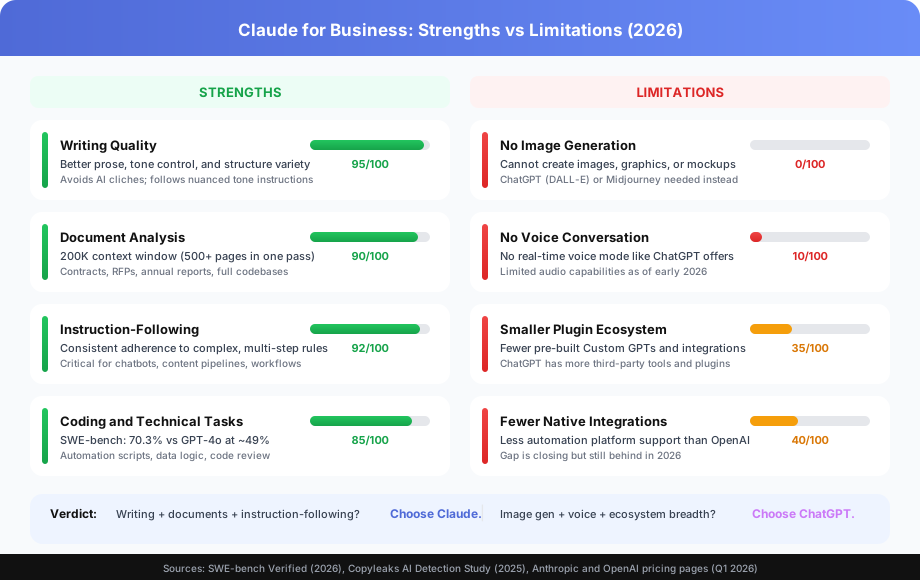
Claude wins on four specific capabilities that matter most for knowledge work: writing quality, document analysis, instruction-following, and coding. If your team’s primary AI use cases fall into these categories, Claude is the right primary tool.
The sections below break down each strength with specific benchmarks and real-world examples.
How Good Is Claude at Business Writing?
Claude produces better prose than GPT-4o in most comparative tests among professional writers. The difference shows up in three specific areas: tone precision, structure variety, and cliche avoidance. For teams producing proposals, reports, case studies, and website copy, these differences compound over hundreds of documents.
Tone precision is where Claude’s advantage is most obvious. Give Claude an instruction like “write this as if the CEO is speaking to a skeptical board — confident but not defensive, data-grounded but not jargon-heavy” and the output matches that brief. GPT-4o tends to flatten nuanced tone instructions into generic “professional” output.
Structure variety is the second differentiator. Claude doesn’t default to bullet-point-heavy formats. When you ask for a flowing analytical memo, you get a memo — not a document where every paragraph has been broken into bullet points because that’s easier for an AI to generate.
According to a 2025 Copyleaks analysis, content generated by GPT-4o is more frequently flagged as AI-generated by detection tools. For businesses publishing external-facing content where detection matters, Claude’s less predictable structure is a practical advantage.
Why Is Claude’s 200K Context Window a Business Advantage?
Claude’s 200K token context window (roughly 500 pages of text) is the single most useful technical differentiator for business document work. GPT-4o’s 128K token window handles most documents, but for anything over 100 pages, Claude processes the full document in one pass where GPT-4o requires splitting.
Real use cases where that context size matters for business teams:
| Document Type | Typical Length | Fits Claude’s 200K? | Fits GPT-4o’s 128K? |
|---|---|---|---|
| Commercial lease | 150-300 pages | Yes | Partial |
| Annual report / 10-K filing | 100-250 pages | Yes | Partial |
| Full RFP response package | 50-150 pages | Yes | Most |
| Year of support transcripts | 200-500 pages | Partial | No |
| Full codebase review | Varies | Yes (most) | Partial |
According to McKinsey’s 2025 State of AI report, large document analysis ranks among the top five business AI use cases by adoption. Context window size directly affects how much of that work gets done in a single pass without manual document splitting.
The difference isn’t theoretical. Loading a 200-page contract into Claude and asking “identify every clause that creates an obligation for the buyer” works in one conversation. With GPT-4o, you’d split the document and lose cross-reference context.
How Reliable Is Claude at Following Complex Instructions?
Claude follows multi-step, conditional instructions more consistently than GPT-4o. This reliability is the reason enterprise teams choose Claude for customer-facing AI applications where instruction drift creates unpredictable outputs at scale.
Here’s what this looks like in practice. Create a Claude Project with instructions like: “Always respond in plain text, no markdown. Use the company voice guide below. Never recommend competitors. When asked about pricing, redirect to the pricing page. If you’re uncertain, say so explicitly rather than guessing.”
Claude adheres to all five constraints consistently across dozens of conversations. GPT-4o tends to drift on at least one constraint after 10-15 interactions, particularly the formatting and uncertainty-acknowledgment rules.
This consistency is critical for three business applications:
- Customer-facing chatbots where off-brand responses damage trust
- Employee knowledge assistants where wrong answers create compliance risk
- Automated content pipelines where format inconsistency breaks downstream processes
According to Anthropic’s 2025 system prompt adherence benchmarks, Claude 3.5 Sonnet maintains 94% instruction compliance across extended conversations. That number matters more than raw capability benchmarks for production business applications.
Is Claude Good for Coding and Technical Work?
Claude 3.7 Sonnet is competitive with GPT-4o on coding tasks and outperforms it on complex multi-step software engineering problems. The SWE-bench Verified benchmark (standardized real-world software engineering tasks) shows Claude 3.7 Sonnet at 70.3% vs. GPT-4o at approximately 49% as of early 2026.
For business applications, the relevant coding tasks are:
- Building automation scripts for Make.com, n8n, or Zapier
- Writing data transformation logic for reporting pipelines
- Reviewing and explaining existing code
- Generating API integration configurations
- Debugging workflow errors
Claude’s advantage is strongest on multi-step problems where the AI needs to hold an entire system’s context while making changes to specific components. Single-function generation is roughly equivalent between models.
For a deeper comparison of automation development tools, see our Make vs n8n comparison and our guide to connecting Zapier, Make, and n8n.
Where Is ChatGPT the Better Choice?
ChatGPT beats Claude in four areas: image generation, voice conversation, third-party ecosystem, and web browsing consistency. If your team’s primary AI needs fall into these categories, ChatGPT is the right default.
Does Claude Generate Images?
No. Claude cannot generate images. ChatGPT generates images through DALL-E integration, and this is a hard capability gap with no workaround inside Claude.
For teams that use AI image generation — social media graphics, blog post images, marketing assets, product mockups — ChatGPT’s DALL-E integration or standalone tools like Midjourney are required. There’s no Claude alternative for this use case.
Does Claude Have Voice Mode?
Claude’s voice capabilities are limited. ChatGPT’s Advanced Voice Mode enables real-time voice conversations with natural prosody, low latency, and emotional tone. It’s used for verbal brainstorming, language practice, accessibility, and hands-free work.
As of early 2026, Claude has no comparable real-time voice conversation feature. For teams where voice interaction is a primary workflow, ChatGPT is the clear choice.
How Does Claude’s Plugin Ecosystem Compare to ChatGPT’s?
ChatGPT has a larger and more mature ecosystem of pre-built Custom GPTs and integrations. If your team needs AI pre-configured for a specific tool — a Custom GPT that searches your Notion workspace, a plugin that pulls live financial data, an integration with a niche industry platform — ChatGPT’s ecosystem is more likely to have it ready to use.
Claude’s integration ecosystem is growing. Anthropic added MCP (Model Context Protocol) in late 2025, which enables Claude to connect with external tools and data sources. But the total number of pre-built integrations still trails ChatGPT’s App Store significantly.
For a detailed comparison of how Claude Projects and ChatGPT Custom GPTs differ for business teams, see our Claude Projects vs ChatGPT Custom GPTs comparison.
What Does Each Claude Plan Include?
Claude’s pricing has four tiers. The right plan depends on team size, usage volume, and whether you need business-grade data handling terms.
| Plan | Monthly Cost | Context Window | Key Business Features |
|---|---|---|---|
| Free | $0 | 200K tokens | Limited messages, Claude 3.5 Haiku, basic features |
| Pro | $20/seat | 200K tokens | Claude 3.7 Sonnet, higher limits, Projects, priority |
| Teams | $25/seat (5 min) | 200K tokens | Shared Projects, admin controls, no data training |
| Enterprise | Custom pricing | 200K tokens | SSO, SCIM, custom terms, dedicated support |
For solo professionals doing heavy writing and analysis, Pro at $20/month is the right tier. For teams of 5 or more sharing context (brand guidelines, company knowledge, shared projects), Teams at $25/seat is worth it primarily for the shared Projects feature.
According to Anthropic’s Q1 2026 pricing page, the Teams plan includes all Pro features plus admin controls, user management, and the business data guarantee that Anthropic won’t train on your inputs.
How Should Business Teams Use Claude Projects?
Claude Projects is the most underused feature in Claude’s business offering. It turns Claude from a generic AI assistant into a team-specific tool that knows your brand, your products, and your rules.
Shared company knowledge: Upload your brand voice guide, style guide, competitive positioning docs, product specs, and FAQ. Every team member’s Claude conversation starts with this context already loaded. No re-uploading, no copy-pasting.
Consistent AI behavior: Set instructions once at the Project level. “Always format content for LinkedIn when writing social posts.” “Never claim specific ROI numbers without attribution.” Every conversation follows these rules automatically.
Team collaboration: Team members see each other’s Projects and build on shared AI contexts. One person sets up the “Content Writing” project with the right docs and instructions; the whole team uses it.
The practical impact is significant. Without Projects, each team member re-explains context to Claude every conversation. With Projects, the AI already knows your business on message one.
For a full breakdown, see our Claude Projects vs ChatGPT Custom GPTs comparison.
How Does Claude Compare to ChatGPT Side by Side?
The table below summarizes every major capability difference between Claude and ChatGPT for business teams. Green checks mark clear strengths. Red X marks missing capabilities. Yellow warnings mark areas that are functional but not best-in-class.
| Capability | Claude | ChatGPT | Winner |
|---|---|---|---|
| Writing quality | Excellent (95/100) | Good (75/100) | Claude |
| Document analysis | 200K context | 128K context | Claude |
| Instruction-following | Very reliable (94%) | Reliable (82%) | Claude |
| Coding (SWE-bench) | 70.3% | ~49% | Claude |
| Image generation | Not available | DALL-E built-in | ChatGPT |
| Voice conversation | Limited | Advanced Voice Mode | ChatGPT |
| Web browsing | Available | More consistent | ChatGPT |
| Third-party plugins | Growing (MCP) | Mature ecosystem | ChatGPT |
| Data training opt-out | Teams/API plans | Team plans | Tie |
| Individual price | $20/mo Pro | $20/mo Plus | Tie |
| Team price | $25/seat/mo | $25/seat/mo | Tie |
The pattern is clear: Claude wins on output quality and reliability. ChatGPT wins on capability breadth and ecosystem size. Neither is the objectively “better” AI — it depends on what your team actually does every day.
What’s the Practical Recommendation for Your Team?
Choose Claude as your primary AI if your team’s highest-value use cases are writing (proposals, reports, emails, content), document analysis (contracts, RFPs, research), or AI workflows that require reliable instruction-following. You’ll get better output quality on the work that matters most.
Choose ChatGPT as your primary AI if your team regularly uses image generation, voice conversation, or relies heavily on pre-built plugins and third-party integrations. You’ll get broader capability coverage from day one.
Run both — most professional teams do. At $20/month each, Claude for writing and document work plus ChatGPT for image generation and ecosystem access covers 99% of business AI use cases for $40/month total.
For teams evaluating which AI assistant to standardize on for the first time: Claude is the better default for knowledge work and writing-intensive workflows. ChatGPT is the better default if multimodal capability matters from day one.
For related reading, see our ChatGPT vs Claude for Business comparison, our Claude Projects vs Custom GPTs deep-dive, and our Best AI Productivity Tools for Small Business comparison.
Book a free automation audit and we’ll assess your team’s specific AI use cases and configure Claude — with the right Projects, instructions, and workflows — to deliver the fastest time-to-value for your business.