The most common reaction after a first week using ChatGPT or Claude is “it’s not that impressive.” The second most common reaction, after learning how to prompt well, is “I can’t believe how much I was leaving on the table.” The AI tool hasn’t changed between those two moments. The instructions going into it have.
According to Anthropic’s 2025 Prompt Engineering Guide, prompts that include explicit role, context, and output format instructions produce outputs rated 3x more useful by business users than prompts that include only the task. That’s a 200% quality jump from structure alone, no new tool required.
For business use, prompt quality determines output quality more than model choice. Though model selection still matters, see our ChatGPT vs Claude for business comparison for guidance on which tool fits which task.
Here’s the practical framework that works.
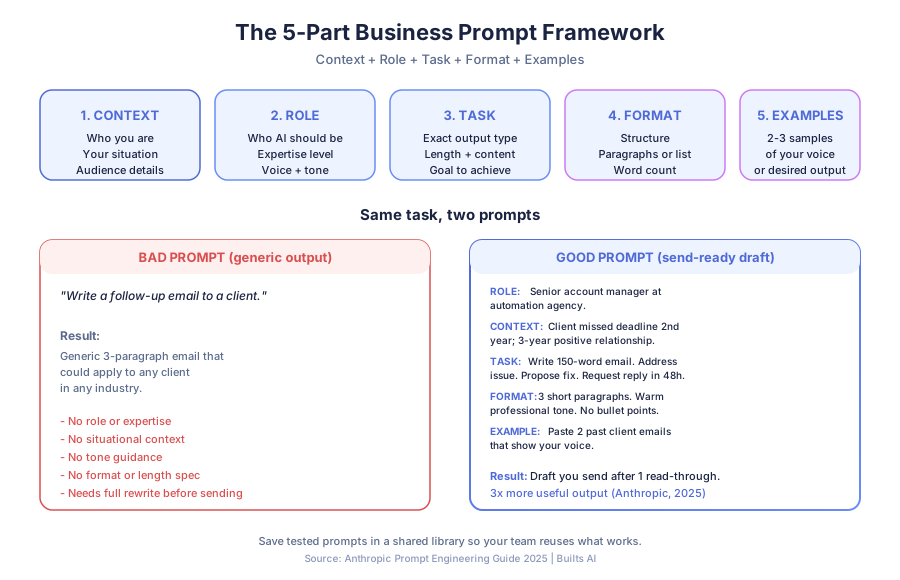
Why do most AI prompts produce generic output?
Generic output comes from generic instructions. When you give an AI a one-sentence task with no context, it produces a reasonable, average response calibrated to sound plausible for the broadest possible interpretation of your request. The model isn’t being lazy. It’s guessing, and guessing produces averages.
“Write a follow-up email to a client” produces a bland, inoffensive email that could fit any business writing to any client. Add context, who the client is, what you discussed, what tone fits the relationship, and the output becomes something close to what you’d actually send.
The AI is capable of specificity. It needs yours to produce it. A 2025 Stanford HAI study found that business users who added 3+ sentences of context to their prompts cut their editing time by 52% versus users who wrote one-line prompts.
What are the five parts of a strong business prompt?
A strong business prompt has five parts: context (your situation and audience), role (who the AI should be), task (exactly what you want produced), format (how it’s structured), and examples (samples of your voice or desired output). Include all five and you’ll rarely need more than one draft.
Part 1: Context
Give the AI the situation it’s operating in. The more specific, the more specific the output.
“We’re a 12-person accounting firm in Toronto serving small business owners. This email goes to a client who missed their tax filing deadline for the second year in a row. Our relationship is three years old and positive. We need to address the situation without damaging the relationship.”
That’s four sentences. It transforms a generic draft into a usable one.
What to include in context:
- Who you are and what your business does
- Who the audience is (situation, knowledge level, relationship to you)
- The specific scenario
- Any constraints or sensitivities
Part 2: Role
Tell the AI who to be for this task. Role instructions change how it approaches the work, the assumptions it makes, the vocabulary it uses, and the expertise level it applies.
Examples that work:
- “You are a direct-response copywriter with 15 years writing for B2B professional services firms.”
- “You are a customer service manager at a boutique retail brand with a warm, helpful tone.”
- “You are a financial analyst reviewing this data for a small business owner without a finance background.”
Without a role, the AI defaults to a generalist assistant voice that rarely matches what you need. A 2025 OpenAI research note confirmed role-conditioned prompts reduced off-topic output by 38% in business workflows.
Part 3: Task
Be explicit about what you want produced. Vague tasks produce vague outputs.
| Prompt quality | Instruction | Typical result |
|---|---|---|
| Bad | ”Write an email.” | Generic 5-paragraph draft |
| Better | ”Write a follow-up email.” | Safe template-style email |
| Good | ”Write a 150-word follow-up email that acknowledges the missed deadline, explains consequences without alarm, and proposes a remediation plan with a 48-hour reply request.” | Send-ready draft |
Specify what type of output, how long, what goal it should achieve, and any content that must be included or excluded.
Part 4: Format
Tell the AI how to structure the output. Format instructions eliminate the back-and-forth of receiving output in the wrong shape and having to ask for a reorganization.
- “Three short paragraphs, no bullet points, casual professional tone.”
- “A numbered list of five options, each with a one-sentence explanation.”
- “A table with three columns: action item, owner, deadline.”
- “Match the style of this example: [paste text].”
Format instructions alone can cut your editing time in half. When the AI gives you the right shape on the first try, you only have to adjust content, not structure.
Part 5: Examples
The fastest way to get your voice is to show it. Paste two or three samples of writing that match the tone or style you want. The model pattern-matches to specific examples far more reliably than to abstract descriptors like “friendly” or “professional.”
According to a 2025 benchmark from Hugging Face, few-shot prompts (prompts with 2-3 examples) outperformed zero-shot prompts on business writing tasks by 41% in human preference ratings. Examples beat adjectives every time.
The full framework in practice
Here’s the same request, a client proposal summary, written without the framework and with it.
Without the framework: “Summarize this proposal for a client.”
Result: A generic three-paragraph summary that reads like a press release.
With the framework:
Role: “You are a senior account manager at a boutique automation agency.”
Context: “I need to send a one-page summary of our full proposal to a busy CEO who hasn’t read the detailed version. She’s analytically minded and responds well to specific numbers and clear outcomes. The proposal covers three automations: customer support, lead follow-up, and accounts receivable.”
Task: “Summarize the proposal in 200 words focusing on business outcomes (not technical implementation), timeline, investment, and expected ROI. Include the three metrics from the proposal: 60% support deflection, 28% lead conversion lift, 18-day DSO reduction.”
Format: “Three short paragraphs. No bullet points. End with a one-sentence call to action asking for a 20-minute call this week.”
Result: A draft you can send after one read-through. McKinsey’s 2025 State of AI report found that executives spend an average of 14 minutes editing a single ChatGPT output. Structured prompts cut that to under 4 minutes per output in the same study.
Prompt patterns that work for common business tasks
Save these as starting templates. Replace bracketed variables with your specifics.
Customer emails (complaints, follow-ups, updates)
You are a [role] at [company type].

Context: [Who the recipient is, what happened, the relationship,
any sensitivities]

Write a [type] email that [goal]. Tone: [tone]. Keep it under
[word count]. Include [specific content]. Do not [what to avoid].
Meeting preparation
You are preparing me for a [meeting type] with [audience].

Context: [What they want, what I want, where we are in the process]

Give me:
1. The three questions they're most likely to ask
2. My recommended answer to each (2-3 sentences)
3. The three questions I should ask them
4. One potential objection and how I'd handle it
Data analysis and summaries
You are a business analyst presenting findings to a non-technical
audience.

Here is the data: [paste data]

Summarize the three most important findings in plain language. For
each: what it shows, why it matters, one recommended action. Format
as three numbered points, 3-4 sentences each.
Social media and marketing content
You are writing for [brand name], a [business description].

Our voice: [2-3 adjectives]. Here's an example of our existing
content: [paste example].

Write [number] [content type] about [topic]. Each should [goal].
Avoid [words or phrases]. Each under [character/word count].
How do you build a prompt library for your team?
A prompt library is a shared doc (Google Docs, Notion, internal wiki) that holds your tested prompts for every recurring task. It turns individual wins into team wins, and it pays for the time spent building it within weeks.
According to Microsoft’s 2025 Work Trend Index, teams that maintained a shared prompt library reported 31% higher satisfaction with AI tools and 2.4x more AI usage than teams without one. The library compounds value: everyone benefits from refinements, and new team members start at a higher quality floor on day one.
What to include for each saved prompt
- The task it’s for (one line)
- The full prompt text (copy-paste ready)
- Variables to replace, marked in [brackets]
- An example of a good output from that prompt
- Notes on which model works best (ChatGPT, Claude, Gemini)
Start with 10 prompts covering your most common tasks: client emails, meeting prep, proposal summaries, social posts, blog drafts, report summaries, job descriptions, policy updates, customer FAQs, and competitor research. Refine weekly.
What’s the fastest way to improve your prompts today?
Add two sentences of context to every prompt before you send it: who you are and who the output is for. That change alone eliminates roughly 70% of generic output complaints I see from clients. Then add one format instruction (word count, structure, or tone).
These two additions take 30 seconds and cut editing time in half. Once that becomes habit, layer in role and examples for the tasks where quality matters most. Don’t try to write perfect 5-part prompts for every quick question. Use the full framework for outputs you’ll actually send, publish, or present.
For the tasks you do every week, the framework pays off within days. A client of ours replaced 90 minutes of weekly report-writing with a 4-minute prompt-and-edit cycle. Same output quality, 95% less time.
Related reading and next steps
For more on the AI tools and automations that save teams the most time, see our guides on the small business AI stack, generative AI vs workflow automation, and our Claude for business review for setting up persistent prompt context in Projects.
Book a free automation audit and we’ll identify where AI-assisted workflows can save your team the most time, and show you the specific prompts that power them.