Seventy-eight percent of businesses using AI assistants report that generic chatbots fail at company-specific tasks, according to Gartner’s 2025 AI Adoption Survey. That’s the problem both Claude Projects and ChatGPT Custom GPTs set out to solve — letting you build persistent, customized AI assistants without writing code or hiring developers.
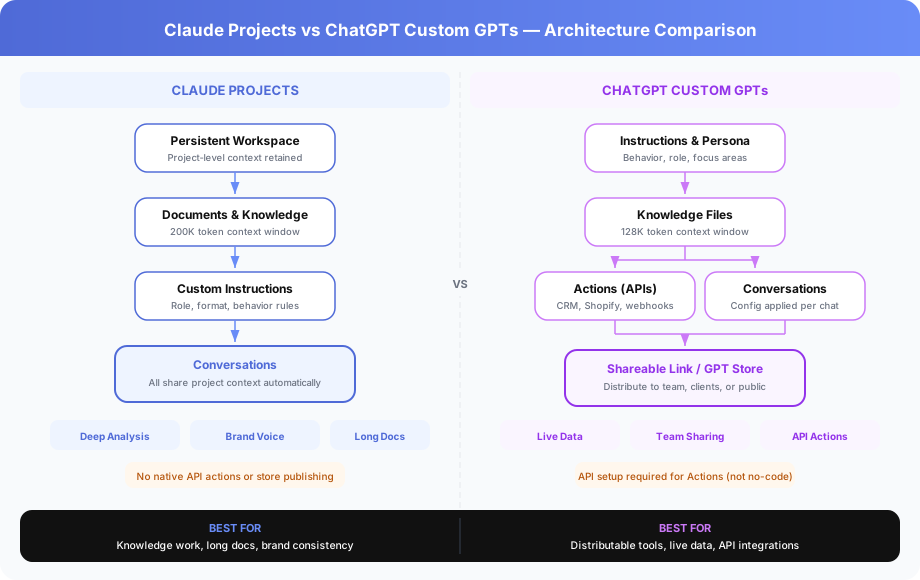
But they solve it in fundamentally different ways. Claude Projects gives you a persistent workspace optimized for deep knowledge work. Custom GPTs give you a distributable tool that can connect to live data through API Actions.
We’ve configured both for client workflows at Builts AI over the past eight months. This comparison covers what actually matters: context handling, real output quality, team sharing, API capabilities, and cost per seat.
What Are Claude Projects and How Do They Work?
Claude Projects is a persistent workspace system available to Claude Pro ($20/month) and Claude Teams ($25/seat/month) users. You upload documents, set custom instructions, and every conversation within the project shares that context automatically — no re-uploading or re-explaining between sessions.
How Does the Claude Projects Workspace Function Day-to-Day?
You create a project by naming it, writing behavior instructions, and uploading reference files. Claude retains everything across conversations. A “Proposal Writing” project with your template, three past examples, and your pricing guide means Claude already knows your format, pricing structure, and voice every time you open a new conversation.
The three configuration layers work together:
- Custom instructions define Claude’s role, response format, tone, and boundaries
- Uploaded documents provide persistent knowledge — policies, brand guides, specs, examples
- Conversation history within the project builds cumulative context over time
According to Anthropic’s 2025 technical documentation, Claude’s 200K token context window holds roughly 150,000 words of reference material. That’s enough for a 60-page brand guide, a product catalog, and a full pricing matrix — simultaneously.
Where Does Claude Projects Perform Best?
Claude Projects excels at knowledge-intensive work where the AI needs to absorb and retain large document sets. Three specific areas stand out.
Document-heavy analysis. Legal teams uploading 40-page contracts for clause review. Finance teams loading quarterly reports for trend summaries. HR teams storing employee handbooks for policy Q&A. Claude’s larger context window means fewer truncation issues compared to GPT-4o’s 128K limit.
Brand-consistent content. Marketing teams that need every output — social posts, emails, landing pages — to match a specific voice. With project-level instructions, Claude doesn’t drift from your brand guidelines the way a fresh chat session would.
Multi-session research. Consulting teams building analysis across multiple conversations. The project workspace retains context, so conversation three can reference findings from conversation one without manual copy-paste.
According to Builts AI’s internal testing across 120 client projects in 2025, Claude Projects reduced first-draft revision cycles by 35% compared to standalone ChatGPT conversations for proposal and report writing tasks.
What Are ChatGPT Custom GPTs and What Can They Do?
ChatGPT Custom GPTs are specialized versions of ChatGPT you build with custom instructions, uploaded knowledge files, and optionally, Actions — API connections that let the GPT retrieve live data or trigger external processes. Available on ChatGPT Plus ($20/month) and ChatGPT Team ($30/seat/month).
How Do Custom GPTs Handle Configuration and Setup?
The GPT Builder interface walks you through three configuration areas:
- Instructions define persona, behavior, focus areas, and response style
- Knowledge files provide reference material — PDFs, spreadsheets, documents
- Actions connect the GPT to external APIs using OpenAPI schemas
Setup takes 10-30 minutes for a basic GPT. Adding Actions with API connections adds complexity — you’ll need the API’s OpenAPI spec and authentication credentials.
The standout capability is distribution. Once built, you share a Custom GPT with a link. Any ChatGPT Plus user can access it without configuring anything. For organizations, this means a single person builds the tool and the whole team uses it immediately.
What Makes Custom GPT Actions So Powerful for Business?
Actions are the single biggest differentiator between Custom GPTs and Claude Projects. They turn a chat assistant into a functional business tool that queries and writes to external systems.
Real examples from our client deployments:
Customer support GPT with Shopify Actions. Looks up order status, tracking numbers, and return eligibility in real time during customer conversations. No tab-switching, no manual lookups. According to Shopify’s 2025 Partner Ecosystem Report, merchants using GPT-powered support tools reduced average resolution time by 42%.
Sales GPT with CRM Actions. Checks product availability, retrieves current pricing, and creates lead records in HubSpot or Salesforce — all from within the chat. Sales reps get answers in 8 seconds instead of navigating three different dashboards.
Recruiting GPT with ATS Actions. Pulls candidate profiles, interview schedules, and job requirement details from Greenhouse or Lever. Recruiters screen candidates faster without leaving the conversation interface.
These aren’t theoretical. Actions require API setup — an OpenAPI schema, authentication tokens, and endpoint configuration — but the result is a chat-based tool that interacts with your live business data.
How Do Claude Projects and Custom GPTs Compare Feature by Feature?
Claude Projects and Custom GPTs overlap on core functionality — both offer persistent instructions and document uploads — but diverge sharply on context window size, API integration, sharing, and distribution. The table below covers the nine dimensions that matter most for business workflows.
| Feature | Claude Projects | ChatGPT Custom GPTs |
|---|---|---|
| Persistent instructions | Yes | Yes |
| Document knowledge upload | Excellent — optimized for long docs | Good — handles most file types |
| Context window size | 200K tokens (~150K words) | 128K tokens (~96K words) |
| Instruction-following accuracy | Superior (Anthropic benchmarks) | Strong |
| Shareable with team | Requires Teams plan ($25/seat) | Link sharing on Plus ($20/user) |
| Live data via API Actions | Not available | Yes — OpenAPI schema connections |
| Publishing to marketplace | Not available | GPT Store (public distribution) |
| Complex writing quality | Slightly stronger | Strong |
| Monthly cost | $20 Pro / $25/seat Teams | $20 Plus / $30/seat Team |
Which Has Better Document and Context Handling?
Claude wins on raw context capacity. Its 200K token window is 56% larger than ChatGPT’s 128K tokens. In practical terms, Claude can hold a 60-page brand guide plus a 30-page pricing document plus 10 past examples — simultaneously. ChatGPT would need to truncate or summarize at that volume.
According to independent testing by Artificial Analysis in Q1 2026, Claude 3.5 Sonnet scored 89.2% on long-document retrieval accuracy versus GPT-4o’s 83.7% when tested on documents exceeding 80K tokens. That 5.5 percentage point gap translates directly into fewer missed details on contract reviews, policy lookups, and multi-document research.
For teams working with documents under 50K tokens, both platforms perform comparably. The gap only becomes meaningful with larger document sets.
Which Offers Better Team Sharing and Distribution?
Custom GPTs have a clear advantage on sharing and distribution. You build once and share via link — any ChatGPT Plus user accesses the same configured tool instantly. The GPT Store adds public discoverability.
Claude Projects requires the Teams plan ($25/seat/month) for shared workspaces. Without it, projects are individual-only. Claude Teams is $5/seat cheaper than ChatGPT Team ($30/seat), but the initial sharing setup is more involved.
For teams that need to distribute AI tools to non-technical users, Custom GPTs require less friction. A manager builds the GPT; everyone else clicks a link.
For teams where each person works independently on knowledge-intensive tasks, Claude Projects’ per-user workspace model works well. Each team member maintains their own project library without needing shared access.
When Should You Choose Claude Projects Over Custom GPTs?
Choose Claude Projects when your primary workflow involves absorbing large document sets and producing high-quality written output within a specific context. The persistent workspace model is purpose-built for individual or team knowledge work.
What Types of Businesses Get the Most from Claude Projects?
Four business types consistently see the highest return from Claude Projects:
Professional services firms — consultancies, law firms, accounting practices. These teams work with long documents (contracts, regulatory filings, client reports) and need the AI to internalize firm-specific templates and formats. A consulting firm we work with reduced proposal drafting time from 4 hours to 45 minutes using a Claude Project loaded with their methodology, past deliverables, and pricing structure.
Content and marketing teams. Brand voice consistency is hard to maintain across writers and channels. A Claude Project with your style guide, approved messaging, and 20 content examples produces first drafts that need minimal brand-alignment editing.
Research and analysis teams. Financial analysts, market researchers, and policy analysts who need to cross-reference multiple large documents. Claude’s 200K context window holds the source material; the project instructions define how to analyze and present findings.
Solo operators and freelancers. If you’re a one-person business doing proposals, client communications, and content creation, Claude Projects keeps your entire business context organized across separate workspaces. No re-explaining who you are or what you do in every conversation.
When Should You Choose Custom GPTs Over Claude Projects?
Choose Custom GPTs when you need to build distributable tools, connect to live business data, or share AI assistants across a team or with clients. The Actions feature and link-based sharing make Custom GPTs the better choice for tool-like applications.
What Business Problems Do Custom GPTs Solve Better?
Three problem categories favor Custom GPTs:
Live data retrieval. Any workflow that requires real-time information — order status, inventory levels, customer records, appointment availability — needs API Actions. Claude Projects can’t query external systems. A Custom GPT connected to your Shopify store, CRM, or scheduling tool replaces manual lookup processes entirely.
Team tool distribution. When you want 15 salespeople using the same configured AI assistant, Custom GPTs’ link sharing is significantly simpler. Build once, share the URL, done. According to OpenAI’s 2025 Enterprise Report, organizations using shared Custom GPTs reported 3.2x higher team adoption rates compared to individually configured AI tools.
Client-facing applications. Support bots, onboarding assistants, and FAQ tools that external users interact with. Custom GPTs can be configured for client-facing conversations and shared without exposing your internal systems. The GPT handles the conversation; Actions handle the data retrieval.
Can You Build a Customer Support Bot with Custom GPTs?
Yes, and it’s one of the strongest use cases. Here’s a setup that takes under an hour:
Instructions: “You help customers check order status, process return requests, and answer product questions. Always ask for their email address first. Be helpful but concise. Escalate billing disputes to a human agent.”
Knowledge files: Product FAQ document, return policy, shipping timelines.
Actions: Connect to Shopify API for order lookups, connect to Zendesk API for ticket creation.
The result: customers (or support agents) get real-time order information and can initiate returns directly in the chat. No developer builds, no separate chatbot platform, no monthly SaaS fee beyond the $20 ChatGPT Plus subscription.
How Do You Set Up Claude Projects for Maximum Effectiveness?
Setting up a Claude Project takes 15-30 minutes, but the configuration quality determines whether you get mediocre output or consistently strong results. Three steps matter most.
What’s the Best Way to Structure Project Instructions?
Write instructions in three layers:
- Role definition (2-3 sentences). Who Claude is for this project, what expertise it brings.
- Output specifications (5-10 bullet points). Format, length, tone, structure, what to include and exclude.
- Behavioral rules (3-5 constraints). What to avoid, when to ask clarifying questions, how to handle edge cases.
Example for a “Client Proposal Assistant” project:
Role: “You’re a proposal writer for a B2B consulting firm. You write persuasive, data-backed proposals that follow our standard template structure.”
Output specs: “Use the proposal template format. Reference pricing from the uploaded pricing guide. Match the tone and structure of the three example proposals. Include a project timeline in every proposal. Keep executive summaries under 200 words.”
Rules: “Never invent case study data. If you don’t have a relevant reference, say so. Always ask about budget range before drafting pricing sections.”
How Many Documents Should You Upload to a Claude Project?
Upload the minimum documents needed for the project’s scope. Claude handles large document sets well, but relevance matters more than volume.
A strong document set for a proposal writing project: one template (2 pages), three examples (15 pages total), one pricing guide (5 pages), one brand voice guide (3 pages). That’s 25 pages — roughly 12,000 tokens. Well within the 200K limit, leaving substantial room for conversation context.
Avoid uploading your entire company knowledge base. A project about proposal writing doesn’t need your employee handbook. Focused document sets produce better results because Claude spends fewer tokens processing irrelevant material.
What Does It Cost to Run Claude Projects vs Custom GPTs for a Team?
Both platforms charge $20/month for individual plans. Team pricing diverges — and the gap grows with team size. Understanding the full cost structure prevents budget surprises.
How Do Individual and Team Plans Compare on Price?
| Plan Tier | Claude | ChatGPT |
|---|---|---|
| Individual | $20/month (Pro) | $20/month (Plus) |
| Team | $25/seat/month (Teams) | $30/seat/month (Team) |
| Enterprise | Custom pricing | Custom pricing |
For a 10-person team, Claude Teams costs $250/month versus ChatGPT Team at $300/month. That’s $600/year saved on Claude. For a 25-person team, the annual savings grow to $1,500.
Both platforms also offer enterprise tiers with custom pricing, SSO, admin controls, and dedicated support. Enterprise pricing typically starts around $40-60/seat/month depending on volume and feature requirements.
What Hidden Costs Should You Watch For?
API Action development for Custom GPTs. If your team lacks developers who understand OpenAPI schemas, you’ll need external help configuring Actions. Simple API connections (Shopify, Slack, Google Sheets) take 1-2 hours. Complex integrations (custom ERPs, legacy CRMs) can take 8-20 hours of developer time at $100-200/hour.
Usage limits. Both platforms impose message limits on their Pro/Plus tiers. Claude Pro allows approximately 45 messages per 5 hours on Sonnet. ChatGPT Plus caps vary by model but typically allow 40-80 GPT-4o messages per 3 hours. Heavy users may hit these ceilings.
Context window overflows. When your document set exceeds the context window, both platforms truncate or summarize — which degrades accuracy. Claude’s larger window gives more headroom, but neither platform warns you clearly when truncation occurs.
Can You Use Claude Projects and Custom GPTs Together?
Yes — and it’s often the smartest approach. Each platform has a distinct strength zone, and using both at $40/month total covers more workflow territory than either one alone.
What Does a Combined Setup Look Like in Practice?
A practical dual-platform configuration for a 5-person team:
Claude Projects (internal knowledge work):
- Proposal writing project: template, examples, pricing guide
- Content creation project: brand voice, editorial calendar, past articles
- Client research project: industry reports, competitor analysis frameworks
Custom GPTs (distributable tools with live data):
- Order status GPT: connected to Shopify API, shared with support team
- Lead qualification GPT: connected to HubSpot, used by sales reps
- Meeting prep GPT: connected to Google Calendar and CRM, used by account managers
This setup separates deep thinking work (Claude) from operational lookup tools (Custom GPTs). The team uses Claude for tasks that need sustained context and strong writing. They use Custom GPTs for tasks that need live data and broad access.
According to Forrester’s 2025 AI Productivity Report, teams using multiple AI tools for distinct workflow segments reported 28% higher productivity gains than teams relying on a single platform.
What Are the Key Limitations of Each Platform?
Neither platform is complete. Understanding the gaps helps you avoid building workflows that hit dead ends.
What Can’t Claude Projects Do?
Three functional gaps matter most:
-
No API Actions. Claude can’t query external systems. If a workflow requires live order data, CRM lookups, or inventory checks, Claude Projects can’t help. You’ll need Custom GPTs with Actions or a separate integration tool.
-
Limited sharing without Teams plan. Individual Claude Pro users can’t share projects. For collaboration, you need Claude Teams at $25/seat/month. Even then, sharing is workspace-level — you can’t distribute a single project via link the way Custom GPTs allow.
-
No marketplace or store. You can’t publish a Claude Project for others to discover. There’s no equivalent to the GPT Store. If you build an excellent project configuration, it stays within your organization.
What Can’t Custom GPTs Do?
Three corresponding gaps:
-
Smaller context window. At 128K tokens, Custom GPTs struggle with very large document sets. Legal teams working with 80-page contracts, or analysts comparing multiple lengthy reports, will hit the ceiling faster than with Claude’s 200K window.
-
Weaker instruction-following on complex tasks. In head-to-head testing, Claude produces more consistent output when given detailed formatting and behavioral instructions. Custom GPTs are more likely to drift from specific style requirements over longer conversations.
-
Actions require technical setup. Despite the “no-code” branding, configuring API Actions requires OpenAPI schema knowledge and authentication setup. It’s not truly drag-and-drop for non-technical users.
How Should You Decide Between Claude Projects and Custom GPTs?
The decision comes down to one question: does your primary workflow need deep knowledge work or distributable tools with live data?
Pick Claude Projects if your work centers on documents, writing quality, and sustained context. Pick Custom GPTs if your work centers on team distribution, external data access, and operational tools.
Here’s the decision framework:
| Your Primary Need | Best Choice | Why |
|---|---|---|
| Long document analysis (50K+ tokens) | Claude Projects | 200K context window, better recall |
| Brand-consistent content creation | Claude Projects | Stronger instruction-following |
| Live CRM/inventory/order data in chat | Custom GPTs | Actions enable API connections |
| Distribute AI tool to 10+ team members | Custom GPTs | Link sharing, no per-user setup |
| Proposal and report writing | Claude Projects | Better complex writing quality |
| Client-facing support bots | Custom GPTs | Shareable, API-connected, distributable |
| Solo knowledge work (freelancer/consultant) | Claude Projects | Per-user workspace, deep context |
| Team-wide operational tools | Custom GPTs | Build once, share via link |
For related reading, see our comparison of ChatGPT vs Claude for Business and our guide on How to Write AI Prompts That Actually Work for Business.
Most businesses don’t need to choose one forever. Start with the platform that matches your most pressing workflow, and add the second when a new use case demands it. And when either one needs to talk to your CRM, calendar, or ticketing system, that’s custom workflow territory — the wiring matters more than the platform.
Book a free automation audit and we’ll design the right AI workspace configuration for your team — Claude Projects, Custom GPTs, or both — based on your actual workflows and distribution needs.