n8n has one of the most devoted followings in the automation world, and the reason is simple: it’s the only major workflow platform you can actually run yourself, for free, with full code access. In 2026 that matters more than ever as small businesses weigh data residency, vendor lock-in, and AI API costs. But “free and open source” hides a messier story. The real total cost of self-hosted n8n lands around $85-175 per month once you account for a VPS and maintenance time, according to typical VPS pricing from Hetzner and DigitalOcean plus standard developer rates. That’s almost 10x Make’s Core plan at $9/month, as listed on Make.com’s public pricing page.
This review covers what n8n actually delivers, who should run it, and when you’re better off paying for a managed platform.
What Is n8n and How Does It Work?
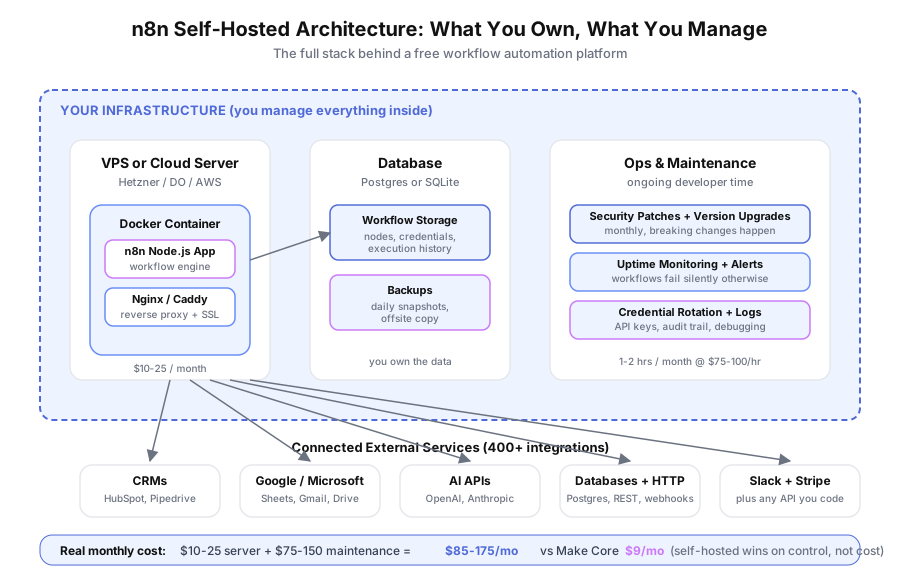
n8n is an open-source workflow automation platform with a drag-and-drop canvas. You build workflows by connecting nodes — triggers, app integrations, logic steps, and code blocks — similar to how Make and Zapier work. The difference is n8n’s source code is public, it runs on Node.js, and you can host it on your own server.
Three characteristics separate n8n from every other mainstream automation tool. First, the whole codebase is available on GitHub under a fair-code license, auditable and modifiable. Second, you can self-host on a $10 VPS, AWS, or on-premises hardware so workflow data never touches a third-party cloud. Third, n8n’s Code node runs full JavaScript or Python, not template expressions — you write real code inside a workflow step.
n8n reports on its website that the platform has been starred over 60,000 times on GitHub as of 2026, making it one of the most popular open-source automation projects.
Is n8n Worth Self-Hosting for a Small Business?
Self-hosting n8n is worth it when you have a developer on staff, strict data residency rules, or automation volume that breaks managed-platform pricing. For everyone else, the real monthly cost of running n8n yourself — about $85-175 including a VPS and maintenance time — is higher than Make’s managed tiers that do the same work.
The short version: “free open source” is real, but infrastructure and maintenance aren’t free. A small business owner asking “can I save money by running n8n myself?” usually can’t, unless the developer hours are already being paid for regardless.
If you’ve weighed all that and still want your own instance — the right call for compliance-bound and high-volume teams — our step-by-step n8n self-hosting guide covers the exact Docker setup, backup routine, and update process we use for client deployments.
Where the math flips in n8n’s favor:
- You already employ a developer and the maintenance time isn’t incremental cost.
- Compliance rules (HIPAA, PHIPA, legal confidentiality) require data to stay on your infrastructure.
- Your workflow volume is above roughly 100,000 operations per month, where Make’s tier pricing starts climbing.
- You want to avoid vendor lock-in entirely and own your automation stack end to end.
For a two-person marketing agency or a local services business with 5-10 basic workflows, Make is almost always the simpler, cheaper answer.
What Does n8n Do Genuinely Well?
n8n is best at complex data transformation, custom logic that doesn’t fit template builders, data-residency compliance, and high-volume automation where per-execution pricing hurts. Its Code node and self-hosted deployment give technical teams a level of control that Make and Zapier simply can’t match — and this is where the tool earns its following.
Data transformation that would fight Make
Reshaping nested JSON, parsing irregular API responses, and running calculations on workflow data are all straightforward in n8n’s Code node. You write standard JavaScript. In Make, similar work requires chains of Iterator, Array Aggregator, and Text Parser modules that weren’t designed for arbitrary transformation.
Custom logic without workarounds
Conditional branches that don’t fit if/then modules, error handling that retries with a backoff, and workflow-wide state — all clean in n8n because you have a real programming environment. Based on discussions in n8n’s community forum, Code node usage is one of the top reasons developers switch from Make.
Self-hosted data privacy
For industries governed by HIPAA, PHIPA, or legal confidentiality rules, self-hosted n8n means workflow data never hits a third-party processor. Make and Zapier can’t offer this — their architecture is cloud-only. This is a genuine compliance advantage, not a marketing claim.
Cost at high volume
n8n’s self-hosted model has no execution limits beyond what your server handles. Above roughly 100,000 operations per month, Make’s per-operation pricing starts to exceed a flat $25 VPS bill, according to Make’s published pricing tiers.
Where Does n8n Fall Short?
n8n has a smaller app library than Make, a steeper learning curve, less polish in the interface, and cloud pricing that’s actually more expensive than Make. These gaps don’t make n8n a bad tool — they make it a tool for a specific type of user, not a general-purpose choice for small businesses looking for simplicity.
Smaller app integration catalog
n8n ships with 400+ native integrations as listed on its integrations page. Make lists over 1,400 as of early 2026. For apps n8n doesn’t cover natively, you use the HTTP Request node and build API calls manually — workable if you know the API, friction if you don’t. Make often has the field mapping done for you.
Learning curve for non-developers
n8n’s expression editor uses JavaScript-like syntax to reference data from previous nodes. Make uses point-and-click data mapping. For a bookkeeper or ops lead who just wants to connect a form to a spreadsheet, Make is markedly friendlier.
Interface polish
n8n’s canvas works, but Make’s is more refined — cleaner module icons, better error messages, richer data previews. Small things add up when you’re debugging a workflow at 9pm.
n8n Cloud pricing
n8n Cloud starts at €20/month for 2,500 workflow executions on the Starter plan, according to n8n.io’s public pricing page as of August 2026. Make Core is $9/month for 10,000 operations. If you want n8n specifically for its Code node but don’t want to self-host, n8n Cloud costs more than Make for comparable work.
What Does Self-Hosted n8n Really Cost?
Self-hosted n8n software is free, but the real monthly cost for a small business lands at $85-175 once you include VPS hosting ($10-25), maintenance labor (1-2 hours per month at $75-100/hour), and initial setup time. That’s often 10x Make Core’s $9/month sticker price, and the gap only closes at high automation volume or when compliance forces self-hosting.
Here’s the honest breakdown. Numbers based on typical Hetzner and DigitalOcean VPS pricing and standard freelance developer rates:
| Cost Component | Monthly Estimate |
|---|---|
| VPS server (Hetzner, DigitalOcean, etc.) | $10-25/month |
| Initial setup (4-8 hours developer time) | $300-600 one-time |
| Ongoing maintenance (1-2 hours monthly) | $75-150/month |
| SSL certs, monitoring, backups | $5-15/month |
| Total monthly (after setup) | $90-190/month |
| Make Core equivalent | $9/month |
| Make Pro equivalent | $16/month |
| n8n Cloud Starter equivalent | €20/month |
Maintenance is the line most small businesses underestimate. n8n ships updates regularly — sometimes with breaking changes — and a workflow that silently fails after a bad update can cost more in missed leads than any infrastructure bill. Uptime monitoring, credential rotation, and disaster recovery planning aren’t optional.
The calculus only flips in n8n’s favor when maintenance time isn’t incremental (you already pay a developer), compliance mandates self-hosting, or automation volume makes flat infrastructure cheaper than per-operation pricing.
Who Should Actually Use n8n?
n8n is the right choice for technical teams with JavaScript skills, businesses with strict data residency requirements, agencies building white-label automation infrastructure, and high-volume operators hitting managed-platform pricing ceilings. It’s the wrong choice for small businesses without developer resources, teams that want fast deployment, and anyone whose needs are well-served by Make’s app library.
Clear fit:
- Healthcare practices, legal firms, and financial services with HIPAA, PHIPA, or similar residency rules
- Development shops and agencies with strong JavaScript skills building custom automation for clients
- Technical founders who value open-source control and want zero vendor lock-in
- Operations teams running above 100,000 automation executions per month
Clear miss:
- Solo operators and small teams without any developer support
- Businesses that want to ship workflows in a day, not a week
- Teams whose automation needs map cleanly to Make’s ready integrations
Worth evaluating:
- Agencies who charge clients for automation and can bill the infrastructure as a service
- Companies with existing server infrastructure where adding n8n has near-zero marginal cost
- High-volume operators who have outgrown Make’s pricing
If you fit the “clear miss” category, our Make review covers the managed alternative in detail.
How Does n8n Cloud Compare to Self-Hosting?
n8n Cloud is the managed version of n8n run by the n8n team. It removes all infrastructure responsibility but costs more than self-hosting at moderate volume and more than Make at comparable usage. It’s the right path when you want n8n’s Code node flexibility without managing a server yourself — a narrower use case than either extreme.
n8n Cloud pricing as listed on n8n.io in 2026:
- Starter: €20/month for 2,500 workflow executions
- Pro: $50/month for 10,000 executions
- Enterprise: custom pricing with SSO, RBAC, and dedicated support
Compare to Make’s listed tiers: $9/month for 10,000 operations on Core, $16/month for 10,000 on Pro. n8n Cloud costs more per execution at every tier below Enterprise. The reason to pick n8n Cloud anyway is the Code node and open-source portability — if you ever outgrow cloud, you can migrate your workflows to self-hosted n8n without rebuilding them. You can’t do that with Make.
What Features Should You Evaluate First?
When testing n8n for your business, focus on four things: the Code node for custom logic, self-hosting fit with your infrastructure, the HTTP Request node for apps outside the 400+ native catalog, and error handling for production reliability. These are the areas where n8n either shines or frustrates depending on your team’s skills.
Start with the Code node. Build one workflow that does a real data transformation you care about — reshaping a Typeform submission into a CRM record, or pulling three API responses together into a Slack digest. This is where n8n differentiates.
Next, try a self-hosted install on a $5 Hetzner VPS using n8n’s Docker Compose template. The official n8n docs walk through this in under an hour for developers familiar with Docker. If the setup feels like a slog, self-hosting isn’t for your team.
Third, pick one app that n8n doesn’t have a native integration for and build it with the HTTP Request node. This simulates the real-world experience when you hit the limits of the 400+ catalog.
Fourth, intentionally break a workflow and see what n8n tells you. Error messages, retry policies, and execution history matter more than feature lists once your automation is in production.
How Does n8n Compare to Make at a Glance?
n8n and Make solve the same problem — visual workflow automation — but with opposite philosophies. Make is managed, polished, and priced for small business. n8n is open source, flexible, and priced by your willingness to run infrastructure. The right choice depends on whether you value control (n8n) or simplicity (Make).
| Factor | n8n (Self-Hosted) | n8n Cloud | Make |
|---|---|---|---|
| Starting price | $10-25/mo infra | $20/mo | $9/mo |
| Real monthly cost | $85-175/mo | $20/mo+ | $9-16/mo |
| Native integrations | 400+ | 400+ | 1,400+ |
| Custom code | Full JS/Python | Full JS/Python | Limited |
| Self-hosting | Yes | No | No |
| Setup time | 4-8 hours | 15 minutes | 15 minutes |
| Data residency | Full control | n8n cloud | Make cloud |
| Best for | Developers, compliance | n8n fans without servers | Most small businesses |
For a deeper comparison, our Make vs n8n post walks through specific use cases.
Bottom Line: Should You Pick n8n in 2026?
Pick n8n self-hosted if you have developer capacity and compliance or volume reasons to own your automation stack — the control and flexibility are real. Pick n8n Cloud if you want the Code node and portability without running servers. Pick Make if you’re a small business looking for fast setup, 1,400+ integrations, and predictable sub-$20 monthly pricing. Most small businesses land in the Make camp, and that’s the right call.
n8n is a tool built for people who want automation infrastructure they can open, read, modify, and move. If that description fits your team, it’s an excellent choice and you’ll get value from every feature. If it doesn’t, the hidden costs and operational burden will drain any savings from the “free” open-source label. (We run n8n and Make for clients as part of custom workflow builds, so that burden lands on us, not you.)
Book a free automation audit and we’ll assess your data requirements, technical capacity, and automation scope — then tell you honestly whether n8n self-hosted, n8n Cloud, or Make is the right foundation for your workflows.