According to Grand View Research’s 2025 market report, the global chatbot market reached $7.01 billion in 2024 and is growing at 23.3% annually. That growth has created a crowded field of no-code chatbot builders, but three platforms keep showing up in every comparison: Chatbase, Botpress, and Voiceflow. After testing all three on real client projects — a 200-page knowledge base for a healthcare practice, a multi-step lead qualification flow for a SaaS company, and a voice-enabled support agent for an e-commerce brand — the differences aren’t subtle. They’re built for fundamentally different users.
What Is the Difference Between Chatbase, Botpress, and Voiceflow?
Chatbase is a knowledge-base chatbot builder that deploys GPT-powered Q&A bots in under an hour. Botpress is an open-source conversational AI platform where developers build complex logic flows. Voiceflow is a visual conversation design tool for teams creating multi-turn chatbots and voice agents without full developer involvement.
These three platforms represent three distinct philosophies. The right choice depends on two factors: how complex your conversations need to be and how much technical capacity your team has.
Chatbase starts from a single question: what content does your business have? You upload documents, website pages, or FAQ text. The platform trains a GPT-powered chatbot on that content and gives you a deployable widget. Users ask questions; the chatbot retrieves answers. That’s the entire product.
Botpress starts from a different question: what conversation logic do you want to build? You create nodes (conversation steps), define transitions, integrate LLM calls, and connect external systems. It’s the most flexible option — and the most complex. According to Botpress’s 2025 community survey, 68% of active users are software developers or DevOps engineers.
Voiceflow asks: what experience do you want to create? Teams design multi-step dialogue flows on a visual canvas. It’s used by conversation designers, product managers, and agencies. More accessible than Botpress for non-developers, more capable than Chatbase for complex flows.
How Do Setup Time and Learning Curve Compare?
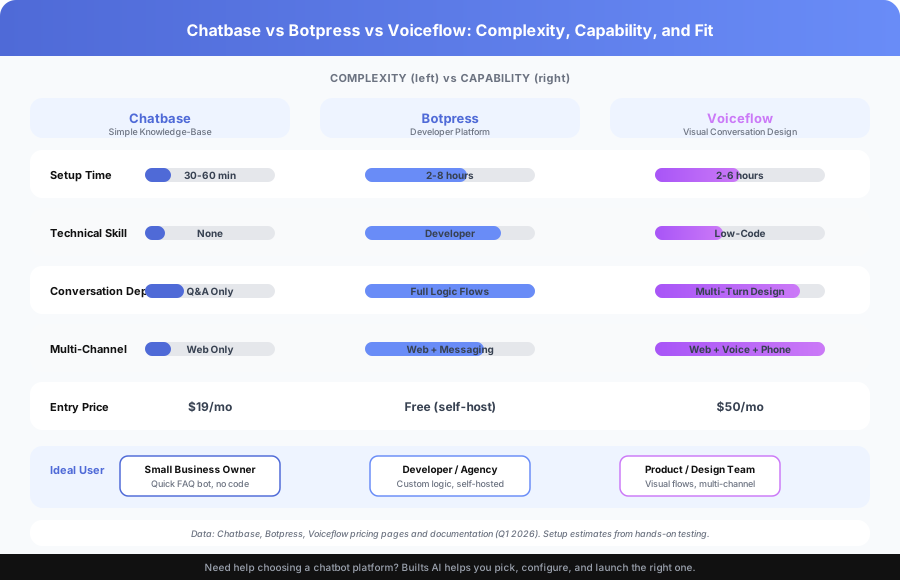
Chatbase takes 30 to 60 minutes from signup to live chatbot. Botpress requires 2 to 8 hours for a basic deployment and weeks to master. Voiceflow sits in between at 2 to 6 hours for a working prototype, with a gentler learning curve than Botpress for non-developers.
Setup time matters because it determines how quickly you can test whether a chatbot actually solves your problem. Here’s what we measured across three real deployments:
Chatbase: We uploaded 47 FAQ documents and 12 policy PDFs for a dental practice. The chatbot was answering patient questions accurately within 45 minutes. No conversation design needed — it’s purely retrieval-based. The widget was embedded on the practice’s website the same afternoon.
Botpress: For a SaaS client that needed conditional lead qualification (different flows for enterprise vs. SMB vs. freelancer), initial setup took 6 hours. The first version worked, but refining the conversation logic, adding API calls to their CRM, and testing edge cases took another two weeks. A developer was involved throughout.
Voiceflow: We built a product recommendation flow for an e-commerce client using Voiceflow’s visual canvas. The first working prototype took 4 hours. A product manager with no coding experience designed 80% of the flow. The developer only stepped in to connect the inventory API.
According to Voiceflow’s 2025 platform report, the average time from account creation to first published bot is 3.2 hours for teams with no prior conversation design experience.
Which Platform Has the Best Features for Your Use Case?
Chatbase excels at one thing: knowledge-base Q&A with zero setup complexity. Botpress wins on developer flexibility and self-hosting options. Voiceflow leads in visual conversation design, multi-channel deployment, and native voice agent capability.
The feature gap between these platforms isn’t about “better” or “worse” — it’s about fit. A dental practice doesn’t need Botpress’s node-based logic editor. An enterprise building a multi-language voice agent doesn’t need Chatbase’s simplicity.
| Feature | Chatbase | Botpress | Voiceflow |
|---|---|---|---|
| Setup time (basic bot) | 30-60 minutes | 2-8 hours | 2-6 hours |
| No-code capability | Full | Partial (code for complex flows) | Strong |
| Knowledge-base Q&A | Core feature | Via LLM integration | Via LLM integration |
| Multi-step guided flows | Limited | Excellent | Excellent |
| Live data API integration | Requires Zapier/Make | Built-in | Built-in |
| Voice agent capability | None | Via integration | Native |
| Multi-channel deployment | Web + API | Web, WhatsApp, Slack, Telegram | Web, WhatsApp, Alexa, phone |
| Open source option | No | Yes | No |
| White-label | No | Yes | Yes (Agency plans) |
| Analytics and testing | Basic | Good | Excellent |
How Does Pricing Compare Across Chatbase, Botpress, and Voiceflow?
Chatbase is the cheapest starting at $19 per month. Botpress self-hosted is free for software but carries infrastructure costs. Voiceflow’s Pro plan starts at $50 per month and scales to custom enterprise pricing.
Pricing is where the differences between these platforms become concrete. The cheapest plan on paper isn’t always the cheapest in practice.
| Plan Level | Chatbase | Botpress | Voiceflow |
|---|---|---|---|
| Free tier | 30 messages/month | 5 bots, limited credits | 1 editor, basic features |
| Entry paid | $19/month (Hobby) | Self-hosted (free software) | $50/month (Pro) |
| Mid tier | $49/month (Standard) | $495/month (Cloud Team) | $125/month (Team) |
| Enterprise | $399/month | Custom | Custom |
The real cost picture: Chatbase’s $19/month Hobby plan includes 2,000 messages. For a small business getting 50-100 chatbot conversations per day, that’s sufficient. At $49/month (Standard), you get 10,000 messages — enough for most mid-size deployments.
Botpress self-hosted is “free” but isn’t actually free. You’ll pay $20-50/month for server hosting (DigitalOcean, AWS), plus developer time for setup and maintenance. According to Botpress’s own documentation, the self-hosted version requires Docker, PostgreSQL, and Redis — meaning someone technical needs to manage it. The Cloud Team plan at $495/month makes sense for agencies managing multiple client bots.
Voiceflow at $50/month (Pro) gets you the full visual canvas, API integrations, and deployment to web. The $125/month Team plan adds collaboration features. For the capability you get — visual design, multi-channel, voice — it’s reasonably priced compared to building the same thing on Botpress Cloud.
When Should You Choose Chatbase Over Botpress and Voiceflow?
Choose Chatbase when you need a knowledge-base Q&A chatbot live in under an hour, have no developer resources, and don’t need multi-step conversation logic. It’s the best option for small businesses that want GPT-powered answers from their existing content.
Chatbase’s sweet spot is narrow but well-defined:
- You have organized content. Website pages, FAQ documents, policy PDFs, help articles. Chatbase trains on this content and answers questions from it.
- Your conversations are open-ended Q&A. Users ask questions, the bot answers. No branching logic, no multi-step flows, no conditional routing.
- You have no developer on staff. The entire setup is drag-and-drop. Upload content, configure persona, embed widget.
- Speed matters. A dental practice we work with went from “we want a chatbot” to “it’s answering patient questions on our website” in 47 minutes.
Real example: A property management company with 200+ FAQ pages about tenant policies. They needed a chatbot that answered tenant questions 24/7. Chatbase handled this perfectly — 92% accuracy on test questions, deployed in under an hour, $19/month. No other platform would have been faster or cheaper for this use case.
The limitation: If your chatbot needs to guide users through a process — qualify leads, collect structured information, route conversations based on answers — Chatbase’s open-ended Q&A model won’t work. You need Botpress or Voiceflow.
When Should You Choose Botpress Over Chatbase and Voiceflow?
Choose Botpress when you have developer resources, need full control over conversation logic, require self-hosted deployment for data privacy, or want to build complex conditional flows with custom code.
Botpress is the platform for teams that think in logic, not in conversation design:
- You have developers building the chatbot. Botpress’s power comes from its node-based logic editor with JavaScript/TypeScript support. Non-developers will struggle with anything beyond basic flows.
- You need conditional conversation routing. If the answer to question 2 depends on the answer to question 1, and the next three questions change based on a CRM lookup, Botpress handles this natively.
- Data residency matters. The self-hosted option lets you run the entire platform on your own servers. For healthcare, finance, and government clients with strict data regulations, this is often a hard requirement.
- You’re an agency building for multiple clients. Botpress Cloud’s white-label capability and multi-bot management make it practical for agencies. The $495/month Team plan supports this workflow.
Real example: A B2B SaaS company needed a chatbot that qualified inbound leads differently based on company size, industry, and current tech stack. The flow had 14 conditional branches, pulled data from HubSpot, and routed qualified leads to different sales reps. Botpress was the only option that handled this without workarounds. Setup took 3 weeks with a developer.
The limitation: The learning curve is steep. According to G2’s 2025 review data, Botpress scores 7.8 out of 10 for ease of use compared to 9.1 for Chatbase. If you don’t have a developer available, Botpress’s flexibility becomes complexity you can’t use.
When Should You Choose Voiceflow Over Chatbase and Botpress?
Choose Voiceflow when you need sophisticated multi-turn conversation design, multi-channel deployment including voice, or when your team includes conversation designers and product managers who aren’t developers.
Voiceflow occupies the space between Chatbase’s simplicity and Botpress’s developer-centric approach:
- Your team designs conversations visually. Voiceflow’s canvas-based interface lets product managers and conversation designers build complex dialogue flows without writing code. Think Figma, but for conversations.
- You’re building across channels. Web chatbot, WhatsApp, Alexa skill, and phone IVR — all from the same conversation design. Voiceflow supports this natively. Neither Chatbase nor Botpress matches this breadth.
- The conversation is complex but the team isn’t technical. Multi-step onboarding, product recommendation flows, guided troubleshooting — these require logic, but Voiceflow’s visual builder makes that logic accessible.
- You do conversation design as a service. Agencies and consultancies use Voiceflow because clients can see and understand the conversation flow on the canvas. It makes collaboration practical.
Real example: An e-commerce company wanted a product recommendation chatbot that asked 5-7 questions, checked live inventory via API, and presented personalized suggestions — deployed on their website and WhatsApp. Voiceflow handled the multi-channel deployment, the visual flow design (the product manager owned 90% of it), and the API integration (one developer connected it in an afternoon). Total build time: 2 weeks.
The limitation: Voiceflow is more expensive than Chatbase for simple Q&A bots. If your chatbot only needs to answer questions from existing content, paying $50-125/month for Voiceflow’s design capabilities you won’t use doesn’t make sense.
How Do These Platforms Handle AI Model Integration?
Chatbase uses OpenAI’s GPT models with automatic retrieval from your uploaded content. Botpress lets developers choose and configure any LLM via API calls within conversation nodes. Voiceflow supports multiple AI models through its visual canvas and offers built-in prompt management.
The AI model layer matters because it determines how “smart” your chatbot’s responses are and how much control you have over that intelligence.
Chatbase is tightly integrated with OpenAI. You upload content, and the platform handles embeddings, retrieval, and response generation automatically. You can adjust the chatbot’s persona, temperature, and response length — but you can’t swap in a different model or customize the retrieval pipeline. For most small businesses, this is a feature, not a limitation. It means less to configure.
Botpress gives developers full control over AI model integration. You can call OpenAI, Anthropic, or any other LLM via API within conversation nodes. This means you can use Claude for nuanced responses, GPT-4 for general queries, and a local model for sensitive data — all in the same bot. The trade-off: you’re responsible for prompt engineering, token management, and API cost optimization.
Voiceflow sits in the middle. It supports multiple AI models through its Knowledge Base feature and AI steps on the canvas. You get visual prompt management — useful for non-developers who need to tune AI responses without writing code. According to Voiceflow’s documentation, teams can A/B test different prompts and models directly from the canvas.
What Are the Key Limitations of Each Platform?
Chatbase can’t handle multi-step conversation logic or conditional routing. Botpress requires developer skills that most small businesses don’t have. Voiceflow costs more than needed for simple Q&A bots and has a steeper learning curve than Chatbase.
Every platform has constraints. Understanding them prevents expensive mismatches.
Chatbase limitations:
- No conditional conversation flows. The bot answers questions — it doesn’t guide users through processes.
- Limited multi-channel support. Web widget and API only. No native WhatsApp, Slack, or voice deployment.
- Basic analytics. You can see conversation logs but lack detailed funnel analysis or drop-off tracking.
- No white-label option. You can remove the Chatbase branding on paid plans, but can’t fully rebrand for agency clients.
Botpress limitations:
- Steep learning curve. Non-developers report 2-4 weeks to become comfortable with the platform, based on community forum feedback.
- Self-hosted maintenance burden. Updates, security patches, scaling, and backup management fall on your team.
- Cloud pricing gap. There’s no mid-tier option — it jumps from the limited free tier to $495/month for Cloud Team.
- Documentation gaps. The open-source community is active, but official documentation sometimes lags behind feature releases.
Voiceflow limitations:
- Overkill for simple Q&A. If you only need a knowledge-base bot, you’re paying for conversation design tools you won’t use.
- Voice deployment complexity. Native voice support is a strength, but voice conversation design is inherently harder than text — expect longer development cycles.
- No open-source option. You’re committed to Voiceflow’s pricing and platform decisions.
Which Platform Wins the Head-to-Head Comparison?
There’s no single winner. Chatbase wins for speed and simplicity on knowledge-base bots. Botpress wins for developer control and self-hosting. Voiceflow wins for visual conversation design and multi-channel deployment. The right choice depends on your team and your use case.
Here’s the decision matrix we use with our own clients:
| If you need… | Choose |
|---|---|
| A quick AI FAQ bot with no coding | Chatbase |
| The cheapest possible option with technical capacity | Botpress (self-hosted) |
| Complex multi-turn conversations with visual design | Voiceflow |
| Voice agent and chatbot on the same platform | Voiceflow |
| White-label for agency clients | Botpress or Voiceflow |
| Live database or CRM access without coding | Voiceflow |
| Self-hosted deployment for compliance | Botpress |
| Fastest time to live chatbot | Chatbase |
| Custom LLM integration with full code control | Botpress |
The pattern we see across client projects: About 60% of small businesses that come to us need Chatbase-level simplicity. They have FAQ content, they want it accessible via chatbot, and they want it live this week. Another 25% need Voiceflow-level conversation design — they’re building guided experiences, multi-channel deployments, or voice agents. The remaining 15% have developers and need Botpress-level control for custom integrations, self-hosting requirements, or complex conditional logic.
Can You Migrate Between These Platforms Later?
You can migrate, but it’s not a one-click process. Chatbase to Voiceflow is the most common upgrade path. Botpress to Voiceflow or vice versa requires rebuilding conversation flows. Plan for 1 to 3 weeks of migration work depending on complexity.
Migration is worth considering because your chatbot needs may grow. A company that starts with a Chatbase FAQ bot might need Voiceflow’s guided flows a year later.
Chatbase to Voiceflow: The most common migration path. Your knowledge base content transfers easily — you re-upload documents into Voiceflow’s Knowledge Base feature. The new work is designing conversation flows that Chatbase didn’t have. Plan for 1-2 weeks.
Chatbase to Botpress: Less common. Usually happens when a company hires developers and wants self-hosting or deep customization. Content migrates through re-upload, but you’re building conversation logic from scratch in a developer-centric tool.
Botpress to Voiceflow (or reverse): These are fundamentally different tools. Conversation logic built in Botpress’s code-based nodes doesn’t translate to Voiceflow’s visual canvas. You’re rebuilding, not migrating. Plan for 2-3 weeks.
Our advice: Start with the simplest platform that meets your current needs. Chatbase at $19/month is a low-risk starting point. If you outgrow it, the migration to Voiceflow or Botpress is manageable.
How Do You Decide Which Chatbot Builder Is Right for Your Business?
Start with two questions: does your chatbot need to guide users through a specific process (yes means skip Chatbase), and does your team include developers (no means skip Botpress). Those two filters narrow the field for 80% of businesses.
Here’s the full decision framework:
Step 1: Define the conversation type.
- Open-ended Q&A from existing content? Chatbase.
- Guided multi-step flow with conditional logic? Voiceflow or Botpress.
- Voice agent or multi-channel deployment? Voiceflow.
Step 2: Assess your team.
- No developer, no conversation designer? Chatbase.
- Conversation designer or product manager, no developer? Voiceflow.
- Developer available full-time for chatbot work? Botpress.
Step 3: Check constraints.
- Data residency or self-hosting required? Botpress.
- Budget under $50/month? Chatbase.
- White-label needed for clients? Botpress or Voiceflow.
Step 4: Test before committing. All three offer free tiers. Build a prototype on your top choice. If it doesn’t fit in the first week, you’ll know. Or skip the prototyping phase — our AI customer service builds include platform selection, so you only build once.
For related reading, see our Chatbase Review, our Best AI Chatbot Builders comparison, and our Intercom Fin AI alternatives comparison if you are choosing between full customer service platforms rather than standalone chatbot builders.
Book a free automation audit and we’ll assess your conversation design requirements and technical capacity — then recommend the right platform and help you design the chatbot flow that serves your customers best.