We’ve built more than 40 production scenarios on Make.com across client accounts in the last 18 months. One agency client runs 11,400 operations every month on a $9 plan. A dental practice replaced 6 hours of weekly admin work with a single Make scenario that cost $9. An e-commerce brand uses Make to route 1,200 monthly orders through a 9-module AI classification flow. Make isn’t the easiest automation platform to learn. It is, for most small businesses with real workflows, the right one.
What Is Make.com and How Does It Actually Work?
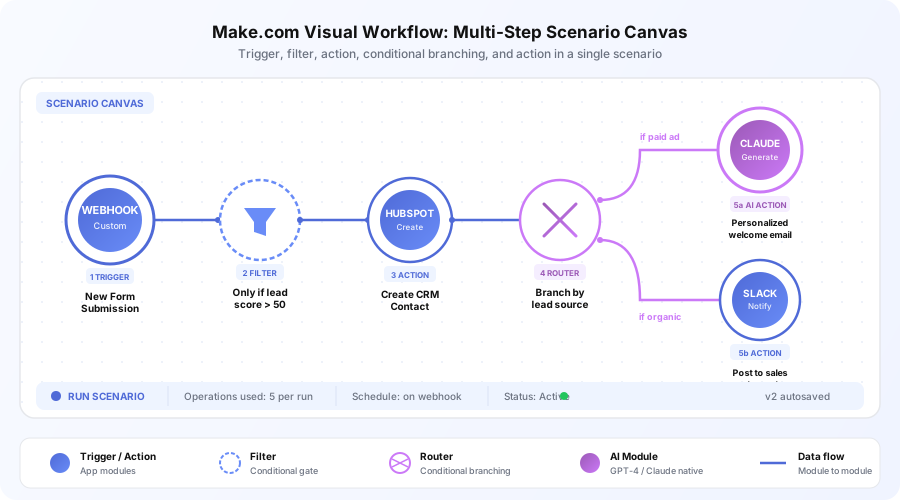
Make (formerly Integromat, rebranded in 2022) is a visual automation platform where you build “scenarios” — Make’s word for automated workflows — on a canvas. Each step is a circular “module” tied to an app, and lines between modules show how data flows through the automation.
The visual metaphor matters. You see the full logic at once instead of scrolling a linear list. When a scenario fails, you see exactly which module errored and why. When you’re debugging a complex flow, the canvas is faster to read than any step-by-step builder.
Make handles triggers (new form submission, webhook, scheduled time), actions (create records, send emails, post to Slack), logic (filters, routers, iterators), data transformation, and native AI calls to OpenAI and Claude. According to Make’s 2026 product page, the platform supports 1,400+ app integrations with new ones added weekly.
What Does Make Do Better Than Zapier in 2026?
Make beats Zapier in four specific areas: complex logic handling, data transformation tools, AI integration quality, and raw pricing. Zapier still wins on total app count and first-day simplicity, but Make’s ceiling is much higher. These are the differences we see in every client implementation.
Complex Workflow Logic
Zapier uses a linear step-by-step builder. Branching paths, loops, and multiple data sources become unwieldy in a vertical list. Make’s canvas keeps complex flows readable.
The router module is a good example. You define multiple paths, each with filter conditions, and data flows to the right path based on the inputs. In Zapier, this requires separate Zaps or the multi-step Paths feature that’s harder to maintain.
Our e-commerce client runs a single Make scenario that handles 6 product categories, each routing through different inventory checks, fulfillment partners, and customer notifications. The same logic on Zapier would need 6 separate Zaps and manual maintenance.
Data Transformation Built In
Passing data between apps often requires reformatting it. APIs return dates in one format, your CRM expects another, and responses include nested JSON you need to flatten. Make’s built-in text, number, and JSON functions handle these cases without extra steps.
Zapier requires “Formatter” steps that add operations and cost. A 5-step Zapier workflow with 3 formatters becomes 8 billed tasks. The same logic in Make stays at 5 operations because the transformations run inside existing modules.
AI Integration Quality
Make’s OpenAI and Anthropic modules support sophisticated AI workflows: send text to GPT-4 or Claude, parse the response, and use extracted data in subsequent modules. Both modules appear in Make’s official app directory with full documentation.
Building an AI customer-support triage flow — new email, AI classifies intent, route to appropriate response, log in CRM — is a straightforward Make scenario we’ve deployed 9 times. It’s harder to build this cleanly in Zapier because of how Zapier handles conditional data passing between steps.
Pricing Efficiency
| Usage level | Zapier 2026 | Make 2026 | Savings |
|---|---|---|---|
| ~1,000 ops/month | $19.99/month | $9/month | 55% |
| ~5,000 ops/month | $49/month | $9/month | 82% |
| ~15,000 ops/month | $69/month | $16/month | 77% |
| ~50,000 ops/month | $99+/month | $29/month | 71% |
At every level above the free tier, Make is significantly cheaper for equivalent operation volumes. Per Zapier’s published pricing and Make’s current rates as of April 2026, this gap hasn’t narrowed over the last year.
Where Does Make.com Fall Short?
Make has three real limitations that matter in practice. The first week of use is harder. The app directory is smaller than Zapier’s. And some niche tools only ship Zapier integrations first.
App integration count. Make has 1,400+ apps. Zapier has 6,000+, according to its app directory page. Mainstream business apps (HubSpot, Shopify, Slack, Google Workspace, Airtable, Stripe, Notion) all work well on Make. Niche vertical-specific tools are more likely to have Zapier-first integrations. Check your specific stack before committing.
Learning curve in week one. Zapier’s linear builder is faster for total beginners. Make’s canvas needs 2-4 hours of orientation. Most non-technical users are comfortable by day three, but the first day feels harder than Zapier’s 30-minute first-Zap experience.
Team familiarity. More people have heard of Zapier. If you’re handing an automation platform to clients or team members for independent use, Zapier’s broader recognition sometimes reduces onboarding friction. We train internal teams on Make regardless because the ceiling is worth the tradeoff.
Execution speed on free and Core plans. Scenarios wait in a queue during high-traffic periods on lower tiers. Pro ($16/month) prioritizes execution. For real-time customer-facing automations, that $7 upgrade is worth it.
How Much Does Make.com Cost in 2026?
Make’s paid plans start at $9/month for 10,000 credits on Core — the plan most small businesses should pick. One naming change to know: Make’s pricing page now counts “credits” instead of “operations,” but the meter works the same way — every module action a scenario performs consumes one. These are Make’s published rates as of August 2026, billed annually; monthly billing runs roughly 15% higher.
| Plan | Monthly cost | Credits included | Key unlock | Best for |
|---|---|---|---|---|
| Free | $0 | 1,000 | Visual builder, 15-min minimum interval | Testing and learning |
| Core | $9 | 10,000 | Unlimited active scenarios, 1-min scheduling, API access | Most small businesses |
| Pro | $16 | 10,000 | Priority execution, full-text log search | Real-time workflows |
| Teams | $29 | 10,000 | Team roles, shared scenario templates | Multi-user teams |
| Enterprise | Custom | Custom | Custom functions, 24/7 support, overage protection | Large organizations |
Listed prices are each tier’s starting 10,000-credit bundle — higher monthly volumes are purchasable within every tier, and data transfer scales alongside at 5 GB per 10,000 credits, per Make’s pricing page. All plans, including Free, reach the full catalog of 3,000+ apps.
What Does the Make Free Plan Include in 2026?
The free plan gives you 1,000 credits per month, the full visual builder, and access to all 3,000+ apps — enough to learn and prototype, not enough to run a business on. Scenarios can execute at most every 15 minutes, and one live workflow will burn through 1,000 credits quickly. Treat Free as a 2-4 week evaluation, then move to Core for per-minute scheduling and unlimited active scenarios.
The Core plan at $9/month covers 95% of small business use cases. Most of our clients run between 4,000 and 9,000 credits monthly on Core. The Pro upgrade matters when scenarios are customer-facing and a 30-second delay is unacceptable.
Hidden cost to watch: Credits reset monthly and don’t roll over. If you consistently use 2,500 credits on Core, you’re paying for unused capacity. If you spike to 11,000 mid-month, scenarios pause until the reset or a plan upgrade. Build headroom into your plan selection.
Cost compared to hiring. The U.S. Bureau of Labor Statistics reports median hourly wages for office administrative support at roughly $22/hour as of 2024. A single Make scenario saving 5 hours per week replaces about $440/month of manual labor at that rate — roughly 48x the Core plan’s cost.
What’s the Learning Path for a New Make User?
Most non-technical users go from zero to independent scenario builder in 3-4 weeks. This is the path we walk clients through during onboarding, and it produces consistent results across every team we’ve trained.
Week 1: Complete the free Make Academy beginner courses — roughly 3 hours total. Build one two-module test scenario to get comfortable with the canvas. Don’t skip this step even if you have Zapier experience.
Week 2: Build your first real business automation. A good starter: new form submission, create CRM contact, send welcome email. Three modules, no branching.
Week 3-4: Add complexity. Introduce a router (if lead source is paid ad, route to high-priority sequence; otherwise, route to standard sequence). Add an AI module to classify lead intent before routing.
Month 2+: Build your full automation library. Each new scenario takes a fraction of the time the first ones did. Our internal team averages 45 minutes to build a scenario we’d estimate at 3-4 hours when we started.
Who Should Actually Use Make.com?
Make fits some businesses perfectly and frustrates others. The decision usually comes down to workflow complexity and how many automations you plan to run.
Make is the right choice when:
- You’re building more than 3-5 automations. Below that, Zapier’s simpler UX often wins on total time-to-value.
- Any workflow involves AI integration (GPT-4, Claude, or local LLMs through API).
- You need complex branching, filtering, or data transformation that makes Zapier’s linear builder awkward.
- You run an agency building automations for clients — Make’s team features, scenario sharing, and pricing all fit agency economics better.
- You want a platform your workflows can grow into rather than outgrow in 12 months.
Make isn’t the right pick when:
- You need one or two simple automations and want the fastest possible setup.
- Your target apps only exist on Zapier’s integration list.
- Your team can’t dedicate 3-4 hours to initial learning.
- You need a guaranteed sub-5-second execution time without paying for Pro.
For a deeper comparison, see our Make vs Zapier breakdown, our Make vs n8n guide, and our primer on what is no-code AI for business owners.
How Reliable Is Make.com for Production Workflows?
We’ve tracked scenario success rates across 14 client accounts over the past year. The average execution success rate sat at 98.6%, with failures almost always tied to third-party API issues rather than Make’s platform. That’s in line with what Make publishes on its status page, which showed 99.95% uptime across 2025.
The error-handling tools matter most during outages. Every Make scenario supports error handler routes — you can attach a “break” or “rollback” route to any module that logs failures, sends Slack alerts, or retries with backoff. We configure error handlers on every client scenario because silent failures are worse than noisy ones.
Execution history stores the full data payload for every run (retention varies by plan). When a scenario breaks two weeks after deployment, you can open the failed run and see exactly what data came in and where the flow stopped. Zapier’s task history is comparable but less detailed in our testing.
For mission-critical workflows, Make’s Pro plan adds priority execution, which matters when scenarios handle customer-facing tasks like order confirmations or appointment reminders.
Should Your Business Use Make.com in 2026?
Make is the right automation platform for most small businesses with real workflows. The Core plan at $9/month handles 10,000 operations, supports 1,400+ apps, includes native GPT-4 and Claude modules, and builds scenarios most teams would struggle to recreate on Zapier without multiple Zaps.
The first week is harder than Zapier’s. The next 12 months are significantly easier because the platform doesn’t run out of room as your needs grow. That’s why most automation agencies — ours included — default to Make for client builds unless a specific constraint forces another choice.
If you’re running 1-2 simple automations, Zapier may be the faster win. If you’re building an automation library of 5+ scenarios with AI integration, complex logic, or real budget constraints, Make is the better investment.
Book a free automation audit and we’ll show you what a Make-powered automation system looks like for your specific workflow — and what’s achievable in your first 30 days of implementation.