Thirty-seven percent of small businesses still book appointments through email or phone, according to a 2025 Appointy survey. That’s 3-5 back-and-forth messages per booking, an average of 17 minutes of admin time per appointment. The fix is straightforward: a booking link where clients pick an available time, and both sides get automatic calendar confirmations. But Calendly, Acuity Scheduling, and HubSpot Meetings solve that problem in very different ways — and the wrong choice costs you either money or functionality you’ll need within 6 months.
Calendly vs Acuity vs HubSpot Meetings: Which Should You Pick?
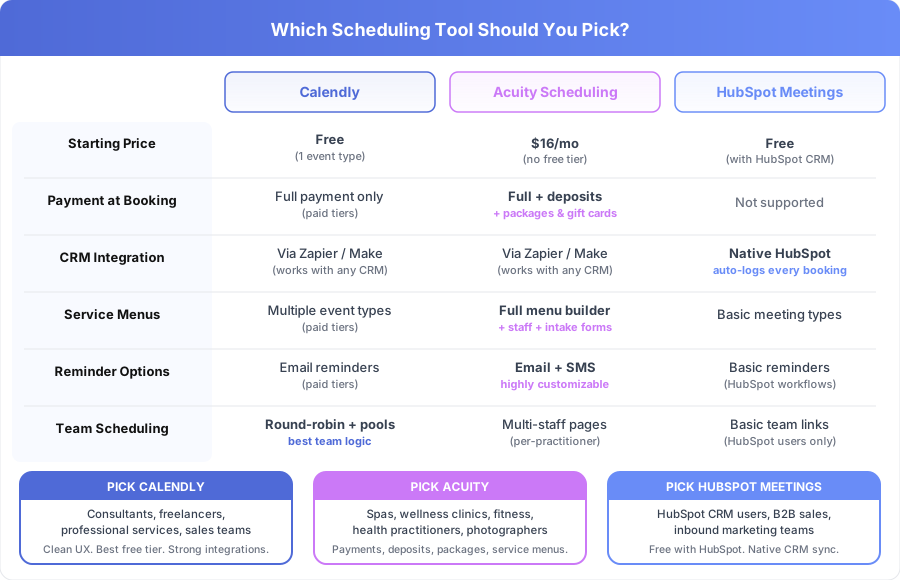
Calendly is the best general-purpose scheduling tool — clean interface, generous free tier, widest integrations. Acuity Scheduling wins for service businesses that need payment at booking (deposits, packages, gift certificates). HubSpot Meetings is the right pick only if you already use HubSpot CRM, where it’s included free and auto-logs every booking.
| Tool | Best for | Starting price | Pick if |
|---|---|---|---|
| Calendly | General-purpose scheduling | Free / $10/mo | Solopreneurs, sales teams, consultants |
| Acuity | Service businesses with payments | $16/mo | Spas, fitness, health, multi-staff |
| HubSpot Meetings | CRM-integrated booking | Free with HubSpot | You already use HubSpot CRM |
The rest of this article explains exactly why, with pricing breakdowns, feature-by-feature comparisons, and a decision framework based on your business type.
Which Scheduling Tool Is Best for Service Businesses?
Calendly is the best scheduling tool for most service businesses because it combines the strongest free tier, the cleanest booking interface, and the widest integration library. Acuity Scheduling is the better pick for businesses that collect payment at booking. HubSpot Meetings is the right choice only if you already use HubSpot CRM.
Each tool was built for a different primary use case, and understanding those origins explains the feature differences:
Calendly started as a scheduling link for individual professionals and grew into a team scheduling platform. Its core strength is simplicity — share a link, the client books, both calendars update. Over 20 million users relied on Calendly as of 2025 (per Calendly’s own reporting), and “send me your Calendly” has become standard professional shorthand.
Acuity Scheduling (now owned by Squarespace since 2021) was built for service businesses where appointments are the product: health practitioners, fitness instructors, spas, photographers, and coaches. It treats each booking as a transaction, not just a calendar event. That’s why it handles service menus, package sales, deposits, intake forms, and multi-practitioner scheduling.
HubSpot Meetings is a scheduling feature inside HubSpot’s CRM platform. It’s not a standalone product. Its advantage is native CRM integration — every booking creates or updates a contact record automatically, with zero configuration.
How Do Calendly, Acuity, and HubSpot Meetings Compare on Pricing?
Calendly offers the lowest entry point with a functional free tier. Acuity starts at $16/month with no free option. HubSpot Meetings is included at no extra cost with any HubSpot plan, including HubSpot Free CRM. The cheapest paid scheduling tool is Calendly Standard at $10/month per user.
| Plan | Calendly | Acuity Scheduling | HubSpot Meetings |
|---|---|---|---|
| Free | 1 event type, unlimited bookings | No free tier (7-day trial) | Included with HubSpot Free CRM |
| Entry paid | $10/month per user (Standard) | $16/month (Emerging) | Included with HubSpot Starter ($15/seat) |
| Mid tier | $16/month per user (Teams) | $27/month (Growing) | Included with HubSpot plans |
| Full features | $16/month per user (Teams) | $49/month (Powerhouse) | Included with HubSpot plans |
Prices as of April 2026. Calendly prices are per user. Acuity prices are per account (not per user), which matters for multi-staff businesses.
A few pricing details that aren’t obvious from the table. Acuity’s $16/month Emerging plan covers a single staff member. If you have 3 practitioners, you’ll need the Growing plan at $27/month. Compare that to Calendly Teams at $16/month per user — for a 3-person team, that’s $48/month versus Acuity’s $27/month. Acuity’s per-account pricing gives it a cost advantage for multi-staff service businesses.
HubSpot Meetings has no separate pricing because it’s bundled with HubSpot CRM. If you’re already paying for HubSpot Starter ($15/seat) or higher, scheduling is included. If you’re not using HubSpot at all, adopting it just for scheduling doesn’t make financial sense — Calendly Free does the job.
Which Tool Handles Payment Collection Best?
Acuity Scheduling is the clear winner for payment collection at booking. It supports full prepayment, deposits, package sales, gift certificates, and subscription memberships through Stripe, Square, or PayPal. Neither Calendly nor HubSpot Meetings matches this feature set.
| Payment Feature | Calendly (paid tiers) | Acuity Scheduling | HubSpot Meetings |
|---|---|---|---|
| Full payment at booking | Yes (Stripe/PayPal) | Yes (Stripe/Square/PayPal) | No |
| Deposit collection | No | Yes | No |
| Package sales | No | Yes (e.g., 5 sessions for $400) | No |
| Gift certificates | No | Yes | No |
| Subscription memberships | No | Yes | No |
| Automatic refund processing | Partial | Yes | N/A |
For service businesses where prepayment is standard — massage therapists, personal trainers, photographers, wellness clinics — Acuity’s payment features are often the deciding factor. A yoga studio selling 10-class packages or a photography studio taking 50% deposits can’t replicate those workflows in Calendly.
Calendly added Stripe and PayPal on its Standard ($10/month) and Teams ($16/month) plans, but it only handles full payment at booking. No deposits, no packages, no gift cards. If your business model requires those, Acuity is the only choice among these three.
HubSpot Meetings doesn’t process payments. If you use HubSpot and need payment at booking, you’d add Calendly or Acuity alongside it.
How Does CRM Integration Differ Between the Three Tools?
HubSpot Meetings has the strongest CRM integration because it’s native to HubSpot — every booking automatically creates a contact, logs the meeting activity, and can trigger follow-up workflows without any third-party connectors. Calendly and Acuity require Zapier or Make to sync with CRMs.
| CRM Feature | Calendly | Acuity Scheduling | HubSpot Meetings |
|---|---|---|---|
| HubSpot CRM | Via Zapier/Make | Via Zapier/Make | Native (automatic) |
| Salesforce | Via Zapier/Make | Via Zapier/Make | Not supported natively |
| Auto-create contacts | Requires setup | Requires setup | Automatic |
| Log meeting activity | Requires setup | Requires setup | Automatic |
| Trigger follow-up workflows | Via integration | Via integration | Native workflows |
If your sales process depends on CRM data — knowing when a lead booked, what they booked, and automatically assigning follow-up tasks — HubSpot Meetings removes all the integration friction. A contact books a discovery call, HubSpot logs it, updates the deal stage, and assigns a follow-up task to the sales rep. No Zapier. No Make. No broken automations when a third-party connector updates its API.
For Salesforce users, none of these three offer native integration. Calendly has the most mature Zapier recipes for Salesforce sync. If Salesforce is your primary CRM, consider Chili Piper or Drift for native connectors.
Calendly and Acuity both connect to CRMs through Zapier, Make, or direct API. The typical Zapier integration takes 30-60 minutes to configure and costs $19.99/month for a Zapier Starter plan on top of the scheduling tool cost.
What Calendar and Video Conferencing Integrations Are Available?
All three tools integrate with Google Calendar, Outlook/Microsoft 365, and major video conferencing platforms (Zoom, Google Meet, Microsoft Teams). Calendar integration prevents double-booking by checking real-time availability. Video links generate automatically when a meeting is booked.
| Integration | Calendly | Acuity Scheduling | HubSpot Meetings |
|---|---|---|---|
| Google Calendar | Yes | Yes | Yes |
| Outlook / M365 | Yes | Yes | Yes |
| Apple iCal | Yes | Yes | No |
| Zoom auto-link | Yes | Yes | Yes |
| Google Meet auto-link | Yes | Yes | Yes |
| MS Teams auto-link | Yes | Yes | Yes |
The functional differences are small. One exception: HubSpot Meetings doesn’t support iCal/Apple Calendar. If your team relies on Apple Calendar, HubSpot won’t check that calendar’s availability.
Calendly has the widest integration library — over 100 tools natively, including Salesforce, Slack, LinkedIn, and Intercom (per Calendly’s integration directory). Acuity’s library is smaller but covers essentials: Google Calendar, Outlook, Zoom, Stripe, Square, PayPal, Mailchimp, and QuickBooks.
Which Tool Offers the Best Service Menu and Customization?
Acuity Scheduling offers the most complete service menu builder. It lets you create different appointment types with individual durations, prices, intake forms, buffer times, and staff assignments. This makes it the clear choice for businesses with complex service catalogs like wellness clinics, salons, and fitness studios.
Here’s a real-world example. A wellness clinic with 5 practitioners offering 8 service types at different durations (30, 60, 90 minutes) and different prices needs Acuity. Each practitioner gets their own booking page, availability rules, and service assignments. Clients see only the services and times available for their chosen practitioner. Try building that in Calendly or HubSpot Meetings and you’ll hit walls fast.
Acuity’s service menu features:
- Unlimited appointment types with individual pricing and durations
- Custom intake forms per appointment type (health history, waivers, preferences)
- Buffer time between appointments (e.g., 15-minute cleanup between massage clients)
- Add-on services (e.g., add a hot stone upgrade to a massage booking)
- Staff-specific scheduling with individual calendars
Calendly’s approach: Multiple event types on paid tiers ($10/month+), each with customizable duration and description. No intake forms beyond basic questions. No add-on services. No service-specific pricing unless you use the payment integration. Works well for consultants offering 30-minute and 60-minute calls but doesn’t handle true service menus.
HubSpot Meetings’ approach: Multiple meeting types (discovery call, demo, follow-up) with different durations. No intake forms, no pricing, no add-ons. Designed for sales meetings and client calls, not service delivery.
How Effective Are Reminders at Reducing No-Shows?
Automated appointment reminders reduce no-show rates by 29-40% compared to no reminders, according to a 2024 study published in BMC Health Services Research. All three tools send automated confirmation emails. The differences are in reminder customization, SMS support, and follow-up sequences.
| Reminder Feature | Calendly | Acuity Scheduling | HubSpot Meetings |
|---|---|---|---|
| Confirmation email | Yes (all plans) | Yes | Yes |
| Custom email reminders | Yes (paid tiers) | Yes (all plans) | Via HubSpot workflows |
| SMS reminders | No (Zapier workaround) | Yes (built-in) | Via HubSpot add-on |
| Reminder timing control | Pre-set intervals | Fully customizable | Via workflow builder |
| Post-appointment follow-up | Via integrations | Built-in | Via HubSpot workflows |
Acuity’s reminder system is the most flexible of the three. You can customize the email content per appointment type, set SMS reminders at any interval, and create different reminder sequences for different services. A dental practice might send a 48-hour reminder with prep instructions and a 2-hour “we’re expecting you” text. A fitness studio might send a 24-hour reminder with class location details.
Calendly’s reminders work well on paid plans — you set intervals (e.g., 24 hours before, 1 hour before) and customize the email text. The limitation: no native SMS. You’d need Zapier + Twilio for SMS, adding $19.99/month plus per-message fees.
HubSpot Meetings sends basic confirmation and reminder emails. For more sophisticated sequences, you’d build them in HubSpot’s workflow tool. The upside: HubSpot workflows can check whether the contact opened the reminder email and send a follow-up if they didn’t.
For related reading on building reminder automations, see our guide on How to Automate Appointment Reminders.
What Are the Best Team Scheduling Features?
Calendly offers the strongest team scheduling features, including round-robin distribution, collective scheduling (finding times when multiple team members are free), and routing forms that direct prospects to the right person. Its Teams plan at $16/month per user is designed specifically for sales teams and multi-person service businesses.
Calendly’s team features:
- Round-robin scheduling: Distributes bookings evenly across team members based on availability and priority weights
- Collective scheduling: Shows only times when all required team members are free (useful for panel interviews or group consultations)
- Routing forms: Pre-booking questionnaires that direct the booker to the right person based on their answers
- Managed events: Admins create standardized event types for the whole team
Acuity’s team approach: Each staff member gets an individual booking page with their own availability, services, and pricing. Clients pick their preferred practitioner first, then choose from that person’s available times. This works better for service businesses where clients have a preferred provider (therapy, hairdressing, personal training) but doesn’t support round-robin distribution.
HubSpot Meetings’ team approach: Supports round-robin distribution for sales teams and group scheduling for team meetings. Less flexible than Calendly for pure scheduling but more powerful when combined with HubSpot’s lead routing and deal assignment features.
For a 10-person sales team that needs to distribute inbound demo requests evenly, Calendly Teams is the strongest option. For a 5-person therapy practice where each client sees a specific therapist, Acuity’s per-practitioner model is the better fit.
How Do Booking Pages and User Experience Compare?
Calendly’s booking page is the cleanest and most widely recognized. It loads fast, works well on mobile, and has become the standard for professional scheduling links. Acuity offers deeper customization but can feel cluttered. HubSpot Meetings pages are functional but basic.
Booking page UX matters because a confusing page increases abandonment. According to a 2024 Sumo survey, booking page abandonment rates average 22%. Calendly’s minimal design minimizes that friction. Acuity’s customization (custom CSS, embedded widgets, branded pages) gives you more control but more complexity. HubSpot Meetings works for B2B meetings but lacks polish for client-facing service businesses.
Which Scheduling Tool Works Best for Specific Industries?
The right tool depends more on your business type than on any single feature. Here’s a breakdown by industry, based on the workflows each tool handles best.
| Industry / Business Type | Recommended Tool | Why |
|---|---|---|
| Consultants and freelancers | Calendly Standard ($10/mo) | Clean interface, easy sharing, professional appearance |
| SaaS sales teams | Calendly Teams ($16/user) | Round-robin, routing forms, CRM integration |
| HubSpot-based businesses | HubSpot Meetings (free) | Native CRM sync, no extra cost, workflow triggers |
| Spas and salons | Acuity Growing ($27/mo) | Service menus, deposits, multi-staff, intake forms |
| Fitness studios | Acuity Growing ($27/mo) | Class packages, membership billing, multiple instructors |
| Health practitioners | Acuity Growing ($27/mo) | Intake forms, insurance copays, HIPAA considerations |
| Photographers | Acuity Emerging ($16/mo) | Deposits, package pricing, session-type menus |
| Coaches and therapists | Acuity Emerging ($16/mo) | Package sales, recurring bookings, intake questionnaires |
| Real estate agents | Calendly Standard ($10/mo) | Quick showing scheduling, clean mobile experience |
| Dental and medical offices | Acuity Growing ($27/mo) | Multi-provider, intake forms, SMS reminders |
One pattern stands out: if your business charges for appointments directly (not for products or retainers), Acuity’s payment and service features almost always win. If your appointments are lead generation conversations (sales calls, consultations, demos), Calendly or HubSpot Meetings are better fits.
For a real-world example of how scheduling automation impacts a specific practice, see our case study on How a Dental Practice Cut No-Shows by 60%.
What Should You Consider Before Choosing a Scheduling Tool?
Start with three questions: Do you already use HubSpot? Do you need payment at booking? How many staff members need their own schedules? Your answers determine which tool is the obvious choice. If none of those factors clearly point to one tool, Calendly Free is the lowest-risk starting point.
Decision tree:
-
Are you already using HubSpot CRM? If yes, start with HubSpot Meetings. It’s free with your existing plan and the native CRM integration is worth more than any standalone scheduling tool’s features.
-
Do you need to collect payment, deposits, or sell packages at booking? If yes, Acuity Scheduling is your tool. No other option in this comparison matches its payment capabilities.
-
Do you have multiple staff members who each need their own booking pages and service menus? If yes and you also need payments, Acuity Growing ($27/month). If you need round-robin team distribution without payments, Calendly Teams ($16/user).
-
None of the above? Start with Calendly Free. It covers the core need — shareable booking link, calendar sync, automatic confirmations — at zero cost. Upgrade to Calendly Standard ($10/month) when you need multiple event types, custom branding, or integrations.
Switching between these tools isn’t hard — update your booking link on your website, email signature, and social profiles. There’s no data migration because the core function is identical across all three. The switch takes 1-2 hours for most businesses.
How Can You Automate the Full Booking Workflow?
The scheduling tool is just the entry point. A complete booking automation also covers CRM sync, reminder sequences, intake form routing, post-appointment follow-ups, and no-show recovery. Most service businesses use only 30-40% of what’s possible by stopping at the scheduling tool’s built-in features.
A full workflow looks like this: client books and pays, confirmation fires to both calendars, a 48-hour + 1-hour reminder sequence runs, intake data routes to your CRM, a follow-up email sends 1 hour post-appointment, and a no-show recovery email triggers automatically with a rebooking link. None of the three tools handle all of that natively — you’ll need Zapier, Make, or HubSpot Workflows to connect the pieces. That end-to-end system is exactly what our booking automation builds cover.
Book a free automation audit and we’ll design the full booking automation around your chosen scheduling tool — including CRM sync, reminder sequences, and post-appointment follow-ups.
Frequently Asked Questions
The FAQ section above covers the most common questions we hear from service businesses evaluating scheduling tools. For questions about specific automation workflows — connecting your scheduling tool to your CRM, building custom reminder sequences, or automating post-appointment follow-ups — get in touch with our team.