A solo CPA we work with was losing two to three client appointments per week. At $300 per consultation, that’s $3,600 per month in missed revenue. Not cancellations. No-shows. People who booked, forgot, and never came. According to Twilio’s 2024 Messaging Trends report, SMS messages hit a 98% open rate versus 20 to 30% for email, and the median read time is 3 minutes. She switched from email-only reminders to an automated SMS sequence. No-shows dropped over 75% inside a month. Here’s the exact sequence, the tools, the message templates, and the math.
Why do email-only appointment reminders fail?
Email reminders fail because most clients don’t open them in time. With 20 to 30% open rates, roughly three out of four reminders never reach the person before their appointment. SMS flips that ratio: 98% open rate and a 3-minute median read time, per Twilio’s 2024 data. SMS isn’t “nicer” than email. It’s functionally louder.
The math is brutal. Send 100 email reminders, and around 75 sit unread in crowded inboxes until hours after the appointment. A 2 PM client might open your 9 AM reminder at 5 PM, wondering why the receptionist called. By then the slot is gone and the revenue with it.
SMS lands differently because phones ping. A text at 1 hour before an appointment reaches the client while they can still act on it: confirm, reschedule, or head out the door. The 3-minute median read time (Twilio 2024 Messaging Trends) means your 1 PM reminder for a 2 PM appointment is seen by 1:03.
We saw this with Taxvisory, a solo CPA managing 300 clients. After switching to automated SMS reminders wired to Calendly, scheduling went hands-off. The same system contributed to an 80% drop in document chasing and gave the firm weekends back.
What’s the optimal reminder timing sequence?
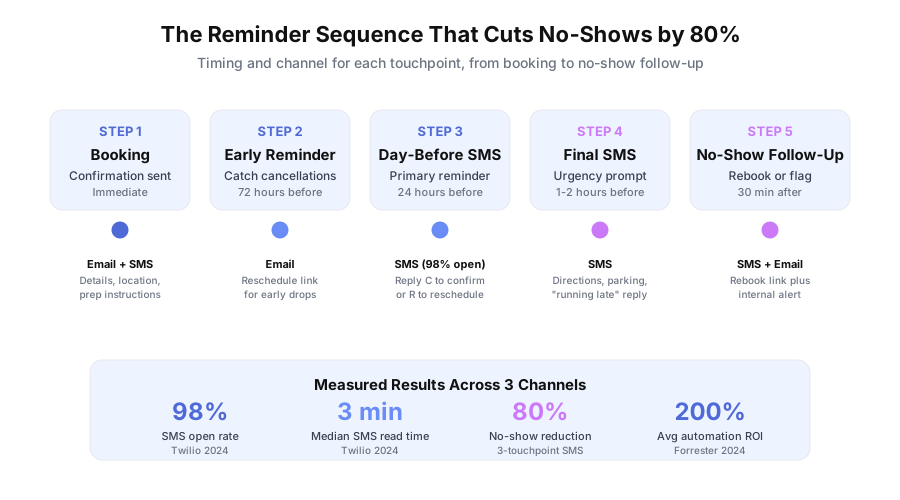
The best sequence uses three to four touchpoints: an immediate booking confirmation, an optional 72-hour heads-up for long-lead bookings, a 24-hour SMS, and a 1-hour final SMS. Each touchpoint does a different job: set expectations, catch early cancellations, prevent forgetfulness, prevent last-minute drop-off.
Here’s the full sequence:
| Touchpoint | Timing | Channel | Purpose |
|---|---|---|---|
| Confirmation | Immediate | Email + SMS | Set expectations, share details |
| Early reminder | 72 hours before | Catch cancellations, allow rebooking | |
| Day-before | 24 hours before | SMS | Primary reminder, last chance to cancel |
| Final reminder | 1 to 2 hours before | SMS | Urgency prompt, directions, parking |
The 72-hour touchpoint matters most when clients book more than a week out. Someone who schedules on a Monday for the following Thursday has nine days to forget. A polite 72-hour email lets them self-reschedule with time to fill the slot from a waitlist.
According to Forrester’s 2024 Total Economic Impact studies, the average ROI on business process automation reaches 200% in the first year. No-show reduction returns that investment faster than most other plays because the revenue was already booked. You’re not closing new business. You’re catching business you’d already sold.
How do you set up SMS reminders with Calendly and Twilio?
Connect Calendly to Twilio through n8n, Zapier, or Make. When a booking fires, the automation reads the appointment time, calculates reminder offsets, and schedules SMS messages through the Twilio API at the 24-hour and 1-hour marks. Setup takes 2 to 4 hours and costs about $50 per year in SMS fees for a solo practice.
Step 1: Configure Calendly’s built-in email reminders
In Calendly, go to Settings, then Notifications. Turn on booking confirmations and one email reminder (24 hours before). Calendly’s email reminders are free and handle the long-form side of the sequence. Leave them on even if you add SMS. They back up the texts with a searchable record.
Step 2: Set up Twilio for SMS
Sign up at twilio.com. Buy a phone number ($1 per month). Complete US A2P 10DLC registration if you’re sending business SMS in the United States. Transactional messages (like reminders) cost roughly $0.0079 each as of 2025 Twilio pricing. Load $20 of credit to start.
Step 3: Build the automation in n8n (or Zapier/Make)
Create a new workflow with these nodes:
- Trigger: Calendly, “New Event Created”
- Calculate: Appointment time minus 24 hours, appointment time minus 1 hour
- Schedule: Twilio SMS at the 24-hour mark
- Schedule: Twilio SMS at the 1-hour mark
Use your automation tool’s “wait until” or “schedule” node so the SMS fires at the right moment instead of immediately. Timezone handling is where 90% of bugs live. Test with appointments in your actual timezone, then with one outside it.
Step 4: Write the message templates
Short, specific, action-oriented:
- 24-hour: “Hi [Name], reminder: your appointment is tomorrow, [Date] at [Time]. Reply C to confirm or R to reschedule. - [Business Name]”
- 1-hour: “See you in 1 hour at [Address]. Reply if you need anything. - [Business Name]”
Keep both under 160 characters to avoid multi-segment SMS charges. Test both templates by booking a real appointment on yourself. If you’re weighing scheduling tools, our Calendly, Acuity, and HubSpot Meetings comparison breaks down pricing and features side by side.
How do you enable two-way SMS for rescheduling?
Point your Twilio phone number’s incoming message webhook at your n8n, Zapier, or Make endpoint. When a client replies “C” or “confirm,” log the confirmation. When they reply “R” or “reschedule,” send a Calendly reschedule link. Two-way SMS turns a broadcast into a conversation and cuts no-shows roughly in half.
The workflow:
- Inbound webhook. In Twilio, set your number’s incoming message webhook to your automation endpoint.
- Parse the reply. Check for keywords: “C”, “confirm”, “R”, “reschedule”, “cancel”.
- Confirm flow. Mark the appointment confirmed in Calendly and reply “Confirmed. See you on [Date].”
- Reschedule flow. Generate a Calendly reschedule link and reply “No problem. Pick a new time: [link]”
- Cancel flow. Cancel the Calendly event, notify the owner, and optionally promote the next waitlist entry.
Two-way replies are the difference between a 50% and an 80% no-show reduction. Clients who can’t make it often skip the cancellation call because phone calls take effort. A text takes 5 seconds. Remove friction, and cancellations become reschedules.
According to IDC’s 2023 Future of Work study, employees spend around 30% of their workweek on manual, repetitive tasks. For front-desk staff, confirmation calls are a chunk of that. Two-way SMS automates the full loop and gives those hours back.
How do you handle no-show follow-up automatically?
When a client misses an appointment without confirming, trigger a three-part follow-up: a polite SMS within 30 minutes offering to rebook, a friendly email two hours later with open availability, and an internal alert to the owner with the client’s no-show history. Automate the rebook path; the rebooked revenue funds the whole system.
Here’s the follow-up table:
| Timing | Channel | Message |
|---|---|---|
| 30 min after missed slot | SMS | ”We missed you today. Want to rebook? [Booking link]“ |
| 2 hours after | Friendly rebook note with open slots | |
| Immediate | Slack or email to staff | ”No-show: [Name], [Date/Time]. This is no-show #[N].” |
The internal alert is as important as the client follow-up. After three no-shows, most practices switch that client to deposit-required booking or shift them to less-valuable time slots. Tracking patterns automatically is the only way that data gets used.
For Taxvisory, we built this exact pattern. The solo CPA no longer spends time chasing appointment confirmations, and no-show data flows back into client records so repeat offenders get flagged without manual review.
How do you measure no-show reduction and ROI?
Track your no-show rate for two weeks before turning on automation. Then compare weekly. Segment by appointment type, day of week, and time of day. Most businesses see a 30 to 50% drop in the first month and reach 60 to 80% by month three as the sequence tunes. Measure revenue recovered, not just no-show percentage.
Track these five metrics:
- No-show rate: missed divided by total appointments (weekly)
- Confirmation rate: share of clients replying “C” to the 24-hour SMS
- Reschedule rate: share using the reschedule link instead of no-showing
- Revenue recovered: no-show reduction multiplied by average appointment value
- Slot fill rate: share of cancelled slots filled from the waitlist
The ROI math: 40 appointments per week, 15% no-show rate (6 missed), $150 average value equals $900 per week lost. An 80% reduction brings that to $180 per week. That’s $720 recovered weekly, or $37,440 per year. Three SMS per appointment at $0.0079 each across 40 appointments equals roughly $0.95 per week in message fees. The ratio isn’t a typo.
According to Statistics Canada’s 2024 Wage Survey, administrative salaries range from $45,000 to $65,000 on average. If front-desk staff spend even 5 hours per week on manual reminder calls, that’s another $5,600 to $8,100 per year in labor on top of the recovered revenue.
For a walkthrough of this system in production, see how a dental practice cut no-shows and reclaimed revenue with appointment automation.
What should you do next?
Build the three-touchpoint sequence this week. Pick your tools (Calendly plus Twilio plus n8n, or GoHighLevel all-in-one), write the two message templates, wire up the two-way reply webhook, and run a test booking. Measure for two weeks against your baseline. Then add the 72-hour early reminder and the no-show follow-up. Most solo operators are done in one afternoon.
If you’d rather skip the setup and get the working system handed to you, book a free 30-minute intro. We’ll audit your current scheduling stack, scope the automation in writing, and show you the exact ROI math for your appointment volume before you commit to anything.