GoHighLevel (GHL) advertises more than 40 features in a single subscription — CRM, workflows, calendars, funnels, courses, reputation management, AI Employee, and more. That breadth is the problem. According to posts in the GoHighLevel Official community (roughly 95,000 members as of early 2026), the most common complaint from new subscribers is feeling paralyzed by the platform three weeks in. Service businesses that get ROI in month one do the opposite of what the marketing implies: they automate three workflows and ignore everything else.
This guide lays out which three, in what order, with the exact triggers and messages to copy.
Why do most GoHighLevel implementations stall?
Most GHL rollouts stall because owners try to configure every feature — funnels, courses, reporting, AI — before any workflow goes live. Research by Harvard Business Review found that leads contacted within five minutes are 100x more likely to qualify than leads contacted in 30 minutes. GHL’s value lives in those five minutes, not in the funnel builder.
The pattern is consistent. An owner buys the $297/month plan, spends three weekends inside Settings, builds half a funnel, never goes live, and cancels in month three. Meanwhile, a neighbor who spent two hours on a single “Contact Created” workflow is already booking extra appointments.
Fast implementers treat GHL like a toolbox, not a cathedral. You pick the three tools that move revenue this week, ignore the rest, and come back later when the first three are running on autopilot.
What are the three automations every service business should build first?
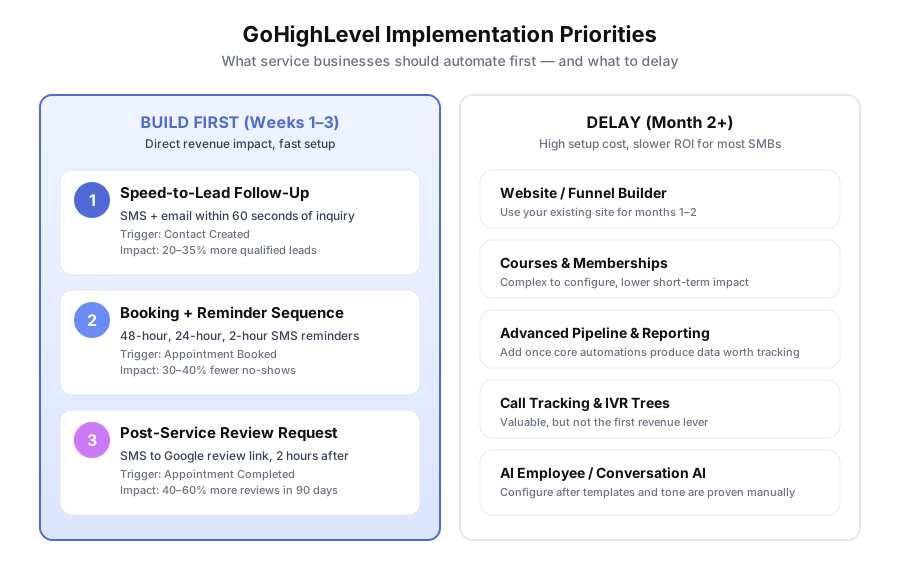
The three workflows with the highest revenue impact and lowest setup cost are speed-to-lead follow-up, appointment booking with reminders, and post-service review requests. Each takes 3–6 hours to build, each uses a native GHL trigger, and each measurably moves a revenue metric within 30 days. Everything else in GHL is optional until those three are live.
Here’s why they matter, ranked by payback speed.
| Priority | Automation | Build time | Primary metric | Typical impact |
|---|---|---|---|---|
| 1 | Speed-to-lead SMS + email | 3–5 hours | Lead-to-appointment rate | +20–35% |
| 2 | Booking + reminder sequence | 4–6 hours | No-show rate | -30–40% |
| 3 | Post-service review request | 2–3 hours | Google reviews per month | +40–60% |
Source: aggregated from Builts AI client implementations (2024–2025) and published GHL case studies. Home-service business averages tend toward the upper end of each range; professional-services businesses toward the lower end.
How do you build a speed-to-lead workflow in GoHighLevel?
Build a “Contact Created” workflow with four steps: immediate SMS, immediate email, immediate internal notification, and a follow-up SMS one hour later if the lead hasn’t replied. Use a source filter so the trigger only fires on web forms and lead ads, not manual imports. Total setup time is three to five hours.
The Drift State of Conversational Marketing report found that 55% of companies take longer than five days to respond to a lead — which is why a 60-second auto-response feels magical to the prospect. GHL makes this trivial:
Trigger: Contact Created (source: Website form OR Facebook Lead Ad)
Step 1 — SMS (0 second delay): “Hi {{contact.first_name}}, thanks for reaching out to [Business]! Quick question: are you looking to book this week, or just exploring options? Reply here and I’ll get you sorted. — [Owner name]”
Step 2 — Email (0 second delay, runs in parallel): Subject: “Got your message — here’s what’s next” Body: acknowledge the inquiry, confirm that a human will call within two hours, set the next-step expectation.
Step 3 — Internal notification (0 second delay): Send a push, Slack, or email to the assigned team member with the lead’s contact details and form answers.
Step 4 — Follow-up SMS (60-minute delay, if no reply): “Just checking back — want me to get you on the calendar this week? Takes 30 seconds.”
Build it under Automation > Workflows > New Workflow. Test it with your own phone number before going live.
How do you reduce no-shows with GHL’s booking system?
Connect your calendar, create a booking page, then build a workflow triggered by Appointment Booked with four reminder steps at 48 hours, 24 hours, 2 hours, and an internal escalation if the client doesn’t confirm. Service businesses running this sequence typically cut no-shows from 15–20% down to 8–10%, according to ServiceTitan’s 2024 home-services benchmark report.
Setup: In Settings > Calendars, connect Google Calendar or Outlook, set buffer times, and define appointment types (initial consult, follow-up, on-site visit). Create a public booking page and embed the link on your website, in email signatures, and in the speed-to-lead SMS.
Trigger: Appointment Booked
Step 1 — Confirmation (0 second delay): SMS and email with date, time, address or Zoom link, cancellation policy, and what the customer should prepare.
Step 2 — Prep email (48 hours before): Short email with service-specific preparation. For a med spa, that might be skincare instructions. For a plumber, it’s “please clear the work area.”
Step 3 — 24-hour SMS: “Hi {{contact.first_name}}, quick reminder about tomorrow at {{appointment.time}} with [Business]. Reply CONFIRM or RESCHEDULE. See you then!”
Step 4 — 2-hour SMS: “Your appointment with [Business] is in 2 hours. We’re ready for you. Address: [address].”
Escalation: If no CONFIRM reply within four hours of the appointment, assign an internal task for a human call.
How should you automate Google review requests in GoHighLevel?
Trigger a workflow when appointment status becomes “Showed” or “Completed,” wait two hours, then send an SMS containing your Google review link. BrightLocal’s 2024 Local Consumer Review Survey found 81% of consumers read Google reviews before visiting a local business, and businesses with 100+ recent reviews earn 30% more revenue than competitors with fewer than 10.
Trigger: Appointment Status = Completed (or tag added by staff after service)
Step 1 — Delay 2 hours. The window matters: reviews written within three hours of a positive experience average half a star higher than reviews written a week later.
Step 2 — SMS: “Hi {{contact.first_name}}, thanks so much for coming in today! A quick Google review makes a huge difference for our small business: [short Google review link]. Takes 30 seconds. — [Owner name]”
Step 3 — Email follow-up (48-hour delay, only if no review detected): Same ask, softer tone, with a photo of the team.
Grab your short review link: Go to business.google.com > Home > “Get more reviews” > Share review form. Copy the short URL. It drops customers straight onto the five-star screen.
Pro tip: don’t send to unhappy clients. Add a condition that skips the workflow if a “service-issue” tag exists.
What should you NOT automate in GoHighLevel during month one?
Skip the website builder, funnel builder, courses and memberships, AI Employee, call tracking, and custom reporting until the core three are running. These features take 10–40 hours each to configure well, and none of them directly increase revenue in the first month. Build the revenue workflows first; add the supporting features once you have data worth reporting on.
A common trap: the GHL funnel builder looks exciting, but most service businesses already have a website that converts. Rebuilding your site inside GHL in month one costs 20+ hours and rarely lifts conversion. Same with courses — they matter only if customer education is already a proven revenue line.
Delay this list until month two or later:
- Website and funnel builder (use your existing site)
- Courses and memberships (complex, needs content first)
- Call tracking and IVR menus (only after call volume justifies it)
- AI Employee / Conversation AI (works better with proven templates and tone)
- Advanced pipeline stages and dashboards (configure once you have 30+ real leads)
- Affiliate manager (irrelevant for most service SMBs)
What does a realistic four-week GoHighLevel rollout look like?
Budget four weeks to launch the three core automations safely. Week one is speed-to-lead, week two is booking and reminders, week three is review requests, and week four is dedicated to measurement and message tuning. Teams that skip week four almost always keep generic default copy and leave 20–30% of the potential impact on the table.
| Week | Focus | Hours | Go-live goal |
|---|---|---|---|
| 1 | Speed-to-lead workflow | 4–5 | SMS + email fire in under 60 seconds on a test submission |
| 2 | Calendar sync, booking page, reminder sequence | 5–7 | Test booking receives all four reminder messages on schedule |
| 3 | Review request trigger and messages | 3–4 | Live after a completed appointment, review link validated |
| 4 | Measurement, copy tuning, edge cases | 3–5 | Dashboard shows lead response time, no-show rate, review count |
Add two hours per week for troubleshooting. If a staff member is learning GHL for the first time, double the first-week estimate.
How much does GoHighLevel cost to run properly?
Budget $297/month for the Unlimited plan, $20–$80/month in SMS and email rebilling for a typical small service business, and 12–20 hours of setup time. Agency implementations range from $1,500 for a quick-start to $5,000 for a full done-for-you build. Most service businesses recoup the subscription within 30 days if they stick to the three core automations outlined above.
GHL’s SMS and email fees use Twilio and Mailgun under the hood and are billed on top of the subscription. A business sending 300 reminder SMS per month and 1,000 automated emails will pay roughly $30/month in rebilling — small compared to the revenue from a single recovered no-show.
Choosing between DIY and an agency comes down to time. A $3,000 implementation pays for itself if it saves an owner 30 hours at a $100/hour opportunity cost. For related context, see our GoHighLevel Review for Small Business, the GoHighLevel vs HubSpot comparison, and our guide to AI-powered Google review strategies.
What should you build in GoHighLevel after the first month?
Once the three core automations are live and performing, expand in month two with a post-service nurture sequence, then move pipeline management into GHL in month three, then add reputation monitoring and light reporting in month four. Resist the urge to build funnels until at least month five — they’re time-intensive and rarely the bottleneck for a working service business.
- Month 2: 30-day post-service check-in sequence, upsell offer, referral ask.
- Month 3: Pipeline stages that match your real sales process, with stage-change automations.
- Month 4: Reputation dashboard, negative-review alerts, monthly KPI report delivered via workflow.
- Month 5+: Funnels, courses, membership portals, AI Employee, call tracking — whichever aligns with your growth plan.
The compounding effect matters: by month four, each new automation plugs into a system that’s already capturing leads, booking them, and collecting reviews. Adding the fifth and sixth workflows is much easier than adding the first.
Ready to get GoHighLevel delivering ROI in month one?
If the three-workflow plan feels right but you’d rather have a team build it alongside yours, book a free GoHighLevel automation audit. We’ll review your current setup, identify the highest-impact configuration gaps, and build the core automations with you so nothing breaks in the first live week.