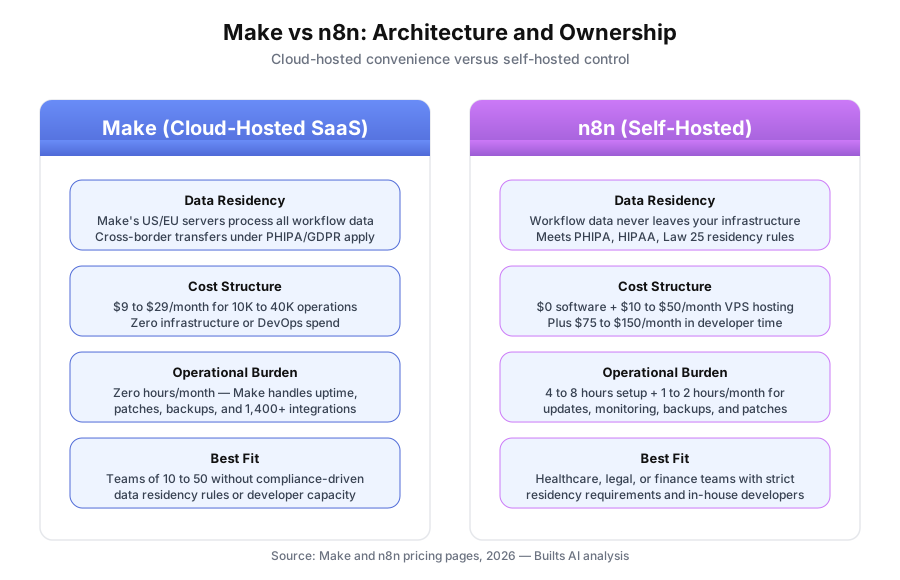
Make processes automation data on its US and EU servers. n8n self-hosted keeps every workflow inside your own infrastructure. That single architectural difference drives almost every decision between the two platforms — and it’s worth about $70/month in hidden ops cost if you pick wrong. Make costs $9/month for 10,000 operations. Self-hosted n8n costs $0 in software but $75 to $150/month in developer time once you factor in server setup, updates, and monitoring. For most small businesses without compliance-driven data residency rules, Make is faster to deploy and cheaper to run.
What’s the Core Difference Between Make and n8n?
Make is a cloud-hosted, no-code automation SaaS with 1,400-plus pre-built integrations running on its servers. n8n is open-source automation software that you can self-host on your own infrastructure or use via n8n.cloud. The critical split: self-hosted n8n keeps workflow data entirely inside your environment, while Make always routes data through its cloud.
Both platforms use visual canvas interfaces. Both handle triggers, actions, conditional logic, loops, webhooks, and API calls. On the surface they look similar. The real divergence happens underneath — where your data lives, who maintains the servers, and what it costs once you add up the invisible line items.
Make (formerly Integromat) launched its visual canvas in 2016 and rebranded in 2022, according to its company about page. n8n launched in 2019 as a developer-first open-source alternative and now reports more than 70,000 self-hosted instances worldwide, per its GitHub repository. The two platforms attract different audiences for structural reasons — not marketing ones.
How Much Does Each Platform Actually Cost?
Make Core starts at $9/month for 10,000 operations. Self-hosted n8n is free software but costs $10 to $50/month in server fees plus $75 to $150/month in developer time for maintenance. For teams without in-house engineers, Make usually costs less despite n8n’s free software price tag.
Here’s the side-by-side pricing breakdown pulled from each platform’s public pricing pages as of April 2026:
| Option | Monthly cost | Operations/executions | Notes |
|---|---|---|---|
| Make Free | $0 | 1,000 ops | 2 active scenarios, basic features |
| Make Core | $9 | 10,000 ops | Unlimited scenarios, standard support |
| Make Pro | $16 | 10,000 ops | Priority execution, custom variables |
| Make Teams | $29 | 40,000 ops | Team roles, templates, shared folders |
| n8n Cloud Starter | $20 | 2,500 executions | Up to 5 active workflows |
| n8n Cloud Pro | $50 | 10,000 executions | 15 active workflows, advanced features |
| n8n Self-Hosted | $0 software | Unlimited | Plus VPS cost + developer ops time |
Source: make.com/en/pricing and n8n.io/pricing, accessed April 2026.
One nuance matters. Make counts every module run as an operation — a 5-step workflow uses 5 operations per run. n8n counts each full workflow execution as one, regardless of node count. Depending on workflow shape, a Make operation isn’t directly equivalent to an n8n execution.
What’s the True Cost of Self-Hosting n8n?
Self-hosted n8n runs $0 for software but typically costs $85 to $170/month once you add VPS hosting ($10 to $20) and developer time for setup and maintenance ($75 to $150). Initial setup runs 4 to 8 hours at roughly $75/hour billed. For most small businesses, this total exceeds Make Teams at $29/month.
Let’s walk through a realistic small business scenario with real numbers:
- VPS server (Hetzner, DigitalOcean, or Linode): $10 to $20/month for a 2GB RAM instance
- Initial setup (Docker, database, SSL, environment config): 4 to 8 hours
- Monthly maintenance (security patches, n8n updates, backup verification, monitoring): 1 to 2 hours
- Developer rate (contractor or internal time): ~$75/hour
At those rates, first-year total cost of self-hosted n8n lands around $1,200 to $2,200. Make Teams over the same period costs $348 ($29 × 12). The software savings evaporate once you price in the work.
When does self-hosting actually pay off? When you already have a full-time engineer whose salary isn’t charged to the automation project, when you’re running thousands of executions daily that would push Make into enterprise pricing, or when compliance requirements make the decision for you regardless of cost. If you land on self-hosting, our step-by-step n8n self-hosting guide covers the Docker setup, backups, and update routine.
When Should You Self-Host n8n vs Use Make?
Self-host n8n when data residency rules (PHIPA, HIPAA, Quebec Law 25, OSFI) require keeping workflow processing inside your infrastructure, when you have in-house developer capacity for setup and maintenance, or when you need custom JavaScript execution Make’s modules can’t provide. Use Make in every other scenario.
Here’s a practical decision framework:
Pick Make if:
- Your data isn’t subject to strict residency laws
- You don’t have a developer on staff who owns infrastructure
- Implementation speed matters more than theoretical flexibility
- You need the broadest pre-built integration library
Pick n8n self-hosted if:
- Healthcare, legal, or financial services compliance requires on-premise processing
- You have a full-time developer who can manage a Linux server
- Custom JavaScript data transformations are central to your workflows
- You’re running enough volume that Make’s per-operation pricing gets expensive
Pick n8n.cloud if:
- You want n8n’s JavaScript flexibility without running servers yourself
- Your usage fits the execution tiers ($20/month for 2,500, $50/month for 10,000)
- You’re already comfortable with the n8n interface from self-hosting experiments
For most teams of 10 to 50 people, Make is the default answer. n8n is the exception, not the rule.
How Do Make and n8n Compare on Interface and Learning Curve?
Both platforms use visual canvases where you connect modules (Make) or nodes (n8n) to build workflows. Make’s interface is more polished and accessible for non-developers, with point-and-click data mapping. n8n feels developer-oriented, with an expression editor that’s steeper to learn but more powerful for complex logic.
Make’s canvas has been refined over almost a decade. Color-coded data mapping shows exactly which output from one module feeds which input of the next. The documentation library at make.com/en/help is extensive, and a non-technical user can build a working 5-step workflow in 2 to 4 hours.
n8n’s canvas looks similar but feels different once you start mapping data. The expression syntax uses JavaScript-style references ({{ $json.fieldName }}) that are fine for developers and confusing for everyone else. On the upside, that syntax lets you do things Make can’t — like transforming arrays with native JavaScript methods inside an expression.
| Interface dimension | Make | n8n (cloud) | n8n (self-hosted) |
|---|---|---|---|
| Learning curve | Moderate (2-4 hours) | Moderate to steep | Steep (adds infra setup) |
| Visual workflow design | Excellent | Good | Good |
| Data mapping | Point-and-click | Expression-based | Expression-based |
| Custom JavaScript | Limited | Full Code node | Full Code node |
| Documentation | Excellent, official | Good, official | Good, community-driven |
| Pre-built integrations | ~1,400 | ~400 | ~400 |
Which Platform Has Better Integrations and Customization?
Make leads on pre-built integrations with roughly 1,400 apps versus n8n’s 400-plus native nodes. n8n wins on customization with its dedicated Code node that supports arbitrary JavaScript execution, library imports, and custom API logic. The right pick depends on whether you need breadth or depth.
Make’s integration catalog, according to its published list, covers virtually every mainstream SaaS tool — plus thousands of niche apps that lack public APIs. For businesses that need to connect obscure industry software to something like HubSpot or Salesforce, Make’s library is often the deciding factor.
n8n’s smaller native catalog covers the essentials (Slack, Google Workspace, Notion, Airtable, GitHub, the usual suspects) but drops off for long-tail integrations. The gap closes somewhat through n8n’s generic HTTP Request node and the community-maintained node repository, though community nodes come with less support than first-party integrations.
Where n8n pulls ahead: its Code node accepts full JavaScript, imports npm packages (on self-hosted), and handles data transformations that would require awkward workarounds in Make. If you’re regularly manipulating complex JSON structures, reshaping API responses, or building custom logic, n8n’s flexibility is genuinely valuable.
What Compliance Scenarios Actually Favor Self-Hosted n8n?
Self-hosted n8n is the right answer when regulations require workflow data to stay inside a specific jurisdiction or inside your direct control. That includes Canadian healthcare under PHIPA, US healthcare under HIPAA, legal firms with solicitor-client privilege obligations, and financial services firms regulated by OSFI or FINTRAC.
Here’s what each compliance scenario actually looks like in practice:
Healthcare providers (PHIPA/HIPAA). Patient records processed through an automation workflow need to stay in controlled infrastructure. Make processes data on US and EU servers, which creates cross-border transfer questions under PHIPA in Ontario and Canada’s federal PIPEDA. A self-hosted n8n instance on a Canadian VPS keeps all processing inside Canadian borders, which simplifies compliance reviews.
Legal firms with privilege obligations. Client matter data, privileged communications, and case documents processed through automation may be subject to solicitor-client privilege concerns. Many law firms have internal policies requiring such data to remain on firm-controlled systems.
Financial services under OSFI/FINTRAC. Certain financial data types carry residency and handling obligations that may favour self-hosted processing on infrastructure the firm controls directly, especially when auditors need to trace exactly where records were processed.
Quebec Law 25 exposure. Businesses processing personal information of Quebec residents face enhanced consent and transfer rules that can make self-hosting simpler than documenting a cloud provider’s compliance posture.
For businesses outside these regulated industries, compliance isn’t a reason to self-host. It’s a justification people sometimes reach for when the real reason is preference.
What Should You Watch Out for With Each Platform?
Make’s biggest gotcha is its operations-based pricing, which can escalate fast with branched workflows. n8n’s biggest gotcha is the maintenance burden of self-hosting — security patches, backup verification, and version upgrades that take time from whoever owns the server. Both need realistic pre-flight planning.
Make watch-outs:
- Operations billing on branched workflows. A router with 4 paths uses 4 operations per run, not 1. Budget accordingly.
- Execution history caps. Lower tiers store limited run history, which matters for debugging.
- Rate limits on free tier. The 1,000 ops/month free plan runs out quickly on any real workflow.
n8n watch-outs:
- Version upgrades can break workflows. Major version changes occasionally require workflow adjustments. Test before upgrading production.
- Backup strategy is your problem. Nobody automatically backs up a self-hosted database except you.
- Community node support varies. First-party nodes are stable; some community nodes are abandoned or poorly maintained.
What’s the Best Hybrid Approach?
Some businesses run both: Make for external-facing workflows with third-party SaaS apps, and n8n self-hosted for internal workflows that process regulated data. This hybrid model uses each tool where it genuinely excels — but it doubles the operational surface area and only makes sense when compliance requires it.
The hybrid pattern usually looks like this:
- Make: CRM sync, email marketing automation, Slack notifications, meeting scheduling, invoice generation — anything that talks to cloud SaaS tools and doesn’t involve regulated data.
- n8n self-hosted: Patient record processing, legal document routing, financial transaction reconciliation — anything touching data that must stay on controlled infrastructure.
The tradeoff is real. Running two platforms means two sets of workflows to maintain, two tools to train staff on, and two vendors (or vendor + server) to monitor. For businesses with genuine compliance requirements, the split is worth it. For businesses that just want “the best of both,” the overhead usually isn’t justified.
If you’re thinking about a hybrid setup, map out exactly which workflows touch regulated data before you commit. The answer often turns out to be a smaller subset than expected.
The Bottom Line
Make is the right default for most small businesses. Its cloud-hosted model, $9/month entry price, 1,400-plus pre-built integrations, and non-technical-friendly interface fit the vast majority of automation needs without the operational burden of running servers.
n8n self-hosted is the right answer in specific situations: regulated industries where data must stay on controlled infrastructure, businesses with in-house developer capacity who can own the server, and teams that need custom JavaScript execution Make can’t match. For those cases, n8n’s flexibility and data sovereignty are genuinely worth the operational cost. Our custom workflow builds run on both platforms, so the choice comes down to your constraints, not ours.
n8n.cloud sits in between — a middle option for teams that want n8n’s developer-friendly features without self-hosting. It’s the least common answer but fits well when Make’s interface feels limiting and infrastructure ownership isn’t appealing.
For a detailed breakdown of n8n’s features and pricing, see our full n8n review for small business. For related comparisons, check out Make vs Zapier for small business and our guide to what no-code AI actually means for business owners.
Book a free automation audit and we’ll evaluate your compliance requirements, technical capacity, and automation scope — then recommend the right platform for your specific environment. No sales pressure, no generic advice.