Automation used to mean hiring a developer. Today, a business owner with zero coding background can build an AI workflow that captures a lead, qualifies it with GPT-4, updates the CRM, and sends a personalized follow-up. All in one afternoon. According to Forrester’s 2025 Low-Code/No-Code Adoption Report, 71% of new SMB automation deployments now run on no-code platforms, and non-technical employees build the majority of them. Here’s what no-code AI actually is, what you can realistically build, and where the limits still sit.
What is no-code AI?
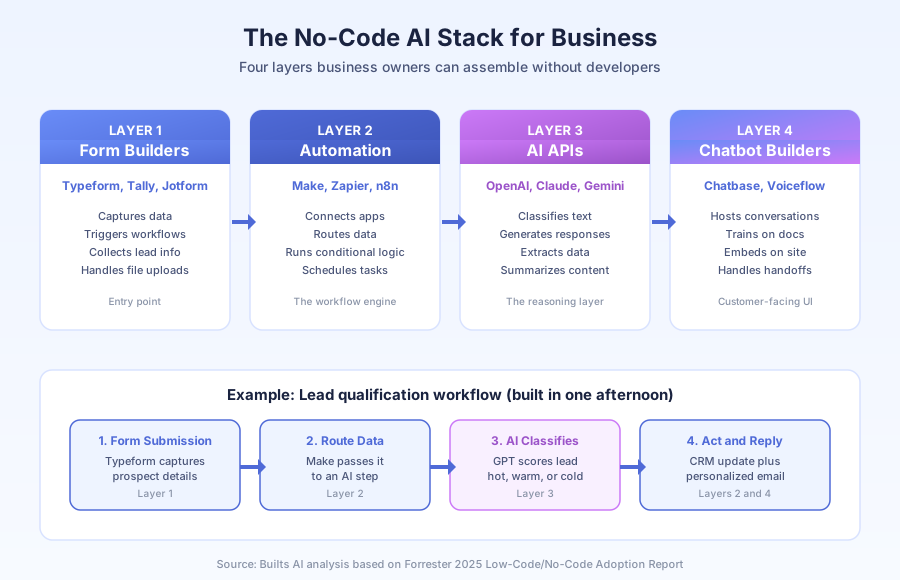
No-code AI is the pairing of visual automation platforms (Make, Zapier, n8n) with AI model APIs (OpenAI, Claude, Gemini) that lets non-technical users build AI-powered workflows by dragging modules onto a canvas. You configure triggers and actions in plain English. No code, no deployment scripts, no DevOps.
The two halves of the stack
The first half is the automation layer: visual tools that connect your apps and run workflows when triggers fire. The second half is the AI layer: pre-built modules that call GPT-4 or Claude to classify text, generate responses, extract data, or summarize content. They plug together seamlessly.
| Layer | Examples | What it handles |
|---|---|---|
| Form builders | Typeform, Tally, Jotform | Data capture, workflow triggers |
| Automation | Make, Zapier, n8n | Routing, logic, scheduling |
| AI APIs | OpenAI, Claude, Gemini | Classification, generation |
| Chatbot builders | Chatbase, Voiceflow | Customer-facing conversations |
Gartner’s 2025 Hyperautomation Forecast projects the no-code automation market will hit $45.5 billion by 2027, up from $26.9 billion in 2024. That growth is driven almost entirely by SMBs adding AI steps to existing workflows.
How do no-code platforms actually work?
Every no-code workflow follows the same pattern: a trigger fires, steps run in sequence, and an outcome happens. You pick the trigger from a dropdown, configure each step by filling in fields, and connect them with drag-and-drop lines. That’s the entire interface.
The three building blocks
Trigger: the event that kicks off the workflow. A form submission, a new email, a past-due invoice, a calendar booking. Triggers are pre-built for every major app, so you select from a list.
Steps: the actions the workflow takes. Create a CRM contact. Send an email. Call GPT-4 to classify the inquiry. Branch the workflow if the classification is “hot lead.” Update a spreadsheet. Each step is a configurable module.
Outcome: the result. A qualified lead sitting in your CRM with a personalized first email already sent. An invoice reminder in the client’s inbox. A classified support ticket routed to the right agent.
In Make, this looks like a flowchart of connected circles. In Zapier, it’s a vertical list of steps. Same concept, different visual style. You’re configuring, not coding.
What can you build without a developer?
The range is wider than most business owners expect. According to McKinsey’s 2025 State of AI in Business survey, 62% of SMBs that adopted no-code AI in the last 12 months built 4 or more production workflows, and 28% built 10 or more. These aren’t experiments — they’re running daily operations.
Lead follow-up with AI qualification
Trigger: new form submission. Steps: create CRM contact, send form data to GPT-4 with the prompt “classify this inquiry as hot, warm, or cold based on budget, timeline, and fit.” If hot, notify sales and send an immediate personalized response. If warm, enter a 5-day nurture sequence. If cold, add to the newsletter list. Build time: 3-6 hours.
AI-powered support email triage
Trigger: new email in support inbox. Steps: send the email body to Claude with a classification prompt (returns, order status, billing, product question). If it’s an order status inquiry, look up the order via API and reply automatically with tracking info. If it’s billing, forward to the finance team with the AI’s summary attached. Build time: 4-8 hours.
Invoice and AR reminder sequences
Trigger: invoice hits X days past due in QuickBooks or Xero. Steps: pull invoice details, draft a reminder email (AI personalizes tone based on payment history), send via Gmail, update a CRM tracking field, schedule the next reminder in 7 days if unpaid. Build time: 2-4 hours.
Content and social post generation
Trigger: a new blog post publishes. Steps: send the post URL to GPT-4 with “write 5 LinkedIn posts and 3 Twitter threads based on this article.” Route the output to a review queue. Once approved, schedule the posts across platforms. Build time: 3-5 hours.
How much does a no-code AI stack cost?
A complete starter stack runs $40-$120 per month for most SMBs. That’s dramatically cheaper than hiring a developer, who would bill $3,000-$8,000 just to build the first few workflows. According to G2’s 2025 Business Automation Pricing Index, the median SMB spends $87/month across their no-code tools.
Typical monthly cost breakdown
| Tool | Purpose | Monthly cost |
|---|---|---|
| Make (Core plan) | Automation engine | $9-$29 |
| OpenAI API | AI model calls | $10-$40 |
| Tally or Typeform | Form capture | $0-$25 |
| Chatbase (optional) | Customer chatbot | $19-$99 |
| Airtable (optional) | Workflow database | $0-$20 |
For comparison, a part-time developer contractor typically charges $75-$150/hour. Building and maintaining the same workflow stack in custom code costs 10-15x more in the first year, and you still need ongoing maintenance. No-code shifts the cost from labor to subscription.
Where does no-code AI hit its limits?
No-code handles 80% of SMB automation needs, but the remaining 20% benefits from developer involvement. Knowing the difference saves months of frustration. Here are the four areas where the no-code ceiling usually shows up in practice.
Complex data transformation
Moving a field from app A to app B is trivial. Parsing unstructured data, restructuring nested JSON, or running multi-step calculations across data sources starts requiring formula syntax that feels a lot like coding. Make’s built-in functions cover most cases, but you’ll hit edge cases.
Custom API connections
Make and Zapier have pre-built modules for 6,000+ apps. But if you use a niche industry tool without a connector, you’ll need to build a custom HTTP module using API documentation. That’s not fully no-code — it’s no-code with a technical reading layer on top.
High-volume, high-reliability workflows
Automations running hundreds of transactions per hour with guaranteed delivery, strict error handling, and audit trails need architecture that goes beyond default platform settings. Payment processing, healthcare data, and regulated industries typically need technical oversight.
Debugging multi-step failures
When a 12-step workflow with AI branching fails at step 7 under a specific input condition, the error message isn’t always clear. Experienced builders diagnose faster because they’ve seen the failure patterns before.
What’s the realistic learning path?
Forrester’s 2025 data shows the median non-technical owner builds their first working automation in 4-6 hours. The second takes half that. By week three, most owners are building independently. Here’s the progression I’ve watched dozens of clients follow.
Weeks 1-4 learning curve
| Week | Goal | Expected outcome |
|---|---|---|
| Week 1 | Free Make account, beginner tutorials | Simple 2-step automation working |
| Week 2 | First real workflow for your business | Form to CRM, or email to task |
| Week 3 | Add first AI step | GPT classifies or generates output |
| Week 4 | Branching logic and error handling | Conditional workflow with fallbacks |
The confidence jump happens after the first workflow runs in production. Everything after that feels like variations on a familiar theme. Make and Zapier both publish 100+ template workflows you can clone and modify, which cuts the blank-canvas intimidation significantly.
When should you hire an agency instead?
The right split is simple: build what you understand, hire out what touches customers directly or has real downside risk. A good agency builds the foundation, documents it clearly, and leaves you with a system you can adjust yourself using the same no-code interface.
DIY vs agency decision grid
| Project type | Best approach |
|---|---|
| Internal admin automation | Build yourself |
| Simple lead capture flows | Build yourself |
| Customer-facing AI responses | Hire help |
| Multi-system integrations | Hire help |
| High-volume production workflows | Hire help |
| Workflow tweaks after launch | Do yourself |
You shouldn’t need an agency for every change — just the structural ones. For related reading, see Generative AI vs Workflow Automation: Which One Should You Invest In First, the Make.com review for 2026, and What Are AI Agents? A Plain-English Guide for Business Owners. For platform comparisons, see Make vs Zapier for Small Business and the n8n review for small business.
Book a free automation audit and we’ll map out what a no-code AI stack looks like for your exact workflow — which parts make sense to build yourself, and which are worth having us configure.