If you’re comparing Make and Zapier for your small business, cost and complexity are the two questions that actually decide the outcome. According to Zapier’s 2024 State of Business Automation report, 76% of employees spend up to three hours daily on manual tasks that could be automated — so the platform you pick directly affects how much time and money you recover.
Here’s the short answer. Zapier is faster to start with and better for simple two-to-three-step automations. Make is roughly 4-8x cheaper at equivalent volume and significantly more capable for complex workflows, branching logic, and AI-integrated builds. For most small businesses running more than five automations, Make delivers better long-term value.
This comparison is based on actual usage across hundreds of small business implementations, not vendor marketing.
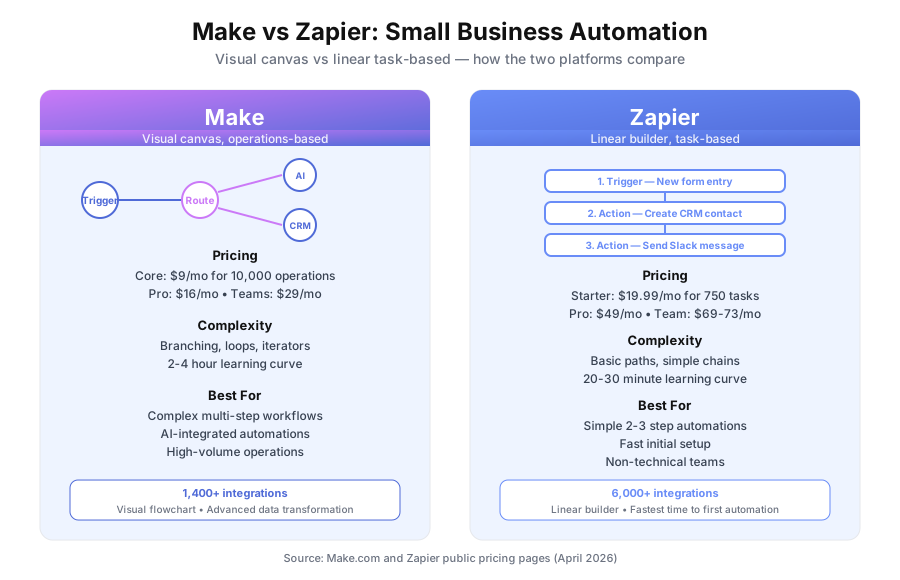
Which automation platform is right for small business?
Choose Make if you’re building more than five automations, need branching logic or AI integration, or care about cost efficiency at scale. Choose Zapier if you need the fastest possible setup, your automations are simple two-to-three step flows, or your team has zero tolerance for a learning curve. Most small businesses save money with Make.
Both platforms do the same fundamental thing — connect apps and move data between them — but the buyer profiles are genuinely different. Zapier optimizes for time-to-first-automation. Make optimizes for capability and cost per operation. The right pick depends on how many automations you’ll run, how complex they need to be, and whether you have 30 minutes or 4 hours to learn the interface.
What do Make and Zapier actually do?
Both are no-code automation platforms. You define a trigger (an event in one app) and one or more actions (things that happen in other apps as a result). When the trigger fires, the automation runs. Make handles complex branching and data transformation through a visual canvas. Zapier chains steps in a linear list.
Here’s a concrete example. A new lead submits your contact form. A CRM contact gets created. A welcome email goes out. Your salesperson gets a Slack notification. Both Make and Zapier can build this.
The difference is in how you build it, how much it costs to run at volume, and what happens when requirements get complicated. A simple linear workflow is trivial on either platform. A workflow that needs to check the lead score, route high-value leads to one path and low-value leads to another, enrich data from three sources, and handle errors differently for each path is where the platforms diverge sharply.
According to Zapier’s own 2024 research, companies using automation platforms save an average of $55,000 per business annually on operational costs. The platform choice determines how much of that saving you keep versus hand back in subscription fees.
How easy is each platform to learn?
Zapier takes about 20-30 minutes to build a first working automation. Make takes 2-4 hours to get comfortable. Zapier wins on initial ease because of its linear step-by-step builder. Make wins once you’re building anything beyond basic automations because the visual canvas makes complex logic readable and debuggable. The choice depends on what you’re actually building.
Zapier’s linear builder
Zapier’s interface is a vertical list of steps. You pick a trigger app, define the trigger event, add actions, and chain steps together. Someone who has never used an automation platform can build a two-step Zap in under 30 minutes.
The limitation: complex logic gets unwieldy in a linear interface. Branching paths, loops, multiple data sources feeding into one step — all of these work, but they create very long vertical chains that are hard to read, hard to debug, and hard for a second person to maintain.
Make’s visual canvas
Make uses a flowchart canvas. Each step is a circle called a “module,” and data flows between modules along connecting lines. You can see at a glance where data branches, where it converges, and which step failed during an error.
The trade-off: the canvas is more complex than Zapier’s list. Expect 2-4 hours to feel comfortable versus 30 minutes for Zapier. For complex builds, the upfront learning cost pays back quickly.
How much does Make vs Zapier cost?
Make is significantly cheaper at equivalent usage. Zapier’s paid plans start at $19.99/month for 750 tasks. Make’s Core plan is $9/month for 10,000 operations. At 5,000 monthly operations, Zapier costs $49-73/month while Make costs $9-16/month. The gap widens as volume and complexity grow, and Make’s operation counting also favors multi-step workflows.
| Plan tier | Zapier | Make |
|---|---|---|
| Free tier | 100 tasks/month, 5 Zaps | 1,000 operations/month |
| Entry paid | $19.99/month — 750 tasks | $9/month — 10,000 operations |
| Mid tier | $49/month — 2,000 tasks | $16/month — 10,000 operations (faster) |
| Business tier | $69-73/month — 5,000 tasks | $29/month — 40,000 operations |
The pricing gap looks large because it is. At 5,000 monthly operations, you’re paying $69-73/month on Zapier versus $29/month on Make. Over a year, that’s an $480-528 difference for identical work.
One important detail on how the two platforms count: in Zapier, each step in a multi-step automation counts as one task. In Make, a scenario run counts operations differently — a 10-step automation may consume fewer operations in Make than the equivalent in Zapier. In practice, Make is often cheaper than raw pricing suggests.
According to Gartner’s 2025 automation platform analysis, iPaaS platforms with operation-based pricing typically deliver 40-70% lower total cost of ownership than task-based platforms at volumes above 3,000 monthly runs. That matches what small business customers report after migrating.
How do the capabilities compare?
Make wins on capability for complex workflows, including branching logic, loops, iterators, and advanced data transformation. Zapier wins on raw integration count with 7,000+ apps versus Make’s 1,400+. For most small businesses, Make’s integration library covers every mainstream tool they actually use, so the count gap matters less than it sounds.
| Capability | Zapier | Make |
|---|---|---|
| App integrations | 7,000+ | 1,400+ |
| Multi-step workflows | Yes | Yes |
| Branching/conditional logic | Basic (Paths feature) | Advanced |
| Loops and iterators | Limited | Full support |
| Data transformation | Basic | Advanced |
| AI/GPT integration | Yes (limited) | Yes (full-featured) |
| Error handling | Basic | Advanced retry/rollback |
| Scheduling | Yes | Yes |
| Webhooks | Yes | Yes |
| Custom HTTP requests | Yes | Yes |
Zapier’s integration lead is the most common reason buyers pick it. In practice, Make’s 1,400 integrations cover Gmail, Slack, HubSpot, Salesforce, Airtable, Notion, Google Sheets, Shopify, Stripe, Mailchimp, and virtually every other mainstream business app. The gap shows up in niche and legacy tools. Check your specific stack against both directories before deciding.
Where Make pulls ahead is inside each integration. Make’s modules typically expose more granular operations per app, more flexible field mapping, and better handling of array data. For simple create/update/lookup operations, both platforms work equally well.
Which is better for AI automation?
Make is better for AI-integrated automations. Make’s OpenAI and Anthropic modules allow sophisticated AI calls within complex workflows — passing data between steps, handling conditional logic based on AI responses, and processing variable-length AI outputs. Zapier has AI features but they’re more limited in how deeply AI interacts with the workflow logic. For classification, generation, or AI-assisted decisions, Make wins.
According to a 2025 McKinsey report on AI adoption in small business, 67% of small businesses integrating AI into workflows report that the automation platform itself is the primary bottleneck — not the AI model. The platform has to handle unpredictable AI outputs, retry failed calls, and route based on AI responses. Make’s error handling and flow control were designed for exactly this.
A common example: a Make scenario reads a new support email, calls GPT to classify intent and extract entities, routes high-urgency emails to Slack, creates CRM notes for everything, and drafts a reply for human review. Building this in Zapier is possible but painful. The same build in Make is a clean visual flow.
Which platform fits specific use cases?
Simple two-to-three step automations
Zapier wins here. Faster setup, no learning curve, more than capable for basic trigger-action flows. A form-to-CRM-to-email sequence builds in 15 minutes.
Complex workflows with branching logic
Make wins. The visual canvas makes branching logic readable. Try mapping out a 10-step workflow with three conditional branches in Zapier’s linear list and you’ll see why.
High-volume automations
Make wins. The pricing advantage compounds dramatically at high volume. At 20,000 monthly operations, Make costs $16/month while Zapier costs $389+/month on comparable plans.
AI-integrated automations
Make wins. More flexible for embedding AI calls within workflow logic, passing outputs between steps, and handling variable AI responses.
Teams with no technical background
Zapier wins. The learning curve advantage is real. If your team needs to build and maintain automations without technical support, Zapier’s simpler interface reduces frustration.
Data privacy requirements
Neither fits. If data can’t leave your infrastructure, you need self-hosted. See our comparison of Make vs n8n for the self-hosting option, and our guide to no-code AI for context on the broader category.
Should you migrate from Zapier to Make?
It depends on volume. For businesses running fewer than 10 simple automations, migration cost probably exceeds annual savings. For businesses running 20+ automations or any complex workflows, the savings and capability gains typically justify the effort. Rebuilding a complex automation in Make takes 30-60 minutes, and the first few builds are slower than you’re used to.
Honest math on a typical migration. Say you have 15 automations on Zapier’s $49/month Pro plan. Moving to Make’s $9/month Core plan saves $480/year. At 45 minutes per rebuild, migration takes 11-12 hours. At a $50/hour internal rate, that’s $550-600 of time. Payback is roughly 13 months with zero capability improvements.
Now say your migration unlocks 5 new automations you couldn’t build before because Zapier’s pricing made them uneconomical. Each new automation saves 2 hours of manual work weekly. You’re now saving 10 hours per week — and payback compresses to a few weeks.
The argument for migration is rarely just the monthly bill. It’s the automations you can’t afford to build on Zapier but can afford on Make.
The decision framework — Make or Zapier?
Pick Make if: you’re building more than five automations, any of your workflows need branching or loops, you’re integrating AI, cost efficiency matters, or you want the platform most automation agencies build on. Pick Zapier if: you need the quickest possible setup, your automations are genuinely simple, you rely on niche apps only Zapier supports, or your team has no tolerance for a learning curve.
For context, Builts AI builds client automations almost exclusively on Make. The visual canvas, the capability at complexity, and the pricing model all align with what small business automation actually requires in 2026. For a deeper look at Make’s features, see our full Make.com review.
For related reading, see our guide on How to Connect Zapier, Make, and n8n to Your Business Tools and our article on What Is No-Code AI? How Business Owners Are Building Automations Without Developers.
Book a free automation audit and we’ll map your specific automation needs and recommend the right platform — Make, Zapier, n8n, or a combination — based on your workflow complexity, tool stack, and team.