A consultant at Skylarks International once spent an entire Tuesday doing nothing but sending “please upload your passport scan” emails. Forty-seven of them. Copy, paste, personalize, send. By Wednesday morning, three clients had replied. That’s the document chase, and if you run an immigration consultancy, you already live it. After automating intake, document collection, and status updates, Skylarks cut their document collection time from 3-4 weeks to under one week, a 70% reduction that freed 17 staff hours every week. According to McKinsey’s 2024 Global Survey on AI and Automation, 60% of occupations have at least 30% of tasks that could be automated, and for immigration firms that automatable portion lands squarely on the operational grind.
What results can a firm expect from automation?
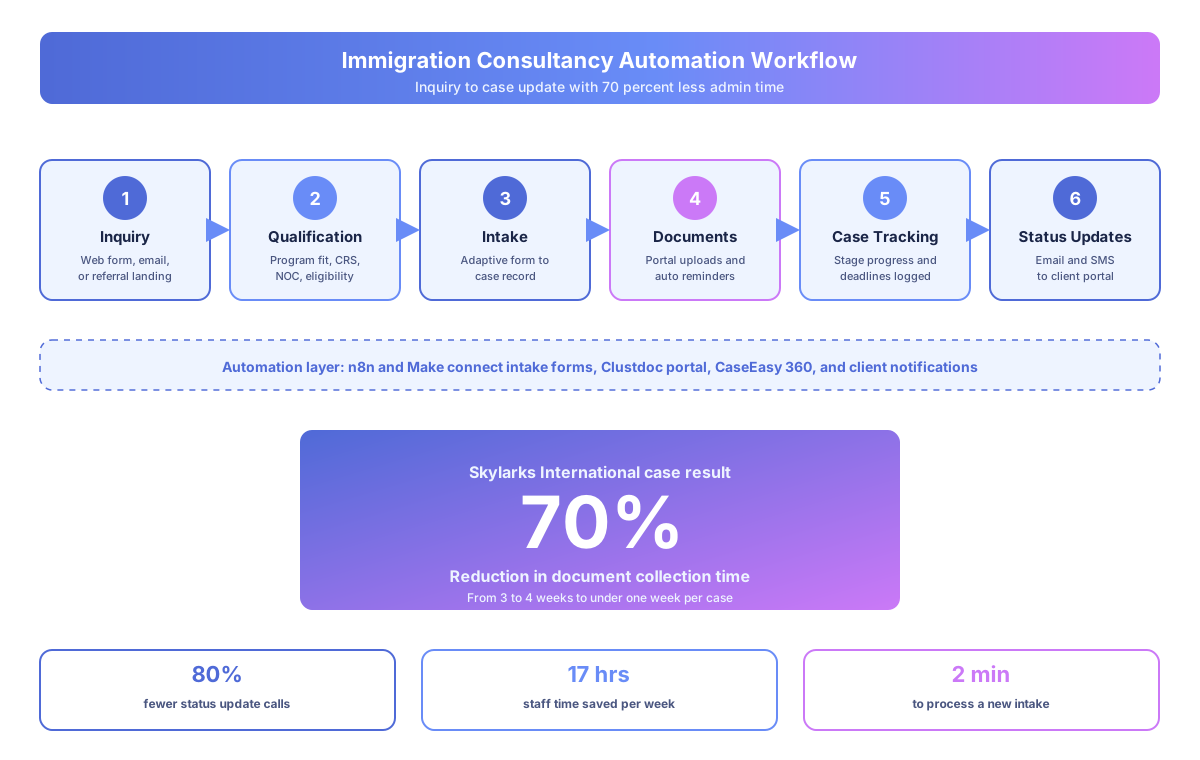
Immigration firms that automate intake, document collection, and client updates typically cut document collection time by 60-70%, reduce status calls by 70-80%, and free 15-20 staff hours per week. Skylarks International, a 15-person Canadian firm, hit every one of those benchmarks in 90 days using off-the-shelf tools.
The numbers at Skylarks International
Here’s what changed at a 15-person consultancy handling LMIA, PR, study permit, and work permit cases across Canada:
| Metric | Before automation | After automation |
|---|---|---|
| Document collection time | 3-4 weeks | Under 1 week |
| Status update calls per week | 60+ | ~12 |
| Staff hours chasing documents | 25-30 hrs/week | 8-10 hrs/week |
| Intake processing time | 15-20 min per client | 2 min per client |
| Missed document deadlines | 8-12 per quarter | 1-2 per quarter |
According to Forrester Research’s 2024 Total Economic Impact methodology, properly implemented workflow automation delivers 200% ROI within 18 months for professional services firms. Skylarks hit that benchmark in under a year, and the same pattern shows up across other mid-size firms we’ve worked with.
Why do immigration consultancies struggle with document collection?
Immigration cases run on paperwork volume. A single LMIA application needs 15-25 employer documents, a permanent residence file can require 30+ documents per applicant, and email-based collection creates endless back-and-forth. Every missed deadline costs client trust and consultant time.
The scale of the paperwork problem
A single LMIA application through Employment and Social Development Canada (ESDC) requires 15-25 supporting documents from the employer alone. Permanent residence applications through IRCC can require 30+ documents per applicant. Study permits, work permits, and provincial nominee programs through Ontario’s OINP or British Columbia’s BC PNP each carry their own checklists.
Most firms handle it with email. Consultant sends a checklist. Client emails back some documents. Consultant checks what’s missing, sends another email. Client forgets. Consultant calls. Client promises Friday. Friday comes, and nothing. The cycle repeats until panic sets in.
According to IDC’s 2023 Future of Work study, employees spend 30% of their time on manual data entry and transfer tasks. For immigration consultants, that number runs even higher because every case touches dozens of documents across multiple systems.
How does automated client intake actually work?
Automated intake replaces manual note-taking and Word attachments with a structured online form that adapts to case type, creates a client record instantly in the case management system, and sends a personalized confirmation. At Skylarks, intake processing dropped from 15-20 minutes per client to under 2 minutes.
The old intake workflow
Before automation, a prospective client called Skylarks. A junior consultant took notes, opened CaseEasy 360, manually entered client details, then emailed an intake questionnaire as a Word document. The client filled it out (sometimes), emailed it back (eventually), and someone re-entered everything into the case management system.
The automated workflow
Now, a prospective client fills out a structured online intake form. The form adapts based on answers:
- Selecting “LMIA” shows employer-specific fields (business number, NOC, wage)
- Selecting “study permit” shows DLI number and program fields
- Selecting “PR through Express Entry” shows CRS score and NOC code fields
That submission instantly creates a client record in CaseEasy 360, sends the client a confirmation email with next steps, and notifies the assigned consultant with a case summary. No copy-paste. No data re-entry. Tools like Visto AI can run automated eligibility assessments on the intake data, giving consultants a pre-screened profile before the first consultation.
What does the document collection portal look like?
The document portal replaces email-based requests with a client-facing dashboard where applicants see every required document, upload files to specific slots, and track their own completion percentage. Automated reminders handle the follow-ups. This single change drove the 70% collection time reduction at Skylarks.
How the portal flow works
When a case type is assigned, the system generates a checklist of every required document for that application type. The client gets a portal link where they can see exactly what’s needed, upload each file to its slot, and watch their completion bar move. No guessing about what’s missing.
The reminder cadence runs automatically:
- Day 1: Friendly nudge with the upload link
- Day 4: Firmer reminder with the deadline
- Day 7: Escalation to the consultant for a personal follow-up call
According to McKinsey’s 2024 Global Survey, organizations using structured digital collection processes see 40-60% faster completion rates than email-based workflows. Skylarks beat that benchmark, going from 3-4 weeks to under one week. For a step-by-step guide, see how to automate document collection.
Why the 70% cut happened
It wasn’t that clients suddenly became more organized. The system removed every friction point: unclear requirements, lost emails, forgotten attachments, and the back-and-forth of “which format do you need?” Clients could upload at midnight in their own timezone without anyone chasing them.
How do you stop the “any update on my file?” calls?
Automated status triggers replace manual call-backs. When a consultant updates a case stage in CaseEasy 360, the client automatically gets an email, SMS, and portal update. Skylarks eliminated 80% of status calls this way, recovering 8 to 10 consultant hours every week for actual casework.
The old status-update problem
Before automation, Skylarks consultants fielded 60+ status update calls per week. Each call took 5-10 minutes: pull up the file, check IRCC processing times, relay the same information, reassure the client. That’s 5-10 hours of staff time weekly on calls that communicated zero new information.
Clients are anxious for good reason. Their case affects their ability to live and work in Canada, so they call. Often. The same question, every time: “Any update?”
The automated fix
Now, when a consultant updates a case stage in CaseEasy 360 (document review complete, application submitted to IRCC, biometrics requested), the client automatically receives an email and SMS with the update. The client portal shows a visual timeline of their case progress, current IRCC processing times, and estimated next steps.
Skylarks eliminated 80% of their status update calls. The remaining 20% were legitimate case questions that required consultant expertise, exactly where their team should spend time. According to IDC’s 2023 Future of Work study, automated information flows cut that manual transfer overhead by 65-75% for knowledge workers.
Which immigration workflows benefit most from automation?
Operational workflows like intake, document collection, scheduling, reminders, and status updates are the highest-value automation targets. Professional work like IRCC submissions, legal strategy, and case assessments stays with the consultant. The CICC regulates the practice, not the operational tools firms use.
The automation decision matrix
| Workflow | Manual pain point | Automated solution | Tool |
|---|---|---|---|
| LMIA employer intake | 20+ fields entered twice | Adaptive form to CaseEasy 360 | Clustdoc + CaseEasy |
| PR document collection | 30+ documents via email | Portal with slot-based uploads | Clustdoc |
| Study permit DLI verification | Manual lookup per institution | Auto-verify against IRCC DLI list | Visto AI |
| IRCC processing time updates | Consultant checks weekly | Auto-pull and client notification | n8n + CaseEasy |
| Appointment scheduling | Email back-and-forth | Self-serve booking with prep checklist | Clio + Calendly |
| Retainer and fee collection | Manual invoicing | Auto-invoice on case assignment | Clio + Stripe |
The pattern is clear. Anything that moves data between systems, sends templated communications, or answers questions with known answers is an automation candidate. Anything that requires professional judgment, regulatory knowledge, or client relationship skills stays with the consultant.
What does the tech stack look like for a mid-size firm?
A typical mid-size immigration stack runs $300-$800 per month: CaseEasy 360 or INSZoom for case management, Clustdoc for document portals, Clio for client communication, Visto AI for assessments, and n8n or Make as the automation layer that connects everything. No custom software required.
The core stack Skylarks runs
Case management: CaseEasy 360 handles case data, deadlines, and workflow stages. INSZoom is the main alternative, popular with larger firms handling high-volume LMIA applications.
Client portal and documents: Clustdoc provides the document upload portal with automated reminders. Clio adds secure messaging, fee tracking, and appointment booking in a branded client portal.
Intake and assessment: Visto AI runs automated eligibility checks on intake form data. It’s especially useful for Express Entry CRS pre-screening and program matching.
Data layer: Airtable tracks metrics, manages referral sources, and builds custom reports that CaseEasy doesn’t offer natively.
Automation engine: n8n or Make connects everything. When a client uploads a document in Clustdoc, the engine updates the case status in CaseEasy 360, notifies the consultant via Slack, and sends the client a confirmation. No manual step between any of those actions.
According to Forrester Research’s 2024 Total Economic Impact studies, the integration layer delivers the highest ROI because it preserves existing workflows while eliminating manual glue between systems.
Is immigration automation compliant with CICC regulations?
Yes, when set up correctly. The CICC regulates the practice of immigration consulting, meaning professional advice, case assessments, IRCC representation, and legal strategy. Automation handles operational tasks only. Every system-generated message should clearly identify itself and direct clients to their licensed consultant.
Where the compliance line sits
The CICC regulates the practice of immigration consulting. That means professional advice, case assessments, representation before IRCC, and legal strategy. Automation doesn’t touch any of that. It handles the operational layer: scheduling, document collection, reminders, data entry, and status communications.
Think of a consultant using a calculator. They’re not outsourcing their accounting judgment to a machine. They’re using a tool to handle the math so they can focus on the analysis. Automation works the same way. The tool handles repetitive operational steps. The consultant handles the professional work that requires their RCIC or RISIA designation.
Data residency and PIPEDA
Canadian firms should pick providers with data residency in Canada to meet privacy expectations under PIPEDA. Every automated communication at Skylarks includes a note that it’s a system-generated message and directs clients to contact their assigned consultant for case-specific questions. Transparency keeps you on the right side of the rules.
What’s the realistic 90-day rollout timeline?
A realistic implementation runs 90 days: first 30 days for intake automation, next 30 for document portal rollout, final 30 for status update triggers. Skylarks followed this exact sequence. Expect 20-30% productivity gains in year one, with compounding improvements as your team optimizes the automated processes.
Phase-by-phase breakdown
Days 1-30: Intake automation goes live. New clients experience structured onboarding instead of scattered emails. Staff notice the difference immediately: fewer data entry tasks, cleaner records, faster first consultations.
Days 30-60: Document portal operational. Collection times start dropping. Clients give positive feedback about the portal (“I can actually see what’s missing”). Reminder automation cuts the daily email volume consultants send by 50-60%.
Days 60-90: Status update automation running. Call volume drops. Consultants report spending more time on actual casework and less on “where’s my file?” questions.
The full Skylarks International case study covers the timeline, costs, and detailed metrics. You can also read how Skylarks cut document collection time by 70% for a focused breakdown.
According to McKinsey’s 2024 Global Survey, organizations that automate operational workflows see productivity gains of 20-30% in the first year, with compounding improvements as teams optimize. For a 15-person firm like Skylarks, that’s equivalent to adding 3-4 staff members without adding headcount.
Ready to stop the document chase?
The document chase doesn’t have to define your firm’s daily reality. The tools exist, the playbook is proven, and your consultants have better things to do than send their forty-eighth “please upload your passport” email of the week. If you run a Canadian immigration consultancy and want to map out your own intake and document collection automation, get in touch with our team for a walkthrough of what a 90-day rollout would look like for your firm.