“Any update on my file?” That one question consumed 80% of Skylarks International’s inbound client communication. Fifteen people. Hundreds of immigration cases. The most common interaction wasn’t case strategy. It was clients asking for a status update someone had to look up and relay by hand. After launching a self-service client portal, status calls dropped 80% in the first month. According to Forrester’s 2024 Total Economic Impact studies, the average ROI on business process automation hits 200% in year one. A client portal is one of the fastest ways to get there.
Why do small businesses need a client portal in 2026?
A client portal kills the status-update loop that eats your team’s time. Clients check their own progress, upload their own files, and book their own meetings. Your staff stop answering “any update?” ten times a day and start doing the work clients actually pay for.
According to IDC’s 2023 Future of Work study, employees spend 30% of their time on manual data tasks. For service businesses, a big chunk of that is the status loop: client asks, staff looks up, staff replies, client asks again next week.
The math is brutal. If five staff each spend 8 hours a week on status updates, that’s 40 hours per week. At a loaded cost of $50/hour, you’re burning $104,000 a year on a task clients can do themselves in 30 seconds.
A portal doesn’t just save money. It also improves the client experience because clients get answers instantly instead of waiting for someone to reply on Monday morning.
What does a self-service client portal actually include?
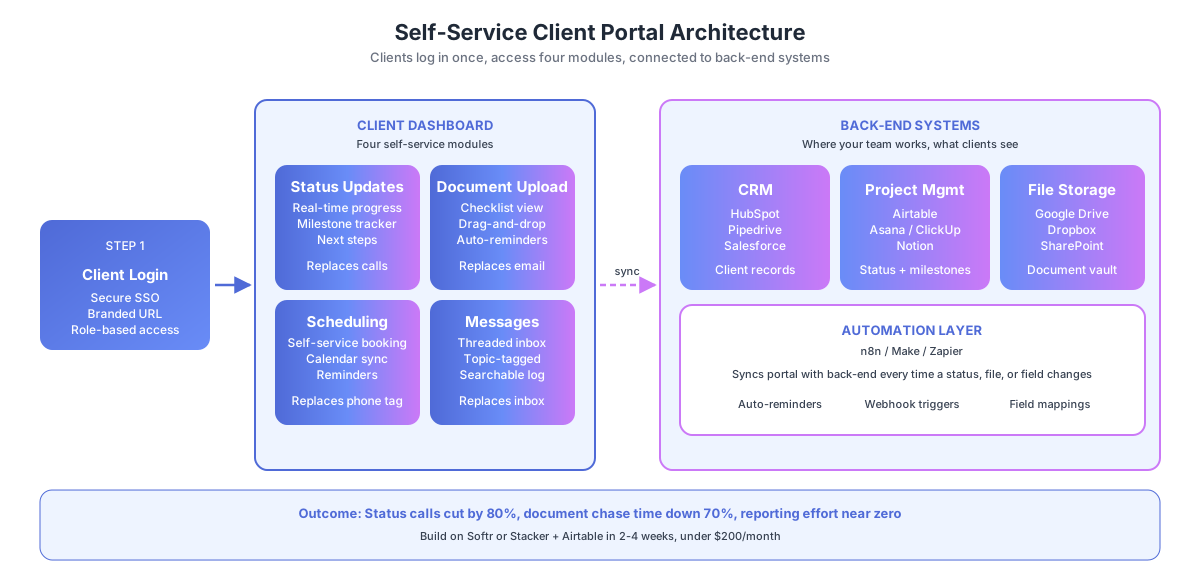
A client portal gives each client a secure, branded login where they can check project status, upload documents, view invoices, book meetings, and send messages. It pulls data from your CRM, project tracker, and file storage in real time, so clients see the same information your team sees, without staff in the middle.
The four essential modules:
| Module | What Clients See | What It Replaces |
|---|---|---|
| Status tracker | Real-time project progress with milestones | ”Any update?” calls and emails |
| Document center | Upload area with checklists and file previews | Email attachments, Drive link chaos |
| Scheduling | Self-service booking tied to your calendar | Phone tag and email back-and-forth |
| Messaging | Threaded conversations by topic or project | Scattered inbox threads |
According to Gartner’s 2024 Digital Customer Experience Survey, 72% of customers say they prefer self-service over speaking with a representative for routine tasks. Status updates, document uploads, and appointment booking are textbook routine tasks.
At Skylarks International, consultants now spend their time on casework instead of repeating the same status answer 40 times a week.
How do you build a client portal without custom development?
You have three paths: off-the-shelf platforms ($29-$99/month), Airtable-based portals ($50-$200/month), and custom builds ($5,000+). Most small businesses get 90% of the value from the first two options. Custom development only makes sense when you have complex role-based access or legacy system integrations.
According to MuleSoft’s 2023 Connectivity Benchmark, the average enterprise uses 1,061 applications. Small businesses use 15-30. A portal should connect to your existing stack, not replace it.
Option 1: Off-the-shelf client portal platforms
| Platform | Monthly Cost | Best For | Limitations |
|---|---|---|---|
| Copilot | $29-$99 | Professional services, agencies | Limited customization |
| SuiteDash | $19-$99 | All-in-one (CRM + portal + invoicing) | Steep learning curve |
| Clinked | $83+ | Client collaboration, file sharing | Pricey for small teams |
| Dubsado | $20-$40 | Creative agencies, consultants | Weak status tracking |
| HoneyBook | $16-$66 | Service providers, freelancers | Consumer-facing focus |
These work well if your workflow matches their template. Setup takes 1-3 days. The trade-off: you adapt to their structure, not the other way around.
Option 2: Airtable + Softr or Stacker (the sweet spot)
Build your portal on Airtable as the database, with Softr or Stacker as the front-end. Airtable stores client data, project status, and document links. Softr or Stacker turns that data into a branded client-facing site. n8n or Make connects everything to your CRM and email.
This approach gives you the flexibility of a custom build at 10% of the cost. You control every field, view, and automation rule. Because Airtable is your database, your internal team works in the same system the client sees, just with different views. For a deeper look at Make as the automation layer connecting Airtable to your CRM and email, see our full platform review.
Taxvisory uses an Airtable-based system for client document tracking. Clients see what documents they need, what’s been received, and what’s still missing. Automated reminders fire until everything is complete. Document chasing dropped 80%.
Option 3: Custom development
For businesses with multi-step approval workflows, role-based access, or legacy system integrations, a custom portal built on your tech stack gives unlimited flexibility. Cost: $5,000-$15,000+. Timeline: 4-8 weeks.
According to Statistics Canada’s 2024 SEPH data, a Canadian full-time employee costs $45,000-$65,000 per year. If your team spends 10+ hours per week on status updates and document handling, a $10,000 portal pays for itself in under six months.
How do you set up real-time status tracking in the portal?
Status tracking is the feature that eliminates the most client calls. Each project gets a status that updates as work progresses. Clients see their current stage, completed milestones, and next steps without asking anyone. The data already exists in your project tracker. You’re just making it visible.
According to McKinsey’s 2024 Global Survey on AI and Automation, 60% of occupations have at least 30% of tasks that could be automated. Status communication is one of the easiest to automate because the information is already in your system.
Setup with Airtable + Softr
- Create an Airtable base with tables for Clients, Projects, and Milestones
- Add a Status field (single-select: Not Started, In Progress, Review, Complete)
- Link Milestones to Projects with dates and descriptions
- Connect Airtable to Softr and build a client-facing page filtered by logged-in user
- Each client sees only their own projects and milestones
- When your team updates status in Airtable, the portal updates instantly
Automation layer (n8n or Make)
- When status changes to Review, auto-email the client: “Your [project] is ready for your review”
- When all milestones are complete, trigger the final deliverable workflow
- When a project stalls for 3+ days, alert the team lead
At AcquireX Properties, investor reporting was a quarterly scramble. After building a real-time property performance tracker, investor reports generate automatically. The 3-person team tripled their portfolio capacity because reporting no longer bottlenecked growth.
How do you automate document collection through the portal?
Document collection through a portal replaces email-based requests with a structured upload interface. Clients see exactly which documents they need, upload them directly, and get automated reminders for anything missing. Your team gets notified when a document set is complete, not after every single upload.
According to CPA Practice Advisor’s 2025 Accounting Industry Report, 69% of tax firms are delayed by slow client document collection. The portal solves this by putting the checklist in the client’s hands and automating the follow-up loop.
The document collection workflow
| Step | Portal Action | Automation |
|---|---|---|
| Assignment | System creates checklist based on service type | Auto-generated from template |
| Notification | Client gets email with portal link and checklist | Triggered on project creation |
| Upload | Client uploads files via drag-and-drop | Files auto-categorize by type |
| Reminder | Client sees what’s missing every 3 days | n8n or Make fires email loop |
| Completion | All documents uploaded | Team notified, project advances |
| Review | Staff reviews uploads for quality | Flagged docs trigger re-upload |
Skylarks International processes LMIA, PR, study permits, and work permits. Each application type needs different documents. Their portal creates the right checklist automatically by application type. Document collection time dropped 70%.
Tool options: Clustdoc ($29/month, purpose-built for document collection), ContentSnare ($24/month, structured collection with reminders), or a custom Airtable + Softr setup with file upload fields. For a complete walkthrough of the collection workflow itself, see our guide on how to automate document collection from clients.
How do you add self-service scheduling and messaging?
Embed a Calendly or HubSpot Meetings link inside the portal dashboard for scheduling. For messaging, use Softr’s built-in comments feature or connect Intercom/HelpScout for threaded conversations. Both modules should feel like part of the portal, not a third-party tab, so clients don’t hunt for them.
According to HubSpot’s 2024 State of Service Report, 76% of customers expect to interact with a company on their own schedule. Self-service scheduling and async messaging are how you meet that expectation without adding staff.
Scheduling setup
- Create a Calendly event type for each service (consultation, kickoff, review)
- Embed the Calendly widget in the portal dashboard
- Calendar sync pulls staff availability in real-time
- Auto-confirmation email with meeting link, agenda, and prep checklist
- Reminders 24 hours and 1 hour before the meeting
Messaging setup
- Enable Softr comments on each project card (threaded by project)
- Or embed Intercom Messenger in the portal for live chat plus async threads
- Route messages to Slack or Teams so staff see them in their normal inbox
- Tag messages by topic (billing, status, technical) for faster triage
For a deeper look at scheduling tool options, see our Calendly vs Acuity vs HubSpot Meetings comparison.
How do you measure portal adoption and business impact?
Track four metrics: portal login rate (target 70%+ monthly), status inquiry volume (target 60-80% drop), document collection time (target 3-7 days vs 2-4 weeks), and client NPS (target +15-25 points). If login rate stalls below 50%, your onboarding is the problem, not the portal.
According to Process Street’s 2024 Automation Benchmark, companies that document processes before automating hit ROI 2.3x faster. For portals, the “documentation” is your client communication patterns. Which questions do clients ask most? How often? Those patterns tell you which portal features deliver the most value.
| Metric | Before Portal | Target After | How to Measure |
|---|---|---|---|
| Status inquiry volume | 20-50/week | Under 10/week | Count calls + emails asking “any update?” |
| Document collection time | 2-4 weeks | 3-7 days | Average days from request to complete |
| Client satisfaction | Baseline | +15-25 NPS | Survey or direct feedback |
| Portal login rate | N/A | 70%+ monthly | Softr, Copilot, or custom analytics |
| Staff time on client comm | 10-20 hrs/week | Under 5 hrs/week | Time tracking |
According to Deloitte’s 2023 Global Intelligent Automation Survey, 73% of organizations report positive ROI from automation within 12 months. For portals, the ROI shows up in the first month. The day clients start checking their own status is the day your phone stops ringing with update requests.
How do you launch a client portal in 30 days?
Launch in four weeks by shipping one module at a time. Week 1: pick a platform and map your data. Week 2: build status tracking for active projects. Week 3: add document collection with automated reminders. Week 4: onboard existing clients and turn off email status replies. Don’t try to build everything at once.
The 30-day rollout plan
| Week | Focus | Deliverable |
|---|---|---|
| Week 1 | Platform + data map | Softr account, Airtable base with client and project data |
| Week 2 | Status tracking | Live status dashboard for 5-10 pilot clients |
| Week 3 | Document collection | Checklist workflow + automated reminders |
| Week 4 | Messaging + scheduling | Calendly embed, comments enabled, onboarding email sent |
Start with the question your clients ask most. If it’s “any update?”, build the status tracker first. If it’s “what documents do I need?”, start with document collection. If it’s “when can I meet with you?”, embed Calendly on day one. Ship the module that kills the most emails first.
If your portal will include an intake flow for new clients, our guide on how to automate client intake covers the end-to-end process from first contact to kickoff.
Ready to build your client portal?
For a portal designed around your specific client workflow, book a free audit. We’ll map your client communication patterns, recommend the simplest system that eliminates the most manual work, and deliver a written plan in 48 hours. No code required to launch in 30 days.