A 4-attorney boutique law firm cut matter-opening time from 1-2 weeks to under 5 days — a 60% reduction — by replacing email-based intake with a structured client portal. Admin time per new file dropped 80% (from 2-4 hours to 30-45 minutes of review), and intake document loss stopped entirely. According to Thomson Reuters’ 2024 State of the Legal Market report, firms that automate client intake report 35% higher client satisfaction than those using manual processes. Here’s exactly what the firm built, what it replaced, and what small firms can copy from the approach.
What results did the firm actually measure?
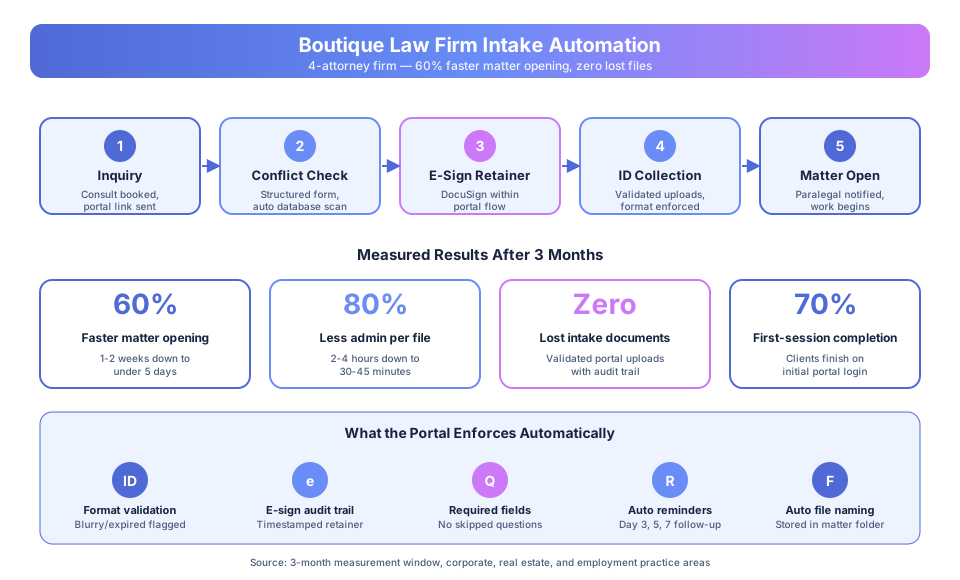
Answer Capsule: Over three months post-launch, the firm cut average matter-opening time by 60% (from 1-2 weeks to under 5 days), reduced admin time per new file by 80%, eliminated intake document loss entirely, and saw 70% of clients complete their full intake in a single portal session. Retainer signing shrank from days to hours.
The firm handles a mix of corporate transactions, real estate, and employment matters. Before the change, every new client followed the same email-based process regardless of practice area. After the change, each practice area ran through a configured portal with its own checklist.
| Metric | Before Automation | After Automation | Change |
|---|---|---|---|
| Average matter-opening time | 1-2 weeks from engagement | Under 5 days | 60% faster |
| Admin time per new file | 2-4 hours (chasing, organizing) | 30-45 minutes (review only) | 80% reduction |
| Intake document loss | Occasional, consistent problem | Zero since implementation | Eliminated |
| First-session portal completion | N/A (email) | 70% complete on first login | Single-session close |
| Retainer signing time | Days (print/sign/scan) | Hours (e-signature in portal) | Same-day close |
According to the 2024 Clio Legal Trends Report, the average small firm loses 1.9 billable hours per day to admin overhead. For a 4-attorney firm, that’s nearly 40 hours of lost capacity per week across the team — capacity the intake portal recovered directly.
Why was the email-based process failing?
Answer Capsule: Email has no enforcement layer. Clients sent what they remembered, in whatever format was handy, to whichever address they last replied to. The firm couldn’t validate completeness, couldn’t flag missing items automatically, and couldn’t track retainer signing status without a paralegal manually auditing each file. Every gap triggered a follow-up interruption.
The intake process began when an attorney or paralegal emailed the standard package request: government-issued ID, intake questionnaire, signed retainer, and any relevant prior correspondence. Clients received a plain-text list and were expected to gather and return everything.
What actually happened:
- Clients sent partial packages and forgot the rest
- Retainer pages came back signed in the wrong place
- ID scans arrived blurry or expired
- Documents landed in old email threads with five cc’d recipients
- Files used inconsistent names that were hard to locate later
Each gap meant another email, another reminder, another interrupted hour. According to the 2024 ABA Legal Technology Survey, attorneys spend roughly 40% of their time on administrative tasks rather than billable work — and new-matter intake was a disproportionate contributor to that overhead at this firm.
Why didn’t better email templates fix the problem?
Answer Capsule: The firm had already tried clearer instructions, better templates, and checklists sent by email. It didn’t work consistently because email places the burden of completeness on the client, and clients under legal stress don’t read instructions carefully. Structural enforcement was needed, not clearer writing.
A client retaining an employment attorney is often in the middle of a termination or discrimination situation. A real estate client is under transaction pressure. A corporate client is closing a deal. The quality of client attention during intake is not their top priority, and no amount of template polish changes that.
According to Deloitte’s 2023 Global Intelligent Automation Survey, professional services firms that automate client-facing intake processes reduce intake-to-engagement time by 40-60%. The gains don’t come from faster client action — they come from systems that guide clients through the process correctly on the first attempt.
The firm’s partners didn’t want to hire another paralegal to manage intake. They wanted a system that didn’t need human follow-up for routine gaps — the pattern we deploy as client intake automation for law firms.
What system did the firm build?
Answer Capsule: A structured client portal with practice-area-specific checklists, DocuSign-integrated retainer signing, automated conflict data capture, and 3/5/7-day reminder escalation. Each new client receives a portal link immediately after engagement, sees only the checklist for their matter type, and completes everything through a single guided flow.
How the intake portal works
The portal routes every new client through the same five-stage flow but shows different content based on practice area:
- Attorney confirms engagement and practice area in the firm’s matter management system
- Portal link generates and sends automatically with a personalized welcome message
- Client logs in and sees their practice-area checklist with clear instructions per item
- Required documents upload through the portal, which validates format and legibility — following the same principles as our guide to automating document collection from clients
- Retainer signs via embedded DocuSign — no printing, no scanning, no email attachment
- Conflict check information captures through a structured form (parties, opposing counsel, related matters)
- The system tracks completeness and sends reminders at days 3, 5, and 7 for outstanding items
- When the file is complete, the paralegal receives a notification and opens the matter
- Every document is timestamped, versioned, and stored in the matter folder automatically
What the system enforces
The portal won’t accept a file as complete until structural requirements are met:
- Identity documents must be government-issued and clearly legible — blurry or expired uploads are flagged
- Retainer agreement signature is confirmed via e-signature audit trail
- Required fields in intake questionnaires cannot be skipped
- File naming is applied automatically — no “document (2) final FINAL.pdf” in matter folders
According to the 2024 ILTA Technology Survey, 62% of law firms cite audit readiness and compliance documentation as primary benefits of automated intake. The same audit trail that speeds matter opening also satisfies file review requirements.
The conflict check integration
Previously, attorneys ran manual conflict checks after intake was complete. Now, conflict data is captured during intake through a structured form and the system runs an automated preliminary check against the matter database before matter opening. Full attorney review still happens — the automation flags possible conflicts, it doesn’t resolve them — but the preliminary scan runs before the paralegal opens the file rather than after.
How did clients respond to the portal?
Answer Capsule: Client feedback split by tech comfort, not generation. Younger clients preferred the portal immediately; older clients needed a brief walk-through but then preferred it because requirements were listed in one place. Across both groups, the most common comment was about clarity — clients knew exactly what was needed and what was outstanding.
Several clients mentioned that the organized process made them feel more confident in the firm’s overall professionalism. For a referral-driven boutique, that perception matters. According to Thomson Reuters’ 2024 State of the Legal Market report, firms that automate client intake and document collection report 35% higher client satisfaction scores than those using manual processes.
The firm’s managing partner noted one unexpected benefit: reduced pre-engagement anxiety. Clients who’d been worried about “getting the paperwork right” found the guided checklist reassuring. They stopped calling the paralegal to ask whether something had been received.
What should other small law firms take from this?
Answer Capsule: Three principles translate directly. Structure enforces completeness while email doesn’t. Embedding e-signature inside the intake flow collapses retainer lag from days to hours. And practice-area-specific checklists outperform generic intake forms because they reduce client confusion and incorrect submissions.
Structure enforces completeness; email doesn’t. Email is flexible, which is exactly why intake fails on it. Clients can send anything, in any format, at any time, to any address. A portal enforces what’s needed, validates what’s submitted, and tracks what’s missing — without a paralegal manually auditing each file.
Embedded e-signature collapses retainer lag. Separating retainer signature from intake adds days. When signature sits inside the portal flow as step two of a four-step process, most clients complete it in the same session as their ID upload.
Practice-area checklists outperform generic forms. A corporate client shouldn’t see the same requirements as a family law client. Tailoring the checklist to the matter type reduces confusion, reduces incorrect submissions, and signals to clients that the firm understands their specific situation.
What did implementation cost and how long did it take?
Answer Capsule: The firm’s portal deployment took roughly 4 weeks end-to-end and runs at around $400 per month in software plus e-signature fees. The payback window was under one billing cycle — recovered attorney time exceeded portal cost within the first month of use, and the firm hasn’t added headcount despite matter volume growing 20%.
Most of the deployment time went into mapping existing document requirements per practice area, not building the portal itself. The structural pattern is repeatable. For firms with similar practice areas, the checklist work translates directly.
Ongoing cost breakdown (approximate):
- Portal platform subscription: $200-300/month
- DocuSign integration and volume: $75-150/month
- Matter management system integration: $50-100/month
For context, a single recovered billable hour at typical boutique rates covers the entire monthly cost. The firm recovered closer to 8-16 hours per week.
Could this approach work for your firm?
Answer Capsule: If your firm regularly deals with incomplete files at matter opening, attorneys spending billable time on document follow-up, or intake delays that frustrate clients before substantive work begins — the solution pattern is the same. Start with your highest-volume practice area, deploy one configured portal flow, then expand.
Every firm’s intake process is different, but the structural problem is consistent: email has no enforcement mechanism, and enforcement is what intake requires. The firm in this case didn’t replace every process at once — they started with corporate transactions (their highest volume), proved the 60% improvement, then rolled out real estate and employment over the following month.
For related reading, see our guide on How to Automate Client Intake Without Custom Development and our Professional Services Automation Playbook. If you want to see exactly what we build for boutique and mid-sized law firms — including conflict checks, document portals, and bar-compliant infrastructure — see our AI customer service for law firms page.
Book a free automation audit and we’ll map your intake workflow, identify the specific bottlenecks worth fixing first, and give you a realistic timeline for your practice areas.