Your accounting software choice decides what you can automate. According to Intuit’s 2025 Small Business Finances Report, businesses using automated invoicing and payment reminders collect outstanding invoices 19 days faster than those handling accounts receivable manually. That’s a direct cash flow impact worth thousands for most small businesses.
QuickBooks Online, Xero, and FreshBooks are the three platforms Canadian small businesses actually shortlist in 2026. Each one targets a different buyer. Pick wrong and you’ll spend the next two years fighting the tool instead of using it.
This comparison covers automation capability, integration depth, pricing, and the one factor most reviews skip: how well each platform plays with your existing accountant.
Which Accounting Software Should a Small Business Pick in 2026?
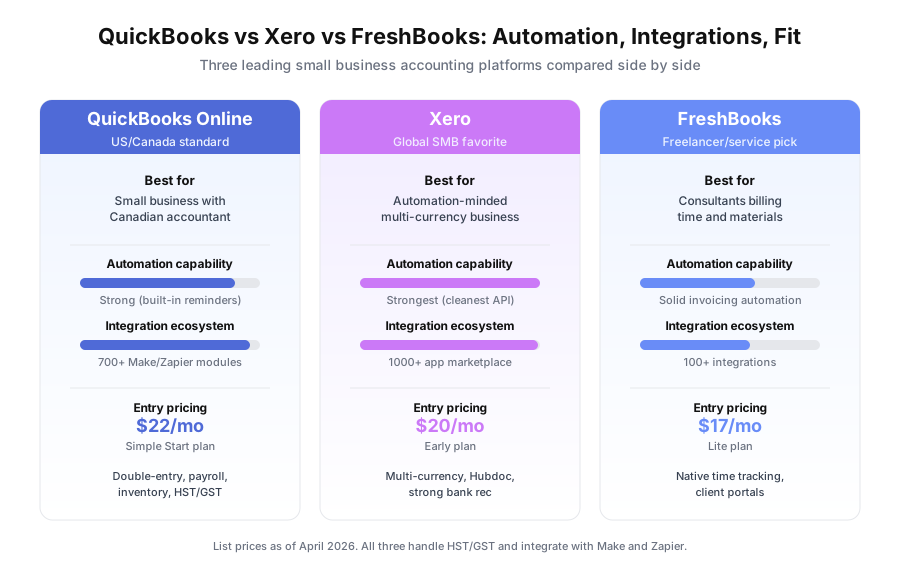
Pick QuickBooks Online if you work with a Canadian accountant. Pick Xero if you’re building automation on top of your books or need multi-currency. Pick FreshBooks if you’re a freelancer or service consultant billing hourly. The decision almost always comes down to accountant fit, API needs, or billing model.
Here’s the short version before the details. QuickBooks wins on ecosystem. Xero wins on automation. FreshBooks wins on invoicing simplicity for solo operators.
The Canadian market skews heavily toward QuickBooks because Intuit has been selling to Canadian accounting firms since 1992. That 34-year head start shows up in every bookkeeper directory and every accounting program at Canadian colleges.
What Is Each Platform Actually Built For?
Each platform has a distinct origin story that still shapes its design. QuickBooks comes from tax prep heritage, Xero from cloud-first architecture, and FreshBooks from freelancer invoicing pain. Understanding these roots predicts which frustrations you’ll hit once you go past 50 transactions per month.
QuickBooks Online (Intuit, founded 1983) — The most widely used small business accounting software in North America. Full double-entry system handling invoicing, expenses, payroll, inventory, tax prep, and reporting. Intuit reported 7 million QuickBooks Online subscribers globally in their fiscal 2024 annual report.
Xero — Founded in New Zealand in 2006, now the dominant SMB accounting platform across Australia, New Zealand, and the UK. Xero reported 4.2 million subscribers worldwide in its 2024 annual report. Built cloud-first with a reputation for the cleanest public API in the accounting space.
FreshBooks — Toronto-founded in 2003 by Mike McDerment after getting frustrated with Word-based invoices. Purpose-built for service businesses and freelancers. FreshBooks claims over 30 million users across 160 countries as of 2025 (including free trials and legacy accounts).
How Do the Pricing Plans Compare?
All three platforms sit in roughly the same price band: $17 to $62 per month depending on tier. FreshBooks Lite is cheapest at $17/month, Xero Early at $20, and QuickBooks Simple Start at $22. For full feature access with inventory, multi-currency, or unlimited users, expect $55 to $62 monthly as of April 2026.
| Plan Tier | QuickBooks Online | Xero | FreshBooks |
|---|---|---|---|
| Entry | Simple Start — $22/mo | Early — $20/mo | Lite — $17/mo |
| Mid | Essentials — $33/mo | Growing — $35/mo | Plus — $30/mo |
| Full features | Plus — $55/mo | Established — $62/mo | Premium — $55/mo |
| Advanced tier | Advanced — $100/mo | N/A | Select — custom |
All three run 50-70% promotional discounts for new customers during the first 3-6 months, per each vendor’s current US pricing pages (verified April 2026). The rates above are standard list prices. Don’t base a multi-year decision on promo rates.
Intuit also charges extra for payroll ($50/month base plus $6/employee), making QuickBooks’ true cost higher than the headline for most businesses with staff.
Which Has Better Invoicing and Time Tracking Automation?
FreshBooks wins on invoicing polish and native time tracking for solo service providers. Xero and QuickBooks both handle invoicing well but require add-ons or higher tiers for serious time tracking. For recurring invoice automation triggered by CRM events or project milestones, Xero’s API makes the build easiest.
All three support scheduled recurring invoices out of the box. That’s table-stakes. The real differentiation shows up in three places.
Trigger-based invoice creation from external systems. When a CRM deal closes or a project stage completes, can you auto-generate an invoice? Xero and QuickBooks both have deep Make and Zapier modules for this. FreshBooks has fewer modules but covers basic triggers. Xero’s API responds faster and handles error cases more cleanly in testing we’ve run for clients.
Time tracking workflow. FreshBooks has native time tracking with timer, manual entry, and automatic invoice conversion. QuickBooks Plus ($55/month) adds time tracking. Xero requires the Harvest integration or a third-party add-on.
Client portal and payment collection. FreshBooks’ client portal with one-click Stripe/PayPal checkout is the cleanest of the three. QuickBooks Payments ships with competitive card processing at 2.9% + 25 cents. Xero routes through Stripe at similar rates.
How Do Their Accounts Receivable Automation Features Compare?
QuickBooks and FreshBooks offer solid built-in payment reminder sequences with zero setup. Xero allows the most customization through its API, letting you build conditional reminder logic, escalation triggers, and custom messaging through Make or Zapier. For standard AR follow-up, all three work. For custom logic, Xero wins.
Accounts receivable automation is where accounting software earns its keep. The Intuit data showing 19-day faster collection with automated reminders translates to real cash flow improvement.
QuickBooks Online includes automated payment reminders in Essentials and Plus tiers. Set the schedule (7 days before due, day of, 7 days after, 14 days after), pick a template, done. No external tool needed.
Xero has built-in invoice reminders on all plans. The API lets you build sequences well beyond what’s possible in the native UI. Teams running AR automation through Make typically use Xero because the webhook reliability is higher.
FreshBooks has automated late payment reminders and late fees built in. The UI is the simplest of the three. API options are more limited for custom workflows.
Case study reference: see how one consulting firm cut AR aging from 34 to 14 days in our accounts receivable automation case study.
Which Platform Wins on Expense Management and Receipt Capture?
Xero wins here. Hubdoc (acquired by Xero in 2018) is now free on all Xero plans and handles receipt capture, bill imports, and document storage natively. QuickBooks pairs with Dext ($12/month extra) or uses its native receipt capture, which is improving but lags. FreshBooks has basic receipt capture.
Receipt processing is one of the easiest bookkeeping tasks to automate. The workflow is the same across all three: employee photographs receipt, AI extracts vendor, date, amount, and tax, transaction flows into accounting software for approval.
The differences show up in three places.
Integration tightness. Xero and Hubdoc share a login, share data in real time, and feel like one product. QuickBooks and Dext require separate subscriptions and a sync setup that occasionally stalls.
Data extraction accuracy. In Gartner’s 2025 Peer Insights reviews of AR automation tools, Hubdoc scored 4.3/5 for data extraction accuracy versus Dext’s 4.4/5 — effectively tied. Native QuickBooks receipt capture scored 3.8/5 in the same period.
Mileage tracking. QuickBooks Online includes native mileage tracking on all plans with automatic drive detection via the mobile app. Xero and FreshBooks require add-ons for this.
For service businesses with field work, QuickBooks’ mileage tracking is genuinely useful. For offices handling vendor bills at volume, Xero plus Hubdoc is cleaner.
Which Accounting Software Has the Best Canadian Accountant Support?
QuickBooks dominates the Canadian accountant ecosystem by a wide margin. Per Intuit’s 2025 ProAdvisor program data, roughly 80% of Canadian bookkeepers and CPAs hold active QuickBooks certifications. Xero’s Canadian partner network is growing but smaller. FreshBooks is primarily a business-owner tool that accountants typically export data from.
This isn’t a product quality statement. It’s a market reality. If your accountant already uses QuickBooks, asking them to learn Xero is a real switching cost.
Three practical implications follow.
Finding a new accountant. Search the Canadian QuickBooks ProAdvisor directory and you’ll find thousands of certified bookkeepers in every major city. The Xero Advisor directory returns maybe 15-30% of that volume in Canadian cities. FreshBooks has an accountant partner program but fewer dedicated FreshBooks specialists.
Year-end tax filing. Canadian CPAs filing T2 corporate returns usually prefer QuickBooks working papers because their tax software (Taxprep, ProFile) imports directly. Xero exports work but require more manual cleanup.
Hourly rates. Canadian bookkeepers quote similar hourly rates across platforms ($40-$80/hour for regular bookkeeping, per the 2025 CPB Canada benchmark), but cleanup work on Xero books sometimes runs 15-20% higher simply because fewer bookkeepers specialize in it.
What About Feature Depth: Inventory, Multi-Currency, Payroll?
QuickBooks Plus and Xero both handle inventory and multi-currency well. FreshBooks doesn’t. For Canadian payroll, QuickBooks offers native Intuit Payroll, Xero partners with Gusto or Wagepoint, and FreshBooks integrates Gusto. If you need inventory or multi-currency, FreshBooks is out.
| Feature | QuickBooks Online | Xero | FreshBooks |
|---|---|---|---|
| Double-entry bookkeeping | Full | Full | Limited (accrual at higher tier) |
| Invoicing | Strong | Strong | Best-in-class |
| Native time tracking | Plus tier only | Via Harvest | Native, excellent |
| Bank reconciliation | Good | Best-in-class | Good |
| Inventory management | Plus tier only | All plans | Not supported |
| Multi-currency | Plus tier only | All plans | Not supported |
| Payroll (Canada) | Intuit Payroll add-on | Gusto or Wagepoint | Gusto integration |
| HST/GST reporting | Yes | Yes | Yes |
| Make/Zapier integration | Strong | Strongest | Basic |
| Canadian accountant support | Dominant | Growing | Limited |
Multi-currency deserves a closer look for Canadian businesses selling to US clients. Xero includes it on all plans. QuickBooks gates it behind the Plus tier at $55/month. FreshBooks doesn’t offer it at all. If you invoice even one recurring US client, this often drives the whole decision.
Which Platform Should You Pick Based on Business Type?
Match your business type to the platform rather than looking for a universal winner. Freelancers pick FreshBooks. Small businesses with Canadian accountants pick QuickBooks. Automation-heavy or multi-currency businesses pick Xero. The table below maps the most common Canadian small business scenarios to a clear recommendation.
| Your Business Profile | Recommended Platform | Why |
|---|---|---|
| Freelancer, consultant, billing hourly | FreshBooks Lite or Plus | Best invoicing + native time tracking |
| Small business with existing QuickBooks CPA | QuickBooks Essentials or Plus | Ecosystem compatibility saves $400-$1,200 in switching costs |
| Automation-first business building Make/Zapier workflows | Xero Growing | Cleanest API, most reliable webhooks |
| Shopify or e-commerce with multi-currency | Xero Growing or Established | Native multi-currency, strong Shopify integration |
| Business needing inventory tracking | QuickBooks Plus | More mature inventory management |
| Starting fresh, no accountant preference, Canada | QuickBooks Essentials | Easiest to find a local bookkeeper |
| Professional services firm, 5-20 staff | Xero Growing or QuickBooks Plus | Either works; pick based on accountant |
Switching costs are real. Canadian bookkeepers charge $400 to $1,500 for platform migration cleanup per the 2025 CPB Canada member survey. That’s a one-time cost worth factoring into the decision.
The Automation-First Recommendation
For businesses prioritizing automation integration — automated invoicing, AR sequences, expense processing, and reporting — Xero’s API quality is the edge. The cleaner architecture produces more reliable Make integrations and fewer failed webhook deliveries.
That invoicing-and-AR layer is what our finance and invoicing automation builds deliver on top of whichever platform you pick.
If your accountant already uses QuickBooks and a switch would damage that relationship, QuickBooks is a perfectly functional automation foundation. Its integration ecosystem covers every common small business pattern.
FreshBooks is the right call when invoicing and time tracking are the primary jobs and you’re not yet dealing with inventory, multi-currency, or complex payroll.
For related reading, see our article on AI for Small Business Finance: What You Can (and Can’t) Automate Today and our comparison of the best CRM for small business in 2026.
Book a free automation audit and we’ll assess your current accounting setup, map the AR and invoicing automation opportunities, and design the workflow connecting your accounting software to your CRM and automation platform.