According to Otter.ai’s 2025 workplace data, professionals spend an average of 31 hours per month in meetings — and 73% report that at least half of those meetings produce no documented action items. AI meeting tools fix that gap, but the category has split into two fundamentally different product types. One helps you during the call. The other helps you after it. Picking the wrong type wastes your budget on a problem you don’t actually have.
This comparison breaks down Cluely, Fathom, Otter, and Fireflies by what they actually do, what they cost, and which combination delivers the most value for small business teams in 2026.
What Are the Two Types of AI Meeting Assistants?
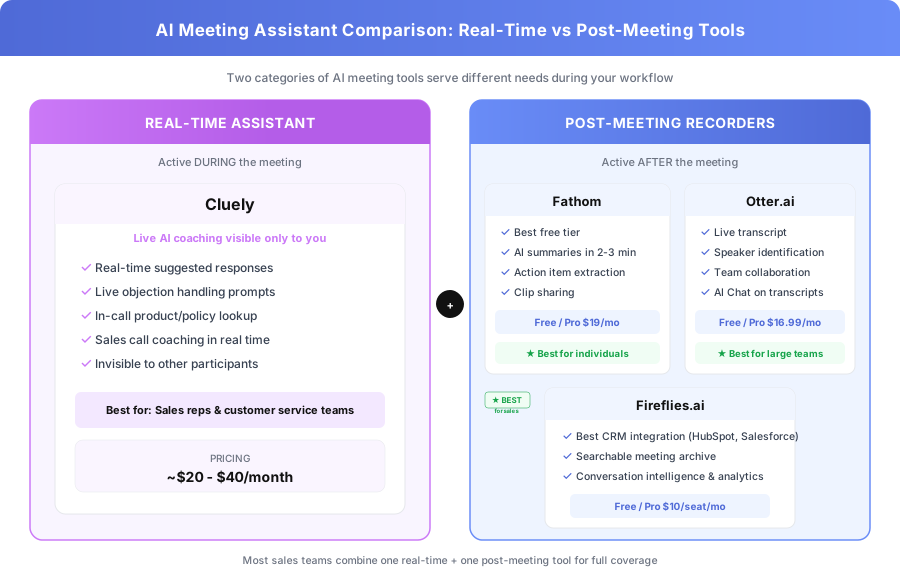
AI meeting tools fall into two categories that don’t overlap: real-time assistants that coach you during calls, and post-meeting recorders that transcribe, summarize, and archive after the call ends. The distinction matters because buying the wrong type solves the wrong problem — and most teams need to prioritize one before adding the other.
Real-time assistants like Cluely operate during the meeting. The AI listens to conversation as it happens and provides live coaching visible only to you: suggested responses, objection handlers, product specs, and talking points. Other participants can’t see the AI’s output.
Post-meeting recorders like Fathom, Otter, and Fireflies operate after the meeting. The AI transcribes the full conversation, generates a summary, extracts action items, and pushes notes to your CRM or project management tool.
These aren’t competing products — they’re different tools for different problems. The decision starts with your team’s biggest pain point.
Which Post-Meeting Recorder Has the Best Free Plan?
Fathom offers the most generous free tier of any AI meeting recorder in 2026 — unlimited recordings, AI summaries, and action item extraction at zero cost for individual users. Neither Otter nor Fireflies match this. If you’re a solo operator or small team testing meeting AI for the first time, Fathom Free is the lowest-risk starting point.
According to Fathom’s 2025 user survey, 68% of users on the free plan report saving 4+ hours per week by eliminating manual note-taking. That’s not trivial — for a consultant billing $150/hour, that’s $2,400 per month in recovered capacity from a free tool.
How Does Fathom Work for Meeting Recording?
Fathom joins your Zoom, Google Meet, or Teams calls as a bot participant. It records audio and video, transcribes in real time, and delivers an AI-generated summary with action items within 2-3 minutes of the call ending. The summary isn’t a raw transcript dump — it’s structured into key decisions, action items with owners, and highlighted talking points.
Where Fathom wins:
- Unlimited free recordings with no monthly minute caps
- Summaries ready within 2-3 minutes of call end
- Clean interface that doesn’t require training
- Clip sharing — highlight any transcript section and generate a shareable link
- HubSpot integration on the paid tier
Where Fathom falls short:
- Team features locked behind Pro ($19/month) or Team ($29/seat/month) plans
- CRM auto-sync requires the paid tier
- Less team management capability than Fireflies for organizations above 10 people
| Fathom Plan | Price | Recordings | AI Summaries | CRM Sync | Team Features |
|---|---|---|---|---|---|
| Free | $0 | Unlimited | Yes | No | No |
| Pro | $19/month | Unlimited | Enhanced | HubSpot, Salesforce | Basic |
| Team | $29/seat/month | Unlimited | Enhanced | Full CRM suite | Full |
Is Otter.ai Worth It for Team Transcription?
Otter is the best choice for teams that need live transcription visible during the meeting — not just a post-call record. If your team includes remote participants who benefit from real-time captioning, non-native English speakers, or anyone who needs to search exact quotes immediately, Otter’s live transcript is the differentiator that Fathom and Fireflies don’t match.
According to Otter’s 2025 accessibility report, teams using live transcription during meetings see a 28% increase in participation from non-native speakers and hearing-impaired team members. That’s a real accessibility improvement, not just a convenience feature.
What Makes Otter Different from Fathom and Fireflies?
Otter’s core feature is the live transcript that appears on screen as participants speak. It’s not a post-meeting artifact — it’s a real-time document that team members can follow, highlight, and annotate during the conversation.
Where Otter wins:
- Real-time live transcript visible to all participants during the call
- Speaker identification that improves with repeated use across meetings
- Team collaboration features including shared workspaces and shared notes
- Otter AI Chat — ask natural language questions about any past transcript
- Strong Zoom, Google Meet, and Teams integration
Where Otter falls short:
- More expensive than Fathom at comparable usage levels
- CRM integration is less developed than Fireflies
- AI summary quality doesn’t match Fathom’s structured output
- Free tier caps at 300 minutes per month — restrictive for teams with daily calls
| Otter Plan | Price | Minutes | Live Transcript | AI Chat | Team Workspace |
|---|---|---|---|---|---|
| Basic (Free) | $0 | 300/month | Yes | Limited | No |
| Pro | $16.99/month | 1,200/month | Yes | Yes | No |
| Business | $30/user/month | 6,000/month | Yes | Yes | Yes |
The 300-minute free cap is Otter’s biggest limitation for small teams. A team of five averaging three 30-minute meetings per day would burn through that in under a week.
Why Do Sales Teams Choose Fireflies Over Other Recorders?
Fireflies is the strongest choice for sales teams specifically because of its CRM integration depth. According to Fireflies’ 2025 sales benchmark data, sales reps using Fireflies’ automatic CRM logging save an average of 45 minutes per day on post-call documentation — the equivalent of gaining back one full working day every week.
Every call recorded by Fireflies gets transcribed, summarized, and automatically pushed to the matching contact, deal, or company record in HubSpot, Salesforce, Pipedrive, or Zoho. Sales reps who previously spent 10-15 minutes after every call updating the CRM manually find that Fireflies eliminates that work entirely.
What CRM Integrations Does Fireflies Support?
Fireflies connects natively with HubSpot, Salesforce, Pipedrive, Zoho, and Copper. The integration isn’t a basic data push — it includes structured meeting notes, identified action items, and conversation metadata like talk-to-listen ratio and topic duration.
Where Fireflies wins:
- Best CRM integration of any meeting recorder: HubSpot, Salesforce, Pipedrive, Zoho
- Searchable archive across all meeting transcripts with keyword and topic filters
- Conversation intelligence features including talk-to-listen ratio and topic tracking
- Meeting scorecard for sales call analysis and coaching
- Team analytics dashboard for managers tracking rep performance
Where Fireflies falls short:
- Interface less polished than Fathom for individual, non-sales use
- Free tier caps at 800 minutes per month of transcription
- Summary quality is functional but not as structured as Fathom’s output
| Fireflies Plan | Price | Minutes | CRM Integration | Analytics | Conversation Intelligence |
|---|---|---|---|---|---|
| Free | $0 | 800/month | No | No | No |
| Pro | $10/seat/month | Unlimited | HubSpot, Salesforce | Basic | Yes |
| Business | $19/seat/month | Unlimited | Full CRM suite | Advanced | Yes |
At $10 per seat per month, Fireflies Pro is the cheapest paid option in this comparison. For a sales team of five, that’s $50/month total — less than the cost of one hour of a sales rep’s time spent on manual CRM logging.
How Does Cluely Compare as a Real-Time Meeting Assistant?
Cluely occupies a different category entirely. While Fathom, Otter, and Fireflies help after the meeting, Cluely helps during it. It’s an invisible AI overlay that listens to your call and provides real-time coaching, suggested responses, and instant information retrieval — visible only to you, not to other participants on the call.
As covered in our Cluely explainer, the tool is most valuable for roles where in-call performance directly affects revenue: sales calls, customer service interactions, and client-facing consultations where having the right answer immediately matters more than documenting the conversation afterward.
When Does Real-Time AI Coaching Actually Help?
Cluely adds measurable value in three specific scenarios, and teams outside these scenarios should prioritize post-meeting tools first.
New sales reps learning call handling. Cluely can surface objection responses, pricing details, and competitive comparison points in real time as prospects raise them. Instead of putting a prospect on hold or saying “let me get back to you,” the rep has the answer instantly.
Customer service reps handling complex products. When a customer asks about a specific policy, warranty term, or technical spec, Cluely pulls the relevant information into the rep’s view without interrupting the conversation flow.
High-stakes client calls with dense specifications. Consultants, account managers, and technical sales reps who handle products with complex pricing tiers or configuration options benefit from having specs surface automatically as topics come up.
Cluely pricing: Approximately $20-$40 per month depending on the plan, though pricing has shifted since launch. Check current rates directly.
What’s the Best Cluely and Fireflies Combination for Sales?
The most common pairing among sales teams we’ve worked with is Cluely during the call plus Fireflies for post-call documentation. This combination covers both gaps: Cluely handles real-time coaching and information retrieval while the rep is live with the prospect, and Fireflies handles the automatic CRM logging and searchable archive after the call ends.
The combined cost for a sales rep is roughly $30-$50 per month — Cluely at $20-$40 plus Fireflies Pro at $10. For context, if that combination helps a rep close even one additional deal per quarter, the ROI is immediate for most B2B sales teams.
How Do These AI Meeting Tools Compare Side by Side?
For small business teams evaluating all four tools, this comparison covers the features that actually matter for daily use: what happens during versus after the call, pricing for small teams, CRM integration depth, and where each tool’s free tier becomes limiting. Fathom is the best starting point for most teams, Fireflies is the pick for sales-heavy organizations, and Cluely is the add-on for roles where in-call performance drives revenue.
| Feature | Fathom | Otter | Fireflies | Cluely |
|---|---|---|---|---|
| When it works | After meeting | During + after | After meeting | During meeting |
| AI summaries | Excellent | Good | Good | None |
| Action items | Yes | Yes | Yes | No |
| CRM integration | Paid tier | Limited | Excellent | No |
| Team analytics | Team plan | Business plan | Pro plan | No |
| Free tier | Unlimited | 300 min/month | 800 min/month | Varies |
| Entry paid price | $19/month | $16.99/month | $10/seat/month | ~$20-40/month |
| Best for | Individuals | Large teams | Sales teams | In-call coaching |
Which AI Meeting Tool Should You Buy First?
The decision depends on a single question: is your biggest problem what happens during calls, or what happens after them? For 80% of small business teams, the answer is after — missed action items, forgotten commitments, and the 15-minute post-call CRM update that nobody wants to do. Start with a post-meeting recorder, and add real-time coaching later if call performance is a revenue bottleneck.
Best for individual use or teams under five: Fathom Free. Zero cost, unlimited recordings, and AI summaries that are ready before you’ve finished your post-call coffee. There’s no reason not to start here.
Best for sales teams with a CRM: Fireflies Pro at $10/seat/month. The automatic CRM logging alone justifies the cost. If your reps spend more than 10 minutes per day updating HubSpot or Salesforce manually, Fireflies pays for itself in the first week.
Best for real-time transcription and accessibility: Otter. The live transcript feature is unique in this comparison and matters for teams with accessibility requirements or heavy meeting cultures where searchable, real-time notes add value.
Best for in-call coaching (sales and CS teams): Cluely. Evaluate the ethical context carefully — real-time AI coaching during calls raises questions that each organization should consider. But for teams where it fits, the productivity gain is real.
Best combination for a revenue-focused sales team: Cluely + Fireflies. Real-time coaching during the call, automatic CRM documentation after. Total cost per rep: approximately $30-$50/month.
How Do You Set Up AI Meeting Tools with Your Existing Stack?
Getting meeting AI connected to your CRM, project management, and communication tools doesn’t require custom development for most small business setups. Fathom, Otter, and Fireflies all offer native integrations with Zoom, Google Meet, and Teams — the setup process is typically under 10 minutes.
The higher-value integration is CRM sync. If you’re running HubSpot or Salesforce, Fireflies’ native integration takes about 15 minutes to configure. You authorize the CRM connection, map the fields you want populated (meeting notes, action items, call duration), and Fireflies handles the rest automatically from that point forward.
For teams that want meeting notes flowing into tools beyond CRM — Slack channels, Notion databases, Asana projects — workflow automation platforms like Make or Zapier connect the outputs from all three recorders to 500+ downstream tools. We’ve covered this integration approach in our guide to the best AI tools for small business.
What Are Common Mistakes When Choosing AI Meeting Tools?
Three patterns show up repeatedly when small business teams evaluate this category — and all three waste either money or time.
Mistake 1: Buying a real-time tool when you need post-meeting recording. If your pain point is “I forget what was decided in meetings” or “nobody updates the CRM after calls,” Cluely won’t fix that. Start with Fathom or Fireflies. Add Cluely later if call performance becomes the bottleneck.
Mistake 2: Paying for Otter when Fathom Free covers your use case. Otter’s paid plans make sense for teams that need live transcription or high-volume team workspaces. For individual users or small teams that primarily need post-meeting summaries, Fathom Free delivers equivalent value at zero cost.
Mistake 3: Skipping CRM integration. According to Salesforce’s 2025 State of Sales report, sales reps spend 28% of their time on administrative tasks including CRM updates. Fireflies’ automatic logging eliminates the most tedious portion of that 28%. If you have a CRM and a sales team, the $10/seat/month for Fireflies Pro is the highest-ROI spend in this comparison.
What’s the Bottom Line on Cluely vs Fathom vs Otter vs Fireflies?
These four tools aren’t direct competitors — they’re complementary products that solve different parts of the meeting workflow. The smartest approach for most small business teams is to start with Fathom Free for post-meeting documentation, add Fireflies if you need CRM integration, and layer in Cluely only when real-time call coaching becomes a priority.
The total cost for a fully equipped sales rep — Fathom Free for personal summaries, Fireflies Pro for CRM logging, and Cluely for real-time coaching — runs between $30 and $50 per month. For a team where meetings drive revenue, that’s one of the better returns available in the AI tools category.
For related reading, see our detailed breakdown on What Is Cluely? The Real-Time AI Assistant Explained and our guide to The Small Business AI Stack: Which AI Tools Are Actually Worth Paying For.
Need help connecting meeting AI to your CRM and automation stack? Book a free automation audit and we’ll recommend the meeting AI configuration that fits your team size, CRM setup, and existing workflows — then wire it all together so your meeting notes actually reach the tools where your team works.