A SaaS founder I know was losing customers not because of bugs, but because of response time. Tickets sat in a shared inbox for 4 to 6 hours. Billing questions went to engineering. Feature requests went to the billing rep. By the time the right person saw the ticket, the customer had already tweeted about it. This isn’t a staffing problem. It’s a routing problem, and you can fix it without writing a single line of code. KwikUI, a SaaS platform with 3,000+ users, built an AI-powered routing system that auto-resolved 65% of tickets, doubled trial-to-paid conversion from 4% to 8%, and cut churn 40%.
Here’s how to build the same system, step by step, in 2 to 4 weeks.
What results should you expect from a no-code routing system?
A well-tuned system auto-resolves 40% to 65% of incoming tickets, cuts first-response time to under 60 seconds, and drops escalation rates under 10%. You can hit these numbers in 6 to 8 weeks of tuning without hiring anyone, using off-the-shelf tools that cost less than one support hire.
KwikUI’s numbers are the benchmark most small teams should target:
| Metric | Before routing | After routing | Change |
|---|---|---|---|
| Auto-resolution rate | 0% | 65% | +65pts |
| Trial-to-paid conversion | 4% | 8% | 2x |
| Churn rate | Baseline | -40% | Large drop |
| Human ticket volume | 100% | 35% | -65% |
| First-response time | 4 to 6 hours | Under 60 seconds | 240x faster |
The ROI isn’t speculative. Per Forrester’s 2024 Total Economic Impact studies, business process automation returns an average 200% ROI in year one. For support routing specifically, the gains come from faster response (which lowers churn) and reduced agent workload (which lets your team focus on complex cases). That’s the whole thesis: route the easy stuff automatically, so humans handle the 35% that actually needs judgment.
Which channels do you need to consolidate first?
Before you route anything, consolidate every inbound channel into one help desk. Most businesses receive support through 3 to 5 channels: email (the channel-specific layer of triage and templated responses is covered in our email inbox automation guide), live chat, web forms, social DMs, and phone. If these stay siloed, no automation can help you. Pick one help desk and route everything there.
Zendesk, Freshdesk, Intercom, and Gorgias all support multi-channel intake natively. Email forwards in, chat widgets embed on your site, social integrations pull from Twitter, Facebook Messenger, and Instagram DMs, and phone calls get transcribed through Aircall or Dialpad and logged as tickets.
Per IDC’s 2023 Future of Work study, employees spend 30% of their time on manual data tasks. For support teams, a big chunk is checking inboxes and copying messages around. Consolidation kills that work entirely.
The tool choice matters less than the decision to consolidate. For small teams (under 10 agents), Freshdesk or Tidio offers the best value. For SaaS, Intercom ties tightly to product data. For e-commerce, Gorgias plugs into Shopify. Zendesk fits any industry but costs more. For a full pricing and feature comparison, see our guide on Intercom vs Zendesk vs Tidio for small businesses.
Thompson Career College consolidated student inquiries from their website, email, and phone into one automated pipeline. Response time dropped from 1 to 2 business days to under 60 seconds.
How does AI classify tickets by intent, urgency, and category?
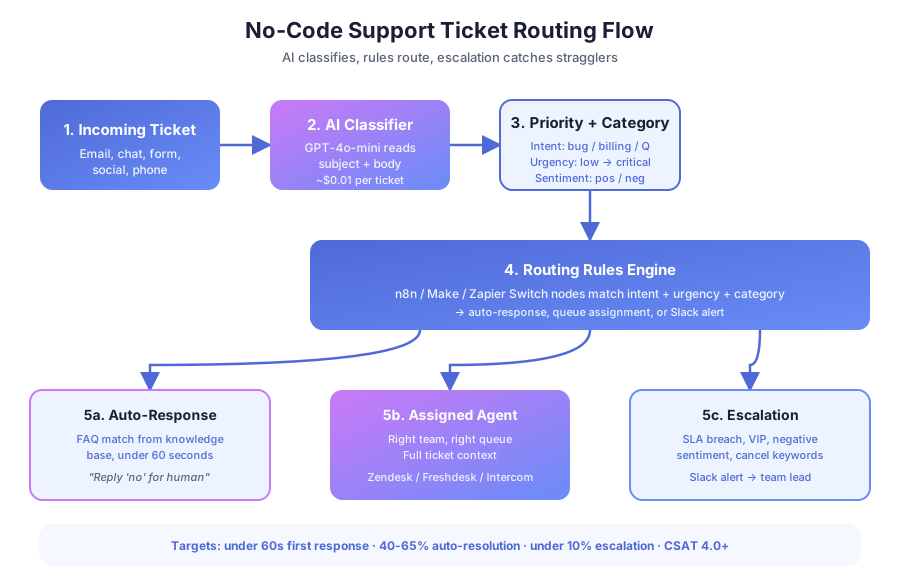
AI classification is the brain of the system. Every ticket gets read by a model like GPT-4o-mini or Claude, which returns a structured label for intent, urgency, and category in under 2 seconds. Your workflow engine then uses those labels to route. No humans read anything until routing is done.
In n8n or Make, the workflow is simple: a ticket arrives in Zendesk or Freshdesk (trigger), the subject and body go to OpenAI with a classification prompt, and the model returns JSON. Here’s the kind of output you want:
| Field | Value | Routing action |
|---|---|---|
| Intent | Bug report | Engineering queue |
| Urgency | High (production down) | SLA timer starts, Slack alert |
| Category | Technical | Assign to senior engineer |
| Sentiment | Negative | Flag for team lead review |
Per McKinsey’s 2024 Global Survey on AI and Automation, 60% of occupations have at least 30% of tasks that could be automated. Ticket classification is a textbook case. It’s pattern matching on text, and AI does it more consistently than a human scanning a shared inbox at 8 a.m.
Cost is a non-issue. At roughly $0.01 per classification using GPT-4o-mini, a business processing 100 tickets/day spends $30/month. Per Statistics Canada’s 2024 Survey of Employment, Payrolls and Hours, the average Canadian salary runs $45,000 to $65,000. A dedicated triage hire costs 1,000x more than the API.
What does a good classification prompt look like?
Your prompt is the one thing you’ll tune most. A weak prompt produces inconsistent labels and misroutes. A strong prompt is explicit, gives examples, and demands JSON output:
“You are a support triage assistant. Read the ticket and return JSON with three fields: intent (question, bug, feature_request, billing, cancellation, complaint), urgency (low, medium, high, critical), category (technical, billing, account, product, general). Example: {intent: ‘bug’, urgency: ‘critical’, category: ‘technical’}. Return only JSON.”
Test the prompt against 50 to 100 historical tickets before going live. Adjust the categories to match how your team actually thinks about work.
How do you build routing rules that hold up in production?
Classification without routing is just labeling. Rules determine what happens after the label lands. This is where you match ticket attributes to a destination: a specific agent, a team queue, an auto-response, or an escalation. Keep the rules simple and documented so any team member can audit them.
Here’s a routing decision table for a typical SaaS support team:
| Intent | Urgency | Route to | Auto-response? |
|---|---|---|---|
| Question (FAQ match) | Any | AI response from KB | Yes, instant |
| Question (no FAQ match) | Low/Med | General support queue | Acknowledgment |
| Bug report | High/Critical | Senior engineer + Slack alert | Ack + ETA |
| Bug report | Low/Med | Engineering queue | Acknowledgment |
| Billing issue | Any | Billing specialist | Acknowledgment |
| Cancellation | Any | Retention specialist + flag | Ack + survey |
| Feature request | Low | Product backlog (Jira/Linear) | Thanks + roadmap link |
| Complaint (negative) | High | Team lead + immediate alert | Apology + escalation notice |
In n8n, this is a chain of Switch nodes after AI classification. Each branch checks intent, urgency, and category, then takes action: assign in Zendesk, send a Slack message, trigger an auto-response, or create a Jira issue. Per Forrester’s 2024 Total Economic Impact studies, automation ROI averages 200% in year one, and in support, that gain comes from faster resolution and lower churn.
Skylarks International, a 15-person immigration firm, eliminated 80% of status update calls by routing common queries to an automated client portal. Their agents stopped answering “any update?” and started doing casework.
How do you auto-respond to FAQs without frustrating customers?
Auto-responses get a bad reputation because most are terrible. Generic “we received your ticket” messages help nobody. But an AI response that actually answers the question? That’s a completely different experience, and it’s how KwikUI hit 65% auto-resolution.
The approach: keep your knowledge base in Notion, Confluence, Zendesk Guide, or Intercom Articles. When a ticket is classified as a question and the AI finds a matching FAQ, it generates a reply using KB content, personalized with the customer’s name. The response goes out instantly.
KwikUI’s key wasn’t quantity of articles. It was quality. They started with their top 20 most-asked questions (pricing, setup, integrations, billing, cancellations) and wrote clear, complete answers for each. Per Harvard Business Review (Oldroyd, 2011; updated by Drift in 2023), responding within 5 minutes makes you 100x more likely to reach a lead. The same principle applies to support: instant, accurate responses prevent frustration.
Always give customers an escape hatch
Every auto-response must include a line like: “Did this answer your question? Reply ‘no’ and I’ll connect you with a person.” If the customer replies no, the ticket routes to a human immediately with full conversation context. No phone trees. No “please explain your issue again.” This is the single most important rule in the whole system. Without it, your automation becomes the problem.
The n8n flow: ticket arrives → AI classifies as FAQ → vector or keyword search against KB → OpenAI generates personalized response → sent via help desk → 24-hour timer. If the customer replies negatively, it routes to a human. If no response after 24 hours, it auto-closes as resolved.
How do you set up escalation triggers that catch problems early?
Escalation is the safety net. Without it, automated routing can bury urgent issues. You need clear rules for when a ticket jumps the queue and lands in front of a senior agent or manager, regardless of its original classification.
Here are the escalation triggers that work for most support teams:
| Trigger | Condition | Action |
|---|---|---|
| SLA breach | Unresolved past SLA (e.g., 4h high priority) | Alert team lead, reassign to senior agent |
| Negative sentiment | AI detects frustration or threat to leave | Immediate human review, notify retention |
| Repeat contact | Same customer, 3+ tickets in 7 days | Alert account manager, VIP routing |
| VIP customer | Tagged enterprise or high-value in CRM | Priority queue, senior agent, manager CC’d |
| Keyword match | ”Cancel”, “lawsuit”, “chargeback” | Escalate to team lead, legal if needed |
| Auto-response failed | Customer replies “no” to FAQ response | Route to human with full context |
Per Gartner’s 2023 Data Quality Market Survey, poor data quality costs organizations an average of $12.9 million/year. In support, “poor data” means missing context. When a ticket escalates, the agent needs to see the original message, the AI classification, any auto-responses sent, and the customer’s history. Your workflow should attach all of this to the escalated ticket automatically.
In n8n, escalation triggers are time-based or event-based nodes. A Cron node checks SLA breaches every 15 minutes. A Webhook node listens for customer replies that trigger re-routing. A Slack notification fires with a summary: customer name, ticket number, issue, urgency, and a direct link.
How do you measure whether routing is working?
Four metrics tell you everything you need to know: first-response time, auto-resolution rate, escalation rate, and CSAT. You can’t improve what you don’t measure, and all four are trackable from your help desk’s built-in analytics without extra tooling.
| Metric | Target | How to measure | Why it matters |
|---|---|---|---|
| First-response time | Under 60s auto, under 15m human | Help desk analytics | Speed correlates with retention |
| Auto-resolution rate | 40% to 65% | Tickets closed without reopening | Measures KB and classifier quality |
| Escalation rate | Under 10% | Tickets triggering escalation rules | High rates mean routing needs tuning |
| CSAT score | 4.0+ / 5.0 | Post-resolution survey | The ultimate experience measure |
| Misroute rate | Under 5% | Tickets reassigned by agents | Measures classification accuracy |
Per Process Street’s 2023 Onboarding Statistics Report, organizations with structured processes see 2.3x higher performance metrics. The same applies to support: structured routing with measurement beats ad-hoc triage every time.
For the first month, review every misrouted ticket manually. Look for patterns. If billing questions keep landing in the technical queue, your classification prompt needs adjustment. After a month, move to weekly reviews. KwikUI’s 65% auto-resolution didn’t happen day one. It started near 30% and climbed over 8 weeks as they refined the KB and prompts. Churn dropped 40% during that same period, proving better routing directly protects revenue.
What’s the full no-code tool stack and what does it cost?
The stack has four layers: help desk, AI classifier, workflow engine, and knowledge base. Total monthly cost for a small team: $100 to $300. You don’t need engineers, only clear routing rules and a well-written prompt.
| Category | Options | Monthly cost | Role |
|---|---|---|---|
| Help desk | Zendesk ($55/agent), Freshdesk (free–$49), Intercom ($39/seat), Gorgias ($10/50 tickets), Tidio ($29+) | $0–$55/agent | Intake, assignment, SLA tracking |
| AI classifier | OpenAI (GPT-4o-mini), Anthropic (Claude), built-in AI | $10–$50 | Intent, urgency, category labels |
| Workflow engine | n8n (self-hosted free), Make ($10+), Zapier ($20+) | $0–$50 | Connects help desk, AI, Slack, CRM |
| Communication | Slack ($7.25/user), Teams (in M365) | $0–$10/user | Agent alerts, escalation notices |
| Knowledge base | Zendesk Guide, Intercom Articles, Notion, Confluence | Included–$10/user | FAQ content for auto-responses |
Per Statistics Canada’s 2024 Survey of Employment, Payrolls and Hours, the average Canadian salary runs $45,000 to $65,000. A dedicated triage person costs that much per year. The routing system costs $1,200 to $3,600/year and handles triage 24/7 without breaks or vacations.
Build time: 2 to 4 weeks. Week 1: intake channels and help desk setup. Week 2: AI classification workflow in n8n or Make, tested against 100 historical tickets. Week 3: routing rules and auto-responses. Week 4: monitor, measure, refine. Most teams see meaningful auto-resolution by week 6.
AcquireX Properties Capital, a 3-person team, tripled their portfolio by automating analysis workflows. The lesson applies here: small teams don’t need more people. They need smarter routing of the work they already have.
What are the most common traps to avoid?
Three mistakes kill otherwise-good routing systems. Avoid all three and you’ll skip the 6-week painful tuning phase most teams go through. Each one is a 15-minute fix if you catch it early.
Vague classification prompts. “Classify this ticket” produces garbage. Give explicit categories, examples, and demand JSON output. Test against historical tickets before going live. Per Gartner’s 2023 Data Quality Market Survey, poor data quality costs organizations $12.9 million/year on average.
Hidden escape hatches. If frustrated customers can’t reach a human in one step, your auto-responder becomes the problem. Every automated reply needs a visible “Reply ‘no’ for a person” line. No phone trees. No forms. One click.
Skipping the weekly misroute review. Routing rules drift. Customer language changes. New ticket types emerge. A 15-minute weekly review catches drift early and keeps accuracy high. KwikUI’s 65% auto-resolution came from exactly this discipline over 8 weeks.
Ready to build your routing system?
A no-code ticket routing system is the highest-leverage support investment a small team can make. 2 to 4 weeks of setup, $100 to $300/month in tools, and you’re handling 3x the volume your team handles today without burning anyone out. The 35% of tickets that still need humans get better attention because nobody is drowning in FAQs.
If you want help designing the classification prompt, mapping intake channels, or building the n8n workflow, book a free consultation. We’ve built these systems for SaaS, e-commerce, and professional services teams, and we’ll show you the exact workflow that fits your stack.
If you’re exploring AI chatbots alongside ticket routing, our roundup of the best AI chatbot builders for small businesses covers the leading platforms. Learn more about customer service automation and see the full KwikUI case study.