Forty-four percent of salespeople give up after one follow-up, according to Iko System’s sales research. That single number explains why most businesses lose leads they’ve already paid to acquire. The leads weren’t bad. The follow-up was missing, late, or generic.
Here’s what the data says about the fix: Harvard Business Review research (Oldroyd, 2011; updated by Drift in 2023) found that responding within 5 minutes makes you 100x more likely to connect with a prospect than waiting 30 minutes. Automated sequences hit that 5-minute window every time, even at 2 AM on a Sunday. Thompson Career College automated their follow-up and tripled admissions calls without hiring anyone.
This guide gives you the exact 7-touch template, tool picks, timing data, and metrics to build your own sequence in under two weeks.
What makes an automated follow-up sequence convert?
Three things: speed on Touch 1, multi-channel reach, and behavior triggers that adapt to prospect engagement. Sequences that hit the 5-minute response window, layer email with SMS, and escalate engaged leads convert 2-3x better than generic time-based drips, according to vendor benchmarks from HubSpot and ActiveCampaign.
The 5-minute rule is the single most important factor. According to the HBR study (Oldroyd, 2011; updated by Drift, 2023), contacting a web lead within 5 minutes makes you 100x more likely to qualify them versus a 30-minute wait, and 21x more likely than waiting one hour. No human team hits this consistently. Automation hits it every time.
Volume is the second reason manual follow-up fails. When you’re handling 20 new leads per day plus existing pipeline, the 5th follow-up to last week’s prospect gets skipped. Then the 4th. Eventually you’re sending one touch and calling it done, which aligns with the Iko System finding that 44% of reps stop after one attempt.
Why does manual follow-up fail so predictably?
Manual follow-up fails because humans can’t maintain consistency at scale. Volume overwhelms schedules, timing slips from minutes to days, and personalization degrades with each touch. McKinsey’s 2024 workforce analysis found 60% of occupations have 30%+ automatable tasks, and follow-up timing is among the most impactful to offload.
Here’s how the breakdown happens in practice. The first email is customized with the prospect’s name and inquiry details. The second gets a generic template. By the fourth, you’re sending “just checking in” messages that prospects delete without reading. Gartner’s 2023 Data Quality report estimates poor data quality costs organizations $12.9 million per year on average, and poorly targeted follow-ups are a direct contributor.
Automation solves all three problems at once. The system sends every message regardless of how busy your team is. Timing is precise because triggers fire on schedule. Personalization pulls live data from your CRM, calendar, and prospect behavior, so Touch 5 can reference the case study Touch 3 linked to.
Time-based vs behavior-triggered: which sequence wins?
Behavior-triggered sequences win. They convert 2-3x better than time-based drips because they respond to real intent signals instead of arbitrary schedules. A prospect who opens every email and clicks your pricing page is ready for a sales call. A prospect who hasn’t opened anything needs a different channel or a re-engagement track.
How time-based drips work
Time-based sequences send messages on a fixed schedule regardless of engagement. Day 1: welcome email. Day 3: case study. Day 7: offer. They’re simple to build and better than nothing, but they waste touches on prospects who’ve already disengaged and under-serve prospects who are hot.
How behavior triggers change the math
Behavior triggers adapt the sequence in real time. Opened your email within 10 minutes? Send Touch 2 at the 2-hour mark instead of 4. Clicked the pricing link? Trigger an immediate sales notification. Visited the case studies page three times? Push a matched testimonial. Ignored three emails? Switch to SMS or a re-engagement track.
Customer.io, ActiveCampaign, HubSpot, and GoHighLevel all support behavior triggers. Mailchimp offers basic triggers but lacks the sophistication for multi-step behavioral logic. For most businesses, ActiveCampaign at $49/month offers the best behavior automation under a $100/month budget.
What does a converting 7-touch sequence look like?
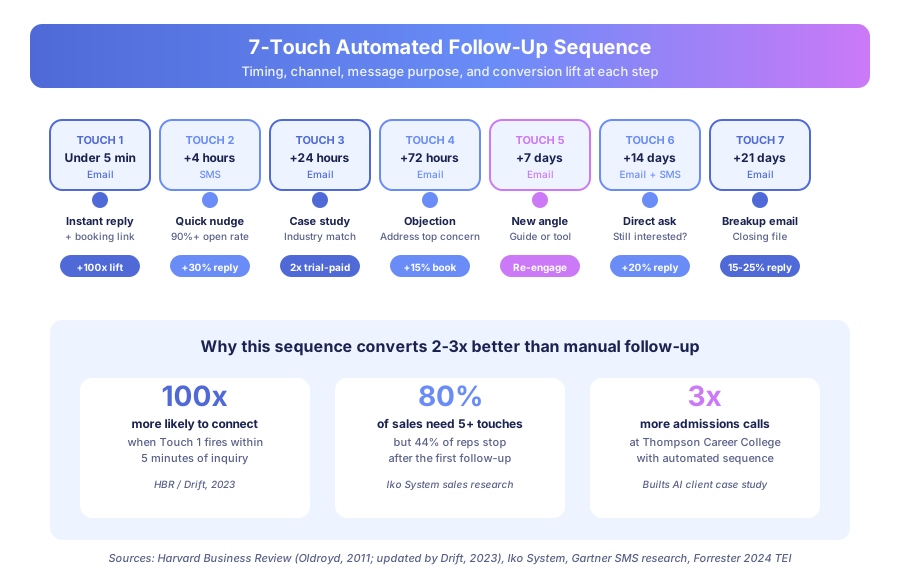
A converting 7-touch sequence runs over 21 days, combines email and SMS, and moves from instant acknowledgment through case studies, objection handling, and a final breakup email. Touch 1 fires within 5 minutes for the HBR/Drift conversion advantage. Touch 7 is the counterintuitive performer, generating 15-25% reply rates across our client base.
Here’s the full template we’ve built for professional services firms, SaaS companies, and educational institutions. Adapt the content to your industry, but keep the structure and timing.
| Touch | Timing | Channel | Content | Trigger to next |
|---|---|---|---|---|
| 1 | Under 5 min | Personalized reply + value + booking link | Sent automatically | |
| 2 | +4 hours | SMS | Brief booking nudge under 160 characters | If no booking from Touch 1 |
| 3 | +24 hours | Case study matched to prospect industry | If no booking or reply | |
| 4 | +72 hours | Address top objection for their segment | If no engagement | |
| 5 | +7 days | New value angle: guide, calculator, checklist | If no engagement | |
| 6 | +14 days | Email + SMS | Direct ask: “Still interested? Here’s a direct line” | If no engagement |
| 7 | +21 days | Breakup email: “Closing your file, reach out anytime” | Final touch |
Touch 1: the 5-minute window
Touch 1 is non-negotiable. This must fire within 5 minutes of form submission. According to HBR (Oldroyd, 2011; updated by Drift, 2023), the 5-minute window is where the 100x conversion advantage lives. Thompson Career College hits sub-60-second response with their automated system, and that speed combined with personalization (mentioning the specific program the student asked about) is what tripled their admissions calls.
Touch 3: case studies do the heavy lifting
Touch 3 carries the sequence because case studies are proof, not pitch. Use client-specific examples whenever possible. One SaaS platform with 3,000+ users sends case studies matched to the prospect’s industry. Their trial-to-paid conversion doubled from 4% to 8% after implementing behavior-matched case study delivery, based on internal analytics shared with our team.
Touch 7: the breakup email surprise
Touch 7 is counterintuitive but effective. The “breakup email” creates urgency without pressure because it signals respect for the prospect’s time. Across our clients, breakup emails generate 15-25% response rates, often higher than any other touch in the sequence. Keep it short: two sentences, one clear exit.
How do I add SMS and multi-channel touchpoints?
Add SMS for time-sensitive actions only: Touch 2 nudge, Touch 6 direct ask, and appointment reminders. Keep each SMS under 160 characters with one clear call to action. Gartner mobile engagement research puts SMS open rates above 90% compared to email’s 20-25%, but prospects disengage fast from SMS that reads like a newsletter.
SMS compliance basics
In Canada, CASL requires explicit consent for commercial electronic messages. In the US, TCPA governs SMS marketing and fines for violations run from $500 to $1,500 per message. Make sure your intake form includes clear SMS consent language. Both ActiveCampaign and GoHighLevel have built-in consent management that flags opt-ins.
Tool picks for SMS automation
Twilio offers the most flexible API but requires developer setup. GoHighLevel includes SMS in its agency plans starting at $97/month. HubSpot offers an SMS add-on at roughly $75/month. For most small businesses, GoHighLevel or HubSpot provides the simplest path to email + SMS automation in a single platform without managing two vendors.
Retargeting adds a third channel
Retargeting ads on Meta and Google Display Network keep your brand visible to prospects who visited your site without converting. This doesn’t require direct contact, so it complements email and SMS without adding consent friction. Combining retargeting with email follow-up can lift overall conversion by 20-30%, based on Meta’s 2024 business case studies.
How did Thompson Career College triple admissions calls?
Thompson Career College automated their 300+ monthly inquiries with an instant-response sequence, dropping response time from 1-2 business days to under 60 seconds. Admissions calls tripled. 80% of student queries now auto-resolve without human intervention. They did it without hiring additional admissions staff.
The before state
Before automation, TCC’s response time averaged 1-2 business days. Over 40% of inquiries came after hours and on weekends, when no one was available. By the time admissions staff responded, students had already contacted Fanshawe College, Conestoga College, and other competitors. Lost leads were the default, not the exception.
The after state
Every inquiry now triggers an instant, personalized response within seconds of submission. The follow-up sequence includes program-specific information, student success stories, and direct booking links for campus tours. SMS reminders confirm appointments, and behavior triggers escalate engaged prospects to live conversations faster. No custom software was built. The system runs on off-the-shelf CRM workflows and Make automations.
The cost comparison
Statistics Canada’s 2024 SEPH data puts the average Canadian employee at $45,000 to $65,000 per year in wages alone. TCC’s automation stack runs under $400/month combined. Tripling capacity without adding an admissions hire represents six-figure annual savings before counting the revenue from captured leads that previously went to competitors.
What metrics should I track for follow-up sequences?
Track six metrics: speed to first response, open rate by touch, reply rate by touch, booking rate, time to booking, and sequence completion rate. Target under 5 minutes on Touch 1, 25%+ open rates through Touch 5, 15-25% replies on the breakup email, and 5-15% booking rate from total leads entered for B2B.
The six metrics that matter
Speed to first response. Target under 5 minutes. The single most impactful number in your entire sales process. According to Drift’s 2023 State of Conversations report (building on Oldroyd’s 2011 HBR research), the 5-minute threshold separates high-converting teams from everyone else.
Open rate by touch. Track each email independently. If Touch 3 has a 5% open rate, the subject line or timing needs work. Healthy sequences maintain 25%+ open rates through Touch 5 before natural decay sets in.
Reply rate by touch. Replies indicate real engagement. The breakup email should generate 15-25% replies. If it’s lower, your earlier touches aren’t building enough value for prospects to feel the loss.
Booking rate. The conversion that matters. For B2B and professional services, healthy booking rates from automated sequences range from 5-15% of total leads entered.
Time to booking. Shorter is better, but the trend matters more than the absolute number. If behavior triggers are working, engaged prospects should book faster than the sequence average.
Sequence completion rate. If 80%+ of prospects reach Touch 7, your early touches aren’t compelling. If fewer than 40% reach the end, your sequence is converting or disqualifying efficiently.
According to Forrester’s 2024 Total Economic Impact studies, the average ROI on business process automation is 200% in year one. Follow-up sequences often deliver the fastest payback because they convert leads you’ve already paid to acquire. If your sequence is firing on every lead the same way, you’re leaving conversions on the table — pair it with a lead-scoring setup so your hottest leads route to a human (or a faster cadence) instead of waiting in the standard drip.
How do I build my first automated sequence this week?
Start with Touches 1 and 2 in one day. Use HubSpot if you already have it, ActiveCampaign at $49/month for standalone automation, or GoHighLevel if you manage multiple client accounts. Prove the first two touches work with real submissions, then layer in Touches 3-7 over the following week.
Day 1: pick your platform
If you already use HubSpot, use HubSpot Sequences. For standalone automation under $100/month, start with ActiveCampaign at $49/month on the automation tier. For agencies managing multiple clients, GoHighLevel at $97/month is purpose-built for this use case.
Day 2: write Touches 1 and 2
Touch 1 is your instant-response email. Personalize with the prospect’s name and specific inquiry. Include a Calendly or HubSpot Meetings link. Touch 2 is a 4-hour-later SMS (if you have consent) with a brief, direct booking link under 160 characters.
Day 3: connect the triggers
Form submission triggers Touch 1 immediately. A wait step of 4 hours triggers Touch 2. That’s it for day 3. Two touches, fully automated, CRM records created on submission.
Day 4-5: test with real submissions
Submit your own form 5 times with different names and emails. Verify timing, personalization, and booking link functionality. Check that CRM records create properly and that Touch 2 only fires when Touch 1 doesn’t result in a booking.
Week 2: add Touches 3-7
Write the remaining emails. Set up behavior triggers if your platform supports them. Add the breakup email last. According to Celonis’s 2024 Process Intelligence report, median time-to-value for business process automation is 6 weeks, but your first two touches deliver results in days.
Follow-up automation tool comparison
| Tool | Best for | Starting price | Email + SMS | Behavior triggers |
|---|---|---|---|---|
| HubSpot Sequences | All-in-one CRM teams | $50/month (Sales Hub) | Email native, SMS add-on | Yes |
| ActiveCampaign | Mid-market automation | $49/month | Email native, SMS via integration | Strongest under $100 |
| GoHighLevel | Agencies, multi-client | $97/month | Both native | Yes |
| Customer.io | SaaS with product events | $100/month | Both native | Event-based |
| Mailchimp | Very small teams | $20/month | Email only | Basic only |
Pricing reflects publicly listed rates as of April 2026. Platform selection should match your team size and existing tool stack rather than chasing features you won’t use.
Where does follow-up fit in a full automation stack?
Follow-up is one piece of a larger automation pipeline. The inputs come from your intake form, website chat, and paid ad lead forms. The outputs feed into your calendar, CRM, and sales rep notification system. Isolating follow-up from the rest of the stack leaves revenue on the table.
If your follow-up sequence starts at the intake form, read our guide on how to automate client intake so the entire flow from first contact to booked call runs hands-free. Our sales automation solutions page shows how we build these sequences for businesses end-to-end. And if you want to see the full pipeline approach, read about how we build automated lead follow-up systems that turn inquiries into booked calls without manual effort.
Every hour your leads wait for a response, they’re talking to your competitors. The sequence doesn’t have to be perfect on day one. It just has to exist, start within 5 minutes, and keep going when your team clocks out.
Ready to build yours? Contact Builts AI for a free automation audit and we’ll map out the exact sequence for your business in 30 minutes.