Your sales team is treating every lead the same. A Fortune 500 VP who’s visited your pricing page three times gets the same follow-up as a student who stumbled onto your blog from Reddit. That’s not a process. It’s a coin flip, and it’s costing you deals.
According to Forrester’s 2024 Total Economic Impact studies, companies running automated lead scoring see 77% higher lead-to-opportunity conversion rates than teams relying on gut feel. The difference isn’t magic. It’s math: assign points based on who the lead is and what they’ve done, then route hot ones to sales in seconds.
Thompson Career College built this system across 300+ monthly inquiries. Students who showed buying signals (viewed program pages, opened enrollment emails, clicked booking links) got routed to admissions instantly. The result: 3x more admissions calls booked, with response time under 60 seconds for qualified leads.
Here’s how to build the same system for your business, step by step.
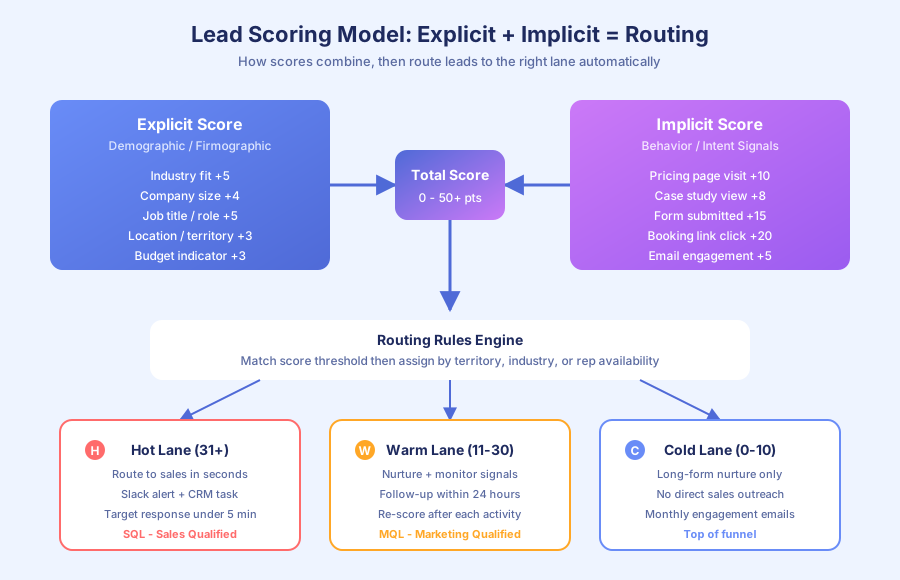
What are the two types of lead scoring criteria?
Lead scoring uses two criteria buckets: explicit data (who the lead is) and implicit behavior (what the lead has done). Explicit data scores fit, the static attributes of a good customer. Implicit behavior scores intent, the actions that indicate purchase readiness. You need both. Neither one alone is enough to predict conversion.
Explicit data answers: “Is this person the right type of customer?”
| Criteria | High Score (4-5 pts) | Medium Score (2-3 pts) | Low Score (0-1 pts) |
|---|---|---|---|
| Industry | Your target verticals | Adjacent industries | Unrelated industries |
| Company size | 5-50 employees (sweet spot) | 50-200 or solo | Enterprise or student |
| Job title | Owner, CEO, COO, Operations Director | Manager, Director | Intern, unspecified |
| Location | Canada or USA | Other English-speaking | Outside service area |
| Budget indicator | Mentions specific pain or project | General inquiry | ”Just browsing” |
Implicit behavior answers: “Is this person ready to buy right now?”
| Action | Points | Why It Matters |
|---|---|---|
| Visited pricing page | +10 | Pricing visitors are 3-5x more likely to convert |
| Viewed case study | +8 | Evaluating proof means they’re comparing options |
| Submitted contact form | +15 | Direct intent signal |
| Opened 3+ emails | +5 | Sustained engagement over time |
| Downloaded a resource | +3 | Interest, but not necessarily intent |
| Visited blog only | +1 | Top-of-funnel, not ready yet |
| Clicked booking link | +20 | Highest intent short of actually booking |
Per McKinsey’s 2024 Global Survey on AI and Automation, 60% of occupations have at least 30% of tasks that could be automated. Lead scoring is one of them. A human reviewing every lead to guess quality burns hours a day. A scoring rule fires in milliseconds.
How do you set up scoring inside your CRM?
Most modern CRMs ship with built-in scoring, but the default configurations are too generic to work out of the box. You need to customize criteria against your actual closed-won data. Here’s how to do it in the three most common small business CRMs, plus a custom option for teams spanning multiple tools.
HubSpot (free plan includes basic scoring):
- Go to Settings > Properties > Create property “Lead Score”
- Set up workflows that add or subtract points based on contact properties and activities
- Create a list filtered by Lead Score above your threshold (say, 30 points)
- Build a notification workflow: when a contact enters the hot lead list, alert the assigned rep via email and Slack
Salesforce (Einstein Lead Scoring for advanced):
- Navigate to Setup > Lead Scoring Rules
- Define criteria and point values for each field and activity
- Build assignment rules tied to score thresholds
- Einstein AI can also auto-score based on historical conversion patterns (Sales Cloud required)
Pipedrive (rule-based scoring):
- Use Custom Fields to create a score field
- Set up Automations to update the score when activities occur (email opened, deal stage changed)
- Create filtered views showing leads above your threshold
- Fire Slack or email notifications for high-scoring leads
For teams that need scoring across multiple tools (CRM + email platform + web analytics + form data), n8n or Make can build a centralized scoring engine. If you’re still evaluating CRMs, our guide to the best CRMs for small business in 2026 compares scoring capabilities across HubSpot, Salesforce, Pipedrive, and more.
Per Gartner’s 2023 research on marketing automation, the most effective scoring models use 5 to 8 high-signal criteria rather than dozens of low-signal ones. Start simple.
What score threshold should trigger a sales handoff?
Set your threshold at the minimum combination of explicit fit and implicit behavior that historically converts. For most small businesses, that’s 15 to 20 explicit points (ideal profile) plus at least one high-intent action worth 10 to 15 behavior points. A practical starting threshold is 30 total points. Run it for 30 days and refine.
| Score Range | Classification | Action |
|---|---|---|
| 0-10 | Cold | Nurture sequence only, no sales contact |
| 11-20 | Warm | Continue nurture, monitor for behavior signals |
| 21-30 | Marketing Qualified (MQL) | Sales gets notified, follows up within 24 hours |
| 31+ | Sales Qualified (SQL) | Immediate routing, respond within 5 minutes |
According to Harvard Business Review research (Oldroyd, 2011; updated by Drift in 2023), responding to a lead within 5 minutes makes you 100x more likely to connect than waiting 30 minutes. Your threshold decides which leads get that 5-minute treatment versus a slower nurture lane.
Thompson Career College runs a version of this. Students who visit specific program pages, open enrollment emails, and click the “Book a Call” link get instant routing to admissions. Students who only viewed the homepage enter a nurture sequence timed to upcoming cohort deadlines.
The key: don’t treat 300+ monthly inquiries the same. Route the 20% showing buying signals to a human in seconds. Nurture the other 80% automatically until they signal readiness.
How do you build behavior-triggered routing?
Behavior-triggered routing pushes leads to the right salesperson based on what they’ve done, not just when they submitted a form. The system watches for high-intent actions in real time and fires an alert the moment a lead crosses the threshold. That cuts response lag from hours to seconds.
Here’s a routing workflow built in n8n (the same logic works in Make, HubSpot workflows, or Salesforce Process Builder):
- Trigger: CRM contact updated (score field changed)
- Condition: Is new score >= 30?
- If yes: Check the lead’s industry and location for rep assignment
- Route: Assign to the correct rep based on territory or specialty
- Notify: Send a Slack message with lead details, score breakdown, and recent activity
- Create task: Add “Follow up within 5 minutes” task to the rep’s CRM queue
- If no: Continue nurture sequence. Re-check score after the next activity.
Per IDC’s 2023 Future of Work study, employees spend 30% of their time on manual data tasks. Lead routing is one of them. Without automation, someone reviews every lead manually, decides who should handle it, and sends an internal message. With automation, the right rep gets the right lead with full context in seconds.
For teams with multiple salespeople, add assignment rules:
| Lead Attribute | Assigned To | Why |
|---|---|---|
| Ontario, Canada | Rep A | Geographic territory |
| USA, West Coast | Rep B | Geographic territory |
| Real estate industry | Rep A (specialist) | Industry expertise |
| Score 40+ (very hot) | Team lead | Highest-value leads get senior attention |
| After hours | Auto-nurture + morning alert | No reps available, don’t let the lead go cold |
How do you measure if your scoring model is working?
Measure three metrics monthly: conversion rate by score tier, time-to-close by score tier, and false positive rate (high-scoring leads that didn’t convert). If high scores convert at 2 to 3 times the rate of low scores, your model works. If there’s no gap between tiers, your criteria need reweighting or replacement with signals from recent closed-won deals.
Per Deloitte’s 2023 Global Intelligent Automation Survey, 73% of organizations report positive ROI from automation within 12 months. For lead scoring, the signal comes faster: conversion differences show up in the first 60 to 90 days.
Monthly review checklist:
| Metric | What to Check | Action If Off |
|---|---|---|
| Conversion rate by score tier | High scores should convert 2-3x more | Adjust criteria weighting |
| Sales cycle length by score | SQLs should close faster than MQLs | Verify threshold isn’t too low |
| False positive rate | < 20% of SQLs should be disqualified | Tighten explicit criteria |
| Coverage | 15-25% of leads should be SQLs | If too many, raise threshold. Too few, lower it. |
| Rep response time | SQLs should get < 5 min response | Fix routing or notification workflow |
Per Statistics Canada’s 2024 SEPH data, a Canadian full-time employee costs $45,000 to $65,000 per year. A salesperson spending 2 hours a day reviewing and manually routing leads burns roughly $12,000 to $16,000 per year on that task alone. Automated scoring pays for itself in the first month.
What are the most common lead scoring mistakes?
Three mistakes kill most lead scoring implementations before they deliver value. Avoiding these is often the difference between a scoring system that drives revenue and one that collects dust in a CRM settings page nobody opens.
Mistake 1: Too many criteria. Scoring models with 20+ factors are impossible to maintain and don’t outperform 5 to 8 factor models. Per Gartner’s 2023 research, simpler models win because each criterion carries more weight and debugging is faster when results don’t match expectations.
Mistake 2: Scoring fit only, ignoring behavior. A CEO at a 50-person company who’s never visited your site isn’t a hot lead. They’re a good fit with zero intent. Behavior signals (pricing page, case study views, form submissions) tell you timing. Explicit signals tell you fit. You need both to route correctly.
Mistake 3: Set-and-forget. Your model needs monthly review. Customer profiles shift. New content creates new behavioral signals. Market conditions change. The teams that get the most from scoring treat it as a living system, not a one-time configuration.
How do you get started this week?
Start with your CRM’s built-in scoring (HubSpot, Salesforce, and Pipedrive all include it). Define 3 to 4 explicit criteria and 3 to 4 behavioral signals using your last 20 closed-won deals as the source of truth. Set a threshold of 30 points. Run for 30 days, then compare conversion rates across tiers and adjust weightings where the gap isn’t clear.
Need a custom scoring system that pulls signals from multiple tools, or want behavior-triggered routing your current CRM can’t handle? Book a free audit. We’ll map your lead flow, spot where qualified leads are falling through, and design a scoring and routing system that puts the right lead in front of the right rep at the right moment.
For more on turning your pipeline into a lead generation engine, read our guide on AI-powered lead generation for small business. You can also learn more about how we build sales automation systems end to end.