According to MuleSoft’s 2023 Connectivity Benchmark Report, the average enterprise uses 1,061 applications, and small businesses typically juggle 15 to 30 tools. None of them talk to each other by default. That’s what automation platforms fix, and picking the wrong one can cost you thousands of hours and dollars over the life of a workflow. Zapier, Make, and n8n dominate the space, but they solve different problems. Zapier is the easiest entry point, Make is the visual powerhouse for complex logic, and n8n is the developer-friendly option that costs nothing to run. Here’s the honest comparison, plus step-by-step setup guides.
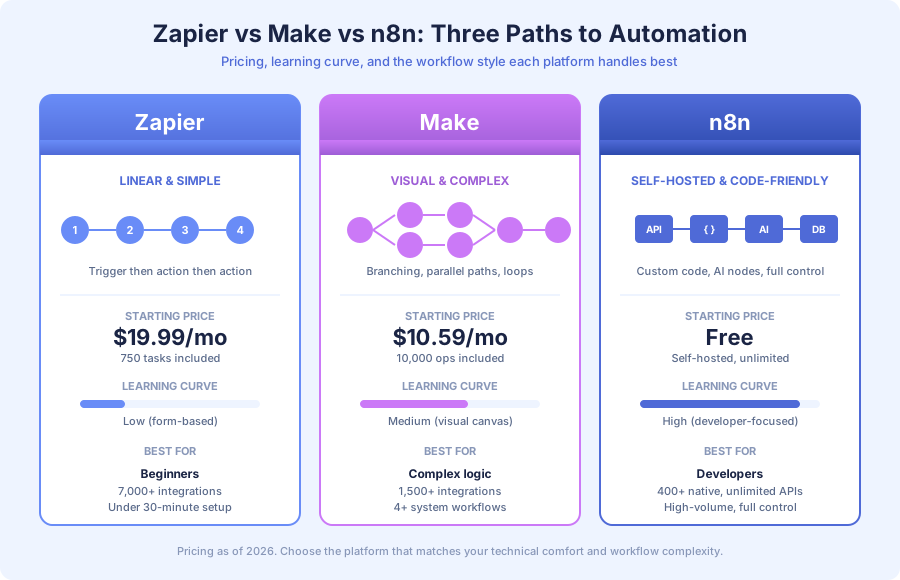
What’s the fastest way to choose between Zapier, Make, and n8n?
Pick Zapier if you need something working today and your workflow is linear. Pick Make if you need branching logic, loops, or parallel paths with a visual canvas. Pick n8n if you have developer skills, high volume, or need to run automations on your own infrastructure. Match the tool to your workflow complexity, not your budget.
Here’s the shortcut I use with clients. One question: how many decision points does your workflow have? Zero decision points means Zapier. One to three means Make. Four or more with custom logic means n8n. The second question is volume. Under 1,000 executions per month favors Zapier. Between 1,000 and 50,000 favors Make. Above 50,000 favors n8n hands down.
How do Zapier, Make, and n8n compare on price in 2026?
Pricing differs dramatically because each platform uses a different unit. Zapier charges per task (each action counts as one). Make charges per operation (similar concept but more generous). n8n charges per execution (the entire workflow counts as one). A 5-step workflow hitting Zapier burns 5 tasks per run, but n8n self-hosted counts it as a single execution and charges zero.
| Feature | Zapier | Make | n8n |
|---|---|---|---|
| Free plan | 100 tasks/month, 5 Zaps | 1,000 ops/month, 2 scenarios | Unlimited (self-hosted) |
| Starter price | $19.99/month (750 tasks) | $10.59/month (10,000 ops) | Free self-hosted; €20/month cloud |
| Mid-tier | $49.99/month (2,000 tasks) | $18.82/month (unlimited scenarios) | €50/month cloud |
| Enterprise | $99.99+/month | $99+/month | Self-hosted: server costs only |
| Pricing unit | Tasks (each action = 1) | Operations (each step = 1) | Executions (whole workflow = 1) |
| Integrations | 7,000+ | 1,500+ | 400+ native, unlimited via HTTP |
| Learning curve | Low | Medium | High |
| Self-hosting | No | No | Yes, free |
| Best for | Beginners, linear flows | Complex logic, visual builders | Developers, high volume, full control |
Those prices come straight from each vendor’s public pricing pages (Zapier.com, Make.com, n8n.io). Our Zapier vs Make comparison for small businesses breaks down the math for specific use cases.
How does pricing scale as workflow volume grows?
Pricing gaps widen fast at scale. A workflow hitting 10,000 monthly executions costs around $99 on Zapier, $18.82 on Make, and essentially $0 on self-hosted n8n. The cheapest platform for 100 runs may not be the cheapest at 10,000. According to IDC’s 2023 Automation Spending Forecast, business automation spending grew 30% year-over-year as volume expanded.
Here’s a simple example. Say you run a 5-step onboarding workflow 1,000 times per month:
- Zapier: 5,000 tasks, requires the $49.99 Professional plan
- Make: 5,000 operations, covered by the $10.59 starter plan
- n8n: 1,000 executions, free on self-hosted
The gap compounds as you add workflows. Forrester’s 2024 Total Economic Impact studies show automation ROI averages roughly 200% within the first year, so the cheapest platform rarely matters as much as picking the right tool. Still, if you’re running 20+ workflows at scale, the difference between $49 and $10 per month adds up to real money.
When should you pick Zapier?
Zapier wins when simplicity matters more than power. It’s the right choice for non-technical teammates who need to build their own automations without asking for help. If your workflow runs in a straight line (trigger, then action, then action), Zapier gets you live in 15 minutes with zero coding and the biggest integration library on the market.
Pick Zapier when:
- You need something working in under 30 minutes
- Your workflows are linear with no branching
- You rely on niche apps only Zapier supports
- You don’t want to learn a visual programming interface
- Your volume stays below 2,000 tasks per month
Real example: lead notification. A Typeform submission triggers a Zap that creates a HubSpot contact, sends a Slack message to your sales channel, and appends a row to a Google Sheet. Setup takes 15 minutes, and you map fields with dropdowns. No canvas, no expressions, no code.
Zapier’s 7,000+ integrations are its biggest moat. Niche CRMs, industry-specific tools, and legacy apps often have Zapier connectors that Make and n8n lack. If you work with obscure software, Zapier is usually the only game in town.
The limitations show up when workflows get complex. Branching, loops, and advanced error handling exist through Zapier Paths (a premium feature), but they feel clunky compared to Make’s visual canvas. According to McKinsey’s 2024 Global Survey on AI and Automation, 60% of occupations have tasks suitable for automation. Simple Zapier workflows cover the easy 30%, and the complex 30% usually needs Make or n8n.
When should you pick Make?
Make (formerly Integromat) is the right call when your workflows have branching logic but you don’t want to self-host infrastructure. Its visual scenario builder feels like drawing a flowchart, which pays off when workflows get complicated. Make is my default recommendation for businesses that outgrew Zapier but lack the in-house developer time to run n8n.
Pick Make when:
- You need branching logic, parallel paths, or loops
- You’re connecting 4+ systems in a single workflow
- You want to see the entire workflow visually
- You care about cost efficiency at scale
- You need built-in error handling paths
Real example: customer onboarding. A new Stripe payment triggers a scenario that creates a HubSpot contact, sends a welcome email through SendGrid, provisions a SaaS account via API, adds the user to a Slack channel, and schedules a 7-day check-in. If the API fails, a parallel error path notifies your team and retries after 15 minutes. Build time: 90 minutes.
Building the same thing in Zapier means chaining multiple Zaps, paying for Zapier Paths, and working around retry logic. Make handles it natively on the starter plan. Our Make.com review for 2026 covers the full feature set and limitations.
Make’s pricing advantage shows up at scale. A workflow running 1,000 times per month with 5 steps each uses 5,000 operations, which fits the $10.59 plan. The equivalent on Zapier (5,000 tasks) forces you to the $49.99 Professional plan. Multiply that across 10 workflows and Make saves hundreds per month.
When should you pick n8n?
n8n is the developer’s choice. It’s open source, self-hostable, and gives you the most control of any mainstream automation platform. If your team includes someone comfortable with Docker, JSON, and REST APIs, n8n is absurdly powerful for its price (free). The learning curve is steeper, but the ceiling is much higher. When you’re ready to run it yourself, our n8n self-hosting guide walks through the full Docker setup.
Pick n8n when:
- You want zero per-operation costs at any volume
- You need custom code execution inside workflows
- You’re handling sensitive data and want full infrastructure control
- You need AI agent capabilities built into automations
- You have access to a developer or DevOps resource
Real example: AI document processing. A file uploaded to Google Drive triggers an n8n workflow. It runs OCR on the document, sends the text to Anthropic Claude for classification, writes structured data to Airtable, and posts a summary to Slack. If AI confidence drops below 80%, the workflow routes the document to a human reviewer instead.
That workflow involves AI model calls, conditional routing, custom data transformation, and external APIs. n8n handles it natively for $5/month in hosting plus API usage. No per-workflow charges, no operation ceilings. Our n8n review for small businesses walks through the strengths and trade-offs.
n8n’s 400+ native integrations cover the major platforms: Google Workspace, Slack, HubSpot, Salesforce, Stripe, Shopify, Airtable, and Notion. For anything not covered natively, the HTTP Request node connects to any REST API. We’ve used n8n to integrate with immigration case management tools, custom databases, and proprietary systems no other platform supports.
Pixorr, a 5-person SEO agency, runs their reporting automation on n8n. They reclaimed an entire work week per month and cut report generation time by 85%. Because n8n self-hosted has zero variable costs, they scale report volume without spending more.
How do you build your first workflow on each platform?
Here’s a practical walkthrough. The same workflow on all three platforms: when a Google Form submission arrives, create a HubSpot contact and post a Slack notification. It covers the basics you’ll use in most automations, and the setup time reflects each platform’s design philosophy.
How do you set up a Zapier workflow in 15 minutes?
Sign into Zapier and click “Create Zap.” Here’s the complete sequence:
- Choose trigger: Google Forms, event “New Form Response”
- Connect account: OAuth into your Google account and select the form
- Add first action: HubSpot, event “Create Contact”
- Map fields: drag form fields into HubSpot properties (email, name, phone)
- Add second action: Slack, event “Send Channel Message”
- Build message: pick your channel and write the template with form data
- Test: Zapier runs a sample to verify each step works
- Publish: flip the toggle and you’re live
The form-based interface handles most setup automatically. You don’t need to know JSON or expressions. Each step has dropdowns for authentication, events, and field mapping. Testing catches most issues before production.
How do you set up a Make scenario in 25 minutes?
Create a new scenario in Make. Here’s the sequence:
- Add trigger module: Google Forms, “Watch Responses”
- Connect account: authenticate and select your form
- Add HubSpot module: “Create/Update Contact”
- Map fields visually: drag data from the picker into HubSpot properties
- Add Slack module: build the message with the data picker
- Configure error handling: right-click any module to add an error route
- Run once: test with real data to verify mapping
- Schedule: set scenario frequency (instant, every 15 minutes, daily)
- Activate: flip the scheduler on
Make’s visual canvas shows the whole workflow at a glance. Adding modules feels like drawing a flowchart. The data mapping is more powerful than Zapier’s, which is why complex workflows are easier to debug here.
How do you set up an n8n workflow in 30-45 minutes?
Access your n8n instance and create a new workflow:
- Add trigger node: Google Forms Trigger with OAuth2 authentication
- Test trigger: submit a test form response to capture sample data
- Add HubSpot node: resource “Contact,” operation “Create”
- Map fields with expressions: use
{{$json["email"]}}syntax - Add Slack node: configure channel and message with expressions
- Add error handling: drop an Error Trigger node with a Slack alert
- Test end-to-end: run the full workflow with sample data
- Activate: toggle the workflow to “Active”
n8n’s setup takes longer because you configure everything manually, including authentication, expressions, and error paths. The payoff is control. Every node exposes its full API, so you can do things other platforms block. Save workflows as JSON files and commit them to Git for version control.
How do you scale beyond your first workflow?
Your first automation saves maybe 2 hours per week. Real operational transformation happens when you connect 5, 10, or 15 workflows into a system. Scaling introduces challenges your first Zap didn’t prepare you for, and getting them wrong means broken automations and silently dropped leads.
Error handling. What happens when an API fails? When a contact already exists in HubSpot? When Slack is down? Zapier retries automatically but gives limited control. Make provides explicit error-handling paths visible on the canvas. n8n offers the most granular control with custom retry logic, fallback paths, and alerts.
Monitoring. At 5+ active workflows, you need a dashboard showing execution counts, error rates, and failed runs. Make and n8n both provide this natively. Zapier’s Task History is functional but harder to navigate at scale.
Version control. When you change a workflow and it breaks, can you roll back? n8n stores workflows as JSON files, so Git-based version control is straightforward. Make offers workflow versioning inside its interface. Zapier’s version history is limited to recent changes.
According to research from Harvard Business Review (Oldroyd, 2011, updated by Drift in 2023), responding to a lead within 5 minutes makes you 100x more likely to connect. Speed matters, and reliable automation at speed matters even more. A broken workflow silently dropping leads is worse than no automation at all.
When should you stop DIY and hire an automation agency?
DIY automation works brilliantly for simple, low-stakes workflows. But there’s a clear inflection point where professional help pays for itself. If you’re debugging more than building, or your workflows touch revenue-critical systems, it’s time to bring in help. Forrester’s 2024 Total Economic Impact studies put professionally built automation ROI at roughly 200% in year one, versus 40-80% for DIY.
Signs you’ve outgrown DIY:
- Workflows span 4+ systems with conditional logic
- You spend more time debugging than building
- Error handling is an afterthought or nonexistent
- You need audit trails for compliance
- Volume exceeds 10,000 operations per month
- Reliability affects revenue directly
The gap between DIY and professional implementations usually comes down to edge cases. What happens when the input data is missing a field? When two triggers fire at once? When an API rate limit hits at 2 AM? DIY workflows usually skip these questions until something breaks.
AcquireX Properties Capital started with a few Zapier Zaps. As they grew, they needed custom deal analysis, tenant management, and investor reporting that processed data across multiple APIs with conditional logic. A 3-person team now manages 3x their portfolio capacity with 80% faster deal analysis after professional architecture.
Thompson Career College needed sub-60-second lead response across their admissions pipeline. Simple Zaps couldn’t handle the routing logic and follow-up sequences required. After professional implementation, they processed 300+ additional inquiries and tripled admissions calls.
Which platform is right for your business?
The platforms are tools. Start with the one matching your current complexity and technical comfort, build your first 3 to 5 workflows, then reassess. Most clients start on Zapier, graduate to Make as complexity grows, and move to n8n when volume or custom logic demands it. The progression is normal and healthy.
If you want help choosing the right platform, auditing your current automations, or building workflows that scale, reach out to Builts AI for a discovery call. We’ve built hundreds of workflows across all three platforms and know where each one shines. Whatever you pick, start building. The best automation platform is the one you actually use.