HubSpot has a reputation problem. Many small business owners assume it’s enterprise software with enterprise pricing, so they never try the free tier. That’s a mistake. HubSpot Free includes unlimited contacts, a full deal pipeline, email tracking, and a meeting scheduler — capabilities that competing CRMs charge $25 to $50 per seat per month for. A 2024 HubSpot customer report put the median Free tier tenure at 14 months before users upgrade, which suggests the free version isn’t a demo. It’s a working product.
The real question isn’t whether HubSpot is affordable. It’s when the upgrade from Free to Starter, Starter to Professional, or Professional to Enterprise actually pays for itself. This guide walks through exactly what each tier unlocks, what it costs in 2026, and the specific situations where paying makes financial sense.
What does HubSpot Free actually include?
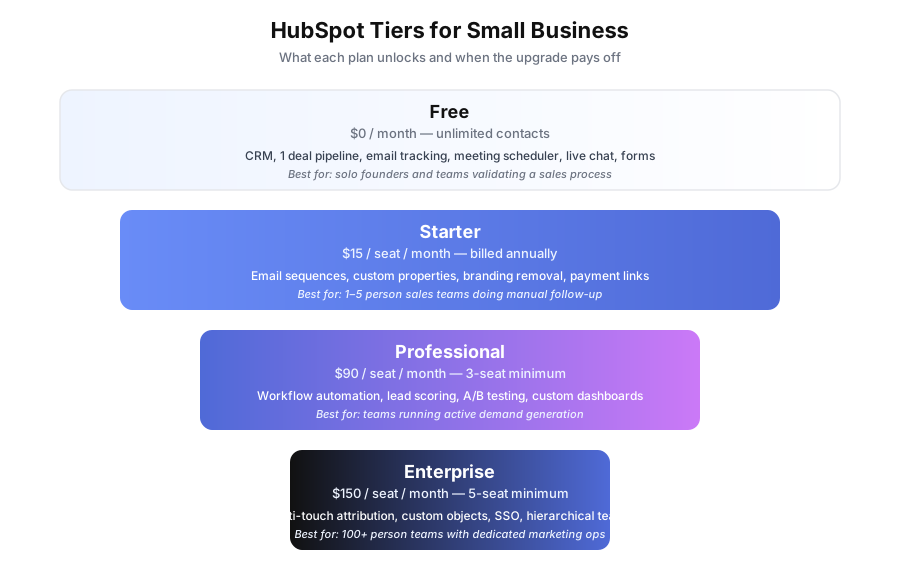
HubSpot Free covers unlimited contacts and companies, one deal pipeline, email open and click tracking, a meeting booking link, a live chat widget, three form types, ad management for Google and Facebook, and basic pre-built reports. It’s a functional CRM that many small businesses use for over a year before hitting its limits.
The Free tier is not a trial and doesn’t expire. According to HubSpot’s 2024 product documentation, there are more than 194,000 paying customers across tiers, but the free user base is several times larger.
What you actually get on Free:
- Contacts and companies: Unlimited records, no cap
- Deal pipeline: 1 pipeline with unlimited deals
- Email tracking: Notifications when contacts open or click
- Meeting scheduler: A personal booking link — see our Calendly vs Acuity vs HubSpot Meetings guide for a comparison
- Live chat: Widget for your website with basic routing
- Forms: Up to 3 form types with lead capture
- Ad management: Connect Google and Meta ad accounts
- Reporting: Pre-built dashboards for deals, contacts, activities
- 1:1 email: Send tracked emails directly from HubSpot
The hard limit most teams hit first is 200 outbound emails per user per day. For a sales rep doing personalized follow-up, that’s usually enough. For anyone running newsletters, it isn’t.
What’s missing from HubSpot Free that matters?
Four missing capabilities are the usual reasons teams upgrade: automated email sequences, workflow automation with if/then logic, multiple sales pipelines, and HubSpot branding removal. The first two drive real time savings once a team’s volume grows. The last is a vanity concern that still matters when your forms are customer-facing.
Here’s what Free doesn’t do:
- No email sequences: You can’t enrol a contact in a multi-step automated cadence
- No workflow automation: No if/then logic triggered by properties or behavior
- No multiple pipelines: One pipeline only, so separate sales motions share the same deal stages
- No advanced segmentation: Lists are static, not behavior-based
- No A/B testing: Can’t split test subject lines or content
- No branding removal: “Powered by HubSpot” shows on forms and chat
- No custom reporting: Stuck with pre-built dashboards
- No payment collection: No native invoicing or payment links
The branding limitation is the most common reason early-stage teams upgrade sooner than expected. If your forms sit on a customer-facing landing page, seeing “Powered by HubSpot” next to your logo is a real problem for brand perception.
What does HubSpot Starter add that’s worth $15?
HubSpot Starter costs $15 per seat per month (billed annually) and adds email sequences, custom properties, deal stage automation, 1,000 daily email sends per seat, payment collection, and branding removal. The single most valuable addition is sequences — automated multi-step email cadences that replace manual follow-up reminders. For small sales teams, sequences alone typically justify the cost within the first month.
Per HubSpot’s pricing page (updated January 2026), Starter has no seat minimum, so a solo founder can upgrade for $15 total. Sales Hub Starter and Marketing Hub Starter are separate products at the same price point.
What Starter unlocks:
| Feature | Free | Starter |
|---|---|---|
| Daily email sends per seat | 200 | 1,000 |
| Email sequences | No | Yes |
| Custom properties | No | Yes |
| Deal stage automation | No | Basic |
| Payment collection | No | Yes |
| Branding removed | No | Yes |
| Multiple currencies | No | Yes |
The math on sequences: if a salesperson previously managed 20 active follow-up conversations manually and now enrols those contacts in a 5-email cadence, the time saved on reminder-based admin alone is typically 2 to 4 hours per week. At any realistic billable rate, that’s a 10x return on $15 per month.
When does HubSpot Professional start paying off?
HubSpot Professional costs $90 per seat per month with a 3-seat minimum, so the real starting price is $270/month or $3,240 per year. It adds workflow automation, lead scoring, marketing automation, social publishing, A/B testing, custom dashboards, and Salesforce sync. Professional pays off when your team actively uses workflows and lead scoring to route leads and trigger behavior-based outreach — not when you’re just hoping to eventually configure them.
The jump from Starter to Professional is 6x in monthly cost, so the decision deserves scrutiny. According to Forrester’s 2024 Total Economic Impact study on HubSpot, customers who fully deployed Professional reported a 76% three-year ROI, but that return depended on actually configuring workflows and integrating with their website and ad platforms.
What Professional adds that Starter doesn’t have:
- Workflow automation: Full if/then builder triggered by any combination of properties, deal stages, form submissions, email engagement, or page visits
- Lead scoring: Automated point values assigned to contact behavior
- Marketing automation: Triggered email campaigns to segmented lists
- A/B testing: Split test subject lines, content, and send times
- Custom reporting dashboards: Build reports on any data combination
- Social media publishing: Schedule and track social posts
- Salesforce integration: Native two-way sync
- SEO tools: On-page recommendations and content strategy
Workflow examples Professional enables:
- When a contact visits the pricing page 3+ times in 7 days, create a task for the assigned rep and notify them in Slack
- When a deal moves to “Proposal Sent,” enrol the contact in a 4-email follow-up sequence spaced over 14 days
- When a contact hasn’t opened any email in 90 days, move them to a quarterly re-engagement workflow
If your team will configure workflows like these in the first 60 days, Professional earns its price. If not, Starter plus an external automation tool is a better bet.
What does HubSpot Enterprise add for $150 per seat?
HubSpot Enterprise costs $150 per seat per month with a 5-seat minimum ($750/month or $9,000/year floor). It adds multi-touch revenue attribution, custom objects for modeling non-standard business data, hierarchical teams, single sign-on, advanced permissions, and higher API limits. Enterprise is designed for businesses with dedicated marketing ops staff and complex attribution requirements — most teams under 100 people don’t need it.
What Enterprise unlocks over Professional:
- Multi-touch attribution: See which touchpoints contributed to a closed deal across first-touch, last-touch, and weighted models
- Custom objects: Model non-contact data (projects, subscriptions, assets) with full CRM functionality
- Hierarchical teams: Parent/child team structure for regional or product-based organizations
- SSO and 2FA enforcement: Required for many enterprise IT policies
- Advanced permissions: Row-level data access controls
- Higher API limits: 500,000 calls per day vs 250,000 on Professional
The honest assessment: if you’re asking whether you need Enterprise, you probably don’t. Teams that need Enterprise usually know it already because their compliance, attribution, or data modeling requirements have already broken Professional.
Which HubSpot tier should a small business actually pick?
For most small businesses, the answer follows a predictable ladder. Start on Free. Move to Starter when manual follow-up is costing real time or branding is hurting your forms. Move to Professional only when workflow automation and lead scoring will actively ship. Skip Enterprise entirely unless you have a marketing ops team.
| Situation | Recommended tier | Monthly cost |
|---|---|---|
| Solo founder, testing sales process | Free | $0 |
| 1-5 person sales team doing manual follow-up | Starter | $15/seat |
| Running active demand generation with workflows | Professional | $270+ (3 seats) |
| 100+ people, dedicated ops, complex attribution | Enterprise | $750+ (5 seats) |
The most common mistake small businesses make is upgrading to Professional too early. A 2024 G2 review analysis of 1,200+ HubSpot customers found that 31% of Professional users reported using fewer than half the paid features six months after upgrade. If you’re not going to configure workflows and scoring, you’re paying $75 per seat per month for capabilities that sit idle.
Can you combine HubSpot Starter with external automation?
Yes — many small businesses stay on HubSpot Starter for years and pair it with Make ($9 to $29/month) or Zapier ($19.99 to $49/month) for workflow automation that would otherwise require Professional. The combined spend is typically under $50/month for a 2-person team versus $270+ for Professional’s 3-seat minimum. The trade-off is configuration complexity and data split across two systems.
This is the path we recommend for most early-stage teams. You get 80% of Professional’s functional capability at roughly 15% of the cost, and you learn automation fundamentals that transfer across tools. For a deeper walkthrough, see our guide on how to connect your CRM, calendar, and email.
When the HubSpot Starter plus Make combination works:
- You have 1-5 team members
- You’re comfortable with basic automation configuration or willing to learn
- Your workflows are triggered by specific events (form submission, deal stage change) rather than complex scoring
- You don’t need native social publishing or A/B testing
When it doesn’t:
- You need native lead scoring with thresholds that route leads automatically
- You want all your data and automation in one system for audit reasons
- You have a marketing team running A/B tests and content strategy
- Your compliance requirements need a single vendor for all customer data
For teams considering an all-in-one alternative, our GoHighLevel vs HubSpot comparison covers the trade-offs, and our best CRM for small business roundup includes other contenders worth considering.
What’s the fastest way to decide between tiers?
Run a 14-day Professional trial and track which features you actually configure during the trial window. HubSpot offers free trials on Starter and Professional with full functionality. If you finish the trial with fewer than three active workflows and no lead scoring rules in production, drop back to Starter. If you have five or more active workflows moving leads or deals, Professional will earn its price.
A simple scorecard for the trial:
- Day 1-3: Configure your top 3 sales sequences and deal stage automation
- Day 4-7: Build one workflow triggered by form submission and one by deal stage change
- Day 8-10: Set up lead scoring with at least 5 rules and a threshold that creates tasks
- Day 11-14: Build one custom report that answers a specific question your team asks weekly
If all four steps ship within 14 days, Professional is the right tier. If you can’t get past step 2, Starter is the right tier. This test is far more reliable than trying to predict future usage.
The bottom line
HubSpot Free is the best free CRM available for small businesses, and most teams should stay on it longer than they think. Starter at $15 per seat per month is the highest-ROI upgrade in the product lineup — if manual follow-up is costing time, upgrade immediately. Professional’s price jump to $90 per seat is only justified when workflows and scoring ship within the first 60 days of upgrade. Enterprise is almost never the right answer for teams under 100 people.
The mistake to avoid: upgrading to Professional because it sounds more serious. A team using Starter well beats a team using Professional badly at any scale we’ve seen. If you’d rather have the workflows built than build them, that’s what our sales automation service is for.
Book a free automation audit and we’ll assess your current HubSpot usage, identify what tier makes sense for your specific workflow, and show you exactly what’s achievable with your current plan before recommending any upgrade.