A SaaS founder asked us last quarter: “Should we buy an AI chatbot or automate our onboarding?” The honest answer was both, in a specific order. Getting that order wrong is the most expensive mistake small businesses make with technology right now. Per Gartner’s 2024 Market Analysis, the business process automation market hit $14.2 billion, while every software vendor slaps “AI-powered” on their product pages. And RPA vendors like UiPath target companies with 10 employees. No wonder everyone’s confused.
Here’s the plain English breakdown of all three technologies, when each one matters, and which one you actually need first.
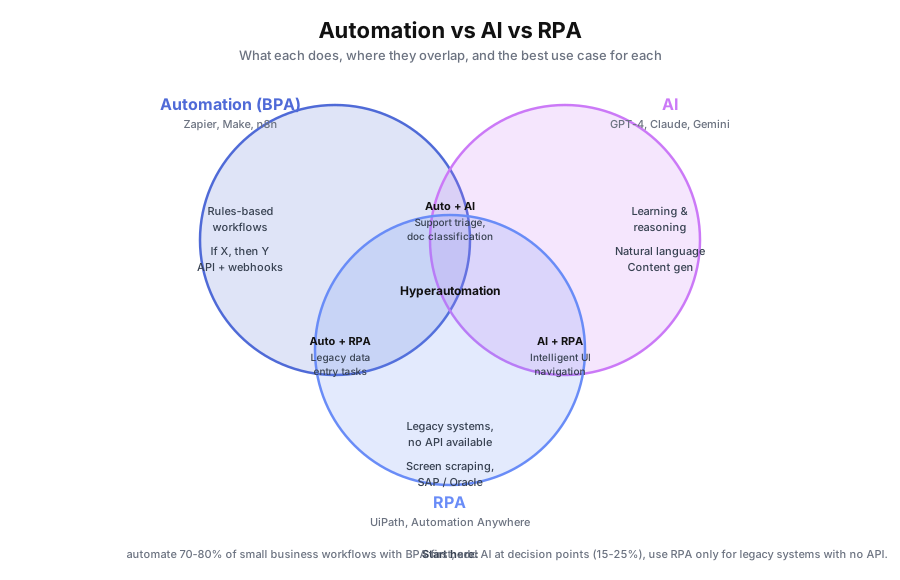
What’s the Difference Between Automation, AI, and RPA?
Business process automation follows rules to execute multi-step workflows through APIs. AI interprets unstructured inputs and makes probability-based decisions. RPA mimics human clicks inside software that has no API. Automation handles the predictable, AI handles the ambiguous, and RPA handles the legacy.
The three technologies get lumped together because they all “do work without humans.” But they solve fundamentally different problems. Automation executes a script. AI interprets context. RPA operates a user interface. Per Deloitte’s 2023 Global Intelligent Automation Survey, 78% of companies that implemented BPA first reported faster time-to-value than those starting with AI or RPA.
Most small business confusion comes from vendors blurring these lines. A chatbot vendor calls their tool “automation.” An integration platform calls itself “AI-powered.” The categories matter because they determine cost, setup time, and what problems you can actually solve.
What is Business Process Automation in Simple Terms?
Business process automation uses technology to execute multi-step workflows based on predefined rules. When a trigger fires, the system runs every step automatically: moving data, sending messages, updating records. No human touches it unless something falls outside the rules you set.
Think of BPA as an extremely reliable employee who follows instructions perfectly and never takes a break. The key constraint: instructions must be specific. If X happens, do Y. If Z is true, go to step 4. BPA doesn’t interpret. It executes. Per Forrester’s 2024 Total Economic Impact studies, the average ROI on business process automation hits 200% within the first year.
Real example: Taxvisory. A solo tax practitioner managing 300 clients was spending evenings chasing documents and tracking submissions manually. Pure automation (no AI needed) handled the entire document collection workflow: automated reminders via email and SMS, status tracking in Airtable, and follow-up escalation sequences. Result: 80% less time spent chasing documents and weekends off during tax season. The process was 100% rule-based, which made it a textbook automation case.
Common tools: Zapier, Make (formerly Integromat), n8n, Microsoft Power Automate, custom API integrations.
What is AI and How is it Different from Automation?
AI analyzes patterns in data to make decisions, generate content, or interpret unstructured inputs. Where automation follows a script, AI works from probability. It doesn’t need exact instructions for every scenario because it’s trained on variation. Automation needs structured inputs like form fields or API values. AI handles messy inputs like free-text emails, scanned documents, or voice messages.
Per McKinsey’s 2024 Global Survey on AI and Automation, 60% of occupations have at least 30% of tasks that could be automated with current technology. The tasks that need AI are the ones requiring interpretation, not just execution.
Real example: KwikUI. This SaaS platform with 3,000+ users was drowning in support tickets. Simple automation could route tickets to the right queue. But understanding what the customer actually wanted (a bug report, a feature request, or a confused user needing a tutorial) required AI. They implemented an AI support system using models from OpenAI and Anthropic Claude. Result: 65% fewer tickets reaching human agents, trial-to-paid conversion doubled from 4% to 8%, and churn dropped 40%. The AI didn’t just route tickets, it understood them and resolved 80% without human involvement.
Common tools: OpenAI (GPT-4, GPT-4o), Anthropic Claude, Google Gemini, Cohere, custom fine-tuned models. For a head-to-head breakdown of the two most popular business AI models, see our ChatGPT vs Claude for business comparison.
What is RPA and When Does it Actually Make Sense?
RPA creates software bots that mimic human actions inside applications: clicking buttons, filling forms, copying data between screens. It’s essentially a script that operates a user interface the way a human would. RPA exists because some software has no API, no integration layer, and no way to connect to modern automation tools.
Think legacy enterprise systems from the 1990s and early 2000s: SAP, Oracle E-Business Suite, mainframe terminals, custom internal tools without external access points. Per MuleSoft’s 2023 Connectivity Benchmark, the average enterprise uses 1,061 applications, and many are legacy systems that can’t talk to anything else. That’s RPA’s sweet spot.
Here’s the thing: most small businesses don’t have this problem. If you’re running Google Workspace, HubSpot, Slack, QuickBooks Online, or Shopify, those platforms already have APIs and native integrations. You don’t need a bot to click buttons when you can connect systems directly through tools like Zapier or Make.
When RPA makes sense: You’re a mid-size or enterprise company with legacy software you can’t replace for regulatory, cost, or contractual reasons, and that software has no API. That’s basically it.
Common tools: UiPath, Automation Anywhere, Blue Prism, Microsoft Power Automate Desktop.
How Do Automation, AI, and RPA Compare Side by Side?
Here’s the decision matrix covering the key differences in cost, setup, inputs, and best-fit scenarios. Use this table to match the right technology to your specific process before building anything. The biggest cost gap is RPA, which rarely fits small business budgets.
| Factor | Business Process Automation | AI | RPA |
|---|---|---|---|
| How it works | Follows predefined rules | Learns patterns, predicts | Mimics human clicks |
| Input type | Structured (forms, APIs) | Unstructured (text, voice) | Screen elements |
| Best for | Repeatable workflows | Interpretation, generation | Legacy systems, no API |
| Setup time | 1-6 weeks | 2-8 weeks | 4-12 weeks |
| Cost (small biz) | $3K-$15K + $200-$600/mo | $5K-$25K + $300-$1K/mo | $15K-$50K+ |
| Maintenance | Low (rule changes simple) | Medium (model monitoring) | High (UI changes break it) |
| ROI timeline | 1-3 months | 2-6 months | 6-12 months |
| Example | Lead follow-up sequence | Support chatbot triage | Data entry into SAP |
Per Deloitte’s 2023 Global Intelligent Automation Survey, 78% of companies that implemented BPA first reported faster time-to-value than those that started with AI or RPA alone. The pattern holds across industries: automate the structured work first, then layer intelligence on top.
Which Type Do I Actually Need for My Business?
Most small businesses need automation for 70-80% of their processes, AI for 15-25%, and RPA almost never. Answer three questions to sort any process into the right bucket: is the input structured, does it need judgment, and does your software have an API?
Question 1: Is the input structured or unstructured? If every input follows the same format (form submissions, spreadsheet rows, database records), you need automation. If inputs vary wildly (free-text emails, voice messages, scanned documents), you need AI.
Question 2: Does the process need judgment or just execution? If the steps are identical every time and a junior employee could follow a checklist, that’s automation. If someone senior must interpret, classify, or make a contextual call, that’s AI.
Question 3: Does the software have an API? If yes, use automation or AI. If no (legacy system, zero integration options), that’s RPA territory. Per Salesforce’s 2024 Small Business Trends Report, 43% of small business owners rank automation as their top operational priority, and they’re right to start there.
Can You Combine Automation and AI in the Same System?
Yes, and this is where things get powerful. The best implementations use automation as the backbone and AI as the brain at specific decision points. Gartner calls this pattern hyperautomation, and it’s what 2026’s smartest small business stacks look like.
Real example: Skylarks International. This 15-person immigration consulting firm combined both approaches. Automation handled document collection workflows: reminders, status tracking, deadline management, and client communication sequences. That alone cut document collection time by 70% and reduced status inquiry calls by 80%.
But immigration documents come in wildly different formats. Passports, bank statements, employment letters, tax returns. Some are scanned, some are phone photos, some are in different languages. The AI layer handled document classification: identifying document types, extracting key fields, and flagging missing or expired documents automatically. Automation handled the predictable (send reminder on day 3, escalate on day 7). AI handled the unpredictable (is this a bank statement or a tax return, and does it meet requirements?).
Per Deloitte’s 2023 survey, 73% of organizations report positive ROI within 12 months of automation implementation, and those layering AI on top of an automation foundation reported the strongest returns.
What Does the Implementation Order Look Like?
The pattern that consistently delivers the fastest ROI starts with automation, adds AI at decision points, and treats optimization as ongoing. Jumping straight to AI before automating underneath creates faster promises with slower delivery.
Phase 1: Automation only (weeks 1-6). Automate your highest-volume, most rule-based processes: lead follow-up, invoicing, document collection, onboarding sequences. This is what Taxvisory did. Per Celonis’s 2024 Process Intelligence report, the median time-to-value for BPA is 6 weeks.
Phase 2: Automation + AI (weeks 7-14). Add AI at specific decision points: customer support triage (like KwikUI), document classification (like Skylarks), content personalization, sentiment analysis on customer feedback.
Phase 3: Optimization (ongoing). Use data from your automations to identify new bottlenecks. Per IDC’s 2023 Future of Work study, employees spend 30% of their time on manual data tasks. Your automation data will show you exactly where that 30% still lives inside your team.
How Do I Figure Out What My Business Needs Right Now?
Start with an inventory of your processes. For each one, note whether inputs are structured or unstructured, whether steps need judgment, and whether your tools have APIs. That assessment alone will sort your processes into the right bucket and tell you where to start.
Per Forrester’s 2024 TEI studies, the average business process automation project returns 200% ROI in year one. Per Gartner’s 2024 Market Analysis, intelligent automation is a $14.2 billion market precisely because the payoff is so predictable when you pick the right tool for the job. The question isn’t whether to automate. It’s which layer to start with, and in what order.
We offer a free automation audit that does this mapping for you. We’ll identify which processes are pure automation candidates, which need AI, and which (if any) justify RPA. You’ll walk away with a prioritized roadmap even if you never work with us. Book your free automation audit and we’ll map out exactly what your business needs.