According to Forrester’s 2024 Total Economic Impact studies, the average business process automation project returns 200% in year one. That’s measured across real implementations, not a vendor projection. According to Deloitte’s 2023 Global Intelligent Automation Survey, 73% of organizations hit positive ROI inside 12 months, and the median payback period for small business builds is 2 to 4 months. For additional benchmarks, our deep dive into AI automation ROI with real numbers from small businesses covers more case studies.
But “200% average” doesn’t tell you what your project will return. A lead response automation for a college generates different numbers than a document collection system for an immigration firm. You need your own calculation.
Here’s the formula, the five components most people miss, and three real client examples with actual dollar figures.
What’s the core formula for automation ROI?
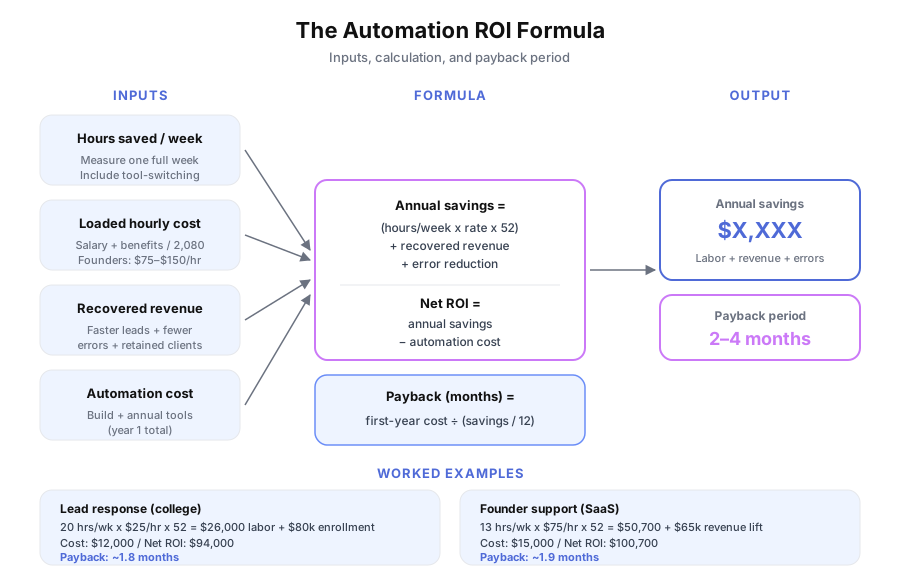
Annual savings = (hours saved per week x loaded hourly cost x 52) + recovered revenue + error reduction savings. Subtract total automation cost (build + annual tools) to get net ROI. Divide first-year cost by monthly savings for your payback period in months. Three inputs, one output.
Here it is laid out:
Annual savings = (hours saved/week x hourly cost x 52)
                 + recovered revenue
                 + error reduction savings

Annual ROI = annual savings − total automation cost

Payback period = total first-year cost / (annual savings / 12)
The math is simple. The hard part is measuring the inputs accurately. If you’re still estimating what the project itself will cost, start with our breakdown of how much business automation actually costs. According to a 2023 McKinsey Global Institute analysis, most teams underestimate savings by 30 to 50% because they forget overhead: tool-switching, exception handling, context-switching, and the downstream effects of delays.
What are the five components of automation ROI?
Most ROI calculations only count labor hours saved. That captures maybe 30% of the actual return. The full picture has five components: labor savings, error reduction, speed-to-revenue, opportunity cost recovery, and scale capacity. Miss any of these and you’ll undervalue the investment.
1. Labor savings (the obvious one)
Pick one process. Time it for a week. How many times does it happen, how long does each instance take (including tool-switching and lookups), and what’s the hourly rate of the person doing it?
For salaried employees, divide total compensation (salary + benefits + payroll taxes) by 2,080 hours. According to Statistics Canada’s 2024 Survey of Employment, Payrolls and Hours, a Canadian full-time employee costs $45,000 to $65,000 loaded, or roughly $22 to $31 per hour. For founders and principals, value time at $75 to $150 per hour. If you’re doing $25/hour work, you’re the most expensive person on the team doing the cheapest work.
2. Error reduction
Manual processes produce errors. Transposed numbers on invoices. Missed follow-ups. Wrong data entered into QuickBooks or Xero. According to Gartner’s 2023 Data Quality Market Survey, poor data quality costs organizations an average of $12.9 million per year. For small businesses, scale that down, but the pattern holds: errors cost real money in rework, refunds, and lost trust. Estimate errors per month x cost per error x 12.
3. Speed-to-revenue
This is the component most people skip, and it’s often the largest. According to Harvard Business Review’s lead response research (Oldroyd 2011, updated by Drift’s 2023 study), responding to a lead within 5 minutes makes you 100x more likely to connect than waiting 30 minutes. If your current response time is hours or days, automation doesn’t just save time. It recovers revenue you’re currently losing.
Ask yourself how many leads go cold, what a converted lead is worth, and how many invoices get paid late because reminders didn’t go out.
4. Opportunity cost recovery
When a skilled person spends 15 hours per week on data entry, that’s 15 hours they’re not spending on work that grows the business. According to IDC’s 2023 Future of Work study, employees spend roughly 30% of their work time on manual data tasks. For a team of 5, that’s 1.5 full-time equivalents locked up in work a system could handle.
5. Scale capacity
Automation lets you handle more volume without adding headcount. If your team currently handles 50 clients and automation lets them handle 150 with the same people, the revenue from clients 51 through 150 is pure growth.
| ROI component | What to measure | Common range |
|---|---|---|
| Labor savings | Hours saved x hourly rate x 52 | $5,000 to $50,000/year |
| Error reduction | Errors/month x cost per error x 12 | $2,000 to $20,000/year |
| Speed-to-revenue | Lost leads recovered x average deal value | $10,000 to $200,000/year |
| Opportunity cost | Hours freed x value of redirected work | Hard to quantify, often largest |
| Scale capacity | Added volume x revenue per unit | Depends on business model |
How do you measure the hours accurately?
Don’t estimate. Track the actual time for one full week, including every interruption, tool switch, and exception. According to a 2023 McKinsey analysis, teams underestimate manual process time by 30 to 50% because they only count the core task and forget the overhead. The fix is a five-day log.
Here’s the measurement process:
- Pick one process (lead response, invoice creation, report generation)
- Track every instance for 5 business days using Toggl, Clockify, or a spreadsheet
- Include setup time, tool switches, lookups, and exception handling
- Multiply by your weekly frequency
- Multiply by 52 for annual hours
Example: Your team responds to new leads manually. Each response takes 8 minutes (check CRM, draft email in Gmail, personalize, send, log in HubSpot). You get 25 new leads per week. That’s 25 x 8 = 200 minutes = 3.3 hours per week = 172 hours per year. At $29/hour loaded, that’s $4,988 per year in labor on lead response alone, before counting any leads lost to slow response.
What does real automation ROI look like?
Theory is useful. Real numbers are better. Here are three examples from actual client implementations, each highlighting a different dominant ROI component.
Example 1: Lead follow-up automation (speed-to-revenue dominant)
Thompson Career College was spending staff hours responding to 300+ monthly inquiries. Over 40% arrived after hours and on weekends. Response time averaged 1 to 2 business days. Prospective students were enrolling at Fanshawe College and other competing institutions before TCC could respond.
| Metric | Before | After |
|---|---|---|
| Response time | 1 to 2 business days | Under 60 seconds |
| Admissions calls booked | Baseline | 3x increase |
| Staff hours on inquiry response | 20+ hrs/week | Near zero |
| Student queries auto-resolved | 0% | 80% |
ROI calculation:
- Labor savings: 20 hrs/week x $25/hr x 52 = $26,000/year
- Recovered revenue (3x admissions calls): $80,000+/year
- Automation cost (year 1): ~$12,000
- Net year 1 ROI: $94,000+
- Payback period: ~1.8 months
Labor savings alone justified the project. The enrollment increase made it one of TCC’s best investments in a decade. According to Forrester’s 2024 TEI methodology, speed-to-revenue gains like this typically represent 60 to 70% of total automation ROI for customer-facing processes.
Example 2: Support ticket automation (opportunity cost dominant)
KwikUI had two founders handling all support for 3,000+ SaaS users. At founder-level opportunity cost of $75/hour, 20 hours per week on support represented $78,000 per year in misdirected effort.
| Metric | Before | After |
|---|---|---|
| Founder hours on support | 20 hrs/week | 7 hrs/week |
| Tickets resolved automatically | 0% | 65% |
| Trial-to-paid conversion | 4% | 8% (2x) |
| Churn rate | Baseline | 40% lower |
ROI calculation:
- Labor savings (opportunity cost basis): 13 hrs/week x $75/hr x 52 = $50,700/year
- Revenue from doubled conversion: $40,000+/year
- Revenue saved from 40% churn reduction: $25,000+/year
- Automation cost (year 1): ~$15,000
- Net year 1 ROI: $100,700+
- Payback period: ~1.9 months
The conversion rate doubling alone outweighed the entire automation investment. When founders stop answering password-reset questions and start shipping features in React and Node.js, the compound effect on the product is massive.
Example 3: Document collection (scale capacity dominant)
Skylarks International had a 15-person team spending significant hours chasing client documents and answering “any update on my file?” calls across their immigration consulting practice.
| Metric | Before | After |
|---|---|---|
| Document collection time | Baseline | 70% faster |
| Status update calls | Major time drain | 80% eliminated |
| Team capacity | Baseline | Handling 40%+ more cases |
| Client feedback | ”Feels disorganized" | "Feels like a bigger firm” |
ROI calculation:
- Labor savings: 30+ hrs/week x $27/hr x 52 = $42,120/year
- Scale capacity: 40% more cases at same headcount
- Automation cost (year 1): ~$18,000
- Net year 1 ROI: $24,120+ in direct savings, plus incremental revenue from expanded capacity
- Payback period: ~3.3 months
According to Deloitte’s 2023 Global Intelligent Automation Survey, 73% of organizations report positive ROI within 12 months. Skylarks hit positive ROI within 4 months and saw the scale benefits compound as they onboarded more clients with the same team.
What should you track after launch?
Don’t calculate ROI once and forget it. Set up monthly tracking across three categories and review them the first week of each month. According to PwC’s 2024 Intelligent Automation Benchmark, teams that track post-launch KPIs weekly identify optimization opportunities 3x faster than those that don’t.
Direct metrics:
- Hours saved per week (compare to your pre-automation baseline from Toggl or Clockify)
- Error rate (missed follow-ups, incorrect data, late invoices)
- Response time for customer-facing automations
Revenue metrics:
- Lead conversion rate (track in HubSpot, Salesforce, or your CRM)
- Customer retention and churn rate
- Average days to payment for finance automations in QuickBooks or Xero
Capacity metrics:
- Clients or projects your team can handle at current headcount
- Ratio of high-value work to admin work per person
- Time your highest-paid people spend on lowest-value tasks
Build a simple dashboard in Google Sheets, Notion, or your project management tool. If savings match or exceed projections, start planning the next automation. If they don’t, investigate why and adjust. Platforms like Make include built-in execution logs that make tracking throughput and error rates straightforward.
What’s the ROI component most people forget?
The value of what your team could be doing instead. This is component #4 (opportunity cost recovery) in action, and it compounds over time. Pixorr’s operations manager was spending a full work week every month on client reporting for their SEO agency. Five staff members pulled data from Google Analytics 4, Semrush, Ahrefs, and Google Search Console, then compiled PDFs for each client.
Reports that took 2 to 3 hours per client now take 20 minutes. That freed 85% of reporting time and saved 40+ hours per month. But the real ROI? That operations manager now does SEO strategy instead of data compilation. Strategy work grows revenue. Reporting work was necessary but not valuable.
When you free up 15 hours per week of a skilled person’s time, the return isn’t just the labor savings on the spreadsheet. It’s what they build, sell, or improve with those 15 hours. According to IDC’s 2023 Future of Work study, reclaiming that 30% of time spent on manual data tasks adds 1.5 FTEs of capacity for every 5 employees. That’s growth without hiring.
How do you get your actual numbers?
Every example above started the same way: a 30-minute conversation about how the business actually operates, followed by a written report with specific savings estimates.
If you want to stop estimating and start calculating, book a free audit. We’ll map your workflows, identify the highest-ROI automation opportunities using the five-component framework above, and send you a report within 48 hours with your real numbers. No pitch. No obligation. You keep the report either way.