Small business owners lose an average of 8 to 15 hours per month to finance admin that AI can now handle automatically, according to Deloitte’s 2025 Finance Automation Report. The same report found businesses that automate routine finance tasks cut month-end close time by 40 percent and trim accounts receivable aging by an average of 22 days.
But not every finance task is safe to automate. Some need AI with human review. Others still belong entirely with a bookkeeper, accountant, or owner. Here’s the practical 2026 map of what works, what doesn’t, and where the real ROI lives.
What finance tasks are safe to fully automate?
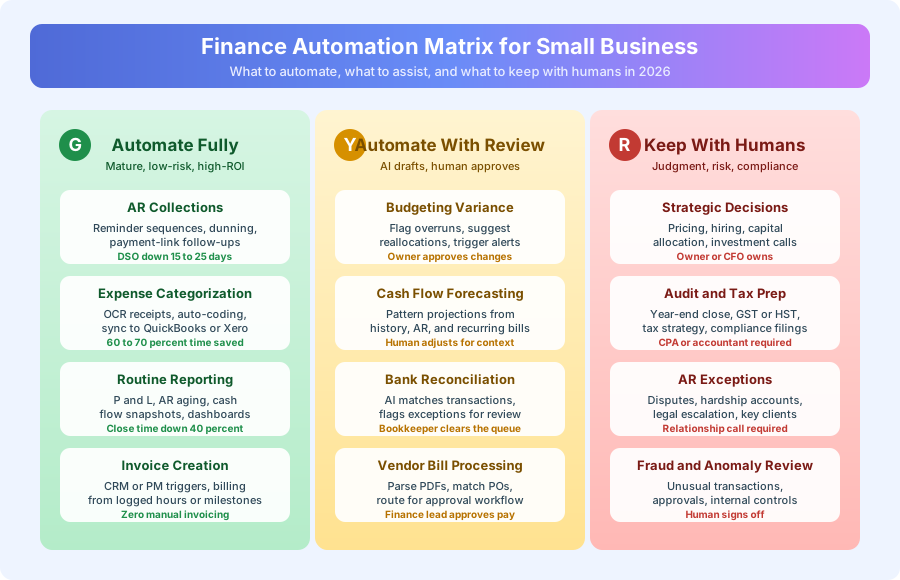
Four finance tasks are mature enough for hands-off automation in 2026: accounts receivable follow-up, expense receipt processing, invoice creation from project or CRM data, and standard financial report generation. Together, these cover roughly 60 to 70 percent of routine finance admin for a typical small business.
Why accounts receivable is the highest-ROI automation
AR automation beats every other finance automation on ROI because it both saves time and accelerates cash flow. A typical sequence sends a friendly reminder on day 1 past due, a firmer message on day 7, an escalation on day 14, and a human-handoff flag on day 21. Each message pulls the client name, invoice number, amount, and payment link automatically.
Per Deloitte’s 2025 Finance Automation Report, businesses running automated AR sequences drop average days sales outstanding by 22 days and recover 35 percent of previously late invoices before any human follow-up is needed. The same report found that 68 percent of late payments are the result of forgetting rather than client cash flow issues — which is exactly the problem automation solves.
For a business billing 100,000 dollars per month, cutting average payment time from 32 days to 14 days frees up more than 60,000 dollars in working capital. That’s not a productivity improvement — it’s cash that was previously locked up in receivables.
What a day-by-day AR sequence actually looks like
The sequence structure matters. Too aggressive and clients churn; too passive and nothing changes. Most working sequences follow a 4-touch pattern: a same-day delivery confirmation, a friendly day-1 nudge, a firmer day-7 reminder, and a direct day-14 escalation with a human-call handoff on day 21. Each message references the specific invoice number and total so the client can act in under 30 seconds.
Per Xero’s 2025 small business data, the response rate on day-1 reminders is 42 percent — meaning nearly half of clients pay within 24 hours of a friendly nudge. Day-7 reminders bring another 28 percent. Day-14 escalations catch another 15 percent. The remaining 15 percent need a human call, which is exactly where the automation hands off.
Receipt capture that stops eating your bookkeeper’s hours
Manual receipt entry is the single most time-consuming line item in small business bookkeeping. AI tools like Dext and Hubdoc read phone-camera receipts, extract vendor, date, amount, and tax, suggest the right category based on vendor history, and push the coded transaction into QuickBooks or Xero.
A human still reviews the categorization — but it’s a 5-second glance for 95 percent of transactions. Per McKinsey’s 2025 AI in Finance report, AI receipt coding hits 95 percent plus accuracy on common vendors after the first month of learning. The accuracy jumps to 98 percent by month three as the system learns your specific vendor patterns, tax treatments, and chart-of-accounts quirks.
The rollout pattern matters. Most teams that fail with AI receipt capture do so because they skip the first-month review step — they assume the AI is right and stop checking. By month three, errors compound and reconciling becomes worse than the original manual process. The working pattern is: weeks 1 to 4 tight review (every transaction), weeks 5 to 12 spot-check review (every fifth transaction), and month 4 forward exception-only review.
| Metric | Manual Entry | AI-Assisted |
|---|---|---|
| Time per receipt | 45 to 90 sec | 5 to 10 sec |
| Monthly time (100 receipts) | 90 to 150 min | 10 to 15 min |
| Error rate | 3 to 6 percent | under 1 percent |
| Categorization consistency | Variable | High |
Source: Dext 2025 customer benchmarks and McKinsey 2025 AI in Finance report.
Standard reports that generate themselves
P&L summaries, AR aging reports, cash flow snapshots — these are pure data-pull-and-format work. QuickBooks and Xero have this built in. For custom report formats, Make or Zapier can pull accounting data via API and populate templates automatically on a monthly or weekly schedule.
Per McKinsey 2025, finance teams that automate standard report generation cut month-end close time by 40 percent and virtually eliminate the data-gathering phase of financial review. The judgment work — interpreting the numbers, spotting trends, flagging issues — still lives with a human. The mechanical work doesn’t.
The best reports to automate first are the ones you generate every month anyway: P&L versus budget, AR aging by client, cash position rolling 30 and 60 days out, and category-level expense breakdown. For most small businesses, that’s 4 to 6 reports totaling 4 to 8 hours of monthly work. Automating them recovers the full 8 hours and eliminates the copy-paste errors that creep into manually built spreadsheets.
How automated invoice creation works
For service businesses billing on milestones, hours, or closed deals, Make or Zapier can watch a project management tool or CRM for a trigger event, pull billing data, create the invoice in QuickBooks or FreshBooks, send it with a payment link, and then hand off to the AR sequence above. The entire chain — from milestone complete to invoice delivered — runs in under 90 seconds with zero manual input.
For recurring retainers, the same system fires on the same day every month without any human involvement. Per Xero’s 2025 small business report, businesses with automated invoice creation collect 18 percent faster than those with manual invoicing because invoices go out on day one of the billing cycle instead of day five or seven. Compounding that 18 percent improvement with a 22-day AR acceleration moves the average collection cycle from 34 days to under 14 days for most service businesses.
The cash flow math is straightforward: every day earlier you collect is a day sooner you can reinvest, pay staff, or cover operating costs without pulling on a line of credit. For businesses operating on thin margins, that compounding effect is often larger than the time savings.
What should you automate with human review?
Some finance tasks benefit from AI drafting or flagging, but need a human to approve or interpret before anything ships. These are the yellow-light tasks: budgeting variance analysis, cash flow forecasting, bank reconciliation, and vendor bill processing. AI does the grunt work. A human owns the call.
Budgeting variance and cash flow forecasting
AI can pull actuals versus budget, highlight overruns, and suggest reallocations. It can project cash position three or six months out based on historical patterns, confirmed AR, and recurring bills. What it can’t do: factor in a key client’s financial health, an upcoming market shift, or a strategic pivot you haven’t entered into the system.
Per Deloitte 2025, AI-generated forecasts hit within 8 percent of actuals for businesses with stable revenue patterns, but error rates climb to 15 to 25 percent during market transitions or for businesses with lumpy revenue. That’s the human-review margin.
The working pattern for AI forecasting is: let the system generate the baseline projection, then have the owner or finance lead adjust it weekly with the context AI can’t see. Most small business owners find the exercise takes 15 minutes a week instead of the 2 to 3 hours it used to take to build a forecast from scratch. The time savings compound across the year.
Bank reconciliation and vendor bill processing
AI matches the obvious transactions and flags exceptions. A bookkeeper clears the queue in 15 to 30 minutes instead of 3 to 4 hours. For vendor bills, AI parses PDFs, matches them to purchase orders, and routes them through an approval workflow — but the finance lead still approves payment.
| Task | AI Does | Human Does |
|---|---|---|
| Bank reconciliation | Matches 85 to 95 percent of transactions | Clears exceptions |
| Vendor bills | Parses, codes, routes | Approves payment |
| Variance analysis | Flags overruns, drafts explanations | Validates, acts |
| Cash flow forecast | Projects baseline scenarios | Adjusts for context |
Source: Deloitte 2025 Finance Automation Report and Xero 2025 small business data.
What should stay entirely with humans?
Four finance categories still belong with a human in 2026: strategic decisions, tax and audit prep, AR exceptions, and fraud or anomaly review. These are the red-light tasks. AI can assist, summarize, or flag. It should never own the final decision.
Strategic decisions and tax or audit prep
Pricing changes, hiring decisions, capital allocation, and investment timing need context AI doesn’t have: competitive positioning, team capacity, owner risk tolerance, market signals. Year-end tax prep, GST or HST strategy, and audit-ready bookkeeping need a CPA who can be legally accountable for the work.
Per the AICPA’s 2025 practice report, 89 percent of small business CPAs now use AI tools to accelerate their work — but final review and sign-off remains 100 percent human. The automation reduces the billable hours; it doesn’t replace the professional responsibility.
AR exceptions and anomaly review
Your AR sequence handles routine follow-up. When a long-standing client is having cash flow trouble, when there’s a dispute over an invoice, or when a key account needs a sensitive conversation — a human calls. Same for fraud signals: AI flags the anomaly, but a human reviews, investigates, and decides.
Per Deloitte’s 2025 Finance Automation Report, 12 percent of AR sequences will encounter an exception that needs human judgment in any given month. That’s the number to watch: if your system is escalating more than 15 percent of invoices, the sequence is mistuned. If it’s escalating less than 8 percent, you’re probably being too lenient and letting collectible invoices slip.
Why a human still owns fraud and anomaly review
AI is excellent at flagging unusual transactions — a vendor you’ve never used, a duplicate payment, an amount that breaks a pattern. It’s not good at deciding whether the anomaly is fraud, a legitimate one-off, or a data entry error. That judgment call belongs to a human because the cost of a false positive (blocking a legitimate vendor payment) and a false negative (approving fraud) are both high.
Per the ACFE’s 2024 Report to the Nations, small businesses lose a median of 150,000 dollars per fraud incident, and 42 percent of frauds are caught by a tip or internal control — not by an automated system. That number is a reminder: automate the detection, but keep a human in the approval loop.
Bank reconciliation without the 3-hour Sunday
Bank reconciliation used to be the Sunday-afternoon task every bookkeeper dreaded. AI-assisted reconciliation in QuickBooks and Xero now matches 85 to 95 percent of transactions automatically by comparing amount, date, vendor, and historical patterns. The bookkeeper’s role shifts from matching every transaction to clearing the 5 to 15 percent of exceptions.
Per Xero’s 2025 data, businesses using AI-assisted reconciliation cut the task from 3 to 4 hours per month down to 20 to 45 minutes. That’s a 75 to 85 percent time reduction on one of the most tedious finance tasks in the entire calendar. The accuracy also improves because the AI catches duplicate entries and coding errors that a tired human reviewing 300 transactions at 9 pm on a Sunday tends to miss.
What does a realistic finance automation stack cost in 2026?
For a small business of 5 to 25 people, a complete AI-powered finance stack runs 70 to 190 dollars per month and recovers 8 to 15 hours of monthly admin time. The AR acceleration alone — 15 to 25 days faster collection — pays for the stack inside the first invoice cycle for most businesses.
| Tool | Function | Monthly Cost |
|---|---|---|
| QuickBooks Online or Xero | Core accounting with AI categorization | 30 to 90 dollars |
| Dext or Hubdoc | AI receipt capture and coding | 25 to 50 dollars |
| Make or Zapier | AR automation and invoice workflow | 16 to 50 dollars |
| Existing CRM or PM tool | Source data for invoice triggers | Already paying |
Total additional cost: 70 to 190 dollars per month. Time recovered: 8 to 15 hours per month. Cash flow impact: 15 to 25 day improvement in average collection time. See our QuickBooks vs Xero vs FreshBooks comparison for picking the core accounting layer.
What’s the fastest path to ROI?
Start with AR automation. It has the highest cash flow impact, the shortest setup time (1 to 2 weeks for most businesses), and the clearest ROI model — you can measure days sales outstanding before and after. Add receipt capture next, then reporting, then invoice automation as your systems mature.
A realistic 90-day rollout looks like this: weeks 1 and 2 for AR sequence setup and testing, weeks 3 and 4 for receipt capture configuration and chart-of-accounts mapping, weeks 5 through 8 for report template creation and API connections, and weeks 9 through 12 for invoice automation across your project management or CRM stack. By day 90 most small businesses see a measurable drop in AR aging and a 6 to 10 hour monthly time recovery.
What to measure in the first 90 days
Track four numbers before and after automation: average days sales outstanding, hours spent on finance admin per week, month-end close time, and the error rate on expense categorization. These four metrics cover 80 percent of the ROI story. If three of the four improve in the first 90 days, the automation is working. If fewer than three improve, the setup needs adjustment — usually in the AR sequence timing or the chart of accounts mapping.
Per Deloitte 2025, the median small business hits full payback on a finance automation stack in 4 to 8 weeks, with the AR component alone usually covering the entire monthly stack cost inside the first invoice cycle. The biggest predictor of success isn’t tool choice — it’s setting up the sequences with client-appropriate tone and realistic escalation timing from day one.
For context on typical outcomes, see our case study How a Consulting Firm Cut AR Aging From 34 to 14 Days and our broader piece on The Real ROI of AI Automation: Numbers From 50+ Small Business Implementations.
Book a free automation audit and we’ll map your current finance workflow, identify where the biggest time losses and cash flow delays are, and design an AR and finance automation system with a specific ROI model built for your revenue and invoice volume.