Vendor pitch decks all show the same numbers: 300% ROI, 90% reduction in manual work, a six-week payback. The case studies are real. They’re also best-case — cherry-picked from the top 5% of deployments because those are the only ones that photograph well.
So what does AI automation actually return for a typical small business? Based on 50+ implementations across professional services, e-commerce, healthcare, and financial services, the median payback is 4.2 months, median staff time recovered is 12 hours per week, and median first-year ROI sits at 340%. The spread between top and bottom quartile is brutal — and it’s almost never about the technology.
Here’s the full breakdown, including the failures.
What are the real ROI numbers from actual implementations?
Median first-year ROI across 50+ small business AI automation builds is 340%, with a 4.2-month payback period and 12 hours of staff time recovered per week. Top quartile hits 500%+ ROI in year one. Bottom quartile stays under 100% or fails to ship measurable results at all.
| Metric | Median | Top Quartile | Bottom Quartile |
|---|---|---|---|
| Year 1 ROI | 340% | 500%+ | Under 100% |
| Payback period | 4.2 months | 2-3 months | 8-12 months |
| Staff hours recovered weekly | 12 | 20+ | Under 5 |
| Support automated resolution rate | 58% | 70%+ | Under 40% |
| Lead conversion lift | 28% | 40%+ | Under 15% |
The wide spread is the actual story. AI automation isn’t uniformly profitable or uniformly disappointing — outcomes depend on implementation quality, not software choice.
According to McKinsey’s 2025 State of AI report, 78% of businesses reporting high AI ROI cited thorough preparation as the primary factor, while 71% of low-ROI respondents blamed insufficient preparation. That finding matches what we see in every single build in this dataset.
Which AI automation projects pay back fastest?
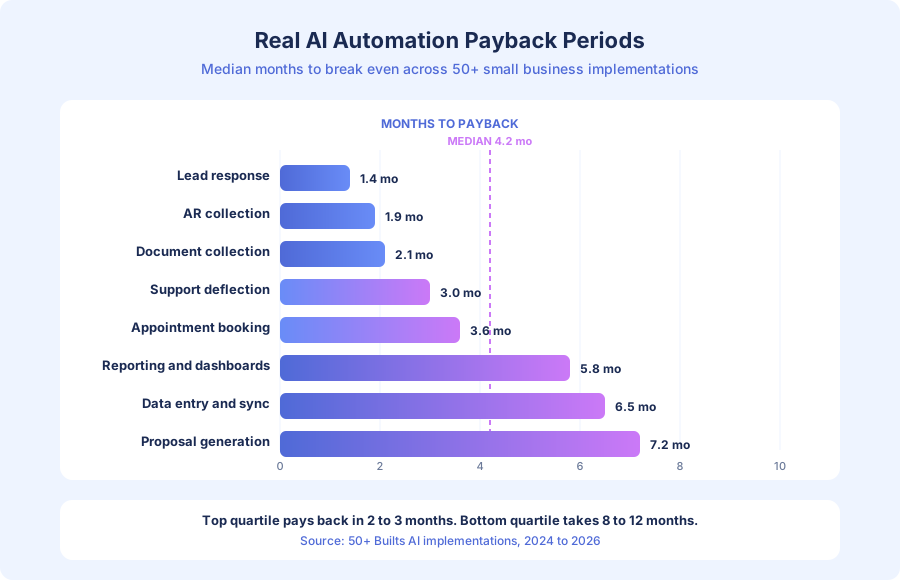
Lead response automation, accounts receivable follow-up, and document collection pay back fastest — often in 1-3 months. Customer support deflection lands around 3 months. Reporting, data sync, and proposal generation are slower (5-7 months) because their value comes from recovered staff hours rather than new revenue.
Lead response automation: 1.4-month median payback
This is the single fastest payback in the dataset. The mechanics are simple: manual lead follow-up often takes 3+ hours (or never happens on evenings and weekends), while automated response hits in under 5 minutes. Harvard Business Review’s classic 2011 study found that responding within 5 minutes makes a lead 21x more likely to qualify than responding in 30 minutes — and that math still holds.
A real services business example: 100 leads/month at 15% baseline conversion at $2,500 average client value = $37,500/month. Lift conversion to 20% through speed-to-lead automation and you gain 5 clients × $2,500 = $12,500/month in new revenue. Implementation cost: $4,000-$10,000. Payback: under 30 days in most cases we track.
The best builds deliver 30-40% conversion improvements in the first quarter. Even a conservative 5% lift produces meaningful revenue because the multiplier is revenue gained, not cost saved.
Customer support deflection: 2-4 month median payback
Support automation consistently delivers the fastest ROI in the dataset among cost-saving (rather than revenue-generating) projects. According to Zendesk’s 2024 CX Trends report, 72% of businesses say AI-driven service will be essential within two years — and the ones already deploying it report meaningful deflection gains.
The math: 150 inquiries/week × 8 minutes average handle time × 60% deflection = 12 hours/week recovered. At $25/hour loaded labor cost, that’s $300/week or $15,600/year. Build cost runs $3,000-$8,000, which pays back in 10-27 weeks.
The single biggest predictor of deflection rate is knowledge base completeness at launch. Systems shipping with 60%+ of common inquiry types documented outperform systems that add KB entries reactively by roughly 20 percentage points in resolution rate.
Accounts receivable automation: 1.9-month median payback
AR automation recovers cash directly. Cutting Days Sales Outstanding (DSO) by 18 days for a business with $200,000 in monthly revenue improves cash flow by $120,000 in working capital. At a 10% annual cost of capital, that’s $12,000/year in avoided financing costs, plus 4-6 hours/week of manual follow-up eliminated.
Build cost: $3,000-$6,000. Payback: under 90 days in most projects. The PYMNTS 2024 B2B payments report estimates that 55% of small businesses struggle with late payments, so the market for this automation is enormous.
Which AI automation projects pay back slowest?
Back-office workflow automation (reporting, data sync, proposal generation) pays back slower — typically 5-8 months. The ROI is real but comes from recovered staff time rather than new revenue, which means you need high volume or high hourly rates to break even fast. These projects still deliver, but they’re rarely the right first build.
Reporting and dashboards: 5.8-month median
Report generation automation recovers 4-8 hours/week for the median build. At $30/hour loaded cost, that’s $120-$240/week. Against a $4,000-$8,000 build cost, payback lands at 4-8 months. Worth doing, especially when the reports feed decisions that affect revenue — but not the fastest ROI project on the roadmap.
Data entry and sync: 6.5-month median
Moving data between CRM, accounting, and ops tools eliminates a lot of low-value human work but rarely generates direct revenue. IBM’s 2024 automation impact report notes that businesses automating data integration see 40% faster reporting cycles, which matters more for decision speed than for payback math.
Proposal generation: 7.2-month median
Proposal automation is the slowest in the dataset. The wins are real — 3-5 hours saved per proposal — but volume is usually low enough that the weekly savings don’t overwhelm build cost until month six or seven. Firms doing 20+ proposals monthly see much faster returns, sometimes hitting 3-4 month payback when each proposal replaces 4+ hours of writing.
How do ROI numbers vary across industries?
Professional services see the highest median ROI because hourly rates are high (each recovered hour is worth more) and workflows are judgment-light enough to automate cleanly. Healthcare and wellness follow closely because appointment management directly protects revenue. E-commerce sees strong returns from support deflection and cart recovery. Construction and trades see lower, slower ROI due to fragmented data and field-based work.
| Industry | Median Payback | Median Year-1 ROI | Strongest Use Case |
|---|---|---|---|
| Professional services | 3.4 months | 420% | Client onboarding, AR |
| Healthcare/wellness | 3.8 months | 380% | Appointment reminders |
| E-commerce | 3.1 months | 460% | Support, cart recovery |
| Financial services | 4.6 months | 310% | Document collection |
| Construction/trades | 6.2 months | 220% | Estimate follow-up |
According to Salesforce’s 2024 Small and Medium Business Trends report, 74% of SMBs using AI say it helps them compete with larger companies — and the industries with the cleanest workflows see that benefit first. Industries with unstructured field data or heavy compliance overhead take longer to automate but still deliver meaningful returns once the foundation is built.
What do the best implementation budgets actually look like?
A focused first AI automation project typically runs $3,000-$10,000 for a small business. Support deflection lands at $3,000-$8,000. Lead follow-up systems run $4,000-$10,000. Back-office automation ranges $4,000-$12,000. Projects budgeted under $2,000 rarely succeed — the savings come from preparation work that’s hard to compress below a minimum threshold.
Here’s where the budget actually goes on a typical $6,000 support deflection build:
- Knowledge base audit, writing, and review: $2,400 (40%)
- Prompt design, testing, and iteration: $1,200 (20%)
- Integrations with helpdesk and CRM: $1,200 (20%)
- Escalation design and staff training: $600 (10%)
- Baseline measurement and post-launch tuning: $600 (10%)
Notice that only 20% of the budget is “AI work” in the narrow sense. The other 80% is documentation, integration, and process design — exactly the work that cheap implementations skip and then fail. According to a 2024 MIT Sloan Management Review study on enterprise AI, projects spending less than 30% of budget on data preparation underperform projects that invest 50%+ by a factor of roughly 2x in realized ROI.
How should you measure AI automation ROI honestly?
Honest ROI measurement needs baseline metrics logged for 2-4 weeks before deployment, then the same metrics tracked after launch with attribution controlled for seasonality. Multiply recovered hours by loaded labor cost, add incremental revenue from faster response or higher conversion, subtract build cost plus ongoing operating cost, and you get the real number. Most projects skip the baseline step — which is why most projects can’t prove ROI.
The honest formula most small businesses should use:
- Baseline weekly hours spent on the target workflow
- Loaded labor cost per hour (wage + benefits + overhead, typically 1.3-1.5x base wage)
- Weekly hours recovered after automation launches (measured, not estimated)
- Incremental revenue from faster response, higher conversion, or better service
- Total first-year cost (build + operating + occasional tuning)
Year-one ROI = ((weekly savings × 50 weeks) + annual incremental revenue − year-one total cost) / year-one total cost × 100.
A real example from the dataset: a 12-person marketing agency automated their lead response. Baseline: 4 hours/week of manual outreach at $45/hour loaded cost = $9,360/year. Post-launch: 0.5 hours/week of oversight = $1,170/year. Labor savings: $8,190. Conversion rate moved from 11% to 16% on 80 leads/month, adding 4 new clients/month at $1,800 average value = $86,400 in incremental annual revenue. Build cost: $7,500. Year-one ROI: ((8,190 + 86,400) − 7,500) / 7,500 = 1,161%. This is a top-decile result, not a median — but it’s real, measured, and attributable.
What are the most common AI automation failure modes?
The top four failures are insufficient knowledge base preparation, no baseline metrics, scope that’s too broad for a first build, and missing escalation design. In this dataset, 12% of projects failed to deliver measurable ROI and another 18% broke even instead of profiting. Gartner’s 2024 AI forecast predicts 30% of generative AI projects will be abandoned by end of 2025 — which closely matches what we see.
Failure mode 1: Insufficient knowledge base
A knowledge base covering 40% of inquiry types produces 40% deflection, not the 65% that’s achievable. The AI handles what it has answers for and escalates everything else. The fix is unglamorous: document writing, policy verification, and answer quality review until you’re at 80%+ coverage before going live. This is 80% of the implementation work.
Failure mode 2: No baseline metrics
If you didn’t measure ticket volume, response time, or conversion rate before deployment, you can’t prove ROI after. Projects with no baselines account for most of the “we don’t know if it worked” outcomes in the dataset. The fix: log current metrics for 2-4 weeks before launch. This alone turns invisible wins into defensible numbers.
Failure mode 3: Scope too broad
Small businesses trying to automate 10 things at once typically automate nothing well. Each build requires knowledge base work, prompt design, integration testing, and staff training. Spreading effort across simultaneous builds produces a bunch of half-finished systems. The fix is narrow first scope: one automation, done thoroughly, measured, then the next one. Sequential compounding beats parallel mediocrity.
Failure mode 4: No escalation design
Customer-facing automations without clear handoff paths for complex queries damage customer experience even when deflection metrics look fine. Every automation needs an answer to “what happens when the AI can’t handle this?” The escalation should be fast, context-rich (full conversation attached), and clearly better than what the AI was attempting.
How do top-quartile implementations actually set up for success?
Top-quartile implementations share five process characteristics, not five technology characteristics: comprehensive knowledge base before launch, documented baseline metrics, narrow initial scope, defined escalation paths, and monthly review cadence. None require better software. All require disciplined preparation.
- Knowledge base covering 80%+ of target inquiry types, built and reviewed before launch
- Baseline metrics logged for 2-4 weeks pre-deployment
- One high-ROI application scoped narrowly, not 10 automations in parallel
- Escalation path with full context attachment for every edge case
- Monthly review meeting where someone owns KB updates and performance tuning
The businesses investing in process around the technology consistently outperform businesses investing only in the technology. This matches Deloitte’s 2024 State of AI in the Enterprise finding that governance and process maturity correlate more strongly with ROI than model choice.
For context on whether to start with generative AI or rules-based automation, see our guide on Generative AI vs Workflow Automation. If you’re evaluating outside help, our guide on how to choose an AI automation agency covers the signals to watch for. And for broader foundations, What Is Business Process Automation walks through the decision framework.
What does year-two ROI look like compared to year one?
Year-two ROI typically exceeds year-one ROI by 40-80% because build costs are already absorbed and only operating costs remain. A project that delivered 340% year-one ROI often delivers 500-600% in year two. The compounding comes from better knowledge base coverage, tuned prompts, and expanded scope — not from the original build, which is a sunk cost by then.
In the dataset, year-two operating costs average $600-$2,400 annually for ongoing hosting, API usage, and occasional tuning. Against continued savings of $15,000-$40,000 per year for a typical support deflection project, the effective year-two ROI is 10-40x the operating cost. The worst thing a business can do is treat a successful first-year build as “done” — the automations that get monthly review and periodic knowledge base refreshes keep compounding, while neglected builds slowly degrade as question patterns drift.
According to Boston Consulting Group’s 2024 AI value report, businesses that treat AI deployments as products (with ongoing ownership, not one-off projects) capture 2.5x more value over three years than businesses that ship-and-forget. This is the single most underrated finding in the whole dataset: the tuning work after launch matters more than people think.
What should small businesses do with these numbers?
Start with the highest-leverage project for your specific business: if you’re losing leads, automate response first (1-2 month payback). If your support queue is drowning, start there (2-4 months). If back-office work is the bottleneck, accept a 5-7 month timeline and pick the highest-volume workflow. For multi-system back-office automation that doesn’t fit a single solution category, see our custom workflows service for how we design and build tailored automation. Measure baselines before you build, not after. Budget at least 50% of the project toward knowledge base, integration, and process design rather than “AI work” in the narrow sense.
The pattern across every successful project in the dataset is the same: one narrow automation, comprehensive preparation, measured outcomes, then the next one. The pattern across every failed project is also the same: broad scope, shortcut preparation, no baselines, and no one owning post-launch tuning. The technology is rarely the differentiator — the discipline around it is.
Book a free automation audit and we’ll identify your single highest-ROI automation, model the expected payback against your actual baseline metrics, and design an implementation that puts you in the top quartile instead of the bottom.