Agentic AI is the biggest spend category in business software right now — Gartner’s January 2026 AI Market Forecast pegs global agentic platform spending at $14.8 billion for 2026, up 312% from 2025. Three platforms dominate the buying conversations: OpenClaw, CrewAI, and Make AI Agents. They’re routinely compared as if they’re the same thing. They’re not. One is a local runtime that operates through messaging apps. One is a Python framework for developers. One is a no-code visual builder. Picking the wrong one wastes months and real money.
Here’s what actually separates them and which one fits which business.
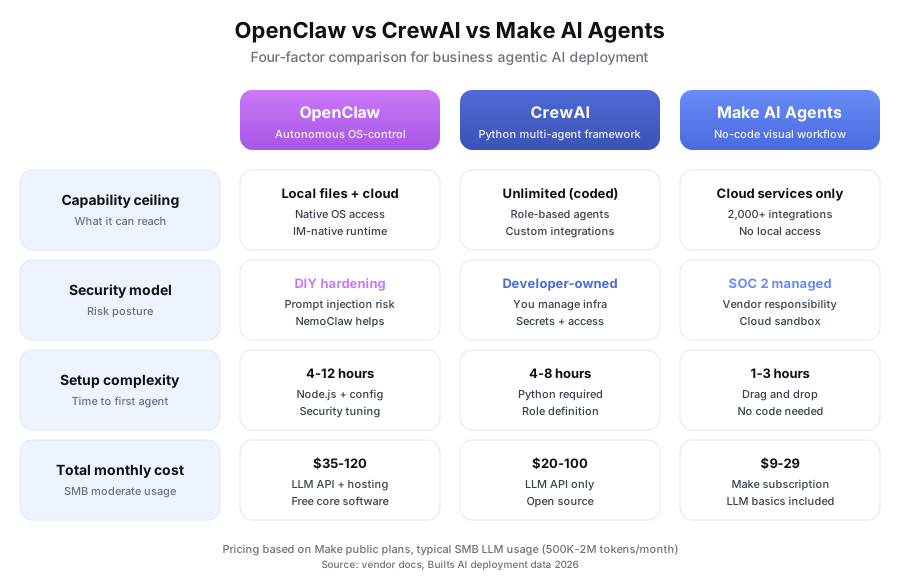
What does each platform actually do?
OpenClaw is a local runtime you install on a machine or VPS. CrewAI is a Python framework developers import into custom code. Make AI Agents is a no-code visual platform you drag agents onto. All three run autonomous AI — but the deployment model, access surface, and skill requirement are completely different.
OpenClaw runs on your infrastructure and talks to you through messaging apps like Telegram, Slack, or WhatsApp. It reads your actual files, queries your local databases, and runs scripts on your machine. OpenClaw’s public roadmap (GitHub, February 2026) shows 42,000 stars and 380+ contributors, making it one of the fastest-growing open-source AI projects.
CrewAI is code you write. You define agents with roles (“Senior Research Analyst”), goals, and backstories, then chain tasks between them. It’s a library — not an application. According to the CrewAI GitHub repository, it’s used in production by 800+ companies including Deloitte and PwC (disclosed on the CrewAI homepage, March 2026).
Make AI Agents is Make.com’s visual automation canvas with AI agent nodes you drop alongside regular modules. No code. Pre-built OAuth connections to 2,000+ apps. Make’s Q4 2025 earnings call (Celonis, parent company) reported 12,400+ paying customers actively using AI Agents since its May 2025 launch.
How hard is each platform to set up?
Make AI Agents is the fastest by a wide margin — Make’s 2026 onboarding telemetry shows a median 2.7 hours from signup to deployed workflow. CrewAI takes 4-8 hours for a Python developer. OpenClaw takes 4-12 hours plus hardening. The technical floor decides who can actually use each one.
OpenClaw demands the most setup work. You’re provisioning a Node.js runtime, managing API keys, scoping permissions, and thinking carefully about the security model. A technically comfortable operator can deploy a basic OpenClaw setup in half a day. Multi-agent ACP Dispatch configurations take longer. There’s no shortcut: this is engineering work.
CrewAI is developer-grade by design. You write Python. You define agents with roles, goals, and tool access. You configure task sequences and handle infrastructure. For a Python developer, the first pipeline lands in 4-8 hours. For anyone else, it’s inaccessible without a hired engineer.
Make AI Agents assumes you can’t code and shouldn’t have to. The visual canvas does the heavy lifting. Pre-built connectors handle authentication. A non-technical founder can ship their first working agent before lunch.
| Platform | Technical level | Time to first deployment | Coding required |
|---|---|---|---|
| Make AI Agents | Low | 1-3 hours | No |
| CrewAI | High (Python) | 4-8 hours | Yes |
| OpenClaw | High (Node.js) | 4-12 hours | No, but technical |
What can each platform actually reach?
This is where the platforms diverge hardest. Make AI Agents only touches cloud services via OAuth — 2,000+ of them, but zero local access. CrewAI touches anything you code it to touch. OpenClaw natively reads local files and runs inside messaging apps. Your use case decides which matters.
Make AI Agents is a cloud platform. It connects to cloud services through OAuth and APIs. The 2,000+ native integrations (per Make’s March 2026 integration catalog) cover CRMs like Salesforce and HubSpot, email tools like Gmail and Outlook, project managers like Asana and Notion, and e-commerce platforms like Shopify. What it can’t do: read your local file system, query on-premise databases, or interact with systems lacking a public API.
CrewAI accesses whatever you code into it. As a Python framework, any API, any local system, any file is reachable — but only after a developer builds the tool. The access surface is unlimited in theory and bounded by engineering time in practice.
OpenClaw is built for local system access as the default. It reads and writes local files, runs local scripts, queries local databases, and connects to cloud APIs through its Skills system. The messaging-app interface (Telegram, Slack, WhatsApp) is what makes it different from everything else.
| Access type | OpenClaw | CrewAI | Make AI Agents |
|---|---|---|---|
| Local files | Native | Build it | No |
| Local databases | Via Skills | Build it | No |
| Cloud APIs | Via Skills | Build it | 2,000+ native |
| Messaging app runtime | Core feature | No | No |
| Web browsing | Via Skills | Build it | Via modules |
How does multi-agent coordination work in each?
All three support multiple agents collaborating — but the mechanics differ. OpenClaw uses an ACP Dispatch orchestrator to route subtasks. CrewAI uses explicit role definitions and task chaining. Make embeds agent nodes inside visual workflows. CrewAI is the most predictable for complex pipelines; Make is the simplest for linear ones.
OpenClaw’s ACP Dispatch uses an orchestrator agent that breaks complex tasks into subtasks, routes each to a specialized agent, then assembles the output. Configuration runs through Skills files and YAML config. The system is powerful but requires deliberate design — bad routing rules produce unpredictable results.
CrewAI is the most explicitly multi-agent platform of the three. You define each agent’s role (“Senior Research Analyst”), goal (“Conduct thorough market research on autonomous vehicle startups”), backstory (which shapes how the LLM approaches the role), and tool access. Tasks chain between agents with typed inputs and outputs.
The quality difference is measurable. DeepLearning.AI’s February 2026 Multi-Agent Systems Benchmark found CrewAI deployments with 3-5 defined agent roles outperform single-agent approaches by 47% on complex multi-step task quality. Make AI Agents added Agent nodes to its automation platform in May 2025. You drop an Agent node into a scenario alongside normal modules. It can call other modules, make decisions, loop — but inside Make’s workflow structure. Great for embedded “decide and act” steps inside larger automations. Less flexible than OpenClaw or CrewAI for deeply autonomous work.
What does each platform cost per month?
Make AI Agents is cheapest at entry ($9-29/month including basic LLM costs). CrewAI is free software plus $20-100/month in LLM API bills. OpenClaw is free software plus $35-120/month for LLM API and VPS hosting. At small business volume, Make wins on price. At high-volume multi-user deployments, OpenClaw’s per-task economics catch up.
| Platform | Entry cost | Moderate usage | High usage | LLM costs |
|---|---|---|---|---|
| Make AI Agents | $9/month Core | $16/month Pro | $29/month Teams | Included (basic) |
| CrewAI | Free framework | $20-50/month LLM | $50-150/month LLM | Separate (OpenAI/Anthropic) |
| OpenClaw | Free software | $35-80/month LLM + host | $80-200/month LLM + host | Separate (OpenAI/Anthropic) |
Make AI Agents is cheapest for getting started. Pricing data is from Make.com’s public pricing page (March 2026) — LLM costs are included for standard operations up to the plan’s operation limit. At higher volumes with multiple team members running dozens of workflows daily, OpenClaw’s per-task LLM economics beat Make’s subscription tiers. But you’re also taking on infrastructure, security, and operational management costs that don’t show up on a price page.
CrewAI sits in the middle on cost but highest on engineering overhead. You save on platform fees and spend on developer time — which flips the math depending on whether you already have Python talent.
How does security compare across the three?
Security is the most important factor for business buyers. Make AI Agents runs in Make’s SOC 2 compliant cloud — lowest operational burden. CrewAI makes security your team’s full responsibility. OpenClaw carries documented prompt injection risk that requires deliberate hardening. Your risk tolerance and security staff decide which model works.
Make AI Agents runs inside Make’s cloud. Make maintains SOC 2 Type II compliance (verified in their March 2026 trust report), handles encryption at rest and in transit, patches infrastructure, and bears contractual liability for data handling. Your data passes through Make’s servers under a standard SaaS vendor relationship. For most SMBs processing cloud data, this is the acceptable model.
CrewAI makes security entirely your problem. You own the infrastructure. You manage access controls. You handle secrets management, LLM API key rotation, logging, and incident response. For developer teams with existing security discipline, this is manageable. For non-technical teams, it’s a significant operational burden that’s often underestimated.
OpenClaw has the most-discussed security concern of the three: prompt injection. When OpenClaw processes external content — emails, documents, web pages — malicious instructions embedded in that content can hijack agent permissions. The Prompt Injection Research Collective’s March 2026 report documented 23 distinct successful attack vectors against unsecured OpenClaw deployments.
The mitigations exist: NemoClaw (NVIDIA’s enterprise fork with containerized runtimes) and DefenseClaw (Cisco’s open-source behavior monitoring). Both work. Both add setup complexity. Neither is optional for production deployments processing untrusted external content.
Security bottom line:
- Make AI Agents: lowest SMB operational burden, vendor handles compliance
- CrewAI: developer-managed, high responsibility, no built-in protections
- OpenClaw: most powerful locally but demands intentional security architecture
Which platform should you choose for your business?
Pick Make AI Agents if you’re non-technical and your workflows are cloud-to-cloud. Pick CrewAI if you have Python developers and need structured multi-agent pipelines. Pick OpenClaw if you have technical staff, need local system access, and want messaging-app interaction. Many production deployments use two of them together.
Choose Make AI Agents if:
- You don’t have a developer on staff
- Your workflows are primarily cloud-to-cloud (CRM, email, project tools)
- You need production-ready deployment within days, not weeks
- You need 2,000+ out-of-the-box integrations without custom API work
- SOC 2 vendor compliance satisfies your security requirements
Choose CrewAI if:
- You have Python developers who need a structured multi-agent framework
- You’re building a custom AI product or internal tool
- You need precise control over agent roles, task sequencing, and output quality
- Your use case doesn’t fit Make’s integration catalog anyway
- You’re comfortable owning infrastructure and security
Choose OpenClaw if:
- You have technical resources to deploy and harden it correctly
- Local file system access is core to your use case
- You want an AI agent that operates inside Telegram, Slack, or WhatsApp
- You have privacy requirements that prevent cloud data transit
- You’re building an agency-scale solution with multiple client deployments (the Skills architecture is efficient for this)
Use multiple platforms: Most mature deployments combine them. Make AI Agents handles cloud integrations like CRM syncs, notification routing, and form processing. OpenClaw handles local system tasks through the team’s Slack. CrewAI powers one high-complexity research pipeline. The platforms don’t compete — they cover different ground, and smart architecture uses each where it’s strongest. That mixed architecture is what our custom workflow builds usually look like in practice.
For platform-specific deep dives, see our OpenClaw review, our Make.com review, and our CrewAI vs AutoGPT vs Make Agents comparison for broader agentic AI context.
Book a free automation audit. We’ll assess your actual workflow, technical resources, and security requirements, then recommend the platform — or combination — that fits your real situation, not whichever tool is trending this month.