An 8-person boutique recruitment agency placed 40% more candidates in 90 days without hiring a single new recruiter. According to LinkedIn’s 2024 Global Talent Trends report, recruiters who automate screening and scheduling spend 50% more time on relationship-building, which is exactly what drives placements. The agency managed 200+ active candidates across concurrent searches and was capacity-bound, not demand-bound. Three automations (candidate screening, interview scheduling, client updates) cut admin overhead by roughly half and unlocked capacity for more searches with the same headcount.
A placement is the revenue event in recruitment. Every hour a recruiter spends on anything other than sourcing, qualifying, and placing candidates is an hour that isn’t generating revenue. For most boutique agencies, a big chunk of every day goes to exactly those non-revenue activities: reviewing applications, chasing interview confirmations, assembling shortlist packages, and fielding status calls from clients.
This agency wasn’t limited by candidate supply or client relationships. They were limited by process bandwidth. Here’s what they changed and what the numbers looked like at day 90.
What was consuming the recruiters’ time before automation?
Three categories of work ate the agency’s day: manual candidate screening, reactive client status calls, and multi-party interview scheduling. Each one was mentally interruptive rather than difficult, which is the worst kind of overhead for senior recruiters. Together they consumed roughly 40% of every recruiter’s working hours, leaving too little room for sourcing and placement work.
Candidate screening happened largely manually. Applications came in through job boards, referrals, and the agency’s database. Each one required a recruiter to read the resume, make a qualification call, and decide whether to advance. With 200+ candidates in active pipelines, that review was consuming hours per day, most of it on candidates who were clearly not a fit.
Client communication was reactive. Hiring managers called or emailed asking where searches stood: how many candidates, who was advancing, when could they expect shortlists. These weren’t strategic conversations. They were status checks that consumed recruiter time without advancing any placement.
Interview scheduling was the most acute time sink per placement. Coordinating availability between a candidate who works business hours, a hiring manager with a packed calendar, and a recruiter who needed to be on the call required rounds of availability sharing, confirmation requests, and calendar management. A single interview round could take 3-5 email exchanges across 2-3 days.
Per LinkedIn’s 2024 Global Talent Trends report, recruiters who automate screening and scheduling spend 50% more time on relationship-building activities. The inverse was true here: the more time spent on process, the less time for activities that actually drove placements.
Why couldn’t they just hire another recruiter?
Hiring is the standard growth lever for boutique agencies, but it has real limits. A new recruiter adds salary cost immediately, with revenue contribution arriving months later after ramping. More importantly, adding a recruiter to a broken process scales the overhead: the screening, scheduling, and status-call work multiplies rather than disappears. Fixing the process first made the existing team more effective.
The math told the story. If each recruiter was spending roughly 40% of their time on administrative work, adding a recruiter added 40% of a new salary to administrative overhead before the actual recruitment work began. That’s a bad ratio for a boutique P&L.
According to Deloitte’s 2023 Global Intelligent Automation Survey, professional services firms that automate high-volume administrative tasks report 35-45% improvement in output per person within six months. For a recruitment agency where output means placements, that range maps directly to revenue.
The agency’s choice: spend six to nine months ramping a new hire who would inherit a broken process, or spend six weeks automating the process so the current team could run more searches. They picked the second option.
What three systems did the agency build?
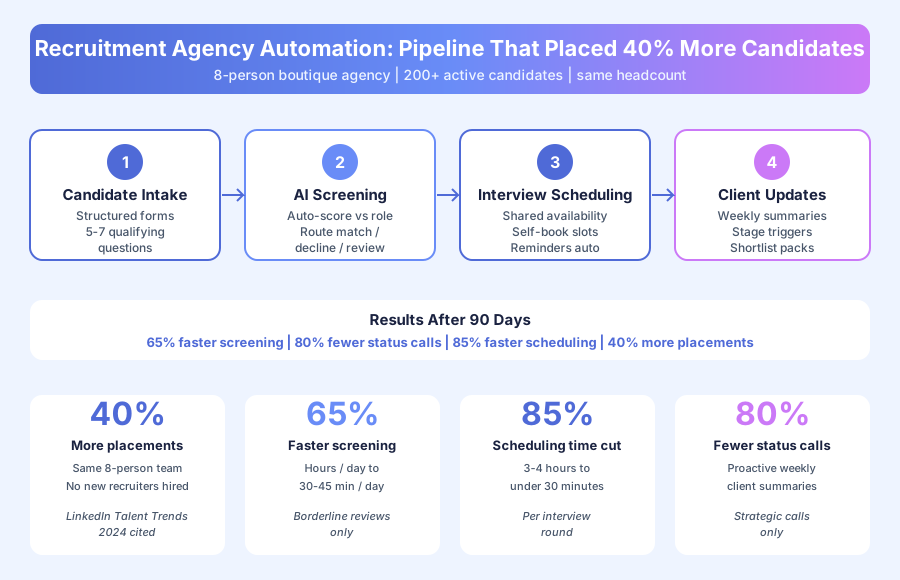
The agency built a screening system, a client update system, and an interview scheduling system. Together they cover the candidate lifecycle from first application to placed hire. Each system runs independently, so failures in one don’t cascade, and each targeted the single largest time sink in its category rather than trying to solve every edge case from day one.
System 1: How does automated candidate screening and routing work?
The screening system collects structured information from every candidate using a short, role-specific intake form. Responses are scored automatically against role requirements. Clear matches advance to phone screen with a confirmation email. Clear non-matches receive a polite decline. Borderline cases flag for recruiter review with full responses pre-loaded. Recruiters now only review roughly 25% of applications.
How it works:
- Candidate applies through a job board, referral, or database outreach
- System sends a 5-7 question intake form: years of experience, specific skills, compensation range, availability, location flexibility
- Responses are scored against role requirements automatically
- Clear matches (above threshold) advance to phone screen and get a confirmation email
- Clear non-matches (below threshold) receive a professional decline
- Borderline cases flag for recruiter review with responses pre-loaded
- Recruiter reviews only borderline cases, typically 20-30% of volume
According to Jobvite’s 2024 Recruiter Nation Report, 52% of recruiters say manual resume screening is their least-favorite task and the one they’d most like to offload to automation. The boutique agency’s recruiters agreed.
System 2: How do automated client update workflows work?
Each active search has a configured client update workflow. Hiring managers receive weekly pipeline summaries with candidate counts, shortlist status, interview schedules, and pending offers. When a candidate hits shortlist stage, the system assembles and sends a candidate package automatically: resume, intake summary, and recruiter notes. Status-check calls dropped by 80% because clients already had the information.
How it works:
- Every Monday (or on stage-change triggers), the system assembles a pipeline summary
- Summary includes new candidates screened, shortlist status, interview schedule, offers pending
- Report sends automatically to the hiring manager without recruiter involvement
- When a candidate moves to shortlist, system assembles and sends the candidate package
- Hiring managers can approve or flag candidates directly from the summary email
- Recruiter is notified of hiring manager responses for follow-up
According to HubSpot’s 2024 State of Service report, proactive status communication reduces inbound customer inquiries by 68% on average. Recruitment mirrors the pattern almost exactly.
System 3: How does interview scheduling automation work?
The scheduling system uses shared availability links instead of email chains. Once a candidate is ready for a client interview, the system sends them a link to the hiring manager’s available slots pulled from calendar integration. The candidate picks a time. The interview books automatically. Reminders send 24 hours before. Per-placement scheduling overhead dropped from 3-4 hours to under 30 minutes.
How it works:
- Recruiter confirms a candidate is ready for client interview
- System sends candidate a link to the hiring manager’s available slots via calendar integration
- Candidate selects their preferred time and the interview books automatically
- Both parties receive confirmation with meeting link, format, and prep materials
- Reminder sends to both parties 24 hours before the interview
- Post-interview, recruiter receives an automated prompt to collect feedback from both sides
G2’s 2024 Scheduling Software Report found that shared-availability scheduling tools cut multi-party booking time by an average of 84% versus email coordination. The agency’s 85% reduction is right in that range.
What were the measurable results at day 90?
Placements rose 40% above baseline with the same 8-person team. Screening time dropped 65%. Client status-check calls dropped 80%. Interview scheduling time fell by roughly 85% per round. Recruiters moved from spending 60% of their day on relationship work to 80%+. Both capacity and conversion improved, which is why the compound effect was so large.
| Metric | Before Automation | After Automation | Change |
|---|---|---|---|
| Initial candidate review time | Hours/day (all applications) | 30-45 min/day (borderline only) | 65% faster |
| Client status-check calls | Multiple per day per recruiter | Occasional strategic calls only | 80% reduction |
| Interview scheduling time per round | 3-5 hours per interview | Under 30 minutes | ~85% faster |
| Placements per month | Baseline | 40% above baseline | Same team, more capacity |
| Time on relationship work | ~60% of day | ~80%+ of day | More time on recruitment |
The 40% placement lift came from two compounding sources: recruiters processed more candidates in the same time, and time-to-placement got faster because scheduling delays disappeared. Both factors matter because they multiply rather than add.
What changed about the quality of the work?
Before automation, much of each day was reactive low-judgment work: skimming resumes that were clearly not a fit, answering client status questions they already knew, exchanging availability emails. After automation, recruiters concentrated on higher-judgment activities: evaluating borderline candidates, advising clients on offer strategy, and managing complex situations. The work felt more like the job they were hired to do.
According to McKinsey’s 2024 Global Survey on AI and Automation, knowledge workers who use automation to offload routine tasks report significantly higher job satisfaction and engagement scores. For a boutique recruitment agency competing for talent on culture and quality of work, that engagement improvement has its own retention value. Nobody quit in the first year after deployment.
The founder put it plainly in a follow-up conversation: recruiters joined to place people, not to copy-paste shortlist emails. Clearing out the administrative layer restored the kind of work that made the team senior in the first place.
What can other boutique recruitment agencies learn from this?
Three principles apply to any agency managing high-volume candidate pipelines with a lean team. First, automate the filter, not the judgment. Second, proactive client updates prevent reactive status calls. Third, interview scheduling is almost entirely automatable. None of these require a large IT budget or a full-time operations hire, which is why the pattern works for 5-10 person agencies.
1. Automate the filter, not the judgment. Roughly 60-70% of applications are clear matches or clear non-matches that don’t require professional judgment. Automating the clear cases in both directions concentrates recruiter time on the 30-40% where judgment actually changes the outcome. Recruiters keep the decisions that matter.
2. Proactive updates replace reactive calls. A hiring manager who receives a detailed pipeline update every Monday doesn’t call on Tuesday asking what’s happening. The automation doesn’t just save call time; it shifts the relationship from reactive to proactive.
3. Interview scheduling is nearly fully automatable. The only reason interview scheduling takes multiple email rounds is that parties don’t share availability through a common link. Once that infrastructure exists, the problem largely disappears. That’s exactly what interview scheduling automation for recruitment agencies is built to do, and it’s one of the highest-ROI single automations a recruitment agency can build.
Could this work for your agency?
The pipeline management pattern described here scales from 5-person boutiques to 30-person practices. The specific configuration (intake questions, screening thresholds, client update format) varies by practice area and client type, but the structure is consistent across recruitment. Agencies with stable role categories benefit fastest because the intake forms can be reused. Generalist agencies take slightly longer to tune.
For related reading, see our Professional Services Automation Playbook and our guide on How to Automate Client Intake Without Custom Development. For scheduling tool comparisons, see Calendly vs Acuity vs HubSpot Meetings.
Book a free automation audit and we’ll map your candidate pipeline, identify where process friction is costing you placements, and show you which automations will pay back fastest for your team size.