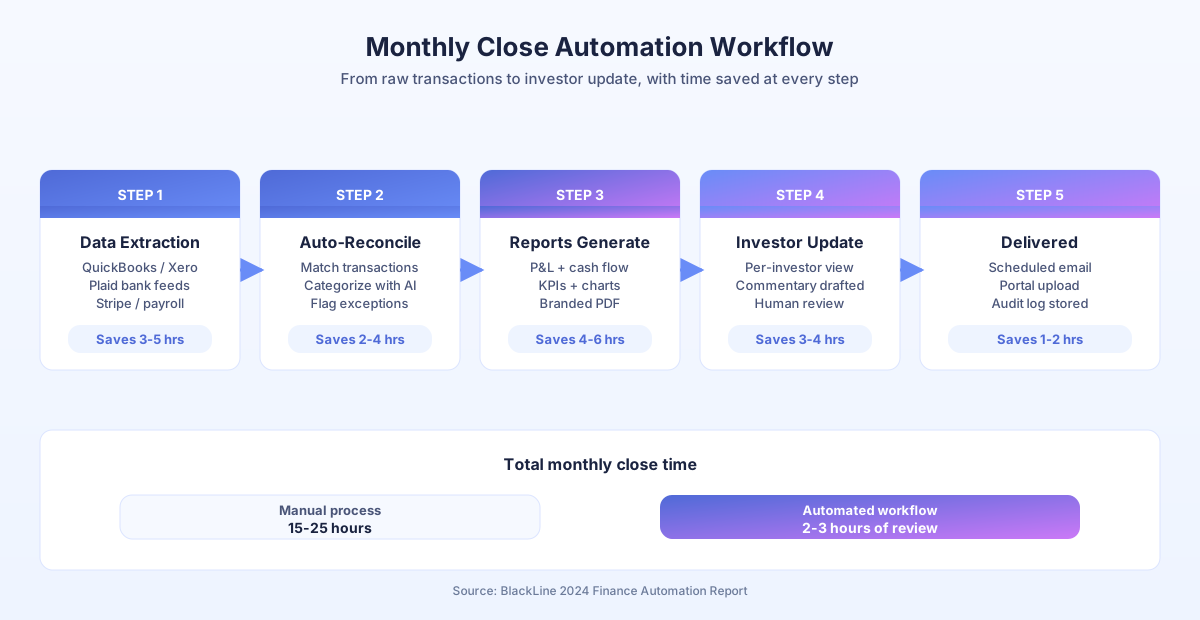
Month-end arrives. Someone opens QuickBooks, exports transactions, categorizes the stragglers, cross-references bank statements, builds a P&L, formats the deck, and emails it around. Two days later a miscategorized expense surfaces and the whole thing gets redone. Small teams burn 15-25 hours on this every single month, according to BlackLine’s 2024 Finance Automation Report, and most of those hours are data handling, not analysis.
Automation flips the ratio. The data pulls, matching, and formatting run on a schedule. You spend your time on commentary and decisions. This guide walks through the exact 4-week setup we use with small teams, with real numbers from AcquireX Properties Capital, a 3-person investment firm that now generates personalized investor reports from live data instead of spending a full week on spreadsheets every quarter.
What parts of financial reporting can you actually automate?
Data aggregation, categorization, reconciliation, and formatting automate cleanly. Analysis, commentary, and strategy stay human. IDC’s 2023 Future of Work study found employees spend 30% of their time on manual data tasks, and during month-end that jumps to 60-70% for finance roles. Automation targets that chunk first.
Here’s where the hours go and what each one looks like automated.
| Task | Manual time | Automated time | Method |
|---|---|---|---|
| Transaction categorization | 3-5 hrs/month | Near zero | QuickBooks/Xero rules plus AI |
| Bank reconciliation | 2-4 hrs/month | 15 min review | Plaid auto-match |
| P&L generation | 2-3 hrs/month | Automatic | Live template |
| Cash flow statement | 1-2 hrs/month | Automatic | Calculated from transactions |
| Report formatting | 2-3 hrs/month | Automatic | Branded template |
| Stakeholder delivery | 1 hr/month | Automatic | Scheduled email |
| Total | 11-18 hrs/month | 2-3 hrs (review) |
Gartner’s 2023 Data Quality Market Survey estimates poor data quality costs organizations $12.9 million per year on average. For small teams, that shows up as miscategorized transactions, missed reconciliations, and errors that surface weeks after the report went out. Automated pipelines catch them in real time.
How do you automate transaction categorization?
Automated categorization uses rules, patterns, and AI to classify transactions as they hit the ledger. QuickBooks and Xero both ship with rule engines that learn from corrections. After 2-3 months of training, they handle 85-95% of transactions without manual input, according to QuickBooks documentation. The remaining few flag for review.
McKinsey’s 2024 Global Survey on AI and Automation found 60% of occupations have at least 30% of tasks that could be automated. Transaction categorization is among the highest-accuracy use cases because the patterns repeat: the same vendors charge the same expense types month after month.
Setup in QuickBooks Online
- Go to Banking, then Bank Rules
- Create rules by payee name, amount range, and description keywords
- Assign category, class, and customer or project
- Enable auto-categorize for high-confidence matches
- Review the “For Review” queue weekly for new patterns
Handling edge cases with AI
For ambiguous transactions, connect QuickBooks or Xero to n8n via API. Route unclear items to Claude or GPT-4 with a classification prompt that includes description, amount, and historical patterns. The AI suggests a category, a human approves, and the model learns your preferences over time.
At Taxvisory, the founder manages bookkeeping for 300 clients. Automated categorization across every client account means she reviews exceptions instead of coding every transaction. CPA Practice Advisor’s 2025 report found firms using AI save 80% of time normally spent on data entry. Taxvisory’s numbers match that benchmark.
How do you automate bank reconciliation?
Automated reconciliation connects your bank accounts to your accounting software through Plaid or direct bank feeds, matches transactions by amount, date, and description, and flags discrepancies. Instead of comparing two lists by hand, you review only the exceptions. BlackLine’s 2024 report shows this cuts matching time by 75% and catches discrepancies 40% faster than manual review.
The real win isn’t speed, it’s continuity. Transactions reconcile as they arrive, not in a batch on day one of the close. Discrepancies surface when they’re fresh and easy to fix.
Reconciliation setup checklist
- Connect bank accounts to QuickBooks or Xero via bank feed or Plaid
- Enable auto-matching rules (exact amount plus date within 3 days plus similar description)
- Set tolerance thresholds for rounding variances ($0.50 works for most)
- Review unmatched items weekly instead of monthly
- Investigate discrepancies immediately, not at month-end
Forrester’s 2024 Total Economic Impact studies put the average first-year ROI on business process automation at 200%. For reconciliation, the ROI isn’t just time, it’s error prevention. One miscategorized $5,000 expense shifts your P&L, your tax liability, and every stakeholder report downstream.
How do you build automated financial report templates?
Automated templates pull live data from your accounting software and populate pre-formatted documents with current numbers, period comparisons, and charts. You build the template once. It updates itself every month. You add commentary and ship it.
Statistics Canada’s 2024 SEPH data shows a Canadian full-time employee costs $45,000-$65,000 per year. A bookkeeper spending 4 hours a month on report formatting costs $1,400-$2,000 annually on a task a template handles in seconds.
Three template approaches
Option 1: Google Sheets plus Looker Studio (free). Google Sheets pulls from QuickBooks via API using n8n or Make. Formulas calculate KPIs. Looker Studio connects to the sheet and renders a branded dashboard. Schedule a PDF export monthly.
Option 2: Fathom ($49/month). Connects directly to QuickBooks, Xero, or MYOB. Generates management reports, KPI dashboards, and financial summaries out of the box. Best for accounting firms running reports for multiple clients, per Fathom’s product documentation.
Option 3: Airtable plus n8n pipeline. For businesses with multiple entities, properties, or complex structures. Airtable stores data across entities. n8n pulls from accounting APIs and bank feeds. Reports generate per entity or consolidated. This is what AcquireX Properties runs for their multi-province portfolio.
How do you automate investor and stakeholder delivery?
Automated delivery compiles the report from live data, personalizes per stakeholder (each investor sees their holdings and returns), and sends on schedule. No manual compilation, no late nights before board meetings. Deloitte’s 2023 Global Intelligent Automation Survey found 73% of organizations see positive ROI from automation inside 12 months.
For investor reporting, the ROI is also reputational. Consistent, on-time, accurate reports build investor confidence. Late or error-prone reports quietly erode it.
AcquireX Properties investor cycle
AcquireX Properties automates the entire quarterly investor reporting loop:
- Property data feeds continuously (occupancy, rental income, expenses)
- At quarter-end, the system calculates returns per property and per investor
- Personalized reports generate per investor showing their specific holdings
- Reports deliver via email with a branded PDF attachment
- The 3-person team reviews and approves before send (30 minutes total)
Before automation, this process ate a full week every quarter. After: 30 minutes of review. The team tripled portfolio capacity partly because reporting stopped being a scaling bottleneck.
What’s the 4-week setup plan for your first automated report?
Start with one report, one cadence. The monthly P&L is the best candidate because it’s frequent, pulls from one primary source, and it’s the report stakeholders read first. Here’s a 4-week build plan that gets you from manual to automated without breaking anything in progress.
Week 1: Data connection
- Verify your accounting software (QuickBooks, Xero, or FreshBooks) has clean, current data
- Connect to Google Sheets via API using n8n or Make, or use Fathom’s direct connection
- Set up automatic data pulls on the 1st of each month
Week 2: Template build
- Create the template with sections for Revenue, Expenses, Gross Margin, Net Income, and Cash Flow
- Add period-over-period comparisons (this month vs last, this quarter vs last)
- Add charts for trend visualization
Week 3: Automation and testing
- Configure the data pull to populate the template automatically
- Add anomaly detection: flag any category that moves more than 20% month-over-month
- Test with last month’s data and compare against your manual report
Week 4: Go live
- Run the automated report alongside your manual process for one month
- Compare line by line for accuracy
- If they match, switch to automated delivery
- Add commentary and strategic analysis manually (that’s where your expertise earns its keep)
Process Street’s 2024 Automation Benchmark found companies that document processes before automating hit ROI 2.3x faster. For financial reporting, the “documentation” step is defining exactly which metrics, comparisons, and formats your stakeholders actually want. Ask them. Most will tell you they want fewer numbers and more context than you’re currently giving them.
What does it cost to run automated financial reporting?
A small-team stack usually lands between $0 and $150 per month depending on tools. Google Sheets plus Looker Studio is free. Fathom runs $49 per month. n8n self-hosted is free, or $20 per month for cloud. Plaid is included with most accounting software. Total: under $150 for a production setup, versus $1,400-$2,000 a year in bookkeeper time on formatting alone.
For context, that’s roughly one-tenth the cost of a part-time bookkeeper handling the same work manually. Forrester’s 200% first-year ROI figure matches what we see on the ground: the automation pays for itself inside the first month or two, and then keeps paying every month after.
How do you get started?
If your month-end close takes more than 2 days, or if stakeholder reports are consistently late, automation will pay for itself in the first quarter. Start with one report. Automate the data pull and formatting. Keep the analysis human. That’s where your judgment adds value, and no tool replaces it.
For a financial reporting system designed around your specific accounting stack, book a free audit. We’ll map your close process, identify where the hours go, and show you what automated reporting looks like for your business. Written report back in 48 hours.
Learn more about finance and invoicing automation.