A 5-person SEO agency we work with was burning a full work week every month on client reports. One person, five straight days, pulling data from Google Analytics 4, Semrush, Ahrefs, and Google Search Console into spreadsheets, then formatting everything into client-ready PDFs. Forty accounts. Identical process every month. Zero shortcuts. According to AgencyAnalytics’ 2024 State of the Agency Report, manual reporting eats 5-10 hours per client per month, which at 40 clients works out to 200-400 hours a year on a task that follows the exact same steps every single time.
Pixorr automated their entire reporting pipeline. Reports that took hours per client now take 20 minutes of review. The operations manager who spent a week on reports now does SEO strategy full-time. Here’s how to build the same system in your agency.
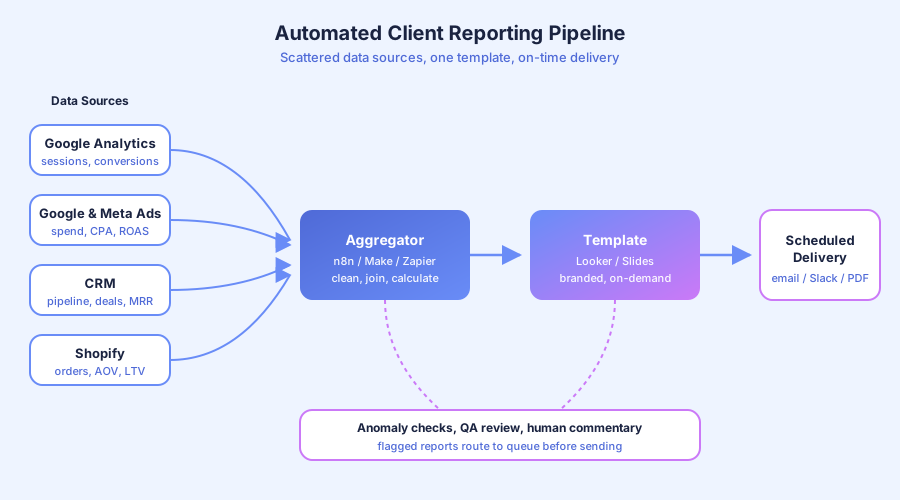
What does an automated reporting workflow actually look like?
An automated reporting workflow connects your data sources to a report template, populates it on schedule, and delivers it to the client with no manual data handling. You review the finished report and add strategic commentary. The pipeline handles everything else, from API pulls to PDF generation to scheduled email delivery.
Here’s the side-by-side:
| Step | Manual Version | Automated Version |
|---|---|---|
| Data collection | Log into 4-6 platforms, export CSVs | APIs pull data on schedule |
| Data formatting | Copy into spreadsheet, clean, calculate | Template pre-formatted with formulas |
| Report building | Paste into doc, format charts, add branding | Template populates from live data |
| Quality check | Review every number manually | Anomaly detection flags outliers |
| Delivery | Email each client individually | Automated email with branded PDF |
| Time per client | 5-10 hours | 20 minutes (review + commentary) |
According to Forrester’s 2024 Total Economic Impact studies, average ROI on business process automation hits 200% in the first year. Reporting automation often beats that benchmark because the time savings are measurable and the task is so consistently repetitive.
Which reporting tool should you pick?
Pick based on your client volume and data sources. Looker Studio is free and ideal if your clients use mostly Google products. AgencyAnalytics is turnkey at roughly $12 per client per month and connects to 80+ marketing platforms. Custom pipelines using n8n or Make suit agencies with niche data sources or unusual formatting needs.
According to MuleSoft’s 2023 Connectivity Benchmark, the average enterprise runs 1,061 applications. Small agencies typically use 10-15, but even connecting 4-5 data sources monthly creates serious overhead.
Option 1: Google Looker Studio (free)
Looker Studio connects natively to GA4, Google Search Console, Google Ads, and Google Sheets. For non-Google sources like Semrush, Ahrefs, or Facebook Ads, add a connector. Supermetrics runs about $39/month, Porter Metrics about $15/month. Best for agencies whose clients live in the Google ecosystem. The $0 price point makes it viable at any scale.
Option 2: AgencyAnalytics (around $12 per client per month)
Connects to 80+ marketing platforms out of the box. White-label branding, automated scheduling, and client login portals come built in. Best for agencies managing 20+ clients who want a single platform for everything and don’t want to maintain connectors themselves.
Option 3: Custom pipeline (n8n + Sheets + template)
For non-standard data sources or specific formatting requirements, n8n or Make pulls data via API into Google Sheets, which feeds a Looker Studio template or custom document generator. More setup work, unlimited flexibility. Pixorr used this approach to handle Ahrefs and Semrush data alongside GA4 and Search Console in one pipeline.
How do you connect multiple data sources into one report?
Choose a central reporting platform that pulls from your data sources via API, then build templates that display live data. Skip CSV exports and copy-paste workflows entirely. The data flows from source to report without a human in the middle. Set one refresh schedule and the template updates itself.
According to Gartner’s 2024 Data Analytics Trends survey, 72% of organizations report data integration as a top pain point in analytics. For reporting specifically, the integration layer is where agencies lose the most hours.
Here’s the practical connection flow for a typical agency stack:
- GA4 and Search Console: Native Looker Studio connectors, free
- Google Ads: Native connector, refreshes hourly
- Meta Ads and LinkedIn: Supermetrics or Porter Metrics connector
- Semrush and Ahrefs: Supermetrics connector or API pull via n8n into Sheets
- HubSpot or Pipedrive CRM: Native integrations in AgencyAnalytics, or n8n for custom fields
- Shopify or WooCommerce: Porter Metrics connector, or API pull for custom metrics
Once connected, every data source refreshes on its own schedule. The template reads from the refreshed data. Your role shifts from “data handler” to “data reviewer.” Nothing about that shape is specific to marketing data either — real estate investment firms run the same pipeline for deal analysis and quarterly investor reporting, pulling market data and holdings instead of GA4 sessions.
What parts of the report should stay manual?
Automate data collection, formatting, and delivery. Keep strategic analysis, client-specific commentary, and recommendations human. Clients don’t pay you for numbers. They pay for what the numbers mean and what to do about them. The automation handles the mechanical work. You handle the thinking.
According to McKinsey’s 2024 Global Survey on AI and the Future of Work, 60% of occupations have at least 30% of tasks that could be automated. For reporting, the automatable portion is closer to 80%. The remaining 20% is where your fees are justified.
Automate completely:
- Pulling data from platforms (traffic, rankings, conversions, ad spend, revenue)
- Calculating period-over-period changes
- Generating charts and visualizations
- Applying client branding to the report
- Scheduling delivery on the reporting cadence
Keep human:
- Writing the executive summary (what happened and why)
- Adding strategic recommendations (what to do next)
- Flagging anomalies that need client conversation
- Adjusting benchmarks based on client-specific goals
- Presenting findings in client meetings and QBRs
According to IDC’s 2023 Future of Work study, employees spend roughly 30% of their time on manual data tasks. For reporting-heavy roles, that share runs much higher. Automating the data layer frees your team to do the strategic work that justifies retainer fees.
How do you set up automated report delivery?
Automated delivery sends the completed report to each client on their preferred cadence, weekly, monthly, or quarterly, via email with a branded PDF attached or a live dashboard link. No manual sending. No “I forgot to send the report” moments. The system triggers on schedule and logs delivery for audit.
Setup depends on your reporting tool:
| Tool | Delivery Method | Setup Time |
|---|---|---|
| Google Looker Studio | Scheduled email with PDF | 5 min per report |
| AgencyAnalytics | Automated email on schedule | Built-in, 2 min |
| Custom (n8n + template) | n8n sends email with generated PDF | 1-2 hours initial |
Looker Studio’s “Schedule email delivery” sends a PDF snapshot on your chosen cadence. For more control, like custom email copy or conditional delivery based on data thresholds, n8n or Make can trigger delivery based on rules you define.
According to Deloitte’s 2023 Global Intelligent Automation Survey, 73% of organizations report positive ROI from automation within 12 months. Report delivery hits ROI almost immediately because you eliminate the last-mile manual work that causes late reports.
Read the full story of how Pixorr reclaimed 40 hours per month by automating their reporting pipeline. Automated delivery meant clients received reports on the same day every month. Before automation, delivery timing varied by days depending on the operations manager’s workload. Consistency built trust, and clients stopped asking “when is my report coming?” For the agency-specific version of this pipeline — rank tracking, GA4 rollups, and white-label delivery at 50-client scale — see how SEO agencies automate client reporting.
How do you handle anomalies and exceptions?
Build anomaly detection into the pipeline. Set thresholds for key metrics, like traffic drops over 15%, conversion rate changes over 20%, or ranking drops of 5+ positions. When thresholds are crossed, the system routes that report to a human review queue instead of auto-sending. Clean reports pass through untouched. You investigate the flagged ones.
According to Gartner’s 2023 Data Quality Market Survey, poor data quality costs organizations an average of $12.9 million per year. For reporting, data quality issues show up as incorrect numbers, missing data points, or metrics that don’t match the client’s own dashboards. Anomaly detection catches these before the client does.
A simple anomaly detection setup:
- Define thresholds for each key metric (organic traffic, conversion rate, rankings, CPA, ROAS)
- Build comparison logic that checks current period vs. previous period
- Flag outliers that exceed thresholds (n8n’s “If” node or Make’s filters handle this cleanly)
- Route flagged reports to a review queue instead of auto-sending
- Auto-send clean reports that pass all threshold checks
This means roughly 80% of reports send automatically during normal months. The 20% with significant changes get human review and commentary before going out. Your clients never receive a report with a 30% traffic drop and no explanation.
What’s the step-by-step setup for your first automated report?
Here’s the sequence to automate your first client report. Start with one client, prove the system works, then roll it out across the book. Don’t try to automate all 30 clients at once.
Week 1: Template and data connections
- Choose your platform (Looker Studio for free, AgencyAnalytics for turnkey)
- Connect your primary data sources, starting with GA4 and one other
- Build a branded report template with standard sections and chart types
- Test data accuracy against a manual export for one full reporting period
Week 2: Automation logic 5. Set up scheduled data refresh (daily or weekly based on reporting cadence) 6. Configure anomaly thresholds for your key metrics 7. Build the delivery workflow (scheduled email or n8n trigger) 8. Test end-to-end with a real client report on staging
Week 3: Review and rollout 9. Send the automated report alongside your manual report for one full cycle 10. Compare for accuracy, formatting, and anomaly handling 11. If they match, cut over to automated delivery 12. Replicate the template setup for remaining clients (15-30 min each)
According to Process Street’s 2024 Automation Benchmark, companies that document processes before automating achieve ROI 2.3x faster. For reporting, the “documentation” is the template itself. A well-built template is reusable across clients with minimal tweaks.
According to Statistics Canada’s 2024 SEPH data, a Canadian full-time employee costs $45,000-$65,000 per year. If your reporting person spends 40% of their time on data handling, that’s 200+ hours yearly, automating that frees $9,000-$13,000 in annual capacity. That’s before you count the value of what they do with the reclaimed time.
How do you get started?
If you manage 10+ clients and spend more than 2 hours per client on monthly reports, you’re past the threshold where automation pays for itself within the first quarter. The math gets better at 20+ clients and gets great at 40+. Most agencies complete a full reporting automation rollout in 2-3 weeks once they start.
Start with one report. Automate the data pull and formatting. Keep the analysis human. Once the system works for one client, roll it out to the rest.
If you want help building a custom reporting pipeline that connects your specific tools, book a free workflow audit. We’ll map your reporting workflow and show you where the hours are actually going. Written report in 48 hours, no pitch deck required.
If your reporting challenges extend to financial data, our guide on how to automate financial reporting covers accounting-specific workflows for QuickBooks, Xero, and custom dashboards. For broader workflow work, read about custom workflow automation.