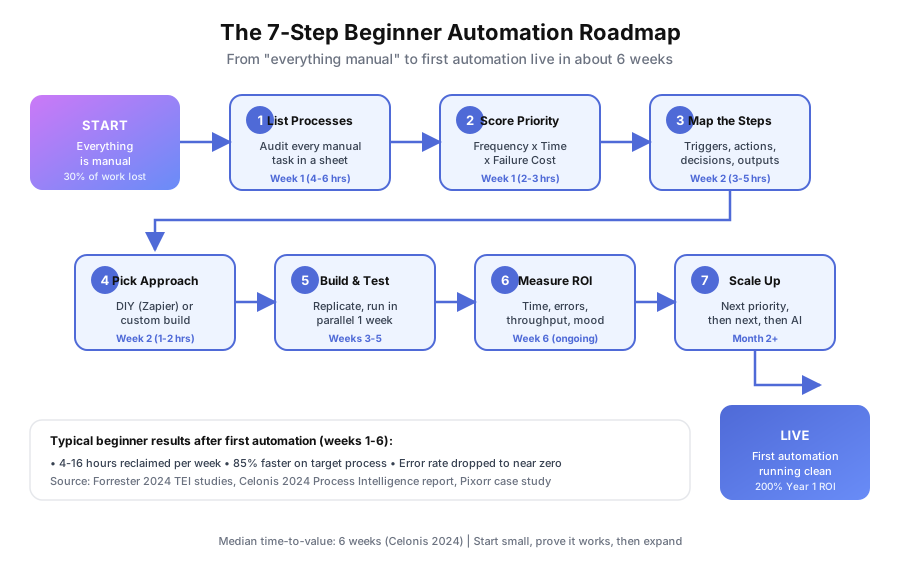
According to Salesforce’s 2026 Small Business Trends Report, 43% of small business owners rank automation as their top operational priority. Yet most haven’t automated a single workflow. Not because automation is hard, but because the starting point isn’t obvious when every process is still manual. This guide gives you a 7-step path from “everything is manual” to “my first automation is running” in about six weeks. No jargon, no theory, just the sequence that actually works for beginner teams.
What’s the Biggest Mistake Beginners Make With Automation?
They pick the wrong process first. Most beginners automate something easy instead of something that matters. The ROI is invisible, the team loses faith, and the project stalls before it proves value. The fix isn’t better technology. It’s better preparation before you touch a tool.
Process Street’s 2024 Automation Benchmark found that companies who document processes before automating achieve ROI 2.3x faster than those that skip straight to Zapier. We’ve used the system below with SEO agencies, immigration firms, SaaS companies, and career colleges. It works across industries because it focuses on the economics of your time, not the specifics of your software stack.
The goal of your first automation isn’t transformation. It’s proof. One clean win that frees 4-16 hours per week and earns your team’s trust in the approach.
Beginner teams almost always overestimate complexity and underestimate preparation. You don’t need a platform decision on day one. You need a list, a score, and a map. Those three artifacts drive every later choice, from whether to use Zapier or hire a developer to how you measure whether it’s working. Skip them and you’ll rebuild twice.
Where Should You Start With Business Automation?
Start by listing every manual process in a spreadsheet before picking any tool. Most teams undercount by 40-60%. Forgotten tasks like copying data between Sheets and a CRM or reformatting client reports hide in plain sight. A written audit reveals the real time drain and points to the right first target.
Grab a spreadsheet. Create columns for Process Name, Owner, Frequency, Time Per Occurrence, Tools Involved, Error Rate, and Notes. List everything. Don’t filter. Don’t judge. Just capture.
IDC’s 2023 Future of Work study found employees spend 30% of their time on manual data entry and transfer tasks. That’s roughly 12 hours per week for a full-time employee doing copy-paste work. If you want a structured walkthrough of this exercise, our guide on how to audit your workflows and find automation opportunities covers it in detail.
Here’s a starter template:
| Process Name | Owner | Frequency | Time (min) | Tools Used | Error Rate |
|---|---|---|---|---|---|
| Lead follow-up email | Sales | 20x/day | 8 | Gmail, HubSpot | Low |
| Invoice creation | Admin | 15x/week | 12 | QuickBooks, Sheets | Medium |
| Client report generation | Account mgr | 10x/week | 25 | GA, Sheets, Docs | High |
| Document collection | Ops | 30x/week | 10 | Email, Drive | High |
| Appointment scheduling | Reception | 25x/week | 5 | Phone, Calendar | Low |
At Pixorr, a 5-person SEO agency, this exercise revealed 23 distinct manual processes. They had no idea how much time was disappearing into report formatting until they wrote it all down. The biggest surprise wasn’t any single task. It was the total: 73 hours per week, or roughly 18% of the team’s collective capacity, locked inside repeatable work nobody had ever measured.
Plan to spend 4-6 hours on this audit over a week. Do it in two sittings rather than one marathon session. You’ll remember processes on day two that you missed on day one, especially the quarterly tasks that don’t surface during a single workday of observation.
How Do You Score Which Process to Automate First?
Use the Automation Priority Score: Frequency x Time per Task x Failure Cost, each rated 1-5. A daily task (5) that takes 10 minutes (3) and triggers client complaints when wrong (4) scores 60. A monthly 3-minute task with no downside scores 3. Start with the 60. The math forces you past “what looks fun” toward “what actually pays.”
| Factor | 1 (Low) | 3 (Medium) | 5 (High) |
|---|---|---|---|
| Frequency | Monthly | Weekly | Daily or more |
| Time per task | Under 5 min | 5-15 min | Over 15 min |
| Failure cost | Minor annoyance | Rework needed | Lost revenue or compliance risk |
McKinsey’s 2024 Global Survey on AI and Automation found that 60% of occupations have at least 30% of tasks that could be automated. Your scoring exercise tells you which 30% to attack first in your specific business.
Pixorr’s highest-scoring process was client SEO report generation. It ran 10 times per week, took 25 minutes each, and formatting errors had triggered two client complaints in the previous quarter. That single process consumed over 4 hours of skilled labor weekly and put retention at risk. The score made the choice obvious.
Resist the temptation to pick a lower-scoring process because it feels simpler. The purpose of the score is to override intuition. Your team already knows the easy wins, and they haven’t bothered to automate them for a reason: the payoff is too small to sustain momentum. A high-score first target is what turns skeptics into advocates by month two.
How Do You Map a Process Before Automating It?
Document every step, including the decisions, exceptions, and workarounds your team does without thinking. Record the trigger, action, tool, decision point, and output for each step. Skipping this is the number-one reason beginner automations miss edge cases and break in production during the first week of live use.
Process Street’s 2024 Automation Benchmark identifies documentation as the stage where most beginners cut corners. The cost of that shortcut is roughly double the rework time when you discover missing branches later.
Here’s what Pixorr’s report generation map looked like before automation:
- Trigger: Monday morning, account manager opens task list
- Action: Log into Google Analytics for Client X
- Action: Export traffic data to Google Sheets
- Decision: If client has Google Ads, pull Ads data
- Action: Copy data into report template in Google Docs
- Action: Format charts manually, screenshot, paste into Docs
- Action: Write 3-paragraph performance summary
- Decision: If traffic dropped 10%+, add explanation section
- Action: Send report via Gmail to client
- Action: Log completion in Asana
Ten steps across six tools. The automation had to handle every branch, not just the happy path. A developer without that map would have built a version that worked for 80% of clients and silently broke for the rest. The two-hour mapping session saved days of debugging.
If you get stuck documenting a step, grab a screen recording of someone doing the task once. Watching the recording back will surface micro-decisions that are invisible when you try to describe the process from memory alone.
Should You Build Your First Automation Yourself or Hire an Agency?
It depends on three things: process complexity, your team’s technical comfort, and the cost of failure. Use DIY tools for linear 2-5 step workflows you can afford to debug yourself. Hire an agency when your process touches multiple systems, needs conditional logic, or has to run reliably at scale without someone watching it constantly.
| Factor | DIY (Zapier, Make, n8n) | Custom Build (Agency) |
|---|---|---|
| Best for | Linear, 2-5 step workflows | Multi-branch, 6+ step workflows |
| Tools | Zapier, Make, n8n | Custom APIs, n8n, Python |
| Setup time | Hours to days | 1-4 weeks |
| Cost | $20-$100/month | $3,000-$15,000 initial build |
| Error handling | Basic retry logic | Custom fallbacks, alerts |
| Maintenance | You fix it when it breaks | Agency monitors and maintains |
| Scalability | Slows at high volume | Built for growth |
Forrester’s 2024 Total Economic Impact studies report average ROI of 200% in year one regardless of approach. The real difference is speed to value and reliability under load.
DIY wasn’t an option for Pixorr. Their report process pulled from Google Analytics, Google Ads, Search Console, Ahrefs, and Semrush, then generated formatted documents and emailed them. Five data sources and conditional logic meant they needed a custom build to keep it stable.
A useful rule of thumb: if your process takes more than 30 minutes to describe on paper or involves more than three systems with different data shapes, a DIY tool will get you 70% of the way and then frustrate you for months. That last 30% is where beginner teams burn out on automation before seeing the payoff.
How Do You Build Your First Automation Without Breaking Everything?
Build exactly one workflow first. Replicate the manual process step for step without optimizing. Test with real client data, run in parallel with the manual version for one full week, then hand off gradually. UiPath’s 2024 Automation Index shows that organizations progressing from single-process to cross-functional automation achieve 4x higher adoption rates, but they all start with one.
Here’s the build sequence:
- Replicate the manual process exactly. Don’t optimize yet. Same steps, same order, same outputs.
- Test with real data. Use actual client records and file formats. Synthetic data misses the edge cases that break production.
- Run in parallel for one week. Keep doing it manually while the automation runs alongside. Compare outputs daily.
- Hand off gradually. Once outputs match for a full week, retire the manual version. Monitor daily for 30 days, then weekly.
Celonis’s 2024 Process Intelligence report pegs median time-to-value for business process automation at 6 weeks. That includes discovery, build, and parallel testing. Your first automation should follow that timeline, not rush past it. Faster builds skip the parallel-run phase, which is exactly where edge cases surface before they hurt clients.
How Do You Measure Whether Your Automation Is Actually Working?
Track four numbers from day one: time saved per week, error rate, throughput, and team satisfaction. After 30 days, calculate (Value of Time Saved + Value of Errors Prevented) minus Monthly Automation Cost. A positive number means you’ve got a winner. Scale from there. Negative means stop and fix before building anything else new.
Here’s how each metric translates to dollars:
| Metric | How to Measure | Example Value |
|---|---|---|
| Time saved | Hours freed x loaded hourly rate | 16 hrs/month x $27 = $432/month |
| Error rate | Mistakes before vs after | 2-3 errors/month to zero |
| Throughput | Volume handled at same headcount | 10 to 40 reports/week |
| Team mood | Monthly pulse survey | 29% automate to cut burnout |
According to Statistics Canada’s 2024 SEPH data, a Canadian full-time employee costs $45,000-$65,000 per year, roughly $22-$32 per hour loaded. Zapier’s 2024 State of Business Automation Report found that 29% of professionals automate specifically to reduce burnout. If your team is happier and throughput is up, the automation is working as designed.
Pixorr tracked report formatting errors: 2-3 per month manually, zero after automation. Throughput jumped from 10 reports per week to 40 with the same team, an 85% time reduction on the core task. The team’s monthly pulse score on “how much of my week is spent on repetitive work” dropped from 7 out of 10 to 3 out of 10 inside eight weeks.
Document these numbers publicly, even if it’s just a shared Slack message or a Notion page. Visible ROI is what gets you approval to build the next automation, because it moves the conversation from “do we trust this” to “what’s next on the list.”
How Do You Scale From One Automation to a Full System?
Once your first automation runs cleanly for 30 days, go back to your priority scorecard and pick the next highest-scoring process. Build it the same way. Deloitte’s 2023 Global Intelligent Automation Survey found 73% of organizations report positive ROI from automation within 12 months, and the ones who succeed build momentum one process at a time rather than launching five at once.
Pixorr scaled in this order: client report generation, keyword tracking alerts, competitor analysis pulls, client onboarding document collection. Within four months, they’d reclaimed a full work week per month across the 5-person team and cut reporting time by 85%.
The scaling pattern that works:
| Phase | Timeline | What to Automate | Expected Result |
|---|---|---|---|
| Phase 1 | Weeks 1-6 | Highest-scoring single process | Proof of concept, measurable savings |
| Phase 2 | Weeks 7-12 | 2-3 related processes in one team | Compound savings, team buy-in |
| Phase 3 | Months 4-6 | Cross-department workflows | Operational change |
| Phase 4 | Months 7-12 | AI-enhanced decisions | Competitive edge |
For Phase 4, our guide to the best AI tools for small business in 2026 covers which AI capabilities to layer on top of your automation foundation.
Gartner’s 2024 Market Analysis put the global business process automation market at $14.2 billion. That money isn’t all flowing to enterprise projects. Small teams of 3-15 people are driving adoption because manual pain hits harder per person in a small team than in a 500-person department.
A common trap at Phase 2 is automating a process that depends on Phase 1 working perfectly. If your first workflow still has rough edges, fix those before stacking new automations on top. Compounding unreliability is the fastest way to lose trust you spent six weeks earning. Give Phase 1 a full 30-day clean run before touching Phase 2.
What’s the Fastest Way to Figure Out Where to Start?
Honestly? You don’t have to do the first three steps alone. Process mapping and scoring can take a full week if you’ve never done it before, and most beginners get stuck on scope rather than technique. A short audit with someone who’s mapped 100+ processes cuts that timeline roughly in half.
We run a free automation audit that covers Steps 1 through 3 for you. We’ll map your processes, score them, and show you exactly which one to automate first, along with the expected ROI. No obligation. Just a clear picture of where your time is going and how to get it back.
Pixorr’s first conversation identified the report generation bottleneck that was costing them 16+ hours per month. Six weeks later, those hours were back on their calendar. That’s the gap between knowing you should automate and actually doing it.
Book your free automation audit and we’ll show you exactly where to start.
One last thing worth remembering: automation is a practice, not a project. The teams that win treat their first build as the beginning of a system, not the end of a task. Come back to your priority spreadsheet every quarter, re-score the processes, and pick the next target. Six months of this rhythm separates the teams still drowning in manual work from the ones running lean.