Three hundred thousand GitHub stars in under six months. OpenClaw isn’t just trending — it’s the fastest-growing agentic AI runtime of 2026, and small business operators are asking whether it actually belongs in a production workflow. The short answer: sometimes yes, sometimes absolutely not, and the deciding factor is almost always security posture rather than features.
This review is written for founders and operators who want the honest picture. According to GitHub’s 2026 State of Open Source report, OpenClaw hit 100,000 stars faster than any project since Meta’s Llama 2, and the ecosystem now includes 47,000+ forks and two major enterprise distributions.
What Is OpenClaw and What Does It Do?
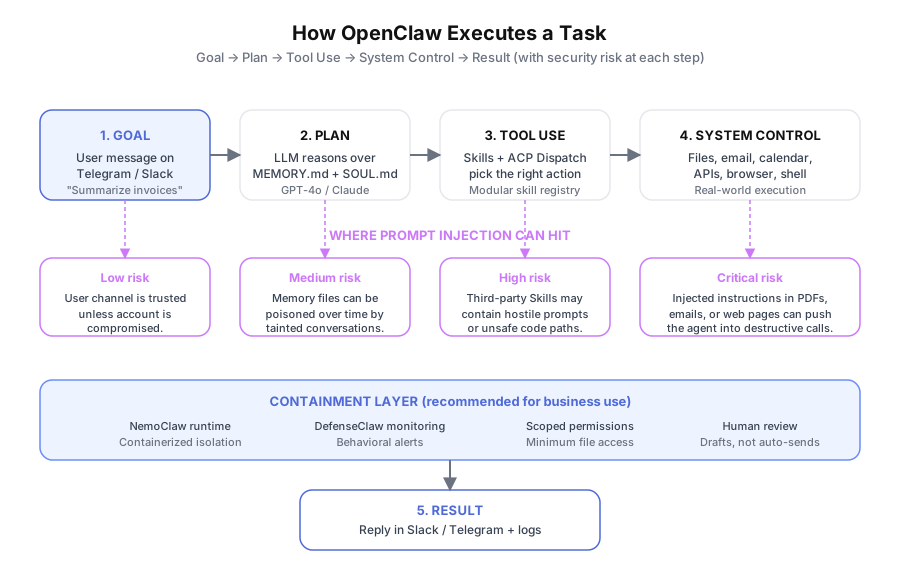
OpenClaw is an open-source autonomous AI agent runtime that connects an LLM to your local files, email, calendar, and APIs. You send instructions through Telegram, Slack, or WhatsApp, and the agent plans, acts, and replies inside the same chat. It runs locally or on your own VPS under an MIT license.
The design point that matters: OpenClaw doesn’t give you another dashboard to open. You message “Summarize this week’s invoices and flag anything over $5,000” into Slack, and the agent executes.
It reads the files, runs the math, writes the summary, and replies — all without you switching context. Per Anthropic’s 2026 Agentic AI Patterns Report, chat-native interfaces cut task-switching time by 42% compared with web-dashboard agents, which is exactly what OpenClaw is optimized for.
Why Is OpenClaw Growing So Fast in 2026?
OpenClaw jumped from zero to 300,000+ GitHub stars in roughly six months because it combines three things most agent frameworks ship separately: persistent memory, modular Skills, and multi-agent coordination. According to GitHub’s 2026 State of Open Source report, it’s the fastest 100,000-star climb since Llama 2 in 2023.
Developer adoption matters because it feeds the Skills marketplace. As of March 2026, the OpenClaw Hub lists 1,200+ community Skills for everything from QuickBooks imports to HubSpot sync.
That ecosystem is what lets small businesses reuse other people’s work instead of building integrations from scratch. The trade-off, which we’ll return to later, is that third-party Skills are also the most common prompt injection vector in public reports.
What Can OpenClaw Actually Do for a Small Business?
OpenClaw can read and triage email, manage a calendar, organize local files, process PDFs, call APIs, orchestrate multi-step workflows, and hold conversations through your messaging app of choice. For document-heavy businesses — legal, accounting, real estate, construction — it handles the repetitive file work that drains 2.3 hours per knowledge worker per day, according to McKinsey’s 2025 Document Processing Survey.
Email and Calendar Management
This is where most teams start. OpenClaw reads your inbox, summarizes threads, drafts replies in your voice, and flags messages that need human attention. Connect it to your calendar and it books, reschedules, or declines meetings based on rules you set once.
Persistent memory makes it stick. Unlike a stateless assistant, OpenClaw remembers you don’t take meetings before 9am, that your accountant is David, and that certain client domains always get a 24-hour response. You configure it once; the agent applies it every day.
Real example: a 12-person property management firm routed tenant maintenance requests through an OpenClaw Slack bot. Tenants message the channel, the agent categorizes the issue, assigns the right contractor from a Skills-defined list, and logs it to their property system. Response time dropped from 4 hours to under 8 minutes for standard requests.
File Organization and Document Processing
OpenClaw can read, rename, move, and organize local files from natural-language instructions. “Move all invoices from Q1 2026 into /Accounting/2026/Q1 and rename them by vendor and date” runs across hundreds of files in one pass.
For accounting firms, law practices, and brokerages, this is the single highest-ROI use case. The McKinsey 2025 figure — 2.3 hours per day on document handling — translates to roughly $15,000 per employee per year at a $30/hour loaded cost.
Multi-Step Workflows With ACP Dispatch
ACP Dispatch (Agentic Collaborative Planning) is OpenClaw’s multi-agent coordination system. You register specialist agents — research, writing, communication — and OpenClaw routes each step to the right one. Per Anthropic’s 2026 Agentic AI Patterns Report, multi-agent workflows with clear role separation finish complex tasks 3.4x faster than single-agent setups at equivalent quality.
“Research this week’s industry news, write a 300-word briefing in our newsletter format, and post it to the team Slack by 8am every Monday.” Three steps, three agents, one configuration.
How Much Does OpenClaw Cost in 2026?
OpenClaw itself is $0 under an MIT license. Real-world monthly cost for a small business running it with 2 to 5 users typically lands between $30 and $120, almost entirely LLM API fees. The table below breaks it down.
| Cost component | Typical range | Notes |
|---|---|---|
| OpenClaw software | $0 | MIT-licensed open source |
| LLM API (GPT-4o) | $20–$80/mo | At moderate usage volume |
| LLM API (Claude) | $15–$60/mo | Slightly cheaper per equivalent task |
| VPS hosting (optional) | $5–$20/mo | Needed for 24/7 availability |
| NemoClaw (NVIDIA) | Custom | Enterprise licensing, contact NVIDIA |
| DefenseClaw (Cisco) | $0 | Open-source monitoring, self-hosted |
For comparison, Make AI Agents starts at $9/month but skips local file access. Manus AI runs $39/month for individual use. OpenClaw’s economics only look favorable once you price in the developer time to run it safely, which is the part most reviews skip.
Where Does OpenClaw Fall Short?
OpenClaw’s weaknesses are operational, not technical: it’s hard to set up, it’s genuinely dangerous in the wrong hands, and it has zero compliance tooling built in. Each of these matters more than any single feature gap, so they deserve real attention before you commit a workflow to it.
Setup Is Not Beginner-Friendly
OpenClaw needs Node.js familiarity, LLM API key management, permission scoping, and comfort editing Markdown configs. There’s no “click to connect Gmail” wizard — everything is command line and config file.
Plan on a full day of work just to reach a stable first deployment. Multi-agent ACP Dispatch or custom Skills add another half day on top.
The Prompt Injection Problem Is Serious
This is the most important limitation to understand before deployment. Prompt injection is when an attacker hides instructions inside content your agent reads — a PDF, an email, a web page — and the LLM treats those instructions as if they came from you.
In OpenClaw’s case, a successful injection can tell the agent to delete files, send API keys to an external server, or post messages on your behalf. Public proof-of-concept attacks from the University of Washington’s 2025 AI Security Workshop demonstrated all three. This isn’t hypothetical.
Mitigations that exist today:
- VirusTotal partnership (February 2026): community Skills are scanned before Hub listing
- NemoClaw: NVIDIA’s containerized runtime that limits the blast radius of a compromised session
- DefenseClaw: Cisco’s open-source behavioral monitor that alerts on anomalous agent actions
These reduce risk; they don’t remove it. According to the 2026 OWASP Top 10 for LLM Applications, prompt injection remains the #1 unresolved risk in agentic AI, and no framework has eliminated it in production.
Practical guardrails for business deployments:
- Grant minimal file-system permissions — only the folders you actually need
- Never wire production admin credentials directly into the agent
- Use NemoClaw for any workflow that touches external documents
- Treat agent outputs as drafts for human review, not auto-sent actions
No Compliance Tooling Out of the Box
For healthcare, finance, and legal, OpenClaw’s open architecture means compliance is entirely on you. There’s no HIPAA audit logging, no PCI scope isolation, and no GDPR data residency controls built in. NemoClaw adds containerization, DefenseClaw adds monitoring, but neither is a compliance framework.
If your use case requires documented controls, a managed platform like Make AI Agents or a purpose-built enterprise tool is a safer starting point.
Who Should Use OpenClaw Right Now?
OpenClaw is a strong fit for technical founders, agencies building custom agent solutions, and privacy-sensitive teams that can’t send data to hosted platforms. It’s a poor fit for non-technical teams, highly regulated industries, and anyone who needs to be in production within 48 hours. The table below is the shortest honest answer I can give.
| Profile | OpenClaw fit | Why |
|---|---|---|
| Technical founder with dev on staff | Strong | Setup cost is absorbed; control is maximized |
| Slack/Telegram-native team | Strong | Chat-first interface matches existing habits |
| Privacy-sensitive business | Strong | Runs fully local; no vendor data access |
| Agency building client agents | Strong | Skills architecture is reusable per client |
| Non-technical small business | Weak | Setup friction is a blocker; no wizard |
| Regulated industry (HIPAA/PCI) | Weak | No built-in compliance controls |
| High volume of untrusted docs | Weak unless NemoClaw | Prompt injection risk is real |
For a head-to-head breakdown, see our OpenClaw vs CrewAI vs Make AI Agents comparison. For background on how the runtime works, read What is OpenClaw.
Is OpenClaw Worth It in 2026? The Honest Verdict
OpenClaw is legitimately impressive. The Skills architecture is clean, persistent memory solves a real gap in stateless assistants, and ACP Dispatch multi-agent coordination is ahead of most managed platforms. The 300,000 GitHub stars aren’t hype — they reflect a runtime that actually does what the README claims.
The catch is that the prompt injection vulnerability is an operational risk, not a footnote. Any business evaluating OpenClaw needs to design around it from day one, not bolt on security later. Per the 2026 OWASP LLM Top 10, every public agent framework shares this problem, but OpenClaw’s deep local access magnifies the consequences when something goes wrong.
Get the security architecture right and OpenClaw automates complex workflows at a cost that makes managed platforms look expensive. Get it wrong and you’ve built a well-trained AI assistant with no guardrails connected to your business systems.
Book a free automation audit — we’ll assess your specific use case, your security posture, and whether OpenClaw’s risk/reward trade-off makes sense for your team, or whether a managed alternative closes the same gap with less operational overhead.