
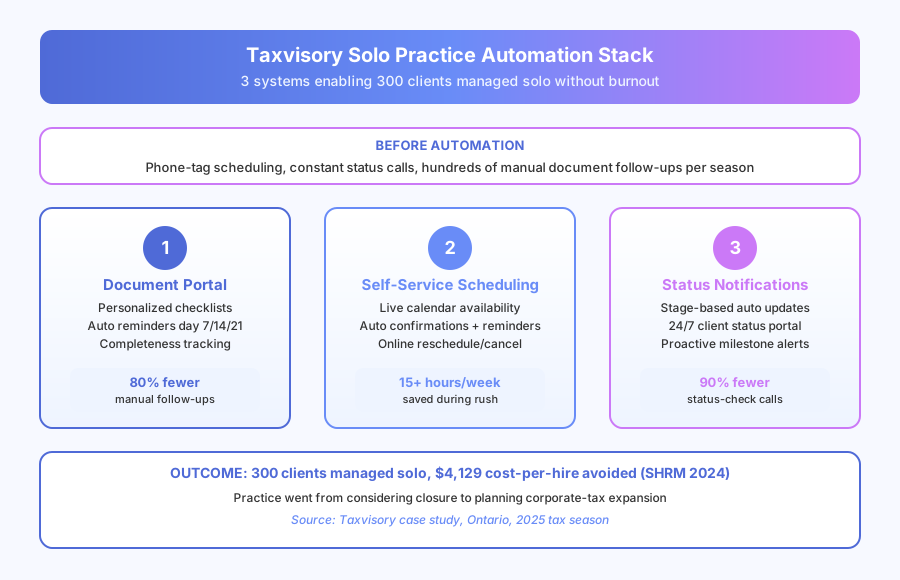
Three hundred clients. One person. January to April. For most tax practitioners, that math sounds like a staffing problem. For Priya Chitkara, founder of Taxvisory in Ontario, it was an automation problem — she just didn’t know it yet. Three automations later, document chasing dropped 80%, scheduling overhead fell from 75-100 hours per season to near zero, and status-update calls shrank by 90%. According to SHRM’s 2024 Human Capital Benchmarking report, the average cost-per-hire is $4,129 before salary — Taxvisory avoided that cost entirely and still tripled its operational capacity during peak season.
What was actually making tax season unsustainable?
The tax work itself wasn’t the problem. Priya was fast, accurate, and thorough. Everything surrounding the tax work — document chasing, scheduling, and status updates — was consuming the hours that should have gone to preparing returns. Three hundred clients meant hundreds of parallel follow-up threads running on memory and sticky notes.
Document collection alone meant chasing each of 300 clients for T4s, T5s, donation receipts, RRSP slips, medical expense records, and situation-specific forms. Some clients sent everything immediately. Most needed at least one reminder. Many needed three. That’s a document collection problem that scales linearly with client count and exponentially with complexity.
Scheduling was phone tag by nature. Clients called to book, Priya returned the call, the client was out, back and forth until an appointment was confirmed. Each booking averaged 15-20 minutes of phone tag. Across 300 clients over four months, that’s 75-100 hours of scheduling overhead during the busiest period of the year, according to Taxvisory’s own pre-automation time tracking.
According to IDC’s 2023 Future of Work study, knowledge workers spend 30% of their time on tasks that could be automated. For a solo tax practice, the automatable share is higher — document collection, scheduling, and status updates are almost entirely pattern-based.
Why didn’t hiring solve the problem?
Hiring was the obvious fix that didn’t work on closer inspection. A part-time seasonal admin introduces recruitment cost, training time, supervision load, and variability in how clients are handled. For a practice built on trust and sensitive financial data, that trade-off was worse than the overload it was meant to solve.
Priya’s clients share deeply sensitive information. They expect professional handling at every touchpoint, every year. A part-time seasonal admin answering calls and managing documents creates a different experience each January — clients don’t want a new person handling their records annually, they want consistent quality.
According to SHRM’s 2024 Human Capital Benchmarking report, the average cost-per-hire is $4,129 before salary begins. For a four-month seasonal role, that cost structure collapses. A full-time person engaged for four months and underutilized for eight is worse. What actually worked was removing the work that didn’t require Priya at all.
What three systems did Taxvisory build?
Three automations now handle the entire client lifecycle — document intake, scheduling, and status communication — so Priya can spend filing season on tax preparation rather than administration. Each system runs without daily supervision and only flags exceptions to Priya’s attention.
System 1: Personalized document collection portal
Every client gets a portal with a checklist pre-built for their specific tax situation. The system builds it from client history — employment type, investment accounts, rental properties, business income, common deduction categories, and carry-forwards from the prior year.
How it works:
- Clients receive a portal invitation at the start of filing season with a personalized checklist
- Salaried employees see: T4s, RRSP receipts, donation slips, medical expenses
- Rental clients see: T4s plus rental records, expense receipts, mortgage interest, property tax
- Clients upload directly through the portal — no email attachments, no unclear filenames
- System tracks completeness and sends reminders on a preset schedule (day 7, day 14, day 21)
- Priya gets notified when a file is complete and ready for preparation
- Unusual items or missing records requiring consultation flag for Priya’s attention only
Before the portal: hundreds of manual follow-ups per season. After: most clients upload everything before their appointment without a single nudge from Priya.
System 2: Self-service appointment booking
The booking system connects to Priya’s calendar and shows real-time availability during the filing window. Clients receive a booking link with their portal invitation and can self-schedule, reschedule, or cancel without any phone contact.
How it works:
- Client receives booking link at the start of filing season
- Client selects an available slot from Priya’s live calendar
- Automated confirmation sends immediately with appointment details and checklist reminder
- Reminder emails go out 48 hours and 24 hours before the appointment
- Clients reschedule online without calling
Phone-tag scheduling during the four-month rush previously consumed 75-100 hours per year. After implementation: effectively zero. The system runs the full scheduling lifecycle without Priya’s involvement.
System 3: Return status notifications
The status system sends automatic updates as each return moves through preparation. Clients receive notifications when documents are confirmed received, preparation is in progress, the return is under review, and the return has been filed with CRA.
A client portal lets them check status anytime — the same information they’d get by calling, available 24/7 without interrupting Priya’s work.
What were the measurable results?
Here are the numbers from the first full tax season after all three systems went live, based on Taxvisory’s internal tracking shared for this case study:
| Metric | Before Automation | After Automation | Change |
|---|---|---|---|
| Document chasing | Hundreds of manual follow-ups | Most clients self-complete | 80% reduction |
| Scheduling overhead | 75-100 hrs/season (phone tag) | Near zero | 15+ hrs/week saved during rush |
| Status update calls | Daily, multiple per day | Occasional genuine questions | 90% reduction |
| Daily work interruptions | Constant during filing season | Minimal | Focus shifted to return prep |
| Practice trajectory | Considering closure | Planning expansion | Strategic shift enabled |
The 90% reduction in status calls is the number that changed Priya’s filing season most directly. Not because individual calls were long — they weren’t — but because each one broke concentration during complex return preparation. Removing 90% of those interruptions improved the quality of the work, not just the volume.
Why does document portal quality matter for a tax practice?
Tax preparation quality depends on complete, organized source documents. When documents arrive over email in inconsistent formats, with unclear filenames, across multiple threads, preparation starts with a sorting and reconciliation step that adds time and introduces error risk.
The portal changed the input quality alongside the collection process. Documents arrived organized by category, labeled consistently, and with completeness tracked automatically. Returns that would have required a callback to clarify a missing item were more often complete on first submission.
According to a 2024 Thomson Reuters Institute survey, 67% of tax professionals cite document management and client communication as their top operational pain points. Both are almost entirely automatable — and both were solved for Taxvisory in one filing season.
What did clients actually say?
Client feedback improved noticeably after the first automated season. Several mentioned in reviews that the process felt more organized and professional than what they had experienced at multi-staff firms. The self-service portal and proactive status updates set a standard clients explicitly compared favorably to larger practices.
This matters commercially for a referral-driven solo practice. Every positive experience becomes a potential referral. Every improved touchpoint — faster document process, no scheduling phone tag, proactive status updates — creates something worth mentioning to a colleague or family member who needs a tax practitioner.
What’s the bigger picture for Priya’s practice?
The operational change unlocked something bigger than efficiency. Priya had been considering closing the practice because the annual workload had become psychologically unsustainable. After automation, the calculus flipped entirely.
With the operational burden reduced, she began thinking about expansion — specifically, corporate tax returns, which she had the expertise for but not the capacity to service alongside personal tax at peak volume. Within the same year, that expansion became a concrete plan rather than a hypothetical one.
According to Forrester’s 2024 Total Economic Impact studies, the average ROI on business process automation is 200% within the first year. For Taxvisory, the ROI was strategic: the practice that was considering closing is now planning to grow.
What can other solo practitioners and small tax firms learn?
Three principles from Taxvisory’s implementation apply to any practice where one person handles both professional work and client administration. Each one is independently valuable — together, they transform the filing-season experience.
1. Personalized checklists outperform generic document lists. This principle applies across every tax firm automation workflow. A checklist that knows a client has rental income collects the right documents the first time. A generic list creates confusion and callbacks. Building checklists from client history is the difference between 80% fewer follow-ups and marginal improvement.
2. Self-booking respects both parties’ time. Clients don’t actually want to schedule by phone — they want a convenient appointment time. Online booking gives them what they want while returning hours of overhead to the practitioner. The professional relationship isn’t weakened by removing phone tag from the equation.
3. Proactive updates eliminate reactive interruptions. Every “is my return done yet?” call happens because the client doesn’t know where their return stands. Automatic stage notifications close that information gap before the question forms. Preventing the call is more efficient than answering it.
Where can you read the full case study?
For the complete breakdown including the specific tools used, technical setup, and full ROI calculation, read the full Taxvisory case study. For related reading, see our Tax Firm Automation Workflows guide and our article on How to Automate Document Collection From Clients.
Book a free automation audit and we’ll map your practice’s document and communication pipeline the same way we mapped Taxvisory’s.