A plumbing company owner once told me he had asked for Google reviews at the end of every single job. In person. For two years straight. He had 23 reviews. His competitor across town, half the staff, had 287. The difference was not service quality. It was timing and friction. According to BrightLocal’s 2024 Consumer Review Survey, 98% of consumers read online reviews before choosing a local business. The plumber with 23 reviews was effectively invisible. Here’s how to build a review pipeline that runs itself, gates by sentiment to protect your rating, and turns one-time customers into a compounding reputation engine.
Why doesn’t asking for reviews in person work?
Face-to-face review requests convert at 3% to 5% because customers agree to be polite, then forget the moment they leave. The process has six dropout points (remember name, search Google, find listing, tap stars, write text, submit). Automated SMS with a direct link collapses this to one tap.
Asking at the counter puts the customer on the spot. They say “sure,” walk out, and never follow through. The request also lands at the worst moment: during payment, when they are half out the door, mentally already at their next errand. They need to remember your exact business name, search for it, scroll past maps results, find the write-review button, pick a star count, type something thoughtful, and submit. Six steps. Each one is a place where intent dies.
According to Gartner’s 2023 Data Quality Market Guide, poor data quality costs organizations an average of $12.9 million per year. For a local business, your review count and star rating are the data. Missing reviews mean an inaccurate public reputation, and an inaccurate reputation directly suppresses new bookings. Review automation fixes the friction problem with precise timing, one-tap links, and a sentiment gate that protects the public rating. For broader context on the AI side of review strategy, read our guide on AI-powered Google review and reputation management.
When is the best time to send a review request?
Send the request 1 to 3 hours after service completion. The experience is fresh, positive emotions are still active, and the client is likely back on their couch with their phone. Two hours is the sweet spot for local service work. Product purchases need 3 to 7 days.
Here’s how timing affects results:
| Timing | Response Rate | Review Quality | Risk |
|---|---|---|---|
| During service | 2-5% | Low, distracted | Feels pushy |
| Immediately after | 5-10% | Medium, rushed | Client in transit |
| 1-3 hours after | 15-25% | High, specific | Optimal window |
| 24 hours after | 8-12% | Medium, fading | Acceptable fallback |
| 3+ days after | 3-5% | Low, generic | ”It was fine” reviews |
The 1-to-3-hour window works because the customer has processed the visit but hasn’t moved on yet. They write detailed reviews (“Mike fixed the leak in 30 minutes and wiped the floor before leaving”) instead of generic ones (“Good service”). Detailed reviews rank higher in Google’s local pack and convert more readers.
According to Forrester’s 2024 Total Economic Impact studies, business process automation delivers an average ROI of 200% within the first year. Review automation pays back from three angles: more reviews (higher map rank), richer reviews (specific details), and fewer public complaints (sentiment routing contains them privately).
What is sentiment gating and why does it matter?
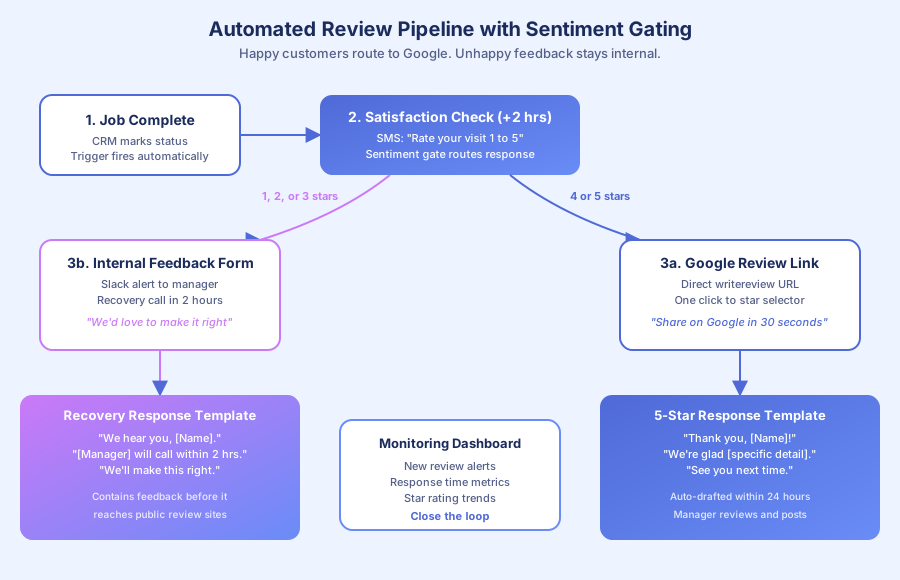
Sentiment gating sends a quick rating check before the review request. Customers who rate 4 or 5 stars get a direct Google review link. Those who rate 1 to 3 stars get routed to a private recovery flow with a manager callback. Everyone is heard. Only satisfied customers get the public prompt.
Here’s the workflow in detail:
- Trigger: Service status set to “completed” in your CRM.
- SMS at +2 hours: “Hi [Name], thanks for choosing [Business]. How was your experience? Reply 1 (poor) to 5 (excellent).”
- If 4 or 5: “Thank you! Mind sharing on Google? Takes 30 seconds: [Direct Link]”
- If 1, 2, or 3: “Sorry to hear that. [Manager] will call within 2 hours to make it right.” Internal Slack alert fires.
This is not the same as review gating, which Google prohibits. Review gating means blocking unhappy customers from leaving any review anywhere. Sentiment routing means directing them to support first. They can still post a Google review on their own. You just are not handing them the one-click link while they are frustrated. Birdeye, Podium, and NiceJob all use this pattern, and it complies with Google’s guidelines on selectively soliciting positive reviews.
How do you create a direct Google review link?
Grab your Google Place ID, then build a URL that opens the review form directly on the star selector. This skips the “search Google, find listing, scroll, click write review” sequence. One tap becomes one step. Expected conversion lift is 3x to 5x over a generic “leave us a review” request.
Method 1: Google Business Profile
- Sign in at business.google.com
- Click “Ask for reviews” or “Get more reviews”
- Copy the short link (format: g.page/r/xxxxx)
Method 2: Place ID construction
- Visit developers.google.com/maps/documentation/places/web-service/place-id
- Search for your business name on the map
- Copy the Place ID (starts with ChIJ)
- Build:
https://search.google.com/local/writereview?placeid=YOUR_PLACE_ID
The direct link is non-negotiable. According to IDC’s 2023 Future of Work study, employees spend 30% of their time on manual, repetitive tasks. Your customers face the same friction tax. Every click you remove roughly doubles completion. A direct link converts at 15% to 25%. A “please find us on Google” request converts at 3% to 5%. That is a 5x difference from one formatting choice.
Always shorten the URL (Bitly, your own domain shortener) for SMS. Long URLs look like spam and trigger lower click-through rates.
What does the complete pipeline look like end-to-end?
The full pipeline has five stages: trigger (service marked complete), satisfaction check (SMS rating), routing (happy to Google, unhappy to support), follow-up (thank-you or resolution), and monitoring (new review alerts and response drafting). Total build time is one weekend for a technical user.
| Stage | Timing | Action | Tool |
|---|---|---|---|
| 1. Trigger | Job marked complete | Start sequence | HubSpot, Pipedrive, GoHighLevel |
| 2. Rating check | +2 hours | SMS “Rate 1-5” | Twilio, GoHighLevel |
| 3a. Happy path (4-5) | Immediate | SMS direct review link | Twilio, GoHighLevel |
| 3b. Unhappy path (1-3) | Immediate | Alert manager, open ticket | Slack, CRM task |
| 4a. Review posted | Within 24 hours | Thank-you SMS, team alert | Google Profile API, n8n |
| 4b. Resolution | Within 24 hours | Manager callback logged | CRM |
| 5. Monitoring | Ongoing | Alerts, response drafts | Birdeye, Podium, Google Alerts |
Tool stacks by budget:
- Budget ($50/month): Twilio SMS plus self-hosted n8n or Make, with Google Business Profile for monitoring.
- Mid-range ($100-200/month): GoHighLevel at $97/month bundles scheduling, SMS, CRM, and automation.
- Premium ($300+/month): Birdeye ($299) or Podium ($249) for multi-location dashboards and AI response drafting.
We have shipped the budget option for several clients with excellent results. For e-commerce, Trustpilot carries more weight than Google reviews.
How do you respond to reviews automatically?
Enable Google Business Profile push notifications, build three response templates (5-star, 4-star, negative), and use AI to personalize each reply with specific details from the review. Target a 24-hour response window. Potential customers read your responses more carefully than the original reviews.
Template framework:
- 5-star: Thank by name, reference something specific (“glad the dishwasher install went smoothly”), invite them back.
- 4-star: Thank, acknowledge the gap, ask what would have made it a 5. Keep the tone curious, not defensive.
- Negative (1-3): Apologize publicly, take responsibility without excuses, move offline. “We are sorry, [Name]. Our manager [Name] is reaching out right now to make this right.”
According to BrightLocal’s 2024 Consumer Review Survey, 89% of consumers are highly or fairly likely to use a business that responds to all its reviews. A thoughtful reply to a 1-star complaint often persuades readers more than any 5-star review ever could.
Birdeye and Podium both draft AI replies that pull details from the original review. For smaller budgets, the Google Business Profile mobile app pushes notifications and lets you respond from your phone in under 60 seconds per review.
According to Statistics Canada’s 2024 Labour Force Survey, average administrative wages run $22 to $32 per hour. Hiring someone to manage reviews manually costs roughly $3,500 to $5,000 monthly. An automated pipeline handles 80% of the same workload for $50 to $200 monthly.
How do you measure whether the pipeline is working?
Track four metrics weekly: request completion rate (reviews received divided by requests sent), average star rating, response time to new reviews, and monthly new review count. Pull the data into a Google Sheet or CRM dashboard from Google Business Profile and your SMS platform.
Target thresholds:
| Metric | Poor | Average | Good | Great |
|---|---|---|---|---|
| Completion rate | Below 5% | 5-10% | 10-20% | Above 20% |
| Average star rating | Below 3.5 | 3.5-4.0 | 4.0-4.5 | Above 4.5 |
| Response time | 3+ days | 1-3 days | Same day | Within 2 hours |
| New reviews/month | 0-2 | 3-5 | 6-15 | 15+ |
For a local service business, aim for 10 to 20 new reviews monthly. At a 15% completion rate, that requires roughly 100 SMS requests per month. A 25-job-per-week shop crosses that threshold in the first month.
According to McKinsey’s 2024 State of AI report, 65% of organizations now regularly use generative AI in at least one business function. Review management is one of the lowest-friction entry points for AI adoption because the feedback loop is immediate, measurable, and tied directly to revenue.
We saw this pattern firsthand at Thompson Career College. Automating the inquiry response system produced under-60-second response times, 300+ inquiries handled, and a 3x jump in booked calls, which lifted their public reputation alongside their operational metrics. The same principles apply here: respond fast, respond personally, respond consistently.
Ready to build your review pipeline?
Build the sequence. Turn it on. Watch the review count compound while you focus on the work that earned those reviews in the first place. If you’d rather skip the weekend of wiring Twilio, n8n, and your CRM together, contact us and we’ll deploy a custom review pipeline on your stack, complete with sentiment gating, direct Google links, and AI response drafting, usually within 10 business days.