SHRM’s 2024 Human Capital Benchmarking Report puts the average cost-per-hire at $4,129. That number covers recruiting, screening, and paperwork (the upstream side, where AI screening and self-serve scheduling now cut time-to-fill by 40% — see our breakdown of AI for hiring in small business), but it misses the 20 to 30 hours of admin time that follow every hire: setting up accounts, chasing tax forms, scheduling orientation, assigning training modules, and sending check-in reminders. For a company hiring 10 people per year, that’s 200 to 300 hours of repetitive work. You can automate roughly 70% of it.
I’ve built onboarding automations for HR teams, staffing agencies, and growing startups. The pattern repeats every time: 70% of new-hire work is predictable and identical for every person. That 70% is what you automate. The 30% that’s human, welcome calls, mentor pairing, culture conversations, stays exactly where it belongs. Here’s the step-by-step guide.
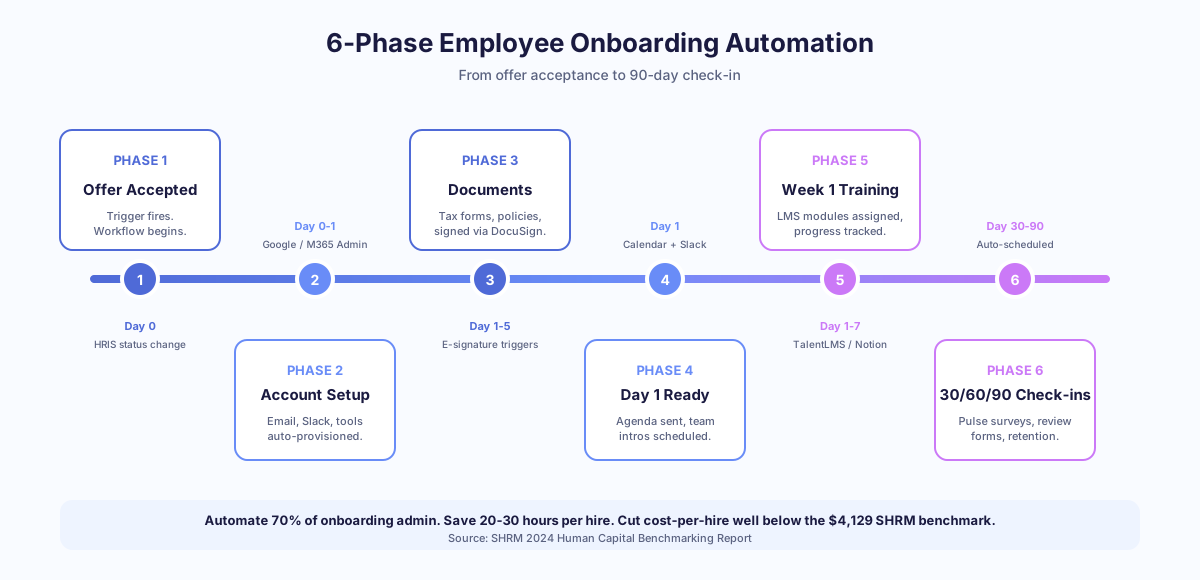
What are the 6 phases of automated employee onboarding?
Every onboarding process follows the same arc: offer acceptance, pre-boarding, day one, week one, month one, and the 90-day review. Automating means mapping each phase, identifying the repetitive steps, and letting software handle them while humans focus on connection and judgment.
Per Gallup’s 2024 State of the Global Workplace report, only 23% of employees worldwide feel engaged at work. Onboarding is your first and best chance to beat those odds. Here’s how the six phases break down by automation potential:
| Phase | Timeline | Key Activities | Automation Potential |
|---|---|---|---|
| Offer acceptance | Day of offer | Offer letter, background check, welcome email | 90% |
| Pre-boarding | Offer to day 1 | Document collection, account setup, equipment order | 85% |
| Day 1 | First day | Orientation, introductions, workspace setup | 40% |
| Week 1 | Days 1-5 | Training assignments, tool access, first tasks | 75% |
| Month 1 | Days 1-30 | Check-ins, feedback loops, milestone tracking | 70% |
| 90-day review | Day 90 | Performance review, survey, retention check | 60% |
Skylarks International, a 15-person immigration firm, automated their internal document workflows and cut document processing time by 70%. The same principles apply directly to onboarding paperwork.
How do you automate the offer and pre-boarding phase?
The moment a candidate accepts your offer, a chain of tasks fires: offer letter generation, background check, welcome email, tax forms, benefits enrollment, IT account requests, equipment orders. Every step is identical for every hire. Automate all of them.
Here’s the workflow in n8n or Make. The hiring manager marks “offer accepted” in the HRIS (BambooHR, Gusto, or Rippling). That triggers the sequence. DocuSign sends the offer letter and tax documents (W-4 in the US, TD1 in Canada). Google Workspace Admin or Microsoft 365 Admin provisions the email account. Slack sends a welcome message to the team channel. Notion creates a personalized onboarding page from a template. The whole chain runs in under 90 seconds.
Which HRIS triggers work best?
BambooHR, Gusto, and Rippling all expose webhooks or native integrations when an employee record changes status. In n8n, you point a webhook node at the HRIS, filter for “status = hired,” and fan out to 6-8 parallel actions. McKinsey’s 2024 Global Survey on AI and Automation found 60% of occupations have at least 30% of tasks that could be automated, and HR coordination sits near the top.
The result: your HR person stops spending 3 to 5 hours per hire on setup tasks. The new hire gets everything they need before day one, instead of spending their first morning filling out forms at a desk.
What should you automate on day one and during week one?
Day one is where automation and human touch need to coexist. Automate the logistics. Keep the relationships human. The split is simple: software handles schedules, access, and content delivery, while people handle welcomes, mentorship, and culture.
Automate these pieces: training module assignments in your LMS (TalentLMS, Lessonly, or even a Notion checklist), calendar invites for orientation, Slack channel additions, and access provisioning for tools like Jira, Figma, HubSpot, or Salesforce. Keep these human: the welcome call from the direct manager, the team lunch, and the mentorship pairing conversation.
Per the Harvard Business Review (Oldroyd, 2011; updated by Drift in 2023), speed and personal connection in early interactions correlate directly with long-term engagement. Here’s a sample week-one workflow:
| Day | Automated Action | Tool | Human Action |
|---|---|---|---|
| Day 1, 8 AM | Welcome email with agenda, parking, links | Gmail via n8n | Manager calls to say hello |
| Day 1, 9 AM | Assign compliance training modules | TalentLMS API | Team introductions |
| Day 2 | Send handbook and policy acknowledgment form | DocuSign | Mentor introduces themselves |
| Day 3 | Check if compliance training is complete; send reminder if not | n8n conditional logic | Manager 1:1 check-in |
| Day 5 | Send week-one feedback survey | Typeform or Google Forms | Team lunch or coffee chat |
Thompson Career College used a similar trigger-based approach for student onboarding, achieving under 60-second response times and 80% automated query resolution. The same logic applies to employee onboarding: trigger, action, follow-up, escalate if needed.
How do you automate 30-day check-ins and milestone tracking?
Month one is where manual onboarding usually falls apart. The HR coordinator is already busy with the next hire. The manager forgets to schedule check-ins. The new employee quietly struggles without saying anything. Automation prevents all three failure modes.
Set up recurring check-in triggers in n8n or Make. At day 7, day 14, day 21, and day 30, the system sends a short pulse survey to the new hire via Slack or email. Questions like “Do you have everything you need?” and “Rate your onboarding experience so far (1 to 5).” Responses below a threshold (say, 3 or lower) trigger an alert to the manager and HR within minutes.
What does the data say about structured check-ins?
Per Process Street’s 2023 Onboarding Statistics Report, organizations with a structured onboarding process see 2.3x higher revenue per employee. Structure doesn’t mean rigid. It means consistent. Every new hire gets the same check-in cadence, the same feedback opportunities, and the same milestone tracking regardless of how busy the team is that week.
At the 30-day mark, automate a milestone email that summarizes what the new hire has completed: training modules finished, documents signed, tools accessed. Copy the manager. This gives both parties a clear picture of progress without anyone having to compile it manually from five different systems.
How do you set up the 90-day review automation?
The 90-day review is your retention checkpoint. Per Statistics Canada’s 2024 Survey of Employment, Payrolls and Hours, the average Canadian salary sits between $45,000 and $65,000 per year. Losing an employee in the first 90 days burns the $4,129 cost-per-hire (SHRM, 2024) plus three months of salary, training investment, and team disruption.
Here’s what to automate at day 90. First, trigger a self-assessment form to the employee via Google Forms or Typeform. Second, send a manager review form with pre-populated data: training completion status, check-in survey scores, project assignments. Third, schedule the review meeting automatically via Google Calendar or Calendly. Fourth, after the meeting, send a summary email to both parties with agreed goals for the next quarter.
The n8n workflow tracks everything with timestamps. If the manager hasn’t completed their review form by day 88, they get a reminder. If the meeting hasn’t been scheduled by day 85, HR gets an alert. Nothing falls through the cracks.
Pixorr, a 5-person SEO agency, reclaimed a full work week by automating their reporting workflows. Their approach of removing repetitive admin so humans can focus on judgment-based work is exactly the philosophy behind onboarding automation. Reports got 85% faster. The team focused on creative work instead of status tracking.
What tools do you need to build this in 2026?
You don’t need enterprise software. A small business can build a complete onboarding automation with 3 to 5 tools. The core stack is an HRIS, a workflow engine, and the communication tools you already use. Total monthly cost for a small team runs $200 to $500.
| Tool Category | Options | Monthly Cost | Role in Onboarding |
|---|---|---|---|
| HRIS | BambooHR, Gusto, Rippling | $6-$15 per employee | Source of truth, triggers workflows |
| Workflow engine | n8n (self-hosted, free), Make ($10+), Zapier ($20+) | $0-$50 | Runs the logic, connects tools |
| Communication | Slack ($7.25/user), Microsoft Teams | $0-$10/user | Welcome messages, reminders |
| Documents | DocuSign ($10/mo), HelloSign ($15/mo) | $10-$15 | Offer letters, tax forms, policies |
| Knowledge base | Notion (free-$10/user), Confluence ($6/user) | $0-$10/user | Onboarding pages, handbooks |
| Provisioning | Google Workspace Admin, Microsoft 365 Admin | Included | Email, calendar, drive access |
Per Forrester’s 2024 Total Economic Impact studies, the average ROI on business process automation is 200% in the first year. For onboarding specifically, payback is faster because you’re eliminating admin hours on every single hire, compounding across the year.
Where does everything connect?
The key integration point is your HRIS. When a new employee record is created in BambooHR, Gusto, or Rippling, that event triggers the entire workflow in n8n or Make. Everything downstream, account provisioning, training assignments, check-in scheduling, flows from that single trigger. If you get this one integration right, the rest is configuration.
What mistakes should you avoid when automating onboarding?
The biggest mistake I see: automating the human parts. Don’t send an automated Slack message pretending to be the CEO. Don’t replace the manager’s welcome call with a chatbot. Don’t automate mentorship pairing without the mentor knowing. People notice immediately.
Per IDC’s 2023 Future of Work study, employees who feel personally welcomed are 58% more likely to stay past their first year. That’s a retention multiplier automation can’t buy. Second mistake: building everything at once. Start with one phase. Pre-boarding is the best starting point because it’s the most administrative and the least human. Get document collection, account provisioning, and welcome emails running first. Then add week-one training automation. Then check-in sequences. Then the 90-day review.
Third mistake: no feedback loop. Your onboarding automation should include a way for new hires to flag problems. A form, a Slack shortcut, a simple “reply to this email if something’s wrong.” Without it, you won’t catch broken workflows or outdated content until several hires have suffered.
Taxvisory, a solo CPA managing 300 clients, reduced document chasing by 80% with automation. She didn’t automate the client relationship. She automated the paperwork around it. Same principle applies here: automate the admin, keep the humanity.
How do you measure onboarding automation success?
Track four numbers. First, time-to-productivity: how many days until a new hire completes their first independent task? Target is 14 days or less. Second, admin hours per hire: how much HR time goes into each new employee? Target is under 5 hours (down from the typical 25-30). Third, 90-day retention: what percentage of hires stay past day 90? Aim for 95% or higher.
Fourth, new-hire satisfaction score: pulse surveys at day 7, 30, and 90, averaged. Target is 4.0 or higher on a 5-point scale. Per SHRM’s 2024 Human Capital Benchmarking Report, organizations with structured onboarding see 50% greater new-hire retention. The numbers prove the pattern: structure plus consistency beats ad-hoc effort every time, especially when HR is stretched across hiring, payroll, and benefits.
For a detailed walkthrough, see how one company streamlined employee onboarding from offer letter to 90-day review. For the full picture, explore our employee onboarding automation use case.
Ready to build your onboarding automation?
If you’re spending 20+ hours per hire on admin and watching new employees wait days for email access, it’s time to automate. Builts AI builds custom onboarding workflows for small businesses using BambooHR, n8n, Slack, and DocuSign. Typical setup takes 2 to 4 weeks. Typical payback is the first or second hire.
Book a free automation audit and we’ll map your six phases, identify the 70% you can automate, and quote a fixed price for the build.